
Enterprise website migration is no longer a once-in-a-decade project. Enterprise companies aren’t simply migrating CMSs; they are increasingly managing multiple CMSs at once. 68% of surveyed organizations had migrated to a new CMS within three years, while 81% were already using more than one CMS.
At enterprise scale, CMS migration is less about moving content from A to B and more about consolidating architecture, preserving search equity, and keeping multiple markets, brands, integrations, and teams operational throughout the transition.
This guide covers enterprise-scale website migration: large URL counts, multiple markets and brands, complex integrations, and regulated environments.
What is an enterprise website migration?
Enterprise website migration is the process of moving a large, complex website to a new CMS, frontend, domain, or URL structure while keeping the site live and preserving its organic search performance.
What separates it from a standard website migration is more than page count. It is the number of dependent systems, the number of markets and brands involved, the volume of accumulated search equity at risk, and the number of stakeholders who can change scope mid-project.
A 500-page site with one locale, three integrations, and twelve components is a contained project. A 500-page site with eight locales, eleven integrations, personalization, and fifty-seven components is an enterprise project. The page count is identical.
What is an enterprise website migration strategy?
An enterprise website migration strategy is the documented plan that defines scope, sequence, ownership, and risk controls before development begins. We take into account:
- Scope: which migration types are in play (CMS, frontend, URL structure, domain, consolidation) and which are explicitly out.
- Target architecture: the content model, frontend framework, integration map, and hosting topology.
- SEO continuity plan: URL inventory, redirect priority tiers, canonical rules, and the platform’s redirect capacity.
- Sequence: what gets built and validated in phases, and what has to happen in a single cutover.
- Success criteria: the metrics, baselines, recovery window, and escalation thresholds agreed with stakeholders.
- Ownership: who decides, who approves, and who owns quality after launch.
The strategy exists to make trade-offs discussable while they are still cheap to change. Most enterprise migration failures are sequencing failures rather than execution failures: the right work done in the wrong order.
Why enterprise website migration differs from a standard CMS migration
Standard migration guidance often becomes impractical at enterprise scale. Here are six specific thresholds where the approach has to change, each rendering advice that works well below that threshold ineffective.
| What changes | Standard migration | Where the method breaks |
|---|---|---|
| 1. Redirect mapping | Map every URL by hand | Above roughly 10,000 URLs, hand-mapping exceeds the project timeline. Above 50,000, the platform itself may refuse to store the rules |
| 2. Reindexing | Weeks | Months on very large sites, which extends the window where performance is uncertain and stakeholders are nervous |
| 3. A component defect | Fix one page | A reusable component with a broken heading or missing form label ships the same defect to every page using it, often thousands at once |
| 4. Compliance exposure | Fix after launch | Under Section 508, the ADA, the European Accessibility Act, or AODA, obligations continue through the migration. Document assets carry the same duty as HTML |
| 5. Content freeze | A calendar entry | With editorial teams across multiple markets and time zones, a communication programme with an exception process and a named approver |
| 6. Failure mode | Technical | Political. A predictable dip triggers an unplanned reversal when no baseline or threshold was agreed in advance |
None of these appear on a 500-page single-locale site. All of them appear together on a multi-market enterprise property, and they interact: a redirect strategy constrained by a platform cap produces more 404s, which produces a sharper dip, which raises the odds of a stakeholder intervention during the months reindexing takes.
The True Cost of Enterprise Migration
The cost of an enterprise website migration extends far beyond initial software licensing and vendor fees. At this scale, true project costs are driven by architectural complexity rather than sheer page volume; specifically the number of integrations, localized markets, and custom components that require mapping and redevelopment.
A comprehensive budget must encompass direct expenses like the new CMS, frontend hosting, middleware, and specialized system integrator fees, which routinely push enterprise projects into the mid-to-high six-figure range (and occasionally into the millions).
However, organizations must also factor in the “hidden” indirect costs:
- internal operational hours spent on QA and training global editorial teams,
- the cost of delta migrations to handle content updates during the freeze,
- the temporary revenue impact of the expected post-launch traffic dip.
Ultimately, accurate forecasting requires pricing the organizational change management and risk mitigation, not just the development hours.
Types of enterprise website CMS migration
Most enterprise programmes combine several of these at once, which is a common source of underestimation.
| Migration type | What changes | Primary risk at scale |
|---|---|---|
| Frontend replatform | The rendering layer, often to Next.js | Component parity, performance, and accessibility regression |
| URL structure migration | Paths, parameters, hierarchy | Redirect volume, chains, internal link debt |
| Domain consolidation | Several properties merged into one | Cannibalization between merged sections, fractured brand entity |
| Subdomain to subfolder | Where content sits relative to the root | Authority consolidation, analytics discontinuity |
An enterprise website CMS migration that changes only the content platform is a contained problem. One that changes the CMS, the frontend, the URL structure, and the domain simultaneously is four overlapping problems, and each makes the others harder to diagnose when something breaks.
If more than two are in scope, ask whether any can be sequenced separately, subject to the warning in the phasing section below.
Enterprise website WordPress migration
At enterprise scale, the challenge in an enterprise website WordPress migration is rarely the content. It is the plugin surface. Every plugin that handles forms, search, redirect management, SEO metadata, access control, or pricing tables needs an equivalent in the new stack, and large installs accumulate dozens of them.
Inventory that surfaces during scoping rather than when someone notices a missing feature in staging.
Find the integrations nobody documented
The dangerous dependencies are the ones no one remembers building: custom APIs, legacy middleware, embedded scripts, webhooks, authentication logic, scheduled jobs, and data feeds.
Documentation will not reveal them. These will:
- Server logs: show which endpoints receive traffic you cannot account for.
- DNS records: reveal subdomains and third-party services nobody listed.
- Tag manager containers: carry scripts added years ago by people who have left.
- Outbound firewall rules: show what the application talks to.
These dependencies surface after development begins, which is the most expensive place to find scope.
Redirect mapping at enterprise scale
Every old URL needs either a redirect to its new location or a deliberate retirement decision. That rule does not change with scale. What changes is how you arrive at each destination, because hand-mapping 100,000 URLs is not a plan.
The full technical SEO sequence, covering baselines, metadata, structured data, canonical rules, staging validation, and post-launch monitoring windows, is in our SEO migration checklist. What follows applies only above the point where that checklist’s per-URL guidance stops being executable by hand.
Tier the inventory before mapping it
Tiering decides which URLs get individually verified destinations and which get pattern rules. It does not decide which URLs get a destination at all.
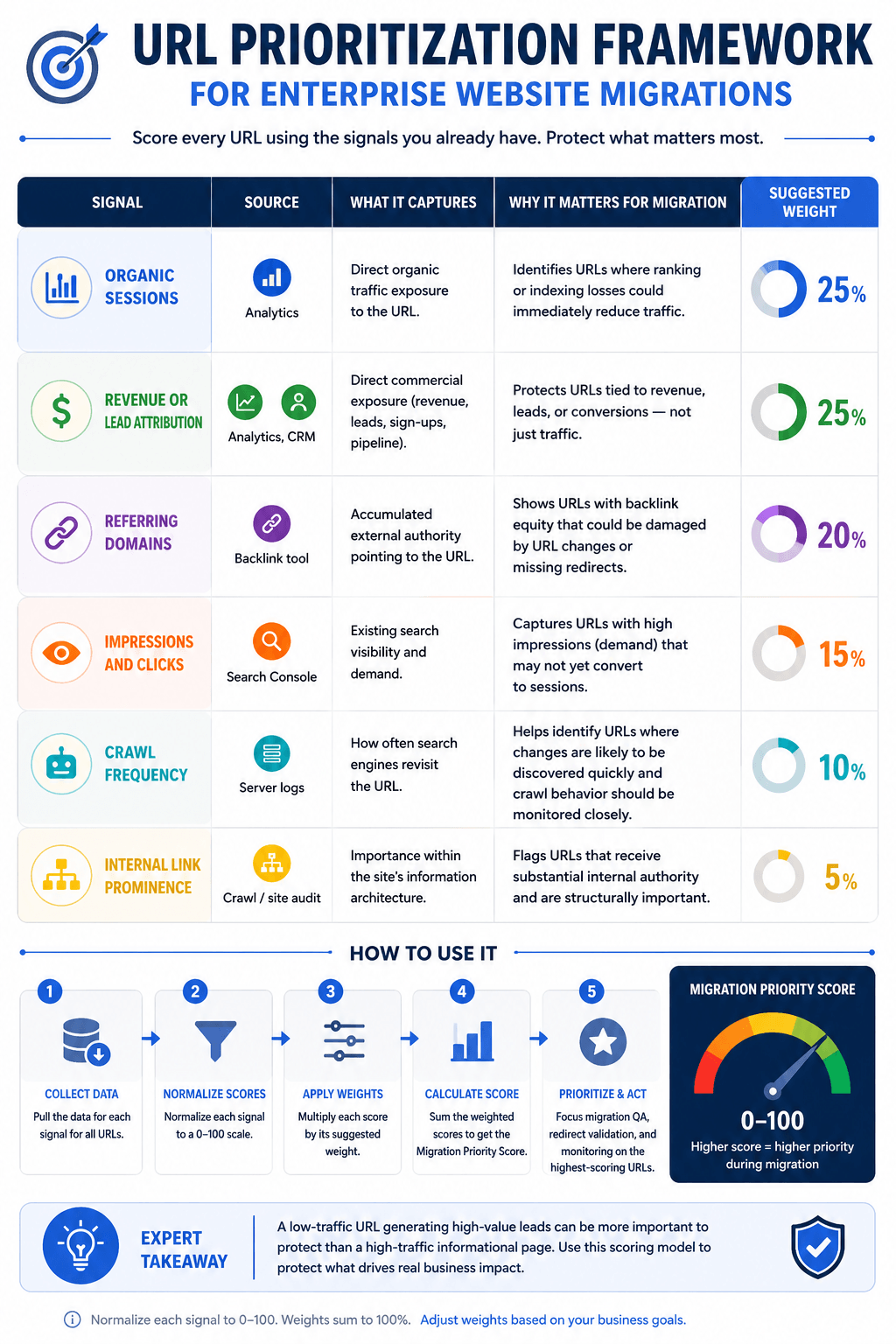 URL Prioritization Framework infographic for enterprise website migrations
Combine your page metrics into a composite score to divide your URL inventory into priority tiers.
Assign your top tiers individually verified, 1:1 redirect mappings. For lower tiers, apply broader pattern rules and verify their success by spot-checking your 404 logs after launch.
This approach concentrates your manual effort on the pages with the highest commercial risk.
What to Do When Your Platform Caps Redirects
Some enterprise commerce platforms, such as SAP Hybris and Salesforce Commerce Cloud, strictly limit the number of redirect entries they will store. Practitioner reports typically place this ceiling between 50,000 and 100,000 entries. Verify the exact limit with your vendor during the scoping phase rather than relying on assumptions.
If your URL count exceeds this cap, a strict 1:1 redirect strategy becomes impossible. To navigate around a hard limit, you will need to employ one or more of the following tactics:
- Implement pattern-based rules: Consolidate entries by using wildcard or regex rules where a single pattern can handle multiple URLs (one-to-many mappings).
- Offload to the edge: Shift redirect overflow away from the CMS and handle it at the CDN or edge server level.
- Drop non-indexed variants: Conserve space by excluding URLs with tracking parameters or sorting filters from your individual entries.
- Flatten redirect chains: Ensure every legacy URL points directly to its final destination so no redirect consumes more than one database entry.
- Prioritize ruthlessly: Allocate your limited entries to URLs with the highest SEO and commercial value, accepting that the low-value long tail may have to 404 temporarily.
- Pay for an upgrade: Negotiate a higher capacity limit directly with your platform vendor, which usually requires an additional fee.
Re-point the redirects you already have
Most enterprise sites carry years of accumulated redirect rules pointing at legacy URLs. If those destinations change or disappear in the migration, the existing rules lead nowhere or form chains.
Audit the current redirect table and, for every rule, establish whether its destination survives. Where it does not, re-point it directly to the new destination. Recent rules deserve most attention, since the traffic and links they carry are still live. Older rules are worth reviewing for retirement, because an unmaintained redirect table becomes its own governance problem.
Use pattern rules carefully
Wildcards handle groups that individual rules cannot. A rule mapping /product/* to a new path captures an entire directory in one entry.
Test patterns before deployment. A wildcard that is slightly too broad can silently capture pages it should not, and the symptom may appear weeks later as unexplained traffic loss in a section nobody was monitoring.
Set the content freeze before export
If you export content instead of syncing it live during migration, any changes editors make in the old CMS after the export will not appear in the new system.
Take into account:
- when the freeze begins;
- which teams are exempt and how their changes are tracked;
- how urgent legal or compliance updates are handled during it;
- whether a delta migration runs immediately before cutover to capture late changes;
Rationalize components during the build
Frontend redevelopment is usually the largest single workstream, and component variety predicts it better than page count.
A thousand-page site may run on twelve standardized components. A two-hundred-page site may carry forty page-specific layouts, fifteen campaign blocks, custom calculators, product configurators, several navigation patterns, and regional variants.
Before development, inventory unique page templates, reusable components, one-off components, interactive modules, campaign layouts, regional variants, and anything that can be consolidated.
The goal is not to reproduce every historical implementation. Reducing 60 components to 25 lowers engineering cost during the build and reduces editorial complexity permanently after it.
QA an enterprise website migration at scale
Sampling a handful of pages at launch is inadequate when one template serves thousands of URLs. Two checks are specific to scale.
Canonicals when two live environments overlap
The well-known canonical trap is a staging URL shipping to production, and our SEO migration checklist covers that one.
Enterprise migrations carry a second version of the problem. During a phased rollout, both the old and new environments are live and crawlable at the same time, sometimes for months. Canonicals then have to resolve between two production systems rather than between production and staging, and the correct target changes as each phase lands.
Decide per phase which environment is canonical for each URL pattern, and re-verify at every phase boundary rather than once before launch. Sites with large volumes of near-duplicate content, such as product pages, location pages, paginated sets, and localized variants, need this audited across the whole inventory rather than spot-checked on samples.
Accessibility per template, and in documents
Test every template, interactive pattern, and content variation rather than a page sample. One component defect appears everywhere that component appears.
Then handle document assets separately. PDFs, spreadsheets, and downloadable files are routinely migrated with no accessibility assessment, and they are invisible to a crawl that only evaluates HTML. On document-heavy enterprise sites, they represent a large share of the real compliance gap. Inventory them and decide explicitly which to replace with accessible HTML, or to retire.
Validate analytics before cutover
Analytics breakage is the most consequential and least visible migration failure, because it removes your ability to evaluate the migration exactly when that matters.
Common causes: tracking snippets dropped during template rebuilds, tag manager configurations that do not carry over, event tracking broken when interactive components are reimplemented, and consent flows collecting differently by market.
Validate in staging and confirm:
- tracking present and correct on every measured template, not just the homepage and top pages;
- conversion and event tracking fire with expected parameters;
- custom dimensions, data layer values, and campaign parameters are intact;
- consent behavior is correct in each market;
- server-side and client-side collection agree;
- historical data is accessible, with the migration date annotated so before-and-after comparisons stay valid.
Consider a quality and visibility measurement source independent of the primary analytics platform. If collection breaks at cutover, it keeps you from being blind at the worst moment.
Choose the launch window deliberately
Cutover timing is a business decision, not a release-calendar convenience.
Avoid launching immediately before or during peak retail seasons, fiscal year-end, major campaigns, product launches, industry events, or regulatory deadlines. Each reduces your capacity to absorb a problem and raises the cost of one.
Check team availability too. A cutover scheduled the day before a holiday period leaves nobody available to respond to what the monitoring finds.
Who decides whether the migration is in trouble
Recovery timelines, monitoring windows, and what counts as a normal post-launch dip are covered in our SEO migration checklist.
At enterprise scale, the harder problem is agreeing in advance who interprets it and who can act on it.
Two things need to be settled before cutover:
- Which baseline the business will be judged against
The prior month is the intuitive choice and the wrong one, because it embeds seasonality into the comparison. Agree on the same period in the prior year, segmented by market, and write it down.
- Which priority set matters
A defined list of revenue-critical terms and templates, agreed with the commercial owners. Without it, any individual ranking drop becomes evidence of failure, and at enterprise scale individual ranking drops.
Managing stakeholders through the dip
Migrations fail politically as well as technically, when a predicted decline triggers an unplanned reversal.
Set KPIs and the recovery window in writing before launch, including the expectation that some metrics decline initially. Define escalation thresholds numerically before anyone is under pressure. Report weekly for the first month, then monthly, against both the pre-migration baseline and the agreed targets.
Give leadership a shared dashboard so they can see data directly rather than waiting for a deck, which reduces the anxiety that drives premature intervention. Report problems with an owner and a date attached, and report wins too, because those fund the next phase.
Hand over governance after launch
The highest-risk moment is not launch day. It is the weeks afterward, when the project team disbands and nobody owns quality.
Define before launch who monitors what, on what cadence, reporting to whom, and how accountability holds across distributed content teams. Organizations that treat go-live as the finish line accumulate the same debt that motivated this migration and face the same conversation in four years.
Phasing an enterprise website CMS migration
Phase the build and validation. Be considerably more careful about phasing the cutover.
Partial cutovers are a legitimate and well-understood pattern, usually implemented with a reverse proxy, and our headless CMS migration guide covers how that works and where the cross-linking difficulties lie.
Two warnings apply specifically at enterprise scale.
**Incremental releases are still full releases.**Publishing a single page through a proxy carries every SEO, redirect, and monitoring requirement of a full launch. The incremental framing creates a false sense that individual releases are low-stakes.
**Domain consolidation is the dangerous case.**When merging multiple properties, running them in parallel can cause search engines to rank the wrong property for a given topic, producing cannibalization between your own domains and diluting the brand entity across hosts. Phases that stall leave that condition in place indefinitely.
If you phase, commit the full sequence in writing with funded phases, named owners, and dates. A phased plan without a funded second phase is a permanently half-migrated site.
How to choose enterprise website migration services
The cheapest proposal is rarely the cheapest migration. Ask each vendor:
- Does the scope include discovery? If they estimate without auditing the existing architecture, ask which assumptions the number depends on.
- How will undocumented integrations be identified? Ask for the method, not the reassurance.
- Is content migration separated from development? Transformation and validation are significant efforts and should not disappear inside a generic development line.
- Does SEO go beyond redirects? Ask how redirects will be prioritized, how existing rules will be re-pointed, and whether the platform’s redirect cap has been checked.
- Is accessibility tested per template, and are document assets in scope?
- Is analytics validated in staging?
- **Does it include post-launch monitoring and a governance handover?**A launch-day handoff leaves you discovering problems after the team has left.
- Are assumptions and exclusions documented? This is the easiest way to separate a defensible estimate from an artificially low one.
Enterprise website migration risk register
You can better plan, make trade-offs, talk about, and defend your budget if you know and expect the risks that come with moving your website or CMS replatforming.
| Risk | What it looks like | Primary control |
|---|---|---|
| Discoverability | Traffic and ranking loss from redirect, canonical, or crawl errors | Prioritized mapping, redirect cap confirmed, pre- and post-launch crawls |
| Content | Missing, malformed, or unmigrated content and assets | Content freeze, delta migration, exception reporting |
| Compliance | New accessibility barriers, including in documents | Per-template testing, document audit |
| Measurement | Broken tracking, invalid comparisons | Staging validation, independent measurement source |
| Integration | Undocumented dependencies found mid-build | Log, DNS, tag manager, and firewall inventory |
| Operational | Cutover errors, no capacity to respond | Launch window discipline, staffed response window |
| Governance | Quality decay after handover | Named owners and cadence agreed pre-launch |
| Transformation | Treating go-live as the finish line | Post-launch operating model included in scope |
Common enterprise website migration mistakes
🚩 Estimating from page count Model content types, components, integrations, locales, and frontend complexity instead.
🚩 Ignoring existing redirect rules
Audit and re-point them, or chains form at cutover.
🚩 Discovering the platform redirect cap late
Confirm it during scoping and design within it.
🚩 Rebuilding every legacy component
Use the migration to rationalize the component system.
🚩 Sampling accessibility at launch
Test per template, and inventory document assets.
🚩 Leaving analytics validation until production
Validate in staging and annotate the migration date.
🚩 Launching without agreed recovery expectations
A predictable dip becomes a crisis without a threshold.
🚩 Phasing a domain consolidation
Parallel properties compete with each other for the same topics.
What to confirm before approving the project
Scope and dependencies
- Migration types in scope documented
- Integrations inventoried from logs, DNS, tag manager, and firewall rules
- Component library assessed for consolidation
- Localization requirements documented
Search continuity
- Existing redirect rules audited
- Target platform redirect cap confirmed with vendor
- Redirect priority tiers defined
- Canonical rules defined for the parallel-availability window
- hreflang strategy defined for multi-locale sites
Quality and measurement
- Accessibility testing scoped per template
- Document assets inventoried and assessed
- Analytics validated in staging
- Migration date annotation planned
Content and timing
- Content freeze date agreed and communicated
- Delta migration approach defined
- Launch window checked against the commercial calendar
- Response capacity staffed for the cutover window
After launch
- Recovery window and escalation thresholds agreed with stakeholders
- Post-launch ownership and reporting cadence assigned
Enterprise CMS Migration Cost: Plan the Budget Before You Commit
Start with the CMS Migration Estimator for a planning range, then validate it with an enterprise CMS migration service before committing to a number.
FocusReactive runs enterprise migrations as clean-slate parallel builds, with SEO continuity, and redirect management built into the CMS so editors can easily maintain rules after launch. Planning an enterprise migration? Let’s work out what it will actually take before the budget starts moving.



 Katarina Harbuzava