
Why Replatforming?
The reasons for website replatforming may be numerous. However, in our experience, the most common concerns are prohibitive pricing, technical challenges with CMS maintenance, and SEO unfriendliness. Sometimes clients seek something sleek and modern instead of a traditional, monolithic CMS, which doesn’t give you those possibilities and future-proofing.
Key Takeaways
- Studies measure replatforming overruns differently, and the numbers cluster between 55% and roughly 70% depending on what’s counted. The most defensible version: only 31% of IT projects finish on time, on budget, and within scope, per the Standish Group’s long-running CHAOS Report, meaning close to 7 in 10 miss the mark on at least one.
- The biggest budget-busters aren’t the CMS license or the design. They’re data migration and legacy integrations that don’t show up until someone actually audits the site.
- Proof this doesn’t have to be the default: FocusReactive’s own delivery data shows 90% of its projects land within the initial offer, across dozens of production migrations.
See what a website migration actually costs in 2026, including a specific breakdown for a 50-100 page Webflow migration. I’ll show how our free CMS Migration Estimator scans your live site and sends a scoped estimate with a built-in risk buffer to your inbox in 24 hours.
The Budget Problem
Every replatforming project starts with a number on a slide. Six weeks, forty thousand dollars, done by Q3. Then discovery happens, and the number stops being true. This is the most predictable part of website replatforming.
Research from ISG reported in February 2026 found that nearly 60% of SAP migration projects were delayed and over budget. None of these is exactly 70%, but they all point the same direction: on a typical replatforming project, budget is the thing most likely to slip.
The good news, covered later in this piece with real numbers: it doesn’t have to be that way, and there are specific, unglamorous reasons why the projects that stay on budget do.
First off, let’s navigate about the core definitions, to talk the same language.
What Is Website Replatforming?
Replatforming means moving a website or application from one underlying platform, such as a CMS, hosting environment, or framework, to another, while keeping the core purpose and most of the business logic intact. It sits between a simple rehost (moving the same code to new infrastructure with no changes) and a full rebuild (starting over with new architecture and features).
In practice, website replatforming usually means one of these:
- Moving from a monolithic CMS like WordPress or Drupal to a headless CMS like Sanity, Storyblok, or Payload
- Moving from a page builder like Webflow or Squarespace to a custom-coded frontend
- Consolidating multiple regional or brand sites onto one shared platform
- Moving an ecommerce storefront from one platform to another (Magento to Shopify Plus, for example)
The common thread: content, functionality, and SEO equity need to survive the move intact, even though the technology underneath changes.
What Is Application Replatforming?
Application replatforming is the process of making targeted changes to an application so it runs better on a new environment, without rewriting its core architecture. A common example is containerizing an application or swapping a self-managed database for a managed cloud equivalent, while leaving the application logic itself alone.
What Is Cloud Replatforming?
Cloud replatforming is application replatforming specifically aimed at cloud infrastructure. Instead of just lifting a workload onto a cloud server unchanged (rehosting), cloud replatforming makes small, targeted adjustments so the workload can take advantage of cloud-native features such as autoscaling, managed databases, or serverless functions, again without a full architectural rewrite. It’s the middle path between “just move it” and “rebuild it for the cloud from scratch.”
Signs You Need to Replatform
Replatforming is a big enough undertaking that it shouldn’t be a default reaction to a slow quarter. A handful of scenarios are the ones that actually justify it:
☞ You’re running multiple brand, regional, or product-line sites that have drifted apart. Different platforms, different design systems, duplicated content and duplicated cost. This is the single most common trigger for multi-brand website replatforming, and it’s usually a consolidation problem before it’s a technology problem.
☞ Every content update requires a developer. If the marketing team can’t ship a landing page or update a location page without opening a ticket, the content platform is the bottleneck.
☞ Integration costs keep multiplying. Each new tool (CRM, personalization, payments) gets bolted onto an architecture that wasn’t built to hold it, and each one gets more expensive to add than the last.
☞ The current platform can’t support where the business is going. New markets, new languages, new sales channels, or a product catalog that’s outgrown what the platform was designed for.
☞ Security or compliance requirements have moved past what the platform can support, particularly on older, less actively maintained systems.
If none of these apply, a redesign or a targeted fix is very likely cheaper and faster than a full website replatform. If two or more do, the conversation about replatforming is probably already overdue.
Why Website Replatforming Projects Go Over Budget
The reasons are consistent across studies, agencies, and platforms. In our own delivery data across dozens of CMS migrations, the same handful of issues account for most of the budget overruns clients walk in with:
- Data migration is harder than it looks. Every CMS has its own opinion about how rich text, media, and relationships between content types should work. A “simple” content export from one system rarely maps cleanly onto another, and the mismatches (broken relationships, mangled rich text, missing media) usually surface late, after the quote has already been signed.
- Legacy integrations get discovered, not planned for. Payment gateways, marketing tools, tracking scripts, and internal APIs accumulate over years on a live site. Many of them aren’t documented anywhere, and they only show up during a technical crawl of the actual site, not during a sales conversation. On ecommerce projects specifically, ERP and custom commerce logic integration is consistently the single largest source of overrun, since the platform license itself is typically only 20-40% of total project cost. Implementation, integration, and data migration make up the other 60-80%.
- Missing sitemaps and undocumented URL structures. If nobody has a clean list of every URL that currently ranks, redirect mapping becomes a discovery exercise mid-project instead of a planning step before it. That’s expensive time, and it’s also where rankings get lost.
- Heavy animation and interaction layers. Custom animations, especially ones built into a page builder like Webflow, don’t transfer automatically to a new frontend framework. They have to be rebuilt, and rebuilding motion design is consistently underestimated in initial scoping.
- Scope creep. Once a project is underway, “since we’re in there anyway” requests are common: a redesign here, a new feature there. Each one is reasonable on its own. Together, they’re one of the most frequently cited drivers of timeline and budget overruns in software project research generally, not just replatforming.
- Content readiness. The build is rarely what stalls a project. It’s waiting on final copy, updated product data, or stakeholder sign-off. Delays here don’t show up as a “budget” line item directly, but they extend the timeline, and time on a project is billed.
To prevent these budget surprises, make sure you model out a true three-year TCO. You can use the scorecard in our enterprise CMS platform guide to uncover hidden vendor fees.
Real Replatforming Projects, Real Numbers
Talking about overrun statistics is one thing. Here’s what happens when the discovery work described above actually gets done, drawn from FocusReactive’s own delivery record.
Arrive: consolidating a fragmented multi-market presence. Arrive came in with a textbook multi-brand problem: a digital presence fragmented across multiple markets, each with its own inconsistencies. The rebuild consolidated everything into a single composable platform on Storyblok and Next.js, with a documented design system of 100+ reusable components serving 4 markets from one codebase. Results after launch: a 97 Lighthouse performance score, a 38% increase in organic traffic, and a 61% increase in organic impressions within 90 days. The client’s own account of the engagement: FocusReactive’s work doubled their SEO traffic in the first week alone.
Reverse Health: migrating to a self-hosted Payload CMS across 9 languages. A wellness brand needed its interactive quiz and tour content moved off a setup that required developer involvement for every change, into something the content team could run independently, with the ability to A/B test on their own. The result was a self-hosted Payload CMS and PostgreSQL setup with 23 content collections, 7 user roles, and full support across 9 languages, plus live content previews so the team could validate every localized version before publishing.
A recent 170+ page, multi-location migration. Another engagement moved a fast-growing brand’s site, previously a custom Next.js build that needed a developer for every update, onto Payload CMS: 170+ pages, 120+ individual locations managed from a single CMS, and 3 languages, delivered in 2 months, with the location-page workflow going from an engineering task to something the marketing team runs directly.
Replatforming Trends Shaping 2026
We’ve noticed several tendencies that push more businesses to website replatforming solutions:
- Old ecommerce platforms are becoming a problem. Magento 1 is no longer supported, Magento 2 is expensive to maintain, and Salesforce Commerce Cloud is losing customers to Shopify. SAP is also struggling, with many migration projects delayed and costing more as the 2027 deadline to stop supporting ECC approaches.
- Maintaining old content management software takes up most of the budget, about 60-70%. This high maintenance cost often leads companies to consider switching platforms.
- Many companies are also trying to reduce the number of different CMSs they use. Over 60% of teams run multiple CMS platforms and want to unify them, especially for multi-brand websites.
- AI and large language models (LLMs) are becoming key reasons to switch platforms. Sites that use structured data and server-rendered content get better visibility in AI search results. Platforms that can’t deliver clean, well-organized content hurt discoverability.
- Composable systems are becoming the new standard. Most companies are increasing their investment in MACH-based (Microservices, API-first, Cloud-native, Headless) infrastructure, with many expecting to fully adopt this by 2026. The market for headless CMS is growing fast, from 1.75 billion in 2025 to an expected 6.23 billion by 2033.
This is not just our observation. Shopify’s own replatforming data shows brands that migrate to its platform are 3x more likely to land on budget and 66% more likely to hit their timeline than the market average, and fashion retailer J.Lindeberg saw a 70% revenue increase and a 7% conversion lift within six months of a 16-week Shopify migration. The pattern holds across vendors: projects that treat discovery as a real phase, not a formality.
Website Migration Cost in 2026: What Things Really Cost
Here’s a realistic range by scope, based on current market pricing across small business, mid-market, and enterprise business websites.
Page count is rarely the real cost driver at any tier, because we should take into account integration count, CMS collection complexity, and redirect volume move the number far more than raw page numbers do.
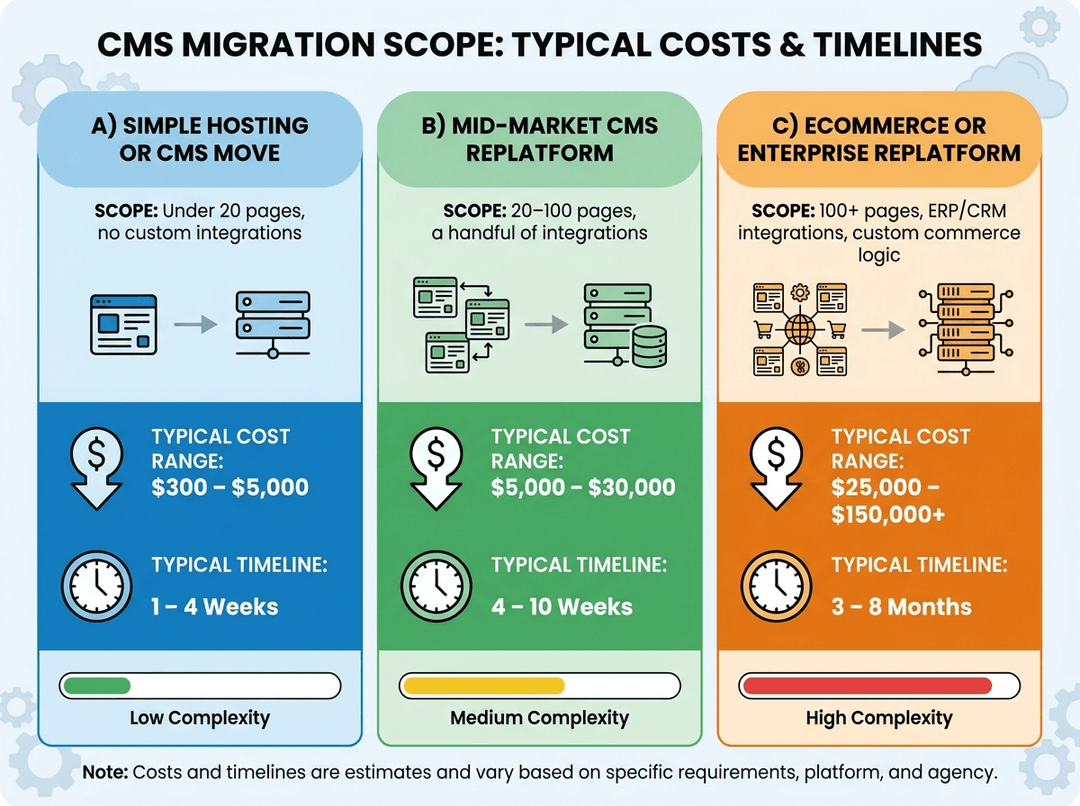 the price of replatforming
Integration count (forms, CRM, analytics, payment)
Redirect and URL structure complexity
Timeline for this scope typically runs 4-10 weeks. If a quote for this exact scope comes in dramatically below $5,000, it’s worth asking what’s been left out, usually redirects, QA, or post-launch stabilization.
Agile Replatforming: A Different Way to Run the Project
Most budget overruns compound because the project is scoped and delivered as one large, all-or-nothing cutover. Agile replatforming breaks that pattern by delivering in phases.
- Discovery sprint. A technical crawl and content audit before any estimate is finalized, surfacing integrations and legacy dependencies early rather than mid-build.
- Core templates first. Migrate and validate the highest-traffic page types (home, product, or main landing templates) before touching the long tail.
- Incremental rollout. Launch in batches rather than a single big-bang cutover, so a problem in one section does not block or blow up the whole project.
- Continuous SEO validation. Check rankings and crawl behavior after each batch, not just once at the end.
The advantage is not just process comfort. Smaller batches mean a scoping mistake costs the price of one batch, not the price of the whole project. Budget conversations also happen incrementally, based on real data from the batches already shipped, instead of once at the start based on assumptions.
How to Prevent Your Replatforming Project From Going Over Budget
- Get a real audit before you get a quote. A quote based on a homepage screenshot and a sales call is a guess. A quote based on a technical crawl of the actual site, covering every integration, content collection, and animation, is an estimate.
- Build in a contingency and treat it as expected, not optional. 20-25% on top of the core estimate is standard across the sources in this article. Budgeting it up front costs nothing. Discovering the need for it mid-project costs trust and time.
- Finish the redirect map and content inventory before build starts, not during it.
- Separate “migration” from “redesign” in both the budget and the contract. Combining a rebrand, a redesign, and a replatform into a single project is one of the most common ways a budget doubles.
- Assign SEO ownership from day one, not as a final pre-launch checklist item.
- Phase the rollout rather than committing to a single cutover date for the entire site.
- Use a proven starting architecture instead of a blank slate. A reusable component and content-model accelerator (FocusReactive’s internal one is called CMS Kit) removes a large chunk of the guesswork that turns into scope creep on custom builds.
- Ask what a fixed-price quote excludes, specifically post-launch support, hosting setup, and QA. These are the line items most often missing from an artificially low number.
Website Replatforming Solutions: What to Look For in a Partner
A website migration agency’s estimate is only as good as the discovery work behind it. Two direct questions are worth asking any website migration service before committing:
- What does your estimate exclude?
- How is your contingency calculated?
An agency that can answer both specifically, with real numbers from past projects, is safer bet than the company offering a flat number with no breakdown behind it.
Get a Real Number Before You Start
Everything above points at the same root cause: replatforming budgets blow up when the first number comes from a sales call instead of a technical audit. Arrive and Reverse Health did not land within scope by luck. They landed within scope because the estimate was built from a real understanding of the site before a contract existed.
FocusReactive built a free CMS Migration Estimator to make this as a starting point available to anyone, before they talk to an agency at all, including this one. It is hundreds of manual estimates from past migrations distilled into a set of specialized AI agents, so the output reflects how these projects actually get scoped rather than what a generic per-page calculator assumes.
What the Estimator Analyzes
Paste in a public URL and the crawler builds a full tech stack fingerprint of the live site:
- CMS and frontend framework
- Animation libraries
- CDN, analytics, and tracking scripts
- Third-party integrations
- Unique section types, content collections, and interactive blocks
What the Report Contains
A comprehensive migration report arrives in your inbox within 24 hours, with actual numbers rather than ranges:
- A phased timeline broken down by week
- Line-by-line development hours per work category
- A realistic cost range with a 20% risk buffer already built in
- The specific gotchas most likely to blow up that particular site’s budget, such as legacy integrations, custom commerce logic, missing sitemaps, and heavy animation layers
Human Review Before Anything Ships
Every report is reviewed by a senior engineer and a tech lead before it goes out, and they adjust for edge cases the automation misses. The tool does not save or share personal data, and the report carries no sales pitch. If a site genuinely is not worth migrating, the report says so.
Which Sites the Estimator Covers
There is a minimum size threshold, since very small site migrations are usually trivial enough not to need a scoped estimate. Coverage currently focuses on migrations from WordPress, Contentful, and Webflow, with more source platforms being added.
FAQs
Does replatforming hurt SEO?
It can, if redirects, structured data, and internal linking are not carried over deliberately. It does not have to. Migrations with a documented redirect map and a pre and post-launch crawl comparison routinely preserve or improve rankings.
Is replatforming the same as a website migration?
Migration is the broader term for moving a site, including a straight host or domain move where nothing underneath changes. Replatforming is a specific kind of migration: the underlying platform changes (CMS migration, framework, or hosting model) while content, functionality, and business logic are preserved. Every replatform is a migration. Not every migration is a replatform.
When should a business consider website replatforming solutions?
Businesses should consider replatforming when their current website limits performance, scalability, content management, security, or integration capabilities. Common triggers include migrating from a legacy CMS, adopting a headless architecture, or redesigning the digital experience.
What common types of website replatforming solutions are popular now?
- Legacy CMS to headless CMS migration
- CMS-to-CMS migration
- Ecommerce platform migration
- Website redesign with replatforming
- Next.js or modern frontend migration
- Cloud hosting migration
- Composable architecture implementation



 Eugene Boruhov