
TL;DR: Why the CMS Choice Is an SEO Decision
When it comes to headless CMS and SEO, what actually impacts rankings isn’t the platform itself, it’s how your content is structured, how pages are rendered, and how easily your team can ship changes. The CMS shapes all three. That’s the decision worth examining.
This guide covers the headless platforms we’ve shipped on most often, evaluated through an SEO lens: the architectural decisions that affect crawlability, indexation, and content scalability at scale — not surface-level feature comparisons.
It’s written for content strategists, SEO leads, and growth teams who are already considering headless architecture and need to make a high-stakes CMS decision tied to SEO outcomes.
Headless CMS and SEO: How the Platform Decision Maps to Search Outcomes
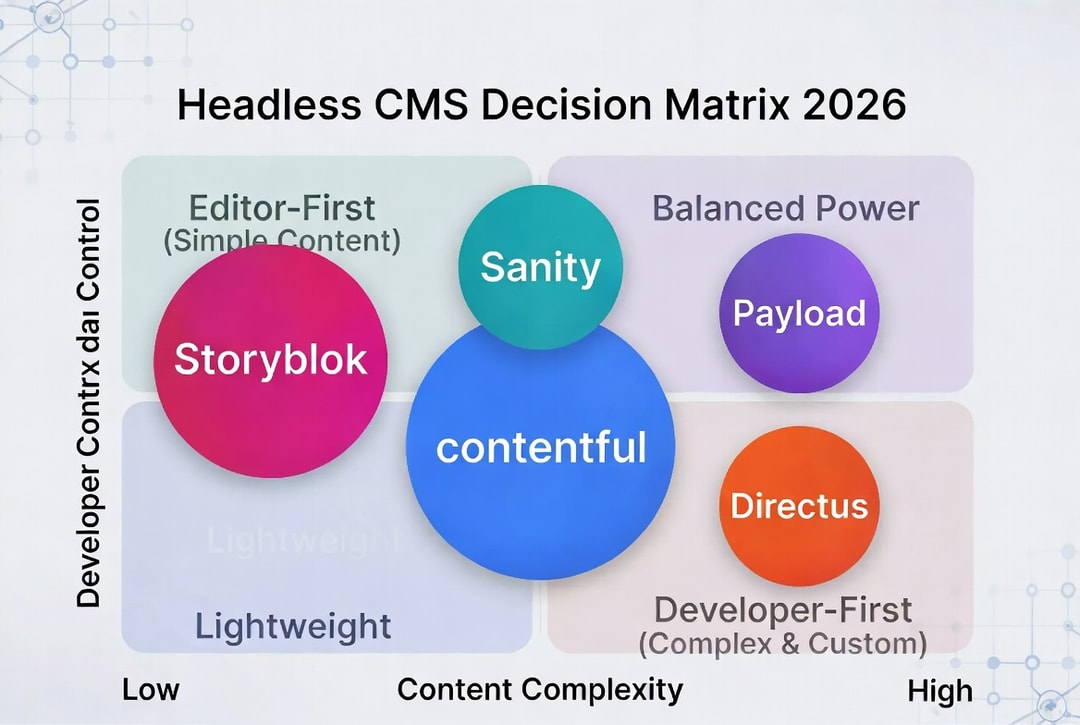
- Publishing a lot of structured content over years, with an evolving content model? Optimise for flexibility. → Sanity or Payload.
- Bottleneck is editorial velocity and competitive advantage is shipping more landing pages faster? Optimise for the editor experience. → Storyblok.
- Operating across many locales with a large team and strict review? Optimise for governance. → Contentful.
- Content is really a dataset? Optimise for the data model. → Directus.
- Already running Next.js in a monorepo and want to own the full stack? Optimise for integration. → Payload.
These are not rankings. They are shapes of problem that map to shapes of platform.
For everything beyond SEO weighting: team fit, budget, editorial experience, governance, read please the full comparison about best headless CMS in 2026.
Why Your CMS Is Killing Your SEO
Most headless teams assume the SEO problem is a framework problem. It isn’t. It’s a CMS-architecture problem.
Bad Content Model ↓ Broken Internal Linking ↓ Duplicate / Thin Pages ↓ Crawl Budget Waste ↓ Poor Indexation ↓ Ranking Loss
We’ve seen this play out on real projects — for Lunacy Audio, we rebuilt a legacy WordPress stack into a headless Next.js setup and recovered SEO headroom that the old CMS architecture made impossible. Lunacy Audio case study
What Google actually sees in headless architecture is not your React components or your design system. It sees response times, canonical consistency, structured data completeness, and whether your content is reachable through clean, crawlable URLs. Every one of those things is shaped by decisions you make at the CMS layer, before a single line of front-end code is written.
Why most headless sites underperform in search comes down to three recurring failure modes:
- The content model doesn’t map to search intent. You have a beautiful component library and a broken topical structure. Pages compete with each other, internal links are an afterthought, and programmatic page generation produces thin content at scale.
- The delivery layer is an afterthought. ISR isn’t configured correctly, TTFB is high, and editorial updates take 20 minutes to reach the index because nobody thought about build pipelines during CMS selection.
- Editorial velocity is bottlenecked by developers. The CMS requires a deploy to fix a canonical tag. The content team can’t iterate. The competitors who can iterate, win.
Headless CMS SEO Requirements: The Four Things That Affect Rankings
Before the platforms, a quick frame. SEO failures inside a CMS almost always trace back to one of four architectural decisions. These are the CMS SEO requirements that matter before any feature comparison.
Content modelling. If your schema does not map to the way users search, you end up bolting on fields, duplicating content across entries, or publishing thin pages that cannibalise each other. The right content model makes topical clusters and internal linking natural. The wrong one makes them a retrofit.
Delivery layer. Whether pages are statically generated, incrementally regenerated, or server-rendered on every request affects crawl budget, TTFB, and how quickly editorial updates reach the index. A CMS does not make this decision — your Next.js app does. But the CMS determines how painful that integration is.
URL and routing control. Canonicals, redirects, localised slugs, and hierarchical URLs live at the intersection of CMS and framework. Platforms that assume a fixed URL structure cause problems the moment SEO needs something nuanced: a regional override, a legacy redirect map, a programmatic page template.
Editorial workflow. If publishing a correction requires a developer, your page speed score is irrelevant. The pages with real ranking potential are the ones the content team can iterate on without a deploy.
Headless CMS SEO Failures: What Teams Get Wrong
These are the specific technical failure modes that appear again and again in headless SEO audits, and the implementation patterns that fix them.
Crawl Budget: What’s Actually Being Wasted
Crawl budget is the number of pages Googlebot is willing to crawl and index in a given window. It’s determined by your site’s authority, server response times, and the ratio of valuable pages to low-quality or duplicate ones. Headless sites burn crawl budget in three specific ways that monolithic setups usually avoid:
API-generated parameter URLs. When facets, filters, and sort orders append query strings that the front end renders as distinct pages, Google sees hundreds of thin variants of the same content. A product catalogue with 10 filter dimensions can produce thousands of indexable URLs that dilute crawl allocation away from your actual content.
Unreachable pages from JavaScript routing. Client-side navigation between pages doesn’t create crawlable links in the HTML. If your internal navigation is entirely JS-driven, Googlebot may never discover the full depth of your site regardless of how well your content is structured.
Duplicate content from preview environments. Staging domains, preview branches, and draft URLs exposed without a noindex header give Googlebot duplicate versions of every page on your site. On larger editorial teams this is endemic — content editors need preview links, and nobody audits whether those URLs are blocked from crawlers.
The fix is structural: clean parameter handling via robots.txt or canonical tags, HTML-level internal links (not just JS router links), and preview environments locked behind authentication or a X-Robots-Tag: noindex header.
Indexation Delays: The ISR vs SSR Tradeoff
This is the rendering decision most teams get wrong, and it directly determines how fast content changes reach Google’s index.
SSR (Server-Side Rendering) generates fresh HTML on every request. Google always sees current content. The cost is server load and latency — every Googlebot request triggers a live render. For frequently changing content (news, live product data, personalised pages), this is the right default.
SSG (Static Site Generation) pre-renders HTML at build time and serves it from a CDN. The fastest possible option for Googlebot — no server processing, edge-delivered HTML. The problem: content changes don’t appear until the next build. On large sites, build times stretch, and a published correction can take 30+ minutes to reach the index.
ISR (Incremental Static Regeneration) is the pragmatic middle ground. Pages are served statically and regenerated in the background based on a revalidate interval or an on-demand webhook trigger. The nuance that matters for SEO: the first Googlebot crawl after a revalidation window expires gets the stale page. The fresh version is only generated and cached when that first request arrives—which means a slow crawler hit can delay your content update reaching the index by the full revalidation interval.
If you’re calibrating ISR for SEO, pair it with Core Web Vitals work; see our deep dive on LCP optimization for SEO success. focusreactive
The practical decision tree:
- Blog posts and marketing pages that change rarely: SSG, webhook-triggered rebuild on publish
- Product catalogs with live inventory: ISR with a short revalidation window (60–300 seconds) + on-demand revalidation via CMS webhook
- News, real-time data, user-specific content: SSR
- Programmatic pages at scale (10K+): ISR with on-demand revalidation — full SSG builds become super slow
The CMS you pick determines how easy on-demand ISR revalidation is to implement. Content platforms with mature webhook support (Contentful, Sanity, Storyblok) make this straightforward. Self-hosted platforms (Payload, Strapi) require you to build the webhook endpoint yourself.
Failure Pattern 1: Duplicate Pages from Bad Content Modelling
This is the most common headless SEO failure, and it almost always originates in the CMS schema rather than the front end.
How it happens: A content model has a product type and a collection type. Products get referenced inside collections, but the slug field is defined independently on each. A product appears at /products/blue-widget and also at /collections/widgets/blue-widget. Neither canonical tag is wired up correctly because nobody defined canonical logic at the schema level. Googlebot now has two competing URLs for the same content, splits link equity, and, depending on which it decides is canonical, may rank the wrong one.
Variants of this pattern include:
- Tag pages + category pages that surface the same content. If tag and category schemas both generate pages with no canonical hierarchy, any post tagged and categorised will have multiple thin-content pages linking to it.
- Locale slugs without hreflang. A multi-locale site that generates
/en/productand/fr/productwithout correct hreflang annotations gives Google duplicate content signals instead of localisation signals. - Draft/published status not enforced at the API query level. CMS platforms that surface draft content through the delivery API if you forget to filter by
status: publishedwill generate pages for every piece of draft content on your site. The fix is a canonical field at the schema level, defined at CMS setup, not retrofitted. Every content type that generates a page should have a canonical URL field (defaulting to self-referencing) that editors can override, and that the front end renders into<link rel="canonical">deterministically.
Failure Pattern 2: Broken Canonicals in Headless Setups
Even when canonical fields exist, headless setups introduce a distinct failure mode that monolithic CMS platforms handle automatically: the canonical tag and the actual rendered URL can diverge.
In a monolithic WordPress setup, the CMS controls both the URL and the canonical. They’re the same thing. In a headless setup, the CMS stores a slug, the Next.js app assembles the URL, and the canonical tag is rendered by a separate component.
If any of these three layers drifts — a slug changes in the CMS, a route pattern changes in the app, a component gets refactored — the canonical points somewhere the URL no longer exists.
Common triggers:
- Locale prefix added after launch. Site goes from
/products/xto/en/products/x. The canonical field in the CMS still stores/products/x. Every page on the site now has a broken canonical pointing to a 404. - Component-level canonical injection overriding page-level. A layout component injects a default
self-referencingcanonical. An individual page also injects one. The last one wins — which one that is depends on component render order, not intent. - Preview URLs leaking into production canonical fields. If editors generate canonical values by copying from their preview environment, those canonicals point to your staging domain. The fix: canonical logic should live in one place — a single, explicitly defined component that derives the canonical URL from the current route (not from a CMS-stored string) and can be overridden at the page level only through an explicit, validated field.
Headless CMS SEO: Implementation Patterns
Sitemap Generation: The Three Approaches
Headless sitemaps fail in a specific way: they’re generated statically at build time and never updated when new content publishes. Google doesn’t discover new pages until the next full deploy. On a site publishing daily, this creates a systematic indexation lag.
Approach 1: Build-time sitemap with webhook-triggered rebuild — suitable for sites publishing fewer than 50 pages per day. The sitemap is generated at build time from a full CMS content query. A webhook fires on every publish event and triggers an incremental rebuild. Fast and simple; breaks down when rebuild time exceeds publishing frequency.
Approach 2: Dynamic sitemap endpoint — an API route (/sitemap.xml) that queries the CMS on every request and returns a fresh sitemap. Works well with a short CDN cache TTL (5–15 minutes). The cost is a live CMS query on every Googlebot sitemap crawl — acceptable for most sites, problematic at very high crawl rates.
Approach 3: Sitemap index with segmented, ISR-regenerated sitemaps — the right pattern for large-scale programmatic sites. A sitemap-index.xml references separate sitemaps per content type (sitemap-posts.xml, sitemap-products.xml, sitemap-locations.xml). Each segment is an ISR page with a revalidation interval matched to that content type’s publishing frequency. Changes to products revalidate the product sitemap; changes to blog posts revalidate only the post sitemap.
Regardless of approach: always serve sitemap.xml and robots.txt from your root domain, not a subdomain. Submit directly in Google Search Console. Include lastmod timestamps pulled from CMS _updatedAt or equivalent fields: this is the primary signal Google uses to prioritise recrawl.
Redirect Handling: Where Headless Sites Lose Link Equity
Redirects in a headless stack live in more places than in a monolithic CMS, and that fragmentation causes equity loss.
The typical pattern: redirects exist in three places simultaneously — a next.config.js redirects array, a CDN/edge redirect ruleset, and a “redirect entries” content type in the CMS. None of them are the single source of truth. A content editor adds a redirect in the CMS. A developer also adds it to next.config.js. The CDN was never updated. The redirect chain is now two hops instead of one, which dilutes link equity and slows Googlebot.
The right architecture: one redirect table, either in the CMS or in a dedicated data store, consumed at edge and in the framework from the same source. The CMS-managed redirect table is the right default for teams where editors manage URL migrations — they shouldn’t need a developer to add a redirect when a page slug changes. Sanity, Contentful, and Storyblok all support custom content types that work well as redirect registries. Payload makes this trivial since the redirect logic lives in the same Next.js codebase.
Practical rules:
- Every 301 should resolve in a single hop. Audit for chains quarterly.
- Redirect logic should fire at the edge (CDN/middleware), not at the application server level — this prevents Googlebot from touching your origin for URLs that will redirect anyway.
- When a slug changes in the CMS, the old slug should automatically become a redirect to the new one. This is a webhook-triggered process, not a manual task.
Internal Linking: Making It Systematic
Internal linking in headless sites degrades because it’s not systematic — it’s editorial. Individual authors add links to articles they remember. Pages that exist in the CMS but aren’t surfaced in navigation accumulate no internal links and become orphans. Orphaned pages don’t get crawled, don’t accumulate link equity, and eventually drop out of the index.
The architectural solution is to make internal linking a function of the content model, not of author memory.
Pattern 1: Reference fields as link surfaces. If a blog post references a topic content type, the front end can automatically render “related posts on this topic” as a linked list, without any editorial action. The links exist because the content model expresses a relationship. This is native to Sanity (references are first-class), straightforward in Payload and Contentful, and requires custom implementation in Storyblok and Strapi.
Pattern 2: Taxonomy-driven link injection. Every programmatic page template automatically generates links to its parent category, sibling pages, and top-performing children. This is defined once at the template level and applies to every page generated from that template, no per-page editorial work.
Pattern 3: Orphan detection in CI. A build-time check queries all published content, identifies any page with zero inbound internal links, and surfaces these as warnings (or build failures, if your team has the discipline). This prevents the gradual accumulation of unlinked pages that erodes crawl coverage over time.
The easiest CMS to work with is the one that offers strong, built-in support for references at the schema level, something Sanity and Payload handle especially well.
Storyblok’s component model makes cross-content references awkward.
Directus handles it naturally because it’s a relational database.
Contentful supports references but limits the depth of relational queries that are practical at scale.
How Each CMS Handles Programmatic SEO: The Technical Comparison
There is no single CMS platform that wins the “best CMS for SEO” title outright, and the table below explains why.
| CMS | Rendering strategy support | Programmatic SEO scalability | URL & redirect control | Crawl risk factors | Structured data (JSON-LD) | Index velocity |
|---|---|---|---|---|---|---|
| Sanity | Full SSG/ISR/SSR via Next.js; GROQ fetches only what each page needs | Excellent — Content Lake + references model topical clusters natively; scales to 100K+ pages | Full control via framework; redirect logic lives in your codebase | Low — no proprietary rendering layer; CDN delivery is direct | Schema defined in code; JSON-LD injected at framework layer with full field access | Fast — on-demand ISR revalidation via webhook means updates reach Google in minutes |
| Storyblok | SSG/ISR/SSR via framework adapters; preview relies on Storyblok CDN | Good for landing-page volume; weaker for relational content graphs | Slug structure managed in Storyblok; overrides require custom logic | Medium — component sprawl increases JS bundle size | SEO fields added as custom components; JSON-LD injected in app layer | Moderate — cache invalidation on publish; ISR revalidation depends on webhook setup |
| Contentful | SSG/ISR/SSR via Content Delivery and Preview APIs; mature webhook infrastructure | Moderate — content model iteration is slow; adding fields across thousands of entries is painful | Slug fields + redirect management via third-party or custom middleware | Low for established sites; high during model migrations | SEO content type is a common pattern; JSON-LD assembly is framework-side | Moderate — CDN-backed API is fast; build-trigger latency depends on CI pipeline |
| Payload | Native Next.js integration — no API boundary; content queries are local database calls | Excellent — programmatic pages generated from the same codebase; no rate limits | Complete — URL structure, canonical logic, and redirect tables are application code | Very low — no external CDN dependency; rendering is entirely framework-controlled | First-class — JSON-LD written alongside content schema in TypeScript; no abstraction penalty | Fastest possible — local DB queries mean no network latency between content fetch and render |
| Strapi | SSG/ISR/SSR via REST or GraphQL API; hosting setup determines performance ceiling | Good at moderate scale; REST API caching critical for programmatic pages | URL structure is framework-side; Strapi doesn’t constrain it, but doesn’t help either | Variable — entirely dependent on hosting and caching discipline | Standard — fields exposed via API; JSON-LD assembled at framework layer | Variable — CDN caching of API responses is the determining factor |
| Directus | SSG/ISR/SSR via REST or GraphQL API; wraps SQL directly | Best-in-class for dataset-driven programmatic SEO — a table of 50K locations is a native query | URL routing is entirely framework-side; Directus is invisible to the URL structure | Low for structured data sites; high if you force editorial content through a data API | Natural fit — relational tables map directly to Schema.org entity types | Fast for structured data — SQL queries are efficient |
Our Next.js development company recommends building on Next.js, and then the choice is evident, it’s Payload. No API boundary, no external CDN dependency, no licensing ceiling — canonical logic, redirect tables, and sitemap generation all live in the same codebase as your application. For programmatic SEO at scale, that integration depth is hard to match.
Sanity is the right call when content operations complexity outgrows what a self-hosted setup can support.
Contentful earns its place in large organisations where governance is the real SEO risk.
But for teams that want full architectural control over every variable that affects rankings: URLs, rendering strategy, redirect chains, internal link surfaces — Payload stands out from the rest.
Headless CMS and SEO: Platform Deep-Dives
1. Sanity: Best CMS for Programmatic SEO at Scale
Best for scalable, structured content and programmatic SEO — large sites, evolving content models, and teams treating content architecture as a product discipline.
Sanity’s strength is that the content model is yours to design. Schemas are code, references between documents are first-class, and the Portable Text format gives you structured rich text that survives migrations and renders cleanly into any front end.
For SEO work that depends on consistent structured content: product catalogues, location pages, comparison pages, glossary entries linked into long-form articles — this is the right foundation. The GROQ query language and CDN-backed Content Lake are fast enough that you can fetch exactly what each page needs, keeping bundle sizes and build times reasonable even at tens of thousands of pages.
On-demand ISR revalidation is well-supported via Sanity’s webhook system. Sitemaps, canonicals, redirects, and internal link surfaces are all implementation work, but they’re implementation work you do once and own completely.
2. Storyblok: Best SEO-Friendly CMS for Digital Marketing Teams
Best for marketing-led teams that need editors to drive content without filing tickets.
Storyblok’s visual editor is genuinely good. Content editors see the page they are editing, drag components into it, and publish without a developer in the loop. For teams where marketing velocity is the SEO edge — landing pages for campaigns, localised variants, A/B tests at the content level — that feedback loop is the product.
The canonical and metadata risk here is component discipline. If SEO fields live inside individual page components rather than at the page schema level, different editors will implement them inconsistently. Define SEO fields as a required, top-level component that locks the canonical URL and meta tags, then treat everything else as swappable blocks.
3. Contentful: Best SEO CMS for Enterprise Governance
Best for large organisations where governance is the real SEO problem.
A lot of ranking regressions come from operational mistakes — a botched canonical, a duplicate slug across locales, a redirect lost in a migration. Contentful’s workflow, validation, and locale fallback logic prevents the most common ones. For large teams, this operational stability is worth paying for.
The programmatic SEO limitation is the content model iteration speed. If your SEO strategy requires rapidly evolving schemas — new fields, new content types, new relationship structures — Contentful’s migration tooling adds friction that Sanity and Payload don’t.
4. Payload: Best Headless CMS for SEO When You’re Self-Hosting
Best for teams that want full architectural control without building a CMS from scratch.
Payload’s SEO advantage is integration depth. Canonical logic, sitemap generation, redirect tables, and internal link surfaces are all Next.js code — not CMS configuration or a third-party integration. There is no API boundary introducing latency between content fetch and page render, which matters both for TTFB and for the complexity of ISR revalidation logic.
The redirect table pattern described above is especially clean in Payload: a redirects collection, a middleware file that reads from it at the edge, and a CMS hook that auto-populates a redirect entry whenever a slug changes.
5. Strapi: Best Open-Source SEO CMS
Best for open-source flexibility with no vendor lock-in.
SEO outcomes with Strapi depend almost entirely on hosting and caching discipline. The platform exposes content via REST and GraphQL cleanly — what happens to that content after it leaves Strapi’s API is entirely your architecture.
Hosted well, with CDN caching on API routes and ISR configured with short revalidation windows, it performs fine. The sitemap generation and redirect logic described above apply here unchanged.
6. Directus: Best CMS for Data-Driven Programmatic SEO
Best for data-heavy SEO where the content is fundamentally a database.
Directus is the right choice for structured-data programmatic SEO — directories, location pages, product catalogues — because the content model is a SQL schema. Relationships between content types are real foreign keys. Canonical and hreflang logic can be derived from relational queries rather than assembled from loosely typed fields.
The internal linking pattern is also natural: a related_locations join table in Directus automatically surfaces as a link list in the front end. No editorial work required.
Headless CMS: SEO & Typical Projects
| Platform | Typical Projects | Headless SEO Strength | Where It Gets in the Way |
|---|---|---|---|
| Sanity | Headless e-commerce (PUMA, SKIMS, Nordstrom); high-volume media (Morning Brew — 13 brands, 6 engineers); SaaS marketing sites; product catalogues; programmatic SEO sites | Structured content model scales to programmatic SEO; GROQ + Content Lake handle tens of thousands of pages without build-time pain | SEO fields, sitemaps, redirects, and previews are all implementation work — nothing is wired up for you |
| Storyblok | Multi-locale campaign sites; B2B SaaS marketing sites; landing-page-heavy growth sites; e-commerce front-ends | Visual editor lets marketing ship and iterate landing pages without developer involvement; strong multi-locale support | Component sprawl hurts Core Web Vitals if the design system isn’t disciplined; weaker for document-shaped content |
| Contentful | Global corporate sites; multi-region brand portfolios; finance/healthcare/regulated content; multi-brand DXP setups | Mature governance, locale fallback, and validation prevent operational mistakes that cause ranking regressions | Slower to evolve the content model; pricing scales steeply; SaaS-shaped architecture whether it fits or not |
| Payload | Production sites at Microsoft, Blue Origin, ASICS; agency client work (Bizee — 2,500 pages in 3 months); programmatic content sites; headless e-commerce | Lives inside your Next.js app — no API boundary, full control over URLs, redirects, and rendering strategy; ideal for programmatic pages | You own hosting, backups, and upgrades; no SaaS safety net |
| Strapi | Mobile-first apps and PWAs (Delivery Hero); API backends for multi-channel publishing; B2B portals; custom admin panels | Open-source flexibility, code-defined schemas, broad database support, no vendor lock-in | SEO performance depends entirely on how you host it — the platform isn’t the bottleneck, your ops are |
| Directus | Directories, marketplaces, location-based aggregators; logistics platforms (Enamic); gaming/e-commerce admin backends; B2B catalogues | Wraps a real SQL database, so structured-data sites model naturally for programmatic SEO | Not built for editorial work — rich text, components, and visual composition are friction |
Go Deeper: Related Guides
If this headless CMS and SEO comparison has narrowed your thinking but you’re still working through the architecture decision, these are the logical next reads:
-
Sanity CMS Overview — how Content Lake and GROQ handle programmatic SEO at scale
-
Storyblok CMS Overview — component model, visual editor, and where marketing teams hit the ceiling
-
Contentful CMS Overview — locale fallback, workflow, and the real cost of enterprise governance
-
Payload CMS Overview — self-hosting, Next.js integration, and full URL/redirect control
-
Strapi CMS Overview — open-source ops, plugin ecosystem, and what “hosting well” actually means
-
Directus CMS Overview — SQL-native content modelling and structured-data programmatic SEO
-
React CMS: Best Headless CMS for Next.js Projects 11 headless content platforms compared by real developer criteria: content modelling, visual editing, API design, and how each integrates with React’s component architecture
CMS for SEO Choice Compounds. Pick Accordingly
The fastest way to pick the wrong headless CMS for SEO is to choose on what’s trending now. The second fastest is to choose on the name you know. The third is to choose on what the last project used.
Pay attention to your team working needs, how your content needs to be modelled, and how your pages need to be delivered. That decision compounds over the life of the site.
If you’re weighing this best headless CMS for SEO decision on a live project, we’ve been there — on all of these platforms, more than once. Tell us what you’re building and we’ll tell you what we’d actually do. FocusReactive is a headless CMS agency that will be working on it with you.



.png&w=828&q=90)