

This article is part of a series focused on identifying the top NextJS CMS options, offering insights into the best headless CMS platforms for developers and content creators.
Sanity headless CMS is one of the most powerful content platforms available today, powering over 10,000 live websites and holding a significant share of the headless CMS market.
FocusReactive is a Sanity CMS development agency and we’d like to provide you with the overview of the most flexible CMS on the market.
What is Sanity CMS?
Sanity is a developer-first headless CMS and content operating system where your content is modeled as structured data instead of being locked into page templates).
Teams define custom content schemas (for pages, product data, marketing assets, etc.), and Sanity stores this in a centralized cloud backend called the Content Lake, making it easy to query and repurpose the same content across multiple channels.
Unlike traditional monolithic CMSs, Sanity decouples the content layer from the presentation layer, so your front end (for example, a Next.js app) consumes content via APIs rather than being tightly bound to a theme or template system. This architecture gives development and content teams fine-grained control over both the structure of the content and the way it is rendered, enabling omnichannel delivery, faster redesigns, and more flexible experimentation.
Sanity includes Sanity Studio, an open‑source, React‑based editing interface that you customize to match your workflows, content models, and editorial tools. Editors get real‑time collaboration, live previews, and structured fields for everything from SEO metadata to complex page builders, while developers get a schema‑driven system, a powerful query language (GROQ), and integration-friendly APIs that work well with modern frameworks like Next.js.
Quick overview of Sanity headless CMS features
| Headless CMS Sanity — Core Benefits | What It Means in Practice |
|---|---|
| Real-time collaboration | Multiple editors work simultaneously — no version conflicts |
| Customizable Studio | Editorial UI built around your workflow, not the other way around |
| Structured content | Content stored as data, reusable across any channel or platform |
| GROQ query language | Fetch exactly what you need in one query — no over-fetching |
| GraphQL support | Works with existing GraphQL tooling out of the box |
| API-first delivery | Content served to any frontend, app, or device via API |
| Scalable infrastructure | Handles small blogs and high-traffic enterprise sites equally |
Where Sanity fits in the headless CMS landscape
The headless CMS market splits roughly into two camps: opinionated platforms built for speed and ease (Contentful, Storyblok), and content software built for customization (Sanity, Payload). Sanity sits firmly in the second camp, as it gives you more control, but expects more from your team.
Sanity Evaluation Query
1. Real-time collaboration
Sanity allows multiple editors to work on the same document simultaneously, with changes appearing instantly for all team members. This makes it one of the few headless CMS platforms built for fast-moving content teams rather than solo editors.
2. Customizable content studio
Sanity Studio is a fully customizable React application that serves as the editorial interface. Unlike fixed admin UIs in other platforms, Studio can be shaped around your exact content model, workflows, and team needs — without workarounds.
3. Structured content model
Sanity stores content as portable, structured data rather than HTML blobs. This means the same content can be reused and delivered across websites, apps, and any other channel without reformatting.
4. GROQ query language
GROQ (Graph-Relational Object Queries) is Sanity’s native query language, designed specifically for structured content. It lets developers fetch exactly the data they need in a single query — more precise and content-focused than general-purpose query languages.
5. GraphQL support
Sanity generates a GraphQL API automatically from your content schema. Teams already working with GraphQL tooling can query Sanity content without learning a new language or changing their existing data-fetching patterns.
Sanity Headless CMS for Developers
API-first approach — Content is queried through GROQ (Graph-Relational Object Queries), Sanity’s own query language, or GraphQL. Both give you precise control over what you fetch, reducing over-fetching and making content delivery faster across channels.
TypeScript support — Sanity’s schema definitions are written in TypeScript, which means your content model is type-safe, version-controlled, and lives in your codebase alongside your frontend. No more content structure that only exists in a GUI.
Deployment flexibility — Sanity Studio can be hosted anywhere — embedded in your Next.js project, deployed to Vercel, or self-hosted. The content backend runs on Sanity’s cloud infrastructure with 99.99% uptime, so you control the frontend without managing the backend.
Integration ecosystem — Sanity connects natively with Vercel, Netlify, Cloudinary, Shopify, and major analytics and localisation tools. Its plugin architecture means custom field types, dashboard widgets, and workflow extensions can be built and shared across projects.
Sanity advantages
Content management
Sanity CMS has a highly adaptable platform that caters to the complex needs of modern digital projects. Its core strength lies in facilitating real-time collaboration and offering customizable content structures, making it a prime choice for projects requiring agile content development and management.
Enhanced team collaboration
Sanity’s real-time collaboration tools are a boon for projects where team input and concurrent editing are critical. Marketing teams can work together on campaign content, seeing updates as they happen, which is invaluable for fast-paced environments and tight deadlines.
Empowering developers and content creators
Sanity strikes a balance between offering developers the freedom to build as they see fit and providing content creators with intuitive tools for content management. This synergy boosts productivity and fosters creativity, allowing teams to bring digital visions to life with precision and flair.
Scalability and performance
Regardless of the project size or audience reach, Sanity CMS ensures your content is delivered efficiently and scales with your growth. Its API-first architecture, global infrastructure, and CDN-backed delivery help keep response times low and user experiences fast, while GraphQL support lets teams plug Sanity into their existing data-fetching tooling without friction.
Clear Content Studio
The malleability of Sanity Studio allows it to be customized extensively, supporting unique project requirements. This adaptability is crucial for digital agencies tasked with creating bespoke websites that require custom content models and editorial workflows.
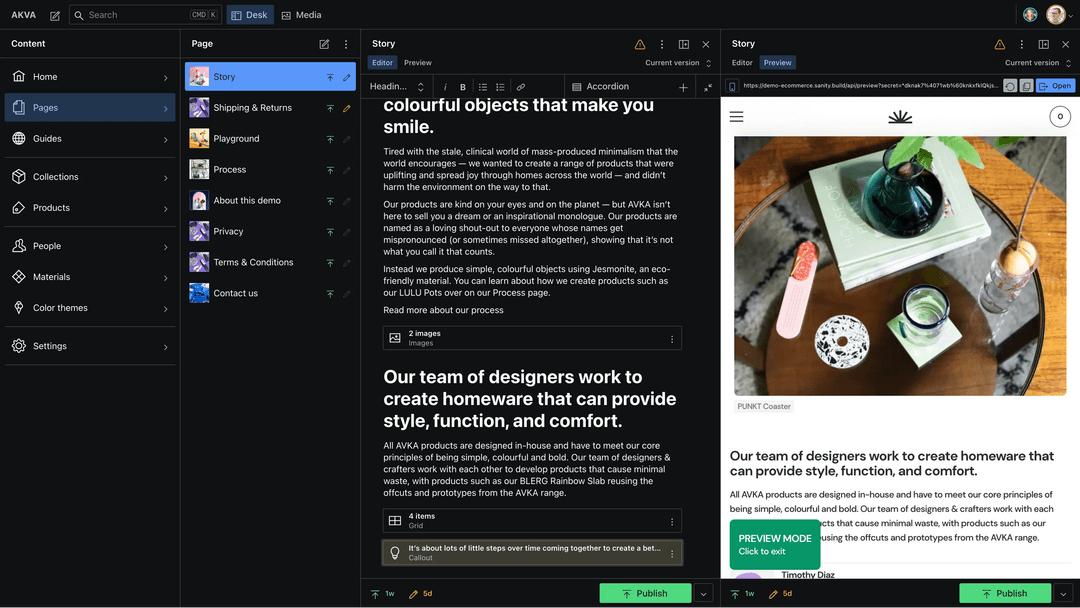 Sanity interface
Sanity CMS Use Cases
1. Digital Agencies
For agencies, Sanity CMS is the tool of choice for developing unique web experiences. Its customizable nature allows for crafting specific content structures that match the vision and requirements of any client project, from portfolio sites to interactive campaigns.
2. E-commerce Platforms
E-commerce businesses benefit from Sanity’s ability to manage and deliver product information, reviews, and blogs in real-time. The platform’s flexibility supports the dynamic content needs of online stores, including seasonal promotions and product launches.
3. Media outlets
News and media organizations utilize Sanity to manage their articles, videos, and multimedia content. The platform’s scalability and real-time editing capabilities ensure that breaking news and updates can be published swiftly across all channels.
4. Educational content
Educational institutions and e-learning platforms find Sanity’s structured content approach conducive to developing and organizing courses, tutorials, and learning materials. The collaboration features also facilitate co-authoring by educators and content experts.
Ideal Project for Sanity Headless CMS
Given its flexibility and expandability, Sanity CMS is appreciated by developers ready to develop custom solutions. Here’s where it consistently delivers:
1. Multi-channel content delivery Projects that need to publish the same content across a website, mobile app, digital signage, or third-party platform. Sanity’s structured content model means content is written once and delivered anywhere via API.
2. Complex editorial workflows Teams with multiple editors, strict publishing processes, or role-based content permissions. Sanity Studio can be customized to reflect the exact workflow your team already uses — no adapting to the CMS.
3. Custom content models Projects where off-the-shelf content types aren’t enough. Sanity gives developers full control over schema design, making it ideal for platforms with unique data structures that no template CMS can accommodate).
4. High-traffic, performance-critical sites E-commerce platforms, media outlets, and enterprise sites that can’t afford slow content delivery. Sanity’s API-first architecture combined with CDN delivery ensures content reaches users fast, regardless of traffic spikes.
5. Long-term, evolving platforms Projects that will grow, change, and add new content types over time. Sanity’s flexibility means the CMS evolves with the product — you’re never locked into a structure that made sense in year one but breaks in year three.
When Sanity Headless CMS Is Not the Right Choice
Sanity CMS is not the right option if:
- The team has no developer resources
- The project has budget limitations (Sanity pricing) Then a simpler CMS like Storyblok will be the best choice.
About FocusReactive
Sanity is a real-time content operating system that pushes beyond traditional content management systems. It lets teams manage and ship content quickly, with the flexibility modern digital projects demand.
Whether you are running a high-traffic e-commerce site, launching a digital marketing campaign, or delivering multimedia-rich educational content, Sanity gives you the tools and scalability to keep pace with your audience.
If you are planning a CMS migration to Sanity or building a new website from scratch, contact us. As a dedicated Sanity CMS agency, we can support you with a free consultation for your project.



.png&w=828&q=90)


.png&w=828&q=90)

 Eugene Boruhov