
When you build a Payload site, the same section often needs two or three card styles. Here are two examples from our project, each showing two variants of one section:
Block A - same section, different card style. The heading and paragraph don’t change, only the row of cards underneath does:
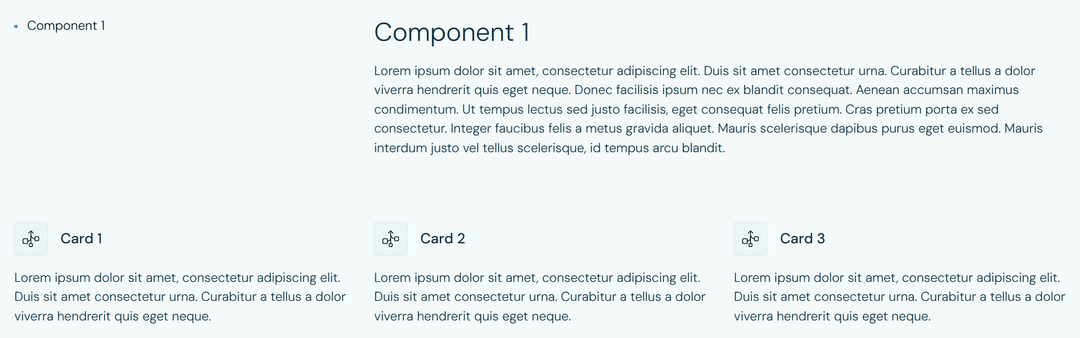 Variant 1. Heading + paragraph above a row of three icon cards
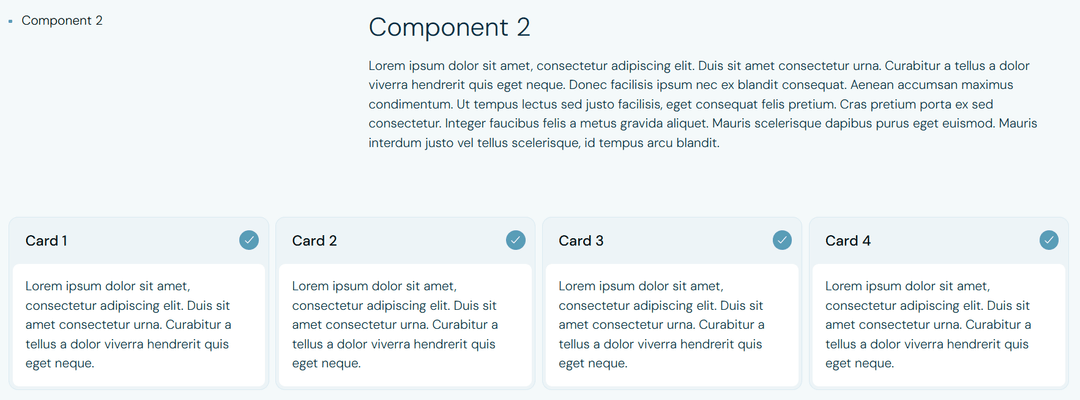 Variant 2. Heading + paragraph above a row of four check-mark cards
Block B - same section, different layout. This one is more dramatic: the right side gets replaced with a different component, and the fields the editor has to fill in are different too. One variant has a stats grid and a testimonial. The other has a card carousel with its own description and metrics.
 Variant 1. Heading on the left, stats grid + testimonial quote on the right
 Variant 2. Heading on the left, single card carousel with description and stats on the right
In both pairs the heading and paragraph stay put. What changes is everything to the right of them. For Block A that’s a styling decision. For Block B it changes the shape of the data the editor has to enter.
The naive way to support this is one block per variation: FeatureListInline, FeatureListStacked, StatsTestimonialsCards, StatsTestimonialsList, and so on. We tried that. By the third pair the page-builder dropdown lists six blocks that look the same to a content editor. Shared bugs have to be fixed in two places. The schema starts to feel like duplicate code with no good way to refactor it.
The usual fix is to collapse those pairs into a single block with a select field for the variant. That’s what we did. And that’s where the actual problem starts.
The variant field in the admin is just a dropdown. Inside it: inline, stacked, stats, cards. The editor opens the field and sees a list of words. To see what inline actually renders, they either save the page and check staging, or open Payload’s live preview alongside the form. Then they do the same for stacked. Then they forget which was which.
This is the section-sized version of the problem. There’s a smaller version too, on a field most editors touch dozens of times a week.
A smaller version: the button appearance field
Every design system we work with has a handful of button styles: a solid button for light backgrounds, a darker one for hero sections, a translucent variant for image overlays, plain text links for footers. Six or seven options total, all CMS-driven, all behind one appearance field that every CTA in the project goes through.
{
  name: 'appearance',
  type: 'select',
  options: [
    { label: 'Solid - light', value: 'solid-light' },
    { label: 'Solid - dark', value: 'solid-dark' },
    { label: 'Translucent - light', value: 'translucent-light' },
    { label: 'Translucent - dark', value: 'translucent-dark' },
    { label: 'Text link - light', value: 'link-light' },
    { label: 'Text link - dark', value: 'link-dark' },
  ],
}
Six values, all describing how a button looks. Nobody on the content team remembers what “translucent - dark” is supposed to mean a week after onboarding. Same save-refresh-look-again loop, just on a smaller field.
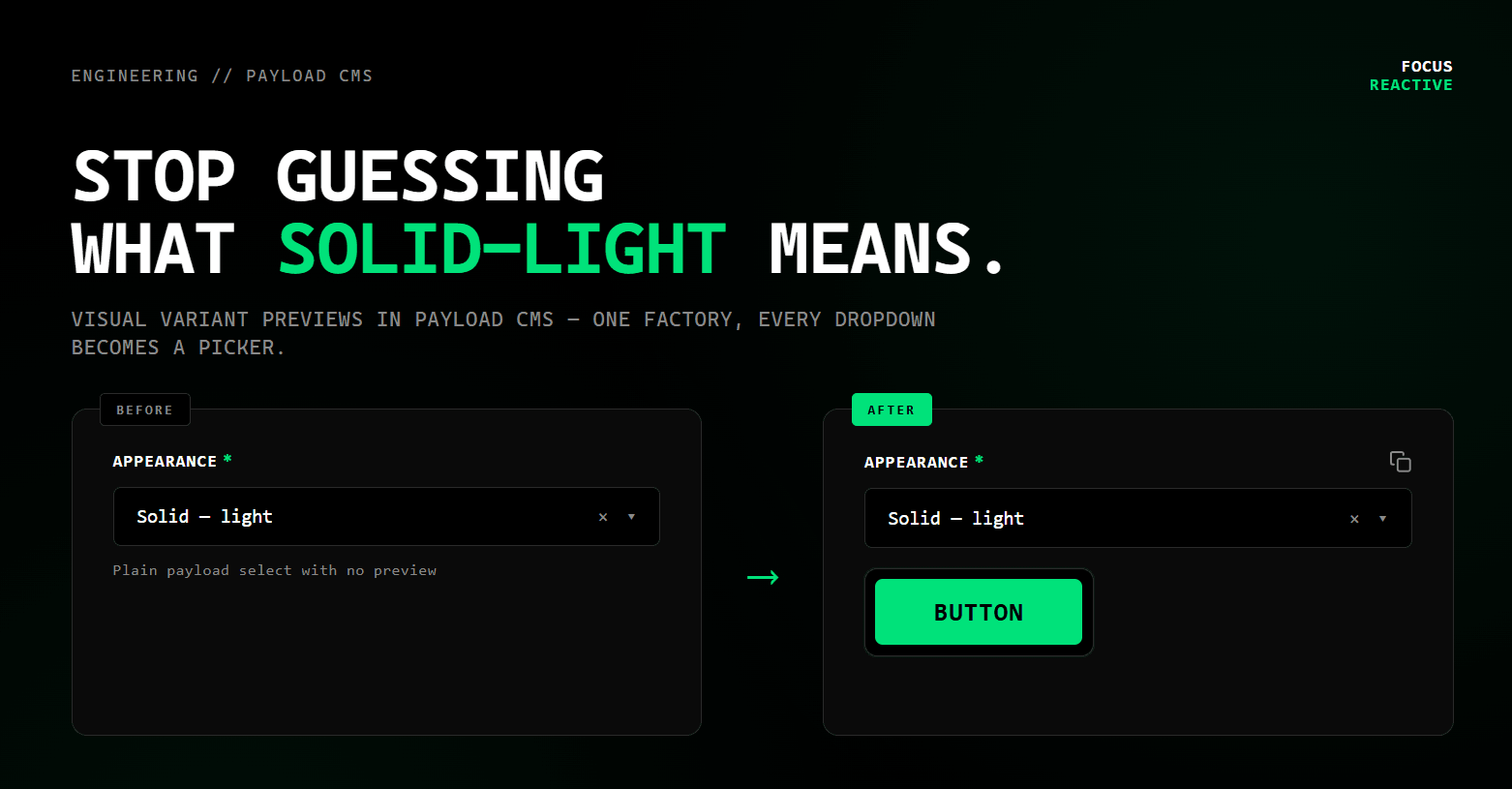
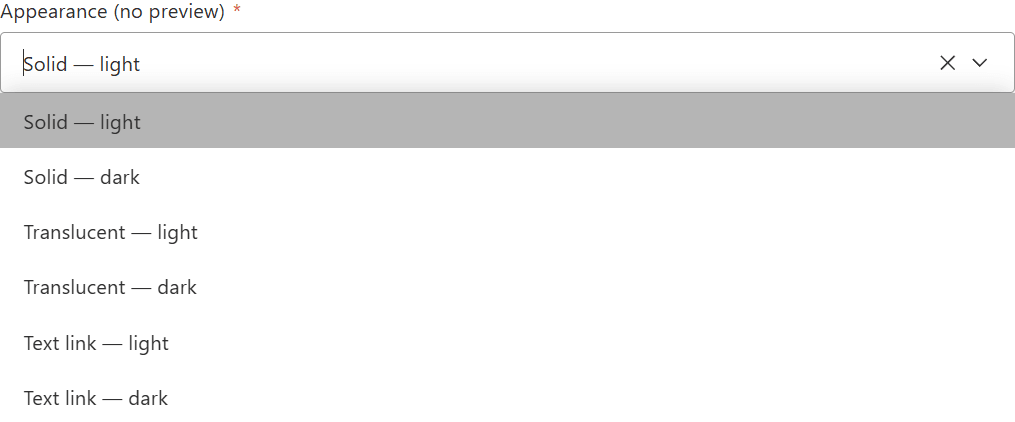 Button variants select before
The rest of this post is about the small primitive we built on top of that select. Around seventy lines of code total. The constraints we set: keep the field as a plain Payload select so types, migrations, and validation don’t change. Show the matching preview image right under the dropdown, swapping live as the value changes. Wrap it in a factory so adding it to a new block takes three lines. And make it work for both a button color and a whole section layout, since in this project both end up as select fields.
The solution: hijack the field description slot
Payload lets you replace a field’s Description with a custom React component via admin.components.Description. That slot is normally for help text. Nothing stops you from rendering an <img> in it. The component receives clientProps from the field config and can read the current field value with useField from @payloadcms/ui.
The preview component is about 40 lines, including the empty state:
'use client'

import { useField } from '@payloadcms/ui'

interface SelectVariantPreviewProps {
  path?: string
  variants: Record<string, { src: string }>
  emptyText?: string
}

export const SelectVariantPreview = ({
  path,
  variants,
  emptyText = 'Select a variant to see a preview.',
}: SelectVariantPreviewProps) => {
  const { value } = useField<string>({ path: path ?? '' })
  const preview = value ? variants[value] : null

  if (!preview) {
    return <p className="/* your empty-state styles */">{emptyText}</p>
  }

  return (
    <div className="/* your frame / card styles */">
      <img src={preview.src} alt="preview" className="/* your image styles */" />
    </div>
  )
}
Two things worth knowing:
pathis injected by Payload automatically. You don’t pass it from the field config.variantsandemptyTextcome throughclientProps, so the same component serves any select on the project - buttons, card variants, layout orientations, anything that maps a value to an image.
Result for the button field from above:
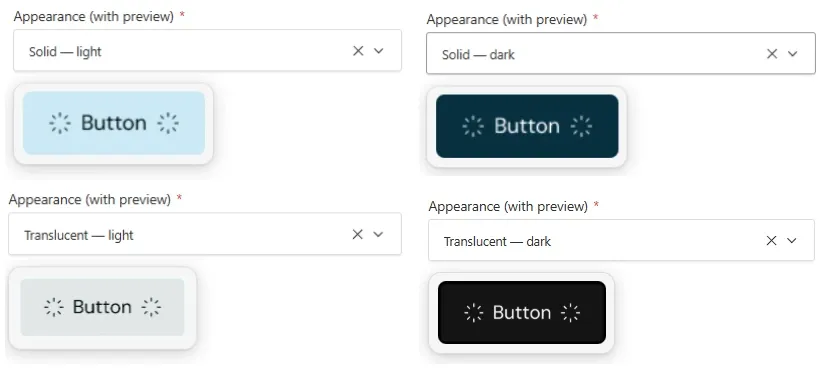 Button variants select after
The factory: one helper, every block gets it for free
Wiring admin.components.Description by hand on every field is the kind of boilerplate that drifts. We wrapped it in a selectVariantField() factory that takes a map of value -> { label, preview } and returns a configured Payload SelectField:
export function selectVariantField({
  name = 'variant',
  label = 'Variant',
  defaultValue,
  required = true,
  variants,
  emptyText = 'Select a variant to see a preview.',
  overrides = {},
}: SelectVariantFieldOptions): SelectField {
  const entries = Object.entries(variants)

  const options = entries.map(([value, v]) => ({ label: v.label, value }))
  const previewVariants = Object.fromEntries(entries.map(([v, { preview }]) => [v, preview]))

  const field: SelectField = {
    name,
    type: 'select',
    label,
    required,
    defaultValue,
    options,
    admin: {
      components: {
        Description: {
          path: '@/core/ui/components/SelectVariantPreview#SelectVariantPreview',
          clientProps: { variants: previewVariants, emptyText },
        },
      },
    },
  }

  return deepMerge(field, overrides)
}
A new variant field in a block now looks like this:
selectVariantField({
  name: 'cardVariant',
  defaultValue: 'card1',
  variants: {
    card1: { label: 'Card - bordered', preview: { src: '/section-previews/feature-list/Card1.jpg' } },
    card2: { label: 'Card - filled',   preview: { src: '/section-previews/feature-list/Card2.png' } },
  },
})
Adding a third variant is one entry in the map and one image in /public/section-previews/.
deepMerge in the factory above is a small in-house helper, not a Payload export. It lets a block override pieces of the field config without re-declaring the whole thing. If you don’t already have one, this version works:
deepMerge implementation (~30 lines)
function isObject(item: unknown): item is object {
  return typeof item === 'object' && !Array.isArray(item)
}

export default function deepMerge<T, R>(target: T, source: R): T {
  const output = { ...target }
  if (isObject(target) && isObject(source)) {
    Object.keys(source).forEach((key) => {
      if (isObject(source[key])) {
        if (!(key in target)) {
          Object.assign(output, { [key]: source[key] })
        } else {
          output[key] = deepMerge(target[key], source[key])
        }
      } else {
        Object.assign(output, { [key]: source[key] })
      }
    })
  }
  return output
}
 Feature list component card variants
Back to Block B
So far the previews have been picking a style: a button color, a card layout. The more interesting case is when the same field decides what fields the editor sees next. That’s the second pair of screenshots from the top of this article, our StatsTestimonials block. Two layouts behind one schema:
- Variant 1 - Stats & Testimonials: a grid of number stats plus a row of testimonial relationships.
- Variant 2 - Heading & Cards: a slider of card groups, each with a title, rich-text description, and up to three sub-cards.
Same block. Same DB table. The fields the editor sees change based on the variant - it’s one selectVariantField and a couple of condition callbacks:
const VARIANT_OPTIONS = {
  stats: {
    label: 'Variant 1 - Stats & Testimonials',
    preview: { src: '/section-previews/stats-testimonials/Card variant 1.jpg' },
  },
  cards: {
    label: 'Variant 2 - Heading & Cards',
    preview: { src: '/section-previews/stats-testimonials/Card variant 2.jpg' },
  },
}

export const StatsTestimonialsBlock: Block = {
  slug: 'statsTestimonials',
  fields: embedSectionTab([
    headingField({
      /* ... */
    }),
    selectVariantField({
      name: 'variant',
      defaultValue: 'stats',
      variants: VARIANT_OPTIONS,
    }),
    {
      name: 'sliderItems',
      type: 'array',
      admin: { condition: (_d, _s, { blockData }) => blockData?.variant === 'cards' },
      fields: [
        /* title, rich-text description, nested cards array */
      ],
    },
    {
      name: 'stats',
      type: 'array',
      admin: { condition: (_d, _s, { blockData }) => blockData?.variant !== 'cards' },
      fields: [
        /* prefix, number, suffix, description */
      ],
    },
    {
      name: 'testimonialItems',
      type: 'array',
      admin: { condition: (_d, _s, { blockData }) => blockData?.variant !== 'cards' },
      fields: [
        /* ... */
      ],
    },
  ]),
}
In the admin the editor:
- Adds a
Stats & Testimonialsblock to the page. - Opens the variant select on top and sees the two layouts as thumbnails - the same two pictures from the start of this article, just inside the form now.
- Picks one. The fields below collapse to only what that variant needs. The other set is hidden, not deleted - switch back later and the data is still there.
Picking the layout
 StatsTestimonials block, variant select open with the two layout thumbnails.
The variant select shows both layouts side by side. The editor picks a shape, not a string.
Stats & Testimonials variant - fields for numbers and quotes
 Same form after selecting "Stats & Testimonials": Stats array (prefix/number/suffix) and Testimonials array fields visible.
With the stats layout selected, only the Stats and Testimonials arrays are visible.
Heading & Cards variant - fields for slider cards
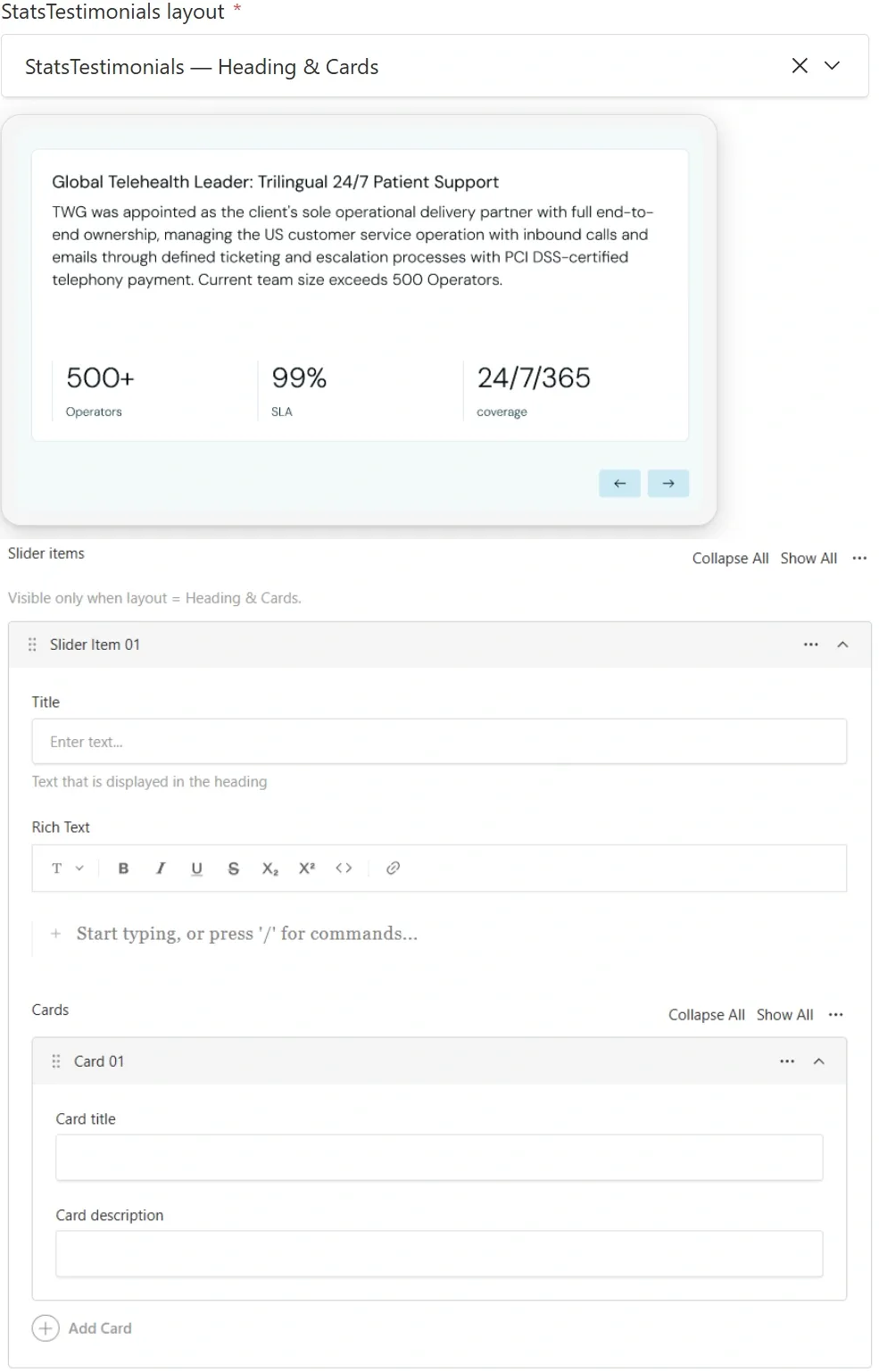 Same form after switching to "Heading & Cards": Slider Items with nested cards visible, Stats/Testimonials fields hidden.
Switching to the cards layout reshapes the form. Slider Items appear. The off-variant fields are hidden, not erased.
Before this pattern, two visually different layouts meant two separate blocks. We used to ship StatsBlock and TestimonialCardsBlock side by side. The editor’s page-builder dropdown gradually filled up with blocks that looked the same to them. Now we flip the question: if two layouts cover the same content intent - social proof in the hero area, for example - they’re one block with two variants, and the editor picks between them the way they’d pick a button style.
FeatureHero, ArcCarousel, TestimonialsCarousel, FeatureList - same approach on each. The page-builder dropdown has gotten shorter over time, which wasn’t a goal but turned out to be a useful side effect.
One more place it pays off: shared field configs
The factory works for new fields. The same primitive also let us upgrade existing shared helpers without touching any of the blocks that use them. Our link() helper is the main example. Dozens of blocks import it. It has an appearance select with six button styles and an orientation select that only appears when appearance === 'action'. Both now render preview images directly in the description slot:
{
  name: 'orientation',
  type: 'select',
  admin: {
    components: {
      Description: {
        path: '@/core/ui/components/SelectVariantPreview#SelectVariantPreview',
        clientProps: { variants: orientationPreviews, emptyText: 'Only for Action anchor.' },
      },
    },
    condition: (_, siblingData) => siblingData?.appearance === 'action',
  },
  defaultValue: 'horizontal',
  options: linkOrientationOptions,
}
Pick Action anchor in the appearance dropdown and the orientation field shows up with two thumbnails. None of the blocks that import link() had to change. The upgrade is invisible to callers.
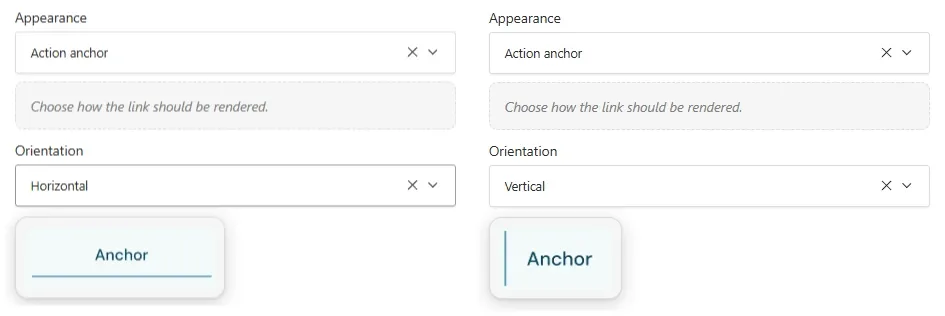 link-orientation
What this costs
- One client component, around 40 lines, written once.
- One factory function, around 30 lines, reused across every variant field on the project.
- No custom field type, no schema changes, no plugin. The field is a plain Payload
select. Types regenerate normally, migrations are stock, and Payload’s built-in validation and error states keep working. - A folder of preview JPGs/PNGs in
apps/payload/public/section-previews/. We export them straight from Figma when designing the block. They don’t have to be perfect - they have to be recognizable at a glance.
If you don’t want to build this pattern in‑house, or your team prefers to stay focused on product work, you can hand it off to a specialist Payload development partner instead.
Closing thought
The original goal was to stop the content team from guessing. That worked. Editors pick a layout, not a string, and the form reshapes to match.
The part we didn’t plan for was the effect on developers. New engineers joining the project read the schema and see the same thumbnails the editors do. The previews end up working as inline documentation: open a block config, see selectVariantField with two pictures, and you know what the section looks like without grepping the UI package or opening Storybook. When an engineer needs to fill in a staging page to verify their own change, they do it as fast as the content team. The line between “I wrote the code” and “I can use the CMS” gets quieter.
Front-end teams tend to treat the admin UI as someone else’s problem. It isn’t. Every editor opening staging to figure out what translucent-dark looks like is a small round trip, repeated thousands of times a year. The same round trip, reversed, eats developer time every time someone needs a test page. The thirty-minute fix closed both loops. The pattern transfers to any Payload install where a select represents a visual choice, and to most other headless CMSes with a way to inject a component into a field’s description. The part that surprised us wasn’t the previews themselves. It was that, once the dropdown showed a picture, we stopped reaching for a new block every time a section needed to look slightly different. The schema got smaller. The page-builder dropdown got shorter. The work got faster on both sides of the wall.



.png&w=828&q=90)