CMS Migration: How to Switch to Headless the Right Way (Complete Guide)

TL;DR
Most CMS migrations arrive with a redesign or UI refresh in scope. That changes the content model and the migration plan. Treat it as a separate workstream from the start.
Real website migration cost ranges from ~$10k for a small marketing site to $30k-$80k+ for enterprise or e-commerce. Published ranges are usually too low. They ignore design scope, integration complexity, and content modelling work.
SEO is the #1 migration risk in CMS migration. Traffic drops of 30-60% are well-documented for major CMS platform changes - and recovery is measured in months, not days. Build this into your timeline before a single line of code gets written.
Not everything gets migrated the same way. You can automate template-based content (blog posts, case studies, news). Core landing pages are often better when made by hand. This is especially true for pages built with visual builders. Here, content, layout, and styling are closely linked.
Headless CMS can be set up wrong. Live preview, page-building capabilities, and content structure all need deliberate implementation. Your editorial team doesn't just need a new tool, they need support to adopt and learn a new workflow.
A good project delivers a working CMS in one month. It includes the key parts. Editors can start right away. They don’t need to wait for the full build.
What a CMS migration actually is
A CMS migration is the process of moving a website's content, structure, and editorial workflows from one content management system to another - while keeping the site live and organic rankings intact.
The technical scope varies by type:
- a domain name migration changes your primary URL and carries SEO implications regardless of what else changes;
- a web hosting migration moves infrastructure without necessarily touching the CMS itself;
- a platform migration replaces the CMS entirely, which is the most common type covered in this guide;
- and a full e-commerce migration adds commerce engine, product catalog, payment logic, and third-party integrations to that scope.
There is always an SEO risk in all of them.
Why do businesses migrate to headless CMS?
The CMS migration conversation usually starts the same way. An editorial team files another ticket asking a developer to change a homepage banner. A campaign launches late because the CMS can't push content to the mobile app without a custom build. A performance audit comes back and the monolithic platform is the ceiling, not the floor. At some point the accumulated friction outweighs the comfort of the familiar.
W3Techs data shows WordPress's share of the CMS market has fallen from 65.2% in January 2022 to around 60.7% by late 2025 - a meaningful shift driven by teams that have outgrown what a monolithic setup can offer. Forrester's Q1 2025 CMS Wave showed that half of enterprise businesses prefer headless delivery. The other half choose template-based. The 2025 HTTP Archive Web Almanac shows new growth across various platforms: Shopify holds about 7.3% of the CMS market, while Wix has around 5.2%. This trend has no single leader.
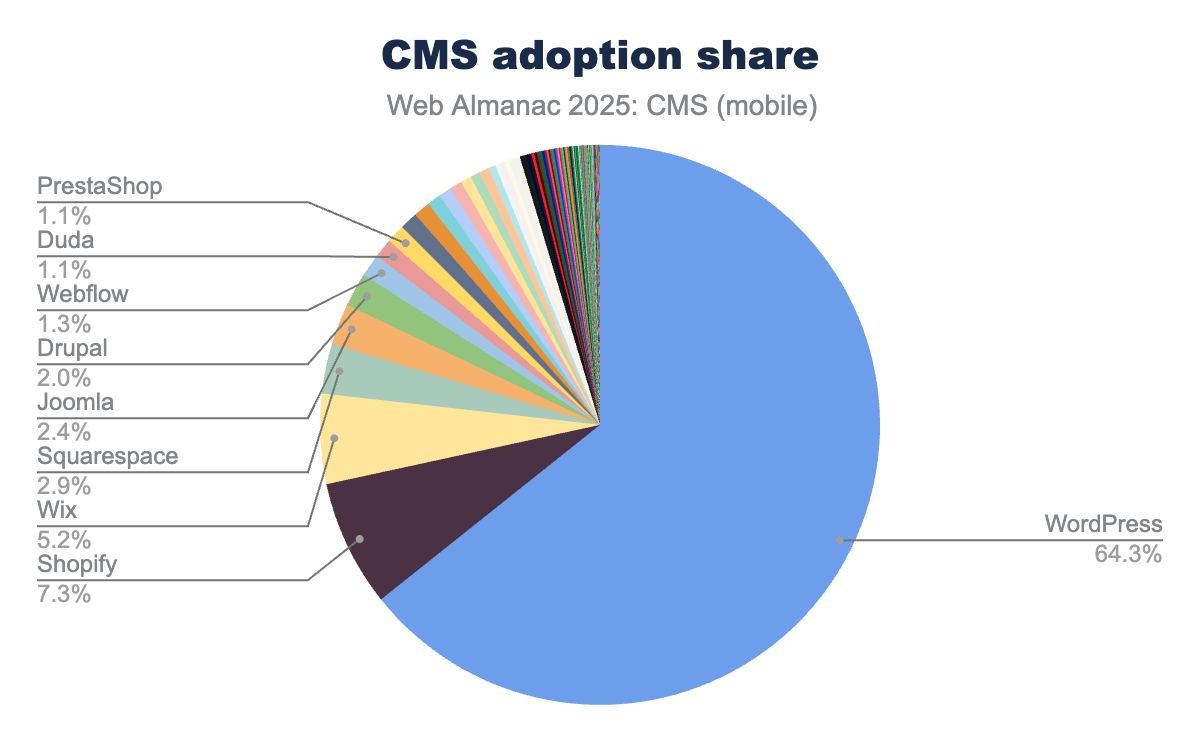 CMS-powered sites now represent over half the web, up from 42% in 2021.
The frustrations behind this shift are common across projects. Editorial teams are often blocked by developers for changes that should take minutes. Content is stuck on one channel. This happens even when the business needs to share it with apps and partner platforms. Performance constraints are built into the platform itself. Often, headless setups are poorly implemented. Live preview features may not be wired correctly. Editors struggle with a content structure that is hard to navigate. Promised page-building capabilities are often missing. The architecture helps only if it’s implemented correctly.
Headless architecture addresses these problems by separating content from presentation: the CMS becomes an API that delivers structured content to any frontend, any channel, any device. But this separation introduces complexity that needs to be designed for, not assumed.
Headless is about flexibility and workflows, not guaranteed speed. The 2025 HTTP Archive Web Almanac puts WordPress at a 45% mobile Core Web Vitals pass rate - still the lowest among major CMS platforms - while Duda reaches 85%, Wix 74% (up 14 points year over year), and Squarespace improved another 8 points.
The top performers are closed-source managed platforms that control the full stack, not headless architectures. Performance comes from implementation quality, caching strategies, and rendering decisions. A poorly implemented Next.js frontend will underperform a well-optimized WordPress site.
 Monolithic CMS couples content, presentation and delivery into one system. Headless separates them - the same content API serves web, mobile, and any other channel you need.
Why CMS migration fails (when it shouldn’t)
Most CMS migrations don't fail because the team picked the wrong platform. They fail because someone assumed the hard part was moving the content. The best migrations see SEO as a key choice. They plan the content model first. Development starts later. They include editors during the build, not just after.
The content moves fine. What kills organic traffic is the redirect mapping deprioritized until week eight, the metadata that doesn't survive the transfer, and the content team handed a platform they were never properly onboarded to. They end up filling more support tickets on day thirty than they did in the old setup.
Major platform migrations consistently produce 30-60% organic traffic drops when the SEO work isn't treated as a technical priority from day one.
The market has shifted decisively toward headless and composable architectures. Businesses are moving from traditional WordPress to headless setups, from Webflow to more scalable CMS platforms, from Contentful due to pricing or structural limitations, and from legacy custom platforms to composable commerce ecosystems.
The migration type, whether it's a domain name migration, a web hosting migration, a platform rebuild, or a full e-commerce overhaul - changes the technical scope. The same failure modes show up regardless. Whether it's a straightforward website migration or a full e-commerce CMS migration involving product catalogs, payment systems, and ERP integrations, the SEO risk is the constant.
The best migrations treat SEO as an architectural decision from day one, content modeling as discovery work, and editorial onboarding as part of the build - not an afterthought. This guide covers what actually determines success on all three fronts: the SEO work, the content modeling decisions, realistic costs, and what a well-run migration project looks like from kick-off to post-launch monitoring.
CMS migration SEO: what actually breaks and how to prevent it
SEO isn't a launch task. In a migration project, you must scope, resource, and sequence architectural concerns early. Don’t hand them off in the final sprint.
CMS migration risks
A study of 892 domain migrations found an average recovery time of 523 days for organic traffic to return to pre-migration levels. Read that again: 17% of migrations never recovered at all, even after 1,000 days of monitoring. Not a temporary dip. Gone.
These aren't botched projects run by people who didn't know what they were doing. These projects treated SEO work as a launch task instead of an architectural concern. Three failure modes consistently emerge:
- Redirect mapping done too late - or done wrong.
The biggest cause of traffic loss after a site migration is simple: bad redirects. Many teams send all old URLs to the homepage instead of mapping them correctly. iPullRank reported a UK retailer losing roughly $5M in the first month after ignoring redirect mapping advice. Not a technical problem, a prioritization problem.
- Content model mismatch.
The instinct when migrating is to replicate the old CMS structure in the new one. Same fields, same hierarchy, same naming. This almost always carries the old platform's problems forward. Migration is the moment to fix the structure, not import it intact.
- Editorial handoff failure.
After a migration, the CMS is live, but the content team gets no onboarding, no documentation, and a system designed for developers, not editors. They route around it. Tickets pile up for simple changes. The architectural gains evaporate.
The last point deserves emphasis because it's the one that surprises teams most. Headless CMSs are genuinely good at editorial experience when configured correctly: visual editing, live preview, flexible page-building, role-based permissions.
But that configuration doesn't happen by default, and it requires understanding how the editorial team actually operates, not just how the developer expected them to.
 The three failure modes that cause most migration damage - and all three are preventable with the right sequencing.
SEO migration checklist
Google's migration documentation is deliberately understated on timelines. The independent data tells a harsher story. Treat every item below as a technical rule.
One practice we use on every project before getting into the migration SEO checklist: redirect management gets built directly into the new CMS, not just the codebase. This way editors can add and update redirects independently after launch, without a developer.
For large sites with complex rule sets (pattern matching, regional redirects, legacy parameter handling), we run code-level redirects in parallel.
For instance, the Real Thread migration, a custom Redirect Configuration tool in Storyblok. This tool lets the editorial team manage their own redirects after launch. They don't need a developer for this.
1. Technical foundations
Full URL inventory. Every URL on the current site, crawled and recorded before any other decisions get made.
Redirect mapping. When a migration keeps the same URL structure, the task is validation and testing. When URL structure or slug patterns need to change, the clearer the plan before build starts, the better developers can implement and test in staging rather than deploying under pressure.
Canonical preservation. If the old site managed duplicate content via canonical tags, those relationships need to carry over. Losing them mid-migration surfaces suppressed content.
Metadata migration. Without explicit migration, template defaults replace custom-optimized metadata across every page simultaneously – and Google notices. Page titles, meta descriptions, Open Graph tags.
Schema validation. Structured data markup needs to be rebuilt and tested in the new environment.
2. Content protection
Header structure validation. H1/H2 hierarchy often breaks during template reconstruction. A full crawl of staging specifically checking heading structure should be part of the pre-launch checklist.
Internal linking audit. Links hardcoded to old domain patterns break silently at cutover. Audit them as part of content migration, not after.
Sitemap regeneration. New platform, new sitemap. Submit to Search Console immediately after launch and monitor coverage reports from day one.
One thing worth calling out separately: robots.txt is routine work until it isn't. One documented case saw a site lose 50% of its indexed pages within a week from an accidental crawl block introduced during migration. Check it in staging. Check it after launch.
3. Performance factors
Core Web Vitals baseline. Measure CWV on the existing site before any migration work begins. You need a benchmark to compare against post-launch.
Rendering strategy. The choice between SSR, SSG, and ISR on a Next.js frontend affects how Googlebot sees your pages. Static generation with ISR is the right default for most content pages. Dynamic pages with real-time data or personalization need deliberate handling. Get this decision made before build starts.
Crawl budget. Large sites with lots of URLs must watch their crawl budget. This is key if the old site had parameter URLs. It also matters for paginated archives and staging environments that got indexed.
 The Pages report in Google Search Console - your primary monitoring view in the weeks after launch. Coverage drops and new "Discovered - not currently indexed" entries are the early warning signals to watch.
How we start every CMS headless migration
When you begin a website migration, it’s easy to stick with what the client has. You might fork the existing repo and change the old setup. But replacing it could be a better choice. We don't do this. Every site migration starts as a brand new project: fresh repository, fresh CMS environment, fresh Vercel deployment.
Legacy environments accumulate unpredictable dependencies. Working inside them is slower, riskier, and tends to produce a new site that inherits the structural problems of the old one. Legacy services with real value keep running and connect via API. Code worth keeping gets ported selectively and refactored. The goal is avoiding unnecessary reimplementation without letting old infrastructure dictate the new architecture.
The clean start is also fast because of CMS-Kit - our internal boilerplate built from seven years of headless CMS project experience. It handles the setup complexity that every headless project shares, and the setup complexity that's unique to each platform.
Every headless CMS works differently, from preview and caching to localisation and SEO. CMS-Kit captures those platform patterns so teams don’t start from scratch each time.
The architecture behind it: the UI layer is built as a shared package, completely independent of any specific CMS. Controller components translate data from any connected CMS into a format the shared UI understands. Swap the CMS and the UI doesn't change. Auto-generated TypeScript types from the schema flow through to the frontend, so data shape mismatches get caught at compile time.
 CMS-Kit separates the UI layer from the CMS entirely. The controller layer handles the translation between any CMS and the shared component library - swap the CMS without touching the frontend.
The MVP milestone this unlocks matters beyond speed. By end of month one, the client has a working CMS environment connected to their new frontend, basic SEO configuration in place, and a component set agreed at kick-off ready to use. The editorial team can start building pages and working in the new CMS before the full build is complete.
This isn’t just efficiency – it’s about early feedback. Content editors know their workflows better than any developer does, so in this phase they:
- Find gaps in the content model;
- Surface friction in the editing experience;
- Expose requirements that only appear in real use.
We provide onboarding sessions in this phase, tune the implementation to real usage, and adjust based on what the team actually needs. Catching those things early shapes everything that comes after, and avoids the alternative: building in a black box for months and handing something over at the end.
Website migration plan for headless CMS
A migration project has two failure modes: poor execution, and poor sequencing - doing the right things in the wrong order. The steps below address both.
1. Technical audit and SEO baseline
Full URL crawl, CWV baseline, existing redirect chains, internal link structure, metadata coverage, third-party integrations, infrastructure dependencies. Run organic performance benchmarking alongside this - rankings, impressions, click-through rates, indexed page count. You need the before state captured before any changes happen.
Teams that skip the audit discover scope mid-project, which is the most expensive place to find it.
2. Content modeling workshop
This step determines how well everything else goes, and it's the one most projects underestimate.
Automate: Blog posts, news articles, case studies, help center content. Template-based, many instances, consistent structure. Nobody wants to migrate 400 blog posts by hand.
Migrate manually: Home page, About, Contact, core landing pages. These pages contain unique data and are typically built using visual builders in the old CMS with deeply nested structures that resist clean extraction. The engineering effort to automate them rarely justifies itself for 10-15 pages - and if design is in scope, the content of those pages will change significantly anyway.
A few questions worth answering in the workshop before the content model gets designed:
What data should be global vs per-page? Header and footer are the obvious examples, but think beyond navigation. If the same content block - a testimonial, a CTA, a pricing note - appears across multiple pages, it's a strong candidate for a global document with a single reference. One place to edit, everywhere it updates.
Do you need technical collections? A Site Configuration document - separate from any page - is useful for global settings that editors need to control without developer involvement. For one client we built a blog CTA selector directly into the Site Config, so the marketing team could swap the CTA appearing on every post without touching a single page.
How does structured data connect to your components? Schema markup isn't just a developer concern - it follows content structure. An FAQ section that's modeled as structured data in the CMS can generate the corresponding JSON-LD automatically on render, rather than being maintained separately. Decisions made here in the content model save significant work later.
If the site is multilingual, how will translations be handled? This is one of the highest-complexity decisions in the content model and it's worth asking explicitly rather than assuming. Field-level translation keeps everything in one document and is simpler to manage, but gives every locale the same layout. Document-level translation duplicates the document per locale, which adds overhead but allows region-specific layouts and content differences.
Translatable slugs - whether
/en/aboutand/de/ueber-unsare separate routes or a single document with locale variants - which adds significant routing complexity if you need it.
Reusable short strings like "Learn More" or "Read more" need a home too: either managed globally as a key-value translation file, or defined per-component on each page.
Each approach has trade-offs. The right answer depends on whether you need editorial simplicity or regional flexibility –– and that's worth agreeing on before a line of schema gets written.
3. The visual builder problem
WordPress sites built with Elementor or Divi store content in serialized PHP inside the database, interleaved with layout and styling data from the plugin. But this isn't only a WordPress issue - it's a property of any system that couples content to layout.
Webflow's Designer pages work similarly: static landing pages built in Webflow's visual editor embed content into layout structures that resist clean extraction, even though Webflow's CMS collections - blog posts, team members, structured data - have clean, well-structured data that extracts via API without issue. If content and layout can't be separated, budget those pages as manual work from the start.
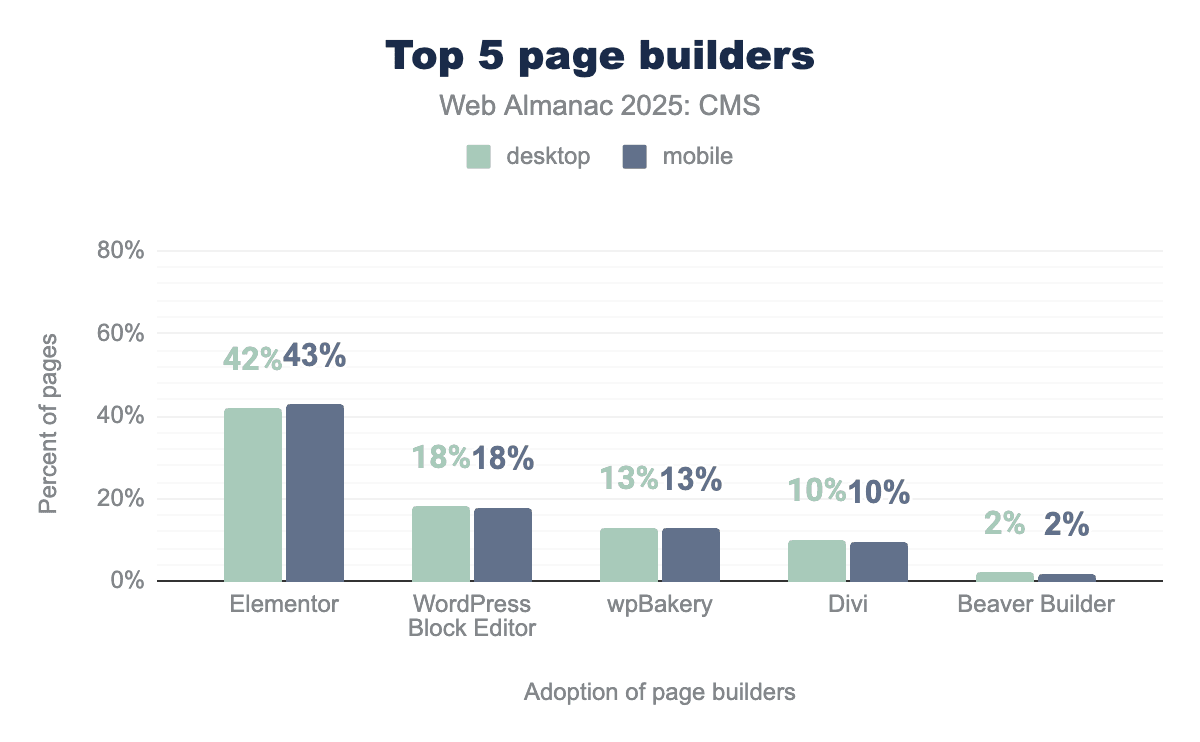 Elementor alone runs on over 14% of WordPress sites. These builders store content interleaved with layout data - which is exactly what makes programmatic extraction unreliable. Source: HTTP Archive Web Almanac 2025.
4. Design scope
Most migrations arrive with design scope attached. Ideally, designs should be fully approved before the content modeling workshop begins. This way, everyone has the complete visual picture. It helps in creating the right content structure and reduces rework.
In practice, design and content modeling almost always run simultaneously. That's the reality of most project timelines, and it's workable, but it means both workstreams need to stay in close contact throughout.
For full redesigns - particularly when there's a brand-defining visual identity involved or significant custom interaction work. We partner with a specialist design agency that handles competitor research, user flows, and the complete design process.
For lighter facelifts, the approach is different: take an established design system like Flowbite or Untitled UI, update the design tokens (typography, color, spacing, etc.) to match the client's brand, and use the component library as the build foundation. Token changes propagate across every section automatically.
5. Development and API integration
New repo, new CMS environment, CMS-Kit as the foundation. Legacy services that need to survive connect via API. Third-party integrations - analytics, search, marketing automation, payment providers - get scoped explicitly here rather than discovered at the end.
6. Staging validation and onboarding
QA is necessary, but not sufficient. Staging validation needs real editorial testing - content editors working in the new CMS, publishing content, testing preview, finding friction points before they become post-launch support tickets. We use this phase for structured onboarding sessions with the editorial team: walking through workflows, identifying where the implementation doesn't match how they actually work, and adjusting. The people who will live in this CMS every day should have hands on it - and genuine input into it.
7. Pre-launch crawl testing and tontrolled launch
A full crawl of staging before the domain switches: redirect coverage, heading structure, metadata presence, robots.txt, sitemap validity, soft 404s. The launch itself should be a non-event - a domain cutover following a well-validated plan.
 Crawl stats after a migration. The 12% 301 rate is expected while Google works through redirect chains - the 7% 404 rate is the number to watch and drive toward zero in the weeks after launch.
Post-launch: watch Search Console daily for a minimum of four to six weeks. The Pages report for coverage drops, crawl errors on old URLs, pages moving from "Indexed" to "Discovered - not currently indexed," and CWV regressions. Decommissioning the old environment happens on a defined schedule - public access off, database archived, infrastructure shut down.
 The migration sequence that holds. Steps 2 and 6 are where most projects cut corners - and where most of the damage happens as a result.
Platform-specific migration paths
The principles are the same for all CMS migrations. Start with a clean slate. Focus on SEO. Model content first. Build later. The specific challenges vary by platform.
WordPress migration
WordPress still powers around 42% of all websites as of early 2026, per W3Techs. Its CMS-only share has been quietly declining, but it remains the most common migration origin we see by a significant margin. The performance case for leaving is legitimate: the 2025 Web Almanac puts WordPress at 45% mobile CWV pass rate, still last among major CMS platforms. Visual builders compound this: the most widely used ones generate complex DOM structures and heavier JavaScript payloads that the new architecture simply won't carry.
The main migration challenge isn't the content. Every plugin that manages key tasks like forms, search, redirect management, SEO meta, and pricing tables needs a similar solution in the new stack. Scope these before build starts, not when someone notices a feature is missing in staging.
The EmailOctopus migration to Payload CMS is a good illustration: 400+ pages migrated, two separate domains consolidated into one clean SEO structure, and 100% green PageSpeed scores across key pages - the kind of result that's only possible when plugin dependencies are scoped and resolved early.
If you're on WordPress and evaluating a move to a headless CMS, our WordPress to headless CMS migration page covers the approach in more detail.
Webflow migration
Webflow migrations are triggered by hitting a ceiling the platform wasn't designed to clear: content modeling complexity, localisation at scale, performance under heavy animation, or dynamic data that Webflow's CMS tier can't handle cleanly.
As noted in the content modeling section, Webflow has a structural distinction worth understanding. Its CMS collections have clean, exportable data that migrates well. Its Designer pages couple content to layout in a way that resists programmatic extraction - budget those as manual work.
The Firsty migration from Webflow to Storyblok and Next.js illustrates what becomes possible on the other side: 190+ localised country pages managed through the CMS, AI-assisted translation into 6 languages, and dynamic pricing connected via API.
Contentful migration
Most Contentful migrations happen because of pricing at scale and platform limits. Before migrating away from Contentful, do a content model audit. Migration is the only opportunity to fix the structure you'd design differently today.
Glimble's migration to Payload CMS is a good illustration of what these projects can involve: multi-market architecture across the Netherlands and Italy with separate regulatory requirements and pricing per country, AI-assisted translation workflows with human review gates, Swell commerce integrated with product data manageable directly from the CMS, a custom email template builder built inside the CMS for the marketing team, and mobile app webviews managed through the same content environment. Two years on, it's an ongoing technical partnership.
Custom CMS SEO migration
Migrating from a custom or legacy CMS is where the SEO work gets genuinely complex - and where the most experienced teams still get caught out.
The technical SEO checklist covered earlier applies to every migration. Custom CMS SEO migration adds complexity because the source data often isn't clean or consistent. Schema is often undocumented. URL patterns were designed around the platform's internal logic, not crawlability. Metadata may be stored in non-standard fields or partially generated by templates that don't survive the move. They're common properties of systems that were built once and never redesigned.
The work this creates is specific. Data normalization comes first: understanding what you actually have before deciding what to migrate and how. Custom field mapping involves matching old data structures to the new CMS content model.
This is also the time to decide which fields to keep and which old constraints to drop. Indexability validation matters here because custom platforms often use non-standard routing, complex URLs, or rendering methods that can be tricky for a headless frontend. What indexed well in the old environment doesn't automatically index well in the new one.
Structured taxonomy is also a common problem. Custom CMSs frequently grew their category and tag structures organically over years, without a coherent model behind them. Migration is the opportunity to fix that, but it requires someone making deliberate decisions about what the taxonomy should look like, not just exporting whatever exists.
The audit phase matters more on these projects than on any other type. The more unusual the source platform, the more crucial it is to really understand the data model before writing any migration code.
How to shut down your old CMS after launch
For most projects, decommissioning the old platform is straightforward: the new site goes live, the domain points to the new environment, and the old infrastructure gets wound down on a defined schedule. The standard sequence – robots.txt updated to block crawlers on the old environment, public access removed, database archived, infrastructure shut down – is operational work rather than technical risk.
Timing is key. The old environment must remain accessible for a set rollback window after launch. Then, it should shut down on a schedule, not run endlessly. Leaving the old CMS accessible after cutover without crawler controls is one of the more common sources of post‑migration duplicate content issues. It’s easy to prevent and easy to overlook.
E-commerce CMS migration and composable commerce
When something goes wrong in an e-commerce migration, the damage shows up in revenue per hour. Not rankings over weeks.
The scope difference is also significant. A CMS migration moves content. An e-commerce migration moves content, product catalog, variant structures, pricing logic, faceted navigation, customer accounts, order history, payment gateway configuration, and every third-party integration the business depends on - analytics, search, email automation, loyalty programs, ERP sync, PIM. Each integration is its own scoping conversation.
Caleffi's migration from Magento to Shopify Plus illustrates what this looks like at scale: 24,000+ unique SKUs, 400,000 orders migrated, 300,000 customers, multiple markets across Italy and the EU with country-specific pricing and regulatory requirements, real-time sync built between an AS/400 ERP and Shopify for orders, inventory, and fulfilment, with Klarna, Algolia, Zendesk, and Trustpilot integrated alongside SEO-friendly redirects across 5,600+ migrated pages. The stack was Sanity for content management, Shopify Hydrogen for the commerce layer, and Remix as the framework.
Gartner predicts 60% of new cloud B2C and B2B digital commerce solutions will align with MACH architecture principles by 2027.
The commerce engine options have expanded with this shift:
- Shopify Plus with Hydrogen is great for mid-market and enterprise builds.
- Crystallize works well for complex product modeling and subscription commerce.
- Swell offers API-first flexibility.
- Medusa.js is for teams needing open-source, self-hosted control. It's TypeScript-native, modular, and becoming more credible for the right projects.
Gartner also published a warning in November 2024: organizations adopting composable commerce without sufficient digital maturity risk failure. They named this "composable regret". Composable architecture gives you flexibility by making you responsible for integration. Every service boundary is a surface area you own.
The honest question before an e-commerce migration isn't "should we go composable?" It's "is our team ready to adopt new workflows and learn the integrations that come with it?" For most mid-market businesses with a clear e-commerce setup, the answer is yes. Still it's important to ask honestly before committing to the architecture.
 The composable commerce stack. Each service does one thing well and connects via API. The flexibility is real - so is the integration surface area you take on.
CMS migration costs in 2026
The cost ranges published in most website migration guides are too low. Not slightly – significantly. They're built around content migration only: moving data, writing some redirects, deploying to a new host. That's maybe 20% of what a real migration project involves.
The actual scope includes content modeling, CMS configuration, frontend development, design, third-party integration work, SEO setup, staging validation, post-launch monitoring, and the support period while the editorial team finds their feet.
| Project type | Rough range | Main cost drivers |
|---|---|---|
| Small marketing site | ~$10k | Content modeling, redirect mapping, CMS setup, basic dev |
| Mid-size site (50-200 pages) | $10k-$30k | Custom integrations, design scope, component library |
| Enterprise / complex site | $30k-$80k+ | Multi-region, complex taxonomy, team training, multiple integrations |
| eCommerce | $40k-$80k+ | Commerce engine, ERP/PIM, product catalog migration, third-party integrations |
Forrester found 53% of CMS migration initiatives exceed budget, miss deadlines, or fail to deliver expected outcomes. In our experience, the fix isn't a larger budget buffer - it's better upfront scoping and a contract structure that doesn't punish honest complexity. We work on a time and materials basis, billing for effective hours only. T&M doesn't come with a guaranteed final number, but the budget tracks real work rather than estimated risk, and scope changes get handled as scope changes. The MVP milestone at month one bounds the initial commitment: something concrete is in clients' hands before the full project scope needs to be locked down.
The cost that should actually concern you isn't the agency fee. If organic search drives 40% of your revenue and a poorly handled migration halves that traffic for six months, the revenue impact far outweighs whatever was saved on the build. That's a well-documented failure pattern, not a hypothetical, and it's driven by scoping and prioritization decisions, not technical complexity.
Why professional CMS migration services matter
Most teams underestimate what a migration actually involves until they're mid-project. The gap between "we're moving to a new CMS" and "we've successfully migrated with traffic intact and an editorial team that knows how to use the platform" is where most of the risk lives. It is also where the most of the cost shows up when things go wrong.
A qualified migration partner doesn’t just bring a process document. They bring a track record of seeing failure modes before they hit your project, a structured SEO framework that treats redirects and metadata as architectural decisions, and content modeling expertise to redesign a legacy CMS structure instead of importing old problems. They also bring real experience with composable architectures, so they know which CMS and commerce stacks fit which use cases, and post‑launch support that actually catches regressions early instead of ending the moment the domain switches.
The website migration services that deliver aren't the ones with the lowest day rate. They're the ones with enough real-world migration experience to tell you what they'd do differently from your current plan - and whether your timeline and budget are actually realistic before the project starts.
Getting the migration right
The CMS platform matters less than the process. A thoughtful moving to a well-implemented headless CMS produces compounding returns: editorial teams that can publish independently, a codebase the next developer can understand, performance that reflects the architecture's potential, and an SEO baseline that survives the transition intact.
Most of what determines success is decided before a line of code is written: the content model, the redirect strategy, the design scope, the sequencing. For projects where Next.js is involved - which most modern headless migrations are - the rendering strategy decisions, caching architecture, and ISR configuration aren't details. They determine whether the new site performs the way the architecture promises.
If Next.js is part of your website migration, you can see how we approach these projects on our Next.js agency page.
If you're working through what a migration looks like for your specific situation - platform, scale, timeline, design scope - get in touch. No pitch, just an honest look at what it would realistically take.
 Core Web Vitals post-migration. Zero poor URLs across 114 tracked pages on both mobile and desktop - the result of rendering strategy and caching decisions made at the architecture stage, not performance fixes applied after the fact.
FAQ
More posts on related topics
Static Websites: Complete Evolution Guide
In this guide, we show what static websites are, explore how it all started and explain why we have returned to them. Discover why modern static sites dominate in 2026: lightning-fast loading speeds, ironclad security, and unbeatable SEO, powered by Next.js + headless CMS like Sanity and Storyblok.
A founder's guide to Webflow vs. Storyblok
Choosing between Webflow and Storyblok? This guide uncovers the hidden costs, migration traps, and long-term trade-offs to help you decide between Webflow's speed and Storyblok's power to scale.
Advanced Codegen Setup for Shopify Admin API in Hydrogen — Developer Guide
Learn how to configure advanced code generation for the Shopify Admin API in Hydrogen. Step-by-step developer guide with examples, setup details, and best practices for efficient headless commerce development.
Granular Cache Invalidation for Headless CMS
Granular cache invalidation lets you refresh only the specific content that changes in a headless CMS, instead of wiping out the entire cache. This short article details how to set up targeted invalidation, covering use cases, best practices, and practical techniques to keep sites fast and content up to date.
Storyblok vs. Sanity - A Comparison of Two Leading Headless CMS Platforms
Looking for the right headless CMS? We compare Storyblok and Sanity on ease of use, content modeling, integration, scalability, localization, developer support, security, documentation, and pricing. As official partners for both platforms, FocusReactive offers the hands-on expertise you need to make the right choice for your project.
Headless vs Composable: What’s Best for Your Business?
Discover the differences between Headless and Composable architectures and learn which is best for your business. Understand the benefits, see real-world examples, and find out how these modern approaches can enhance your digital presence and drive success.