


Static Websites Explained in 5 Points
- A static website delivers pre-built HTML pages directly to visitors instead of generating content on every request.
- Modern static websites built with Next.js and JAMstack load faster, scale more easily, and often achieve better SEO results than traditional dynamic websites.
- Technologies such as Incremental Static Regeneration keep content fresh without requiring full site rebuilds.
- Headless CMS platforms like Sanity and Storyblok allow content teams to manage updates while developers maintain a flexible frontend architecture.
- Combined with hosting platforms such as Vercel and Netlify, static websites offer an efficient balance of performance, security, and maintainability.
What Is a Static Website? The History of Static Sites
Early Internet Era (1991)
If you were around in the early years of the internet, you likely remember those simple text-based pages, like the first website created by Tim Berners-Lee in 1991:
Dynamic Web Evolution (1995–2010s)
The web has evolved from static pages to dynamic applications over the decades. Initially, websites were simple, static HTML and CSS files manually edited for changes.
Modern Static Renaissance (JAMstack)
Today, JAMstack brings static sites back: combining static site generators, headless CMS, and serverless functions for unmatched speed, security, and scalability that modern web demands.
What Makes a Good Static Website? Key Requirements
 What do we want
Fast Loading Speed
One of the key expectations from modern websites is fast loading speed. Users demand instant access to content, and even a few seconds of delay can significantly impact their experience.
Fast Loading Speed (2026 Stats)
Users abandon sites instantly—65% of mobile users leave if load >3s (up from 53% in 2017).
**Static sites crush performance:
*Static sites load 2-3x faster (LCP <1.2s vs 2.5s dynamic)
*90% score >90 PageSpeed (vs 40% dynamic sites)
*40% of NEW websites in 2026 use SSGs (up from 28% in 2023)
**Conversion impact:
*Every 1s faster = 2% conversion lift (Walmart)
*7% uplift from 0.85s improvement (COOK)
*1.11% per 100ms homepage gain (Mobify)
Why static websites win: Pre-built HTML served from CDN = zero server processing.
Source: Cloudflare
Good SEO
SEO for static websites remains a critically important aspect for any website. High ranking in search results is one of the main factors of success on the internet, as organic traffic plays a key role. Good SEO not only helps attract more visitors but also ensures a quality audience genuinely interested in the site’s content. Sites that follow best SEO practices rank higher in search engines, increasing their visibility and attracting more traffic.
Static sites, by nature, support good SEO for several reasons:
-
Fast Loading Times: Static sites are typically faster because they serve pre-built HTML files directly, which search engines favor for higher rankings.
-
Efficient Indexing: Search engines can quickly and efficiently index static pages since they are simple HTML files, making it easier for crawlers to understand and index the content.
-
Consistent Content Delivery: Static sites deliver the same content consistently to all users, ensuring that search engines see the same content as visitors, maintaining the integrity of the site’s SEO.
These factors collectively help static websites achieve and maintain good SEO, leading to better visibility and higher rankings in search engine results.
Security
Security remains one of the top priorities for modern websites. Users expect their data to be protected and the site itself to be safe to visit. Ensuring a high level of security not only protects user data but also builds trust in the site.
Static sites, by their nature, are more secure and resilient, reducing the risk of vulnerabilities and potential attacks.
Here’s why:
- No Server-Side Processing for Static Content: Static sites serve pre-rendered HTML files, eliminating server-side code execution for static content and reducing the attack surface.
- Minimal Attack Surface for Static Content: Without database connections or server-side scripts for static content, static sites avoid common vulnerabilities like SQL injection and cross-site scripting.
- Content Delivery Networks (CDNs): Static sites are often served through CDNs, which provide additional security layers such as DDoS protection and secure TLS encryption.
Relevance and Freshness of Data
Users want to see up-to-date information, and for sites that frequently update content, this is especially important. The ability to update site content without needing to regenerate all pages ensures the information remains relevant in real-time.
Modern static websites’ generators and technologies like Incremental Static Regeneration enable sites to be updated efficiently. This allows for content changes to be made quickly and easily without a complete site rebuild, ensuring that users always have access to the most current information.
In the sections below, we will discuss how the modern stack helps meet this requirement.
This concludes our overview of the aspects that can be confidently attributed to the strengths of static sites. Now, let’s discuss some of these points in detail.
What Is a Modern Static Website Built With?
NextJS is a popular framework for creating React applications that supports static site generation. It allows developers to build high-performance static sites with modern capabilities.
Key benefits of using Next.js for static sites
- Static Content Generation: Next.js allows pre-generating HTML pages at build time (Static Generation), ensuring fast loading and excellent SEO optimization.
- Flexibility: Next.js supports a hybrid approach, where some pages can be static and others dynamic.
- Scalability: Applications built with Next.js are easy to scale and integrate with various services.
- Incremental Static Regeneration (ISR): Allows pages to be re-generated in the background after the initial build, enabling content updates without a full site rebuild.
Here is an example of how the code might look to create a website featuring various products in Next.js:
// pages/index.js
import React from 'react';
import Head from 'next/head';
import Link from 'next/link';
import Image from 'next/image';

export async function getStaticProps() {
  const res = await fetch('https://api.example.com/products');
  const data = await res.json();

  return {
    props: {
      data,
    },
  };
}

const HomePage = ({ data }) => {
  return (
    <div>
      <Head>
        <title>Our Products</title>
        <meta name="description" content="Browse our selection of products." />
        <meta property="og:title" content="Our Products" />
        <meta property="og:description" content="Browse our selection of products." />
        <meta property="og:image" content="https://yourwebsite.com/default-og-image.jpg" />
        <meta property="og:url" content="https://yourwebsite.com" />
        <meta name="twitter:card" content="summary_large_image" />
        <link rel="canonical" href="https://yourwebsite.com" />
        <script type="application/ld+json">
          {JSON.stringify({
            "@context": "https://schema.org",
            "@type": "ItemList",
            "itemListElement": data.map((item, index) => ({
              "@type": "ListItem",
              "position": index + 1,
              "url": `https://yourwebsite.com/products/${item.id}`
            }))
          })}
        </script>
      </Head>
      <h1>Our Products</h1>
      <div>
        {data.map(item => (
          <div key={item.id}>
            <Image src={item.image} alt={item.name} width={200} height={200} />
            <h2>{item.name}</h2>
            <p>{item.shortDescription}</p>
            <Link href={`/products/${item.id}`}>View Details</Link>
          </div>
        ))}
      </div>
    </div>
  );
};

export default HomePage;
The getStaticPaths function is used to create dynamic routes based on data:
// pages/products/[id].js
import React from 'react';
import Head from 'next/head';
import Image from 'next/image';

export async function getStaticPaths() {
  const res = await fetch('https://api.example.com/products');
  const products = await res.json();

  const paths = products.map(product => ({
    params: { id: product.id.toString() },
  }));

  return { paths, fallback: 'blocking' };
}

export async function getStaticProps({ params }) {
  const res = await fetch(`https://api.example.com/products/${params.id}`);
  const product = await res.json();

  return {
    props: { product },
    revalidate: 10, // Re-generate the page every 10 seconds
  };
}

const ProductPage = ({ product }) => {
  return (
    <div>
      <Head>
        <title>{product.name} - Buy Now at Great Prices</title>
        <meta name="description" content={`Purchase ${product.name} at an affordable price. ${product.description}`} />
        <meta property="og:title" content={`${product.name} - Buy Now at Great Prices`} />
        <meta property="og:description" content={`Purchase ${product.name} at an affordable price. ${product.description}`} />
        <meta property="og:image" content={product.images[0]} />
        <meta property="og:url" content={`https://yourwebsite.com/products/${product.id}`} />
        <meta name="twitter:card" content="summary_large_image" />
        <link rel="canonical" href={`https://yourwebsite.com/products/${product.id}`} />
        <script type="application/ld+json">
          {JSON.stringify({
            "@context": "https://schema.org",
            "@type": "Product",
            "name": product.name,
            "description": product.description,
            "image": product.images,
            "brand": {
              "@type": "Brand",
              "name": product.brand
            },
            "offers": {
              "@type": "Offer",
              "priceCurrency": "USD",
              "price": product.price,
              "availability": "https://schema.org/InStock",
              "url": `https://yourwebsite.com/products/${product.id}`
            }
          })}
        </script>
      </Head>
      <div>
        <h1>{product.name}</h1>
        <div>
          {product.images.map((image, index) => (
            <Image key={index} src={image} alt={`${product.name} image ${index + 1}`} width={400} height={400} />
          ))}
        </div>
        <p>{product.description}</p>
        <p>Price: ${product.price}</p>
        <p>Brand: {product.brand}</p>
      </div>
    </div>
  );
};

export default ProductPage;
As you can see, we immediately work out all the necessary SEO tags and add structured data for products, which will allow us to achieve enhanced results in Google’s search output. This ensures that our pages are well-optimized and more likely to appear prominently in search results, driving more organic traffic to our site.
This example also uses the revalidate parameter, which tells Next.js to regenerate the page every 10 seconds. This keeps information current without full rebuilds, improving user experience while boosting SEO through fresh content.
Dynamic Data Handling
We’ve already discussed static pages, but we also need dynamic data, including handling data for specific users. Next.js provides robust capabilities for dynamic content and interactive user experiences, making it an excellent choice for modern web applications.
Next.js allows you to fetch and render dynamic data efficiently. Using API routes, you can create endpoints to handle server-side logic and data fetching, providing personalized content to users. This is particularly useful for user-specific data, such as profiles, settings, and personalized recommendations.
Dynamic Components
We can also use the framework’s capabilities for delayed loading of client-side components, further enhancing initial optimization. This technique is known as dynamic import, and it helps reduce the initial load time by only loading the necessary components when they are needed. Here’s an example:
// components/DynamicComponent.js
import dynamic from 'next/dynamic';

const DynamicComponent = dynamic(() => import('./MyComponent'), {
  loading: () => <p>Loading...</p>,
  ssr: false, // Disable server-side rendering for this component
});

export default DynamicComponent;
In this example, the DynamicComponent will load dynamically only on the client side, reducing server load and speeding up the initial page load. This is particularly useful for components that are not essential to the initial render but improve user interaction and experience once loaded.
Server-Side Rendering and Static Generation
Next.js combines the best of server-side rendering and static generation, allowing you to choose the right rendering method for your specific use case. SSR is beneficial for pages that need to be rendered dynamically on each request, such as user dashboards or content that changes frequently. Static generation, on the other hand, is ideal for pages that do not change often, like blog posts or marketing pages, providing faster load times and better performance.
Next.js packs serious power for high-quality static sites. If you’d like to see how leading companies use the framework in production, check out these real-world Next.js website examples.
Using Headless CMS
Headless CMS are systems that separate content management from its presentation. This allows developers to use any framework or tool to display content. Let’s consider Sanity CMS and Storyblok CMS.
Sanity CMS
Sanity is a powerful and flexible headless CMS that provides developers with an API for managing content.
Key advantages of Sanity
-
Customizability: Sanity allows you to configure content schemas and editorial interfaces to suit the specific needs of a project. You can define your own content types and structures, giving you complete control over how your content is organized and presented. This flexibility ensures that Sanity can be tailored to meet the unique requirements of any project, regardless of its complexity.
-
Real-time Collaboration: Sanity offers real-time collaboration features, allowing multiple users to edit content simultaneously. Changes are reflected instantly, making it easier for teams to work together efficiently. This real-time support for content updates ensures that everyone is always working with the most current version of the content.
-
Visual Editor: Sanity’s Studio provides a user-friendly, visual editor that simplifies the content creation process. Content creators can see a live preview of their changes, making it easier to understand how the final content will look. This intuitive interface reduces the learning curve and enhances productivity.
-
Content Versioning: Sanity automatically tracks changes and maintains a history of content versions. This version control allows you to revert to previous versions if necessary, ensuring that you can manage and recover your content effectively.
-
Developer-Friendly: Sanity provides a robust set of tools and APIs for developers, including GROQ, a powerful query language that allows you to fetch and manipulate content with ease. The developer-friendly nature of Sanity accelerates the development process and empowers developers to build complex applications more efficiently.
Storyblok CMS
Storyblok is another popular headless CMS that makes content management simple and intuitive.
Key advantages of Storyblok
- Visual Editor: A user-friendly interface for editing content, allowing you to see changes immediately. This WYSIWYG editor enables content creators to make edits in a more intuitive way, without needing to navigate through complex backend systems or code. The real-time preview ensures that you can see how your content will look on the live site as you make changes, reducing the risk of errors and enhancing the editing experience.
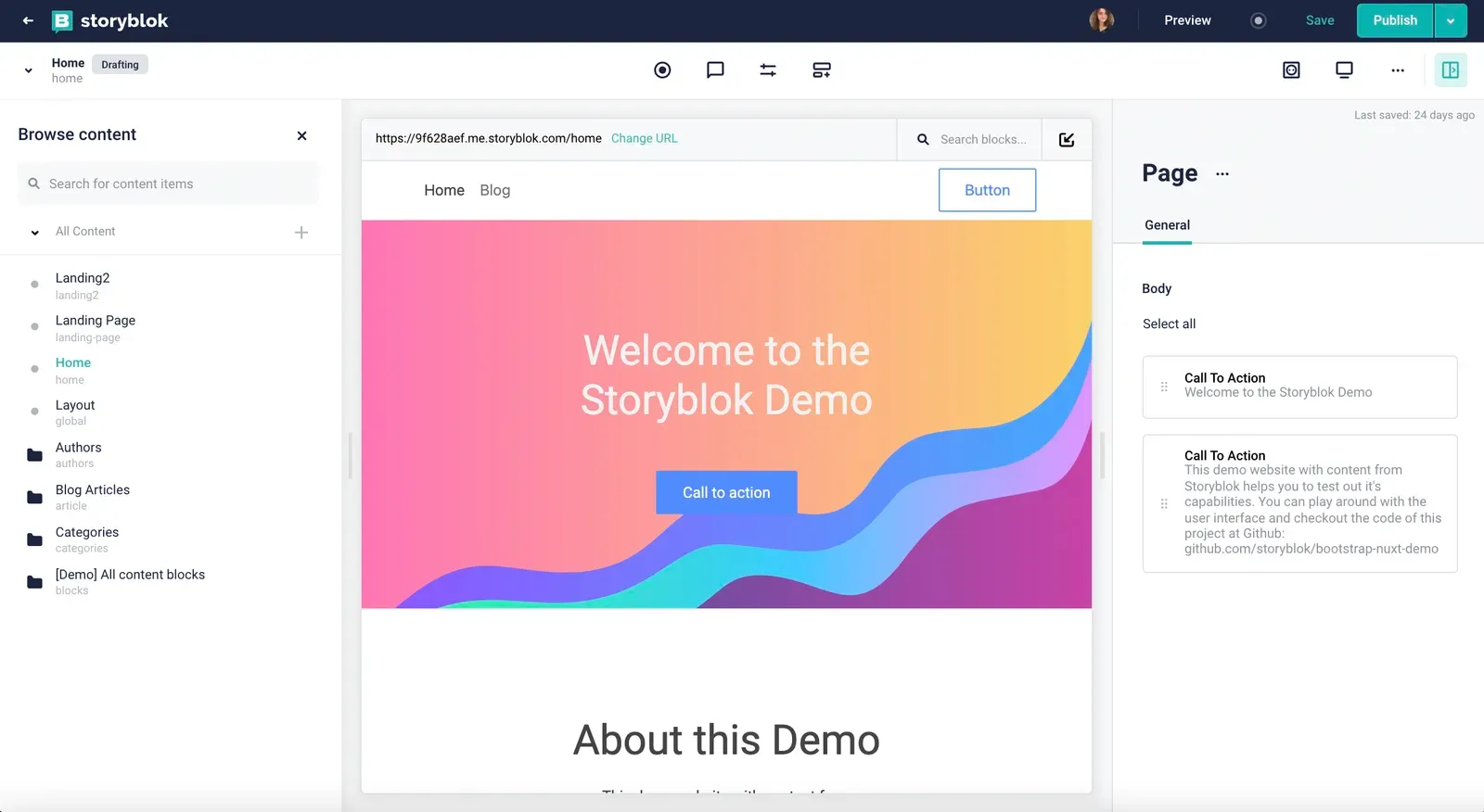 Storyblok
-
Component-Based Approach: Storyblok uses a component-based system, making it easy to reuse and manage content blocks across different pages. This modular approach not only speeds up the content creation process but also ensures consistency throughout the website.
-
Collaboration Features: With Storyblok, multiple users can work on the same project simultaneously, streamlining the collaboration process. Comments and approval workflows help maintain quality and ensure that all changes are reviewed before going live.
-
Content Versioning: Storyblok keeps a history of all changes made to the content, allowing you to revert to previous versions if needed. This version control is crucial for maintaining content integrity and tracking edits over time.
-
Flexible Content Delivery: As a headless CMS, Storyblok can deliver content to any platform or device through its API. This flexibility makes it an excellent choice for multi-channel strategies, ensuring your content reaches your audience wherever they are.
Why Headless CMS Perfects Static Sites
As we have seen, headless CMS platforms like Storyblok CMS and Sanity offer powerful features that significantly simplify and enhance the process of managing website content.
By decoupling the content management system from the presentation layer, these platforms provide greater flexibility and scalability, allowing for consistent content delivery across various platforms and devices. The enhanced performance, achieved through optimized static site generation and global CDNs, ensures fast and secure content delivery to users worldwide.
Moreover, headless CMS facilitates seamless real-time collaboration, enabling teams to work together more efficiently and ensuring swift, accurate content updates.
The structured approach to content management promotes reusability and consistency, which is crucial for maintaining a high-quality user experience. The developer-friendly nature of these systems, combined with the ability to integrate with modern frontend technologies like Next.js, empowers developers to build customized, optimized websites that meet specific project needs.
Overall, headless CMS platforms streamline the development and maintenance of static websites, making it easier to manage content, improve performance, and ensure scalability. This leads to a more efficient workflow, higher-quality websites, and a better overall experience for both developers and users.
Where Should You Host a Static Website?
Modern platforms for hosting static websites offer many features that simplify the development and deployment of projects. Let’s consider Vercel hosting and Netlify.
1. Vercel
Vercel is a platform created by the creators of Next.js, ideally suited for hosting static and dynamic web applications.
Advantages of Vercel:
- Automatic Deployment: CI/CD support for automatic deployment of changes.
- Global CDN: Content is delivered through a global CDN network, ensuring fast loading worldwide.
- Integrations: Easily integrates with various headless CMS and other services.
- Preview Deployments: Every pull request generates a unique URL for preview, making collaboration easier.
- Performance Monitoring: Built-in analytics to monitor the performance and reliability of your site.
2. Netlify
Netlify is a powerful platform for hosting static sites, offering numerous tools for developers.
Advantages of Netlify:
- Ease of Use: Simple setup and automatic deployment.
- Serverless Functions: The ability to add features with Lambda functions.
- Global CDN: Fast content delivery worldwide.
- Continuous Deployment: Automatically deploy changes from your Git repository.
- Form Handling: Built-in form handling capabilities, making it easy to manage user submissions.
- Split Testing: Supports A/B testing to optimize performance and user experience.
By utilizing these platforms, developers can significantly streamline their workflow, reduce deployment time, and ensure that their static sites perform optimally across the globe.
Why Static Websites Use CDNs
Now that we have mentioned CDNs, let’s list some of the advantages these tools offer. CDN is a system of distributed servers that allows fast delivery of content to users based on their geographical location.
Using a CDN for static sites provides the following benefits:
- Reduced Load Time: Content is loaded from the server closest to the user.
- Reduced Server Load: Distribution of load among multiple servers.
- Increased Reliability: Lower likelihood of overload and failures.
As you can see, these are crucial factors that significantly enhance content delivery and reliability. Implementing a CDN reduces latency, improves load times, and ensures high availability, even under heavy traffic conditions.
Moreover, CDNs provide robust security features, including DDoS protection and secure content delivery, which are vital for maintaining the integrity and performance of your website.
Of course, properly configuring a CDN requires deep expertise and experience, but the benefits far outweigh the initial effort. A well-implemented CDN not only improves user experience but also boosts SEO rankings, leading to higher engagement and conversion rates. In the long run, investing in a CDN setup can lead to substantial cost savings on bandwidth and server resources.
Check our detailed study of CDN configuration at various levels.
Modern Static Websites: Performance, Flexibility, and SEO
Modern static websites have evolved far beyond simple HTML pages. Frameworks like Next.js enable developers to combine static generation with dynamic functionality, while Incremental Static Regeneration (ISR) helps keep content up to date without rebuilding an entire site for every change.
Combined with a headless CMS like Sanity or Storyblok, deployment platforms such as Vercel or Netlify, and a content delivery network (CDN), this architecture offers a practical balance of performance, scalability, and editorial flexibility.
For businesses, the benefits extend beyond faster page loads. A well-implemented static or hybrid-rendered website can support better Core Web Vitals, efficient content management, stronger technical SEO, and a more reliable user experience. The right approach depends on the project’s content update frequency, personalization needs, and functional requirements.
About FocusReactive
At FocusReactive, we help businesses design, build, and optimize high-performance digital experiences with Next.js, headless CMS platforms, and modern web technologies. From Next.js technical audits and performance improvements to enterprise-scale website development, our team builds scalable, search-friendly digital experiences tailored to business needs.
If you’re planning a new project or looking to improve an existing website, get in touch with FocusReactive to discuss your requirements and explore the right approach for your business.






.jpg&w=64&q=90)

.png&w=828&q=90)