
Headless Frontend Development in 2026: Key Takeaways
- A headless front-end is the part of a website that users see, built as its own application and fed by a CMS, a commerce engine and other APIs.
- In 2026 the question is no longer “headless or not” but “which rendering model, which framework, and which host”. Those three choices decide speed, SEO and running costs.
- Every page that should rank or be cited by AI assistants needs HTML built on the server. In the most recent large study, the major AI crawlers did not run JavaScript.
- Next.js 16.4 remains the default for complex React sites. Astro 6 leads on content-heavy sites. Nuxt 4 and SvelteKit 3 are solid choices for Vue and Svelte teams. TanStack Start 1.0 is the new type-safe option for React.
- Hosting companies now employ the core teams: Vercel builds Next.js and acquired NuxtLabs (Nuxt, Nitro), and Cloudflare acquired the Astro team. Plan for portability from day one.
- Choose the framework by the shape of your content and your team’s skills, not by benchmarks.
What a Headless Front-End Is in 2026
 headless framework
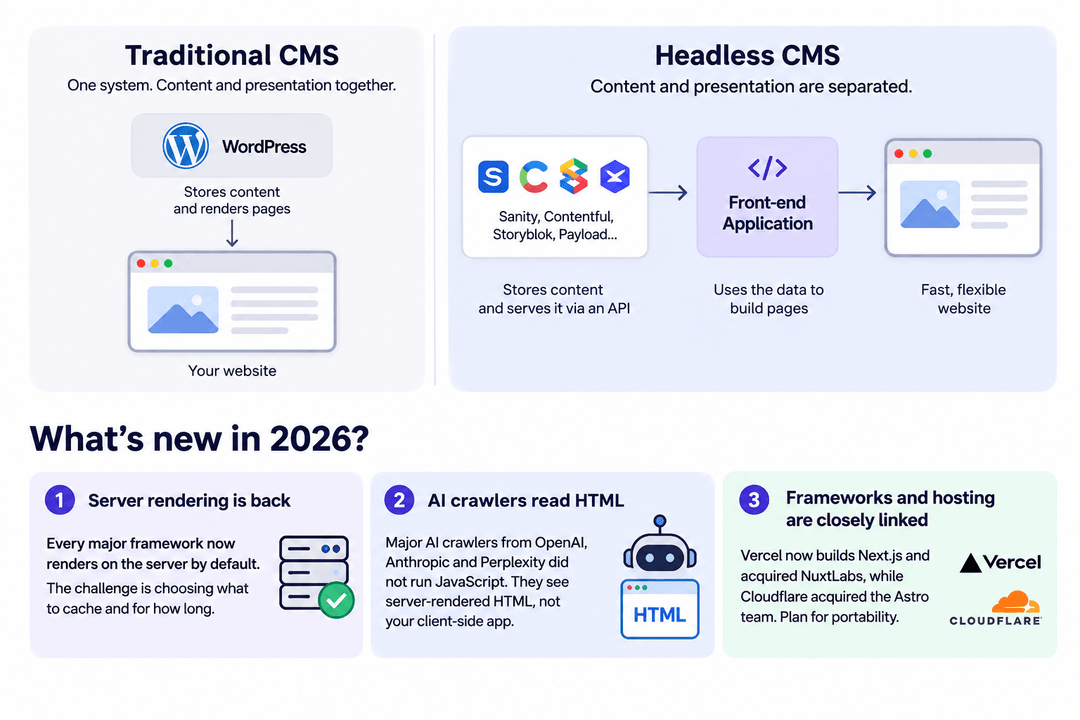
In a traditional CMS such as WordPress or Drupal, one system stores the content and also renders the pages. A headless setup splits those jobs. The CMS (or a commerce platform, a search service, a product database) only stores data and serves it through an API. A separate front-end application fetches that data and turns it into pages.
That front-end is what this guide is about. It decides how fast the site feels, what search engines and AI crawlers see, how editors preview their changes, and how much the site costs to host. If you are still choosing the back-end side, start with our guide on how to choose a headless CMS and our overview of headless CMS architecture.
Three things make 2026 different from even two years ago:
- Server rendering is the default again. Every major framework now renders on the server out of the box, and the hard part is choosing what to cache and for how long.
- AI crawlers read your HTML, not your app. In a December 2024 study of AI crawler traffic, Vercel and MERJ found that none of the major AI crawlers from OpenAI, Anthropic or Perplexity executed JavaScript (Vercel). Content that appeared only after JavaScript ran was invisible to them.
- Frameworks now come with a host attached. Vercel acquired NuxtLabs, the company behind Nuxt and Nitro (Vercel), and Cloudflare acquired the Astro team (Cloudflare). More on what that means in the hosting section below.
Rendering Models That Matter
Before comparing frameworks, it helps to know the rendering models they offer. Most modern frameworks support several of them and let you choose per page.
- Static generation (SSG). Pages are built once, at deploy time, and served from a CDN. This is the fastest and cheapest option, and it fits pages that rarely change, such as landing pages, docs and blog posts. The downside: every content change needs a rebuild, which gets slow on sites with tens of thousands of pages.
- Incremental regeneration (ISR) and on-demand revalidation. Pages are generated statically but refreshed in the background after a set time or when the CMS sends a webhook. This is the sweet spot for most marketing and content sites. The trick is invalidating only what changed. We wrote a separate guide on granular cache invalidation for headless CMS.
- Server-side rendering (SSR) and streaming. Pages are built on each request. This is right for personalized pages, search results, carts and dashboards. Streaming sends the page in pieces, so users see the layout first and slower parts fill in later.
- Partial prerendering and component-level caching. Next.js 16 introduced Cache Components and the
use cachedirective, which let one page mix a cached static shell with dynamic parts. Instead of choosing a mode for the whole page, you mark what can be cached. - Islands. Astro’s model: the page is plain HTML, and only interactive components (“islands”) load JavaScript. For content-first sites this ships far less JavaScript than a full React app.
- Client-side rendering (SPA). The server sends an almost empty page and the browser builds it. It is still fine for logged-in apps, but it is the wrong choice for any page that has to rank. Our guide to React SEO in 2026 explains why.
A practical rule: default to static or cached pages, add server rendering where data is personal or changes every request, and keep client-only rendering behind the login.
The 2026 Framework Landscape
Here is where the main options stand as of November 2026. Versions and dates below come from official release notes.
1. Next.js 16
Next.js is still the most widely used meta-framework. The State of JavaScript 2025 survey says Next.js “keeps on gaining ground and dominating the meta-framework category” while losing developer satisfaction, with a 39% satisfaction gap behind the leader, Astro (State of JS 2025).
Next.js 16 made Turbopack the default bundler, introduced Cache Components and replaced middleware.ts with proxy.ts. The latest minor, Next.js 16.4, released on October 6, 2026, adds lazy compilation, smaller Turbopack output and React 19.3 features (Next.js blog).
Best for: complex React sites with a mix of static, personalized and app-like pages, large catalogs, and teams that want the biggest ecosystem of CMS and commerce integrations. Most major headless CMSs offer a maintained Next.js SDK, and many support visual editing with it.
Watch out for: caching complexity and the pull toward one host. Next.js runs outside Vercel, but some features take more work to self-host. See our Vite vs Next.js comparison for when a lighter setup is enough.
2. Astro 6
Astro is built for content-first websites. Astro 6, released on March 10, 2026, rebuilt the dev server so it runs the production runtime during development (via Vite’s Environment API), made Live Content Collections stable (content fetched at request time from a CMS) and stabilized its Content Security Policy API. It also added a built-in Fonts API and an experimental Rust compiler. The Cloudflare adapter now runs Cloudflare’s workerd runtime in development, prerendering and production, and Astro 6 requires Node.js 22 or later (Astro).
Best for: marketing sites, blogs, documentation and editorial platforms where most pages are content and only a few widgets are interactive. You can still use React, Vue or Svelte components inside Astro pages.
Watch out for: app-like sections with a lot of shared client state. That is not where islands shine.
3. Nuxt 4
Nuxt is the main meta-framework for Vue. Version 4 is the current major line: Nuxt 4.6 shipped on October 5, 2026, and Nuxt 5, which will move to Nitro v3, is still in preparation (Nuxt blog). Nuxt 3’s end of life was scheduled for July 31, 2026, so any Nuxt 3 project still running should be upgraded to Nuxt 4 now.
Best for: teams that already work in Vue. Nuxt offers file-based routing, hybrid rendering per route and strong CMS modules.
Watch out for: the coming Nuxt 5 and Nitro v3 migration. Check that the modules you rely on are ready.
4. SvelteKit 3
SvelteKit 3 was released on October 1, 2026, together with version 1.0 of the sv command-line tool (Svelte blog). Svelte compiles components to small, fast JavaScript, and SvelteKit adds routing, server rendering and form actions on top.
Best for: teams that care about small bundles and a simple mental model.
Watch out for: a smaller ecosystem. CMS SDK coverage is good but thinner than for React.
5. TanStack Start 1.0
TanStack Start reached a stable 1.0 on October 13, 2026 (TanStack). It is a full-stack React framework built on TanStack Router, Vite and Nitro. Its main idea is end-to-end type safety: each route can render on the server, load data on the server only, or render on the client, and you call typed server functions from loaders and event handlers.
Best for: React teams building app-like products who want more explicit routing and data loading than Next.js. For content-heavy marketing sites with visual editing, the CMS ecosystem is still younger.
6. React Router and Remix 3
The old Remix framework became React Router’s “framework mode”, and React Router v8 shipped in June 2026 (Remix blog). Remix 3 is a different project: the team describes it as “a full-stack JavaScript framework built on web primitives”, with its own UI runtime instead of React. Its release candidate came out on August 31, 2026 (Remix). For client websites in 2026 we would treat it as early.
7. Shopify Hydrogen
Hydrogen is Shopify’s toolkit for headless storefronts. Its current docs (version 2026-10) describe it as framework-agnostic: the React Router 7 template is deployed to Shopify’s Oxygen hosting, and there is also a Next.js 16 template deployed to Vercel, with Nuxt, Astro and SvelteKit supported too (Shopify). Using Hydrogen no longer ties you to one front-end framework. If you need a partner, see our overview of Shopify Hydrogen development services.
Quick Comparison
- Next.js 16: React; the widest CMS and commerce ecosystem; mixes static and dynamic content within one page. Strongest for complex sites and large catalogs.
- Astro 6: any UI library through islands; minimal JavaScript by default. Strongest for content and marketing sites.
- Nuxt 4: Vue; hybrid rendering per route. Strongest for Vue teams.
- SvelteKit 3: Svelte; small bundles and simple code. Strongest for lean teams and performance-sensitive sites.
- TanStack Start 1.0: React; type-safe server functions; explicit routing. Strongest for app-like React products.
- Remix 3 (RC): its own UI runtime built on web standards. Worth watching, too early for most client work.
Connecting the Front-End to Your CMS and Commerce Stack
The framework is only half of the front-end. How it talks to the CMS decides whether editors are happy with the site.
- Visual editing and live preview. Sanity, Storyblok, Contentful, Payload and others offer click-to-edit previews, but each needs front-end work: preview routes, draft mode and, for some CMSs, content source maps. Check that your CMS has a maintained SDK for your framework before you commit. Our Next.js CMS guide compares the options for the most common stack.
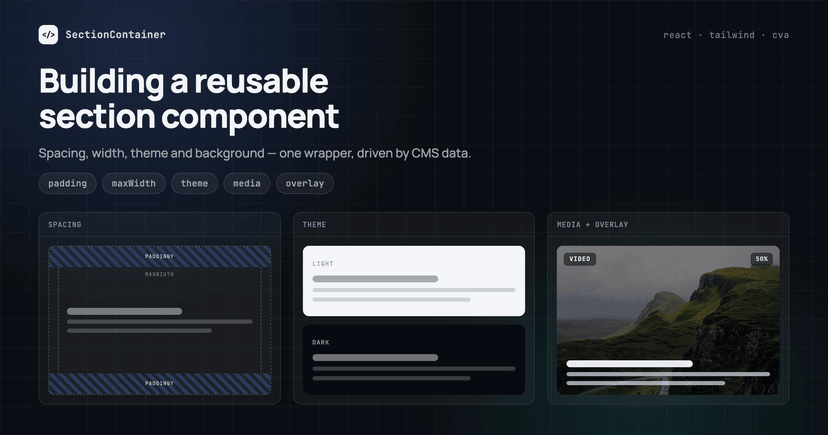
- A block-based page model. Editors build pages from sections; developers map each CMS block to a component. A shared section wrapper keeps spacing and themes consistent, as we show in building a reusable section component for any headless CMS.
- Cache invalidation through webhooks. When an editor publishes, the CMS should tell the front-end exactly which pages to refresh. Getting this right is what makes a static-first site feel instant to editors.
- Commerce and search as separate services. Product data, prices and search usually come from different systems than editorial content. The front-end is where they meet, so keep each integration behind a small data layer instead of calling APIs from components.
🛠️ For developers Keep CMS fetching code in one place per data source, and make every data function work in both preview and published mode. Most preview bugs come from a component that fetches published content directly.
SEO and AI Visibility Are Architecture Decisions
Search engines and AI assistants judge a site by the HTML it sends and how the page behaves for real users. On a headless site, the front-end owns all of that:
- Pages that should rank need server-built HTML: static, cached or server-rendered.
- Titles, meta descriptions, canonical tags, Open Graph tags and structured data must be in the initial HTML and come from CMS fields that editors can edit.
- Redirects, sitemaps and hreflang tags are front-end responsibilities now, not CMS plugins. Plan them before migration, not after launch.
- Core Web Vitals depend on how much JavaScript you ship. Islands, React Server Components and image optimization all help.
For a deeper look, read Headless CMS SEO: architecture decisions that affect rankings.
Hosting and Vendor Gravity
Your front-end has to run somewhere, and in 2026 the host and the framework are more connected than ever.
- Vercel builds Next.js and funds the teams behind Nuxt and Nitro. It gives the smoothest experience for those frameworks. See what Vercel is and how headless deployment works.
- Cloudflare employs the Astro team. With the Cloudflare adapter, Astro 6 runs Cloudflare’s workerd runtime in development, prerendering and production, and it still deploys to Node.js, Bun and Deno.
- Netlify, Render, Railway and self-hosting on containers remain good options, especially for Vite-based frameworks with portable server layers, such as Nuxt and TanStack Start (Nitro) and SvelteKit and Astro (adapters), which are designed to deploy almost anywhere.
None of this is a reason to avoid a framework. It is a reason to check, before you start, how the features you depend on (image optimization, caching, proxy.ts or middleware, ISR) work on a second host, and to keep vendor-specific code in a few known places.
How to Choose: A Practical Decision Framework
Ask these questions in order:
- What is the site mostly made of? Mostly content (pages, articles, docs): start with Astro or a static-first Next.js setup. Mostly app (accounts, dashboards, complex flows): Next.js or TanStack Start. A store: Next.js or Hydrogen’s React Router template, depending on your commerce platform.
- What does your team already know? A Vue team will ship faster and safer with Nuxt than with a new React stack. The best framework is often the one your developers can maintain for five years.
- Which CMS and commerce platforms are fixed? Check SDK quality and visual editing support for your framework. This often narrows the choice to one or two options.
- How many pages, and how often do they change? Tens of thousands of pages that change hourly need on-demand revalidation and careful caching, not full rebuilds.
- Where must it be hosted? Compliance, data residency or an existing cloud contract may rule out some hosts and, with them, some frameworks.
- What will it cost to run? Server rendering every request costs more than serving cached pages. Estimate traffic and choose the cheapest rendering model that meets the need for each page type.
For most of the marketing and content websites we build, the answer is still Next.js or Astro with a headless CMS. The right choice depends on how much of the site is interactive and how much the team values ecosystem size over minimal JavaScript.
Common Mistakes to Avoid
- Rendering everything on the client because “it’s an app”. Marketing pages inside an SPA won’t rank or be cited.
- Server-rendering everything without caching, which makes hosting bills and response times grow with traffic.
- Skipping preview and visual editing at the start. Adding them later usually means refactoring every data function.
- Picking a framework for benchmarks instead of for the team and the content model.
- Treating migration as a design project only. URLs, redirects and metadata decide whether you keep your traffic. Our headless CMS migration guide covers what to plan.
Building Your Headless Front-End with FocusReactive
FocusReactive provides front-end development for headless CMS websites, building fast, scalable and SEO-friendly digital experiences with Next.js and Astro. We work with leading headless CMS platforms, including Sanity, Storyblok, Contentful and Payload, helping teams choose the right technology stack, build flexible content models, implement visual editing and caching, and migrate existing websites without losing organic traffic.
Whether you’re building a new headless website or modernizing an existing one, explore our headless CMS and Next.js development services and headless website design and development, or contact our team to discuss your project.