.png&w=1920&q=90)

TL;DR
- Short answer: if the whole app sits behind a login (dashboard, admin panel, internal tool) and search traffic means nothing, take Vite. If public pages (catalog, blog, landings) have to show up in Google and bring visitors, take Next.js. For the hybrid case, a public site plus an app behind a login, see the verdict table.
- Vite is a bundler, Next.js is a framework: tools at different levels. But the real choice at the start of a React project is still framed as a vite vs nextjs decision, so we compare them head to head and state that level difference out loud.
- We built the same app on both stacks and measured it (medians of 5 to 10 runs, both projects on default, out-of-the-box settings). On a small demo, Vite’s dev mode paints the first page about 1.6x faster, and a cold build runs about 2.4x faster. But at 300 realistic pages, the builds come out even, while client JS in the SPA grows to 2.6 MB versus 7 KB for Next. Details and caveats are in the tables below.
- Next.js caching is the most common source of surprise behavior in production. The catalog page in our demo gets baked at build time by default and will not show new data without explicit invalidation; Vercel itself has already changed the caching rules twice, in version 15 and again in 16.
- Direct AI crawlers (GPTBot, ClaudeBot, PerplexityBot) do not execute JavaScript as of this writing; the single exception is Gemini. A pure SPA, meaning an app that assembles itself right in the browser, looks to them like an empty div. Visibility through third-party search indexes is partial and out of your control.
- Vercel lock-in is soft but expensive: you can leave (OpenNext, standalone, Adapters API), but in exchange you get to run your own infrastructure for images and for ISR, the Next mechanism that keeps pages static and refreshes them in the background. By default, there is no hard spend cap.
We did the thing we couldn’t find in a single Vite vs. Next.js comparison: we built the same project twice. Shoply, a public product catalog plus an admin panel. Two copies of the project: one on Vite 8 with TanStack Router, one on Next.js 16 with App Router. Same Tailwind, same API, same pages. As of August 2026, those are the latest stable majors of both. Then we moved on to measurements, from HMR (hot module replacement, code edits applied instantly with no page reload) to Web Vitals over a throttled network, and wrote down everything that disagreed with the received wisdom. The short answer is already up there in the TL;DR. The long one, with numbers and conclusions we found inconvenient ourselves, is below.
Vite vs. Next.js: The real comparison
On paper, these are tools at different levels. Vite is a dev server and a bundler: it turns your sources into static files and knows nothing about your server. Next.js is a framework: routing, rendering, caching, server functions, and an opinion on every question, all included. One tool ends where the other begins.
In practice, though, the choice at the start of a React project isn’t phrased as “bundler or framework” but as “npm create vite or npx create-next-app”. Two ready-made paths with different philosophies, and you pick one whole. So we compare what life actually compares: Vite 8 + React + TanStack Router as a modern SPA (single-page application: an app that lives entirely in the browser) against Next.js 16 App Router. Hybrids (TanStack Start, React Router in framework mode, Astro) are out of scope here; they get their own section on third paths below.
The real scale of the two ecosystems looks quite different from the way they are usually presented. The vite package gets 164 million npm downloads a week: more than next, react-router and @tanstack/react-router combined (~126M; snapshot for August 3 to 9, 2026, per npm registry data, chart on npm-stat). That number flatters Vite: it arrives transitively with Vitest, Astro, and Storybook. But it does show clearly that the “Vite world” stopped being a niche alternative long ago and is now infrastructure for half the ecosystem.
The demo app is identical on both: a product list backed by an API, a product page, a create form in the admin panel, protected routes, nested layouts, a 404, and one public content page that must be indexable.
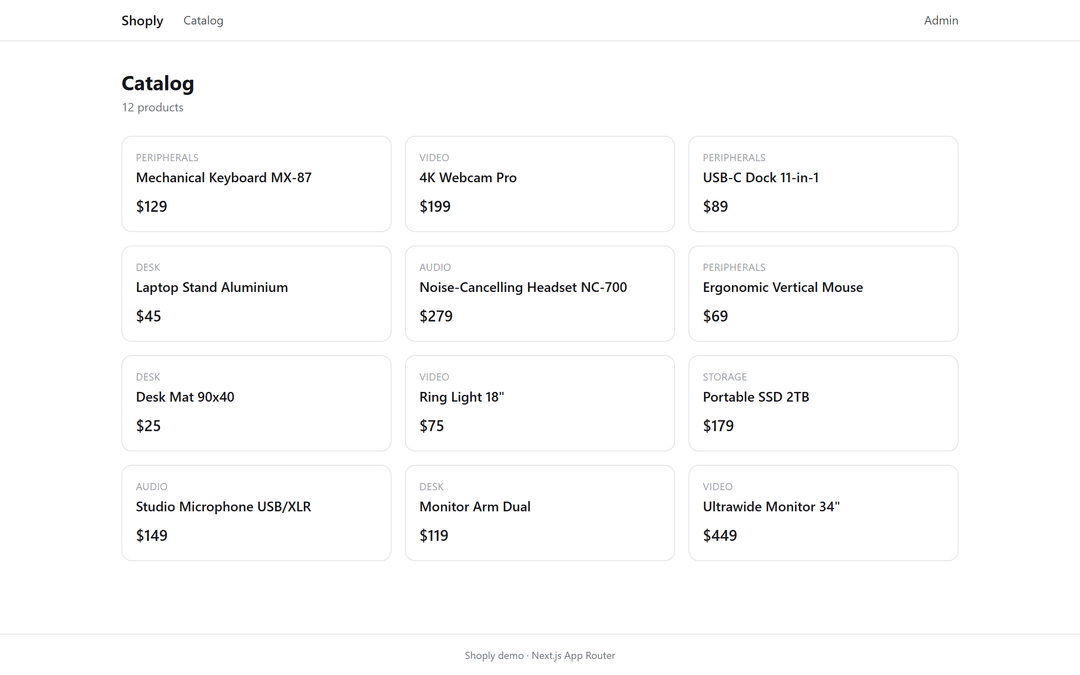 Shoply catalog: the same UI on both stacks
Why you can trust these numbers
The methodology is simple. Both apps came from the official scaffolders (npx create-next-app and npm create vite), with default settings and versions pinned exactly. Every measurement is at least 5 runs; the noise-sensitive ones ran in alternating A/B order. Medians go into the report, and the full min-max ranges live in the raw JSON. We’ll name the test machine as it is: AMD Ryzen 5 5600H, 16 GB RAM, Windows 11 (Insider Preview), Node 22, background apps left running. We compensate with medians and A/B pairs, and we state that limitation plainly, not in fine print. Both apps, the benchmark scripts and the raw runs, are in the article’s repository.
| Package | vite-app | next-app |
|---|---|---|
| vite / next | 8.2.1 | 16.3.1 (Turbopack by default) |
| react | 19.2.8 | 19.2.8 |
| @tanstack/react-router / react-query | 1.170.29 / 5.101.4 | — |
| tailwindcss | 4.3.3 | 4.3.3 |
| typescript | 6.0.3 (from Vite’s template) | 5.9.3 (from create-next-app) |
| React Compiler | — | enabled by the scaffolder |
Look at those last two rows. The scaffolders made different decisions on their own: different TypeScript majors, React Compiler only on the Next side. We left it that way. We’re comparing what teams actually get out of the box, not ideal configurations. That’s part of the comparison too.
The rendering model: what the browser actually gets
Let’s start simple. Open the catalog page through curl, no browser and no JavaScript, and look at what the server actually hands over. Vite sends 643 bytes: an empty <div id="root"> and a script tag. That’s it. Next sends a finished page that already contains product names, prices and meta tags. This is the fork in the road: CSR (client-side rendering, the page is assembled in the browser) versus SSR (server-side rendering, the page arrives from the server ready to go). Everything else follows from here.
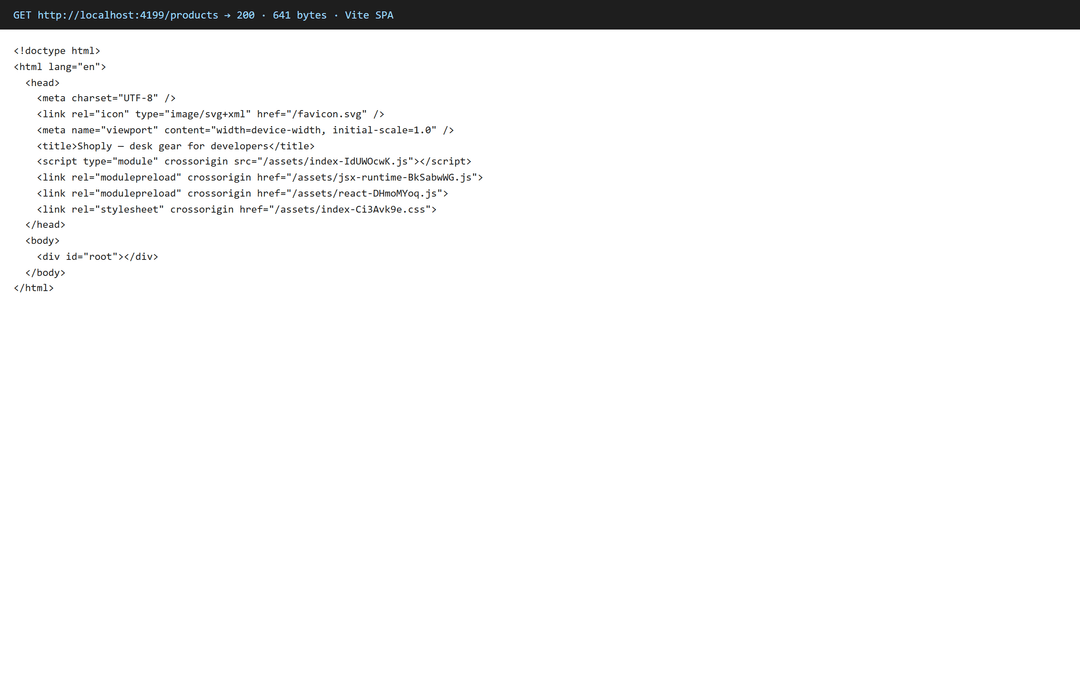 Vite SPA HTML response: 643 bytes and an empty div#root
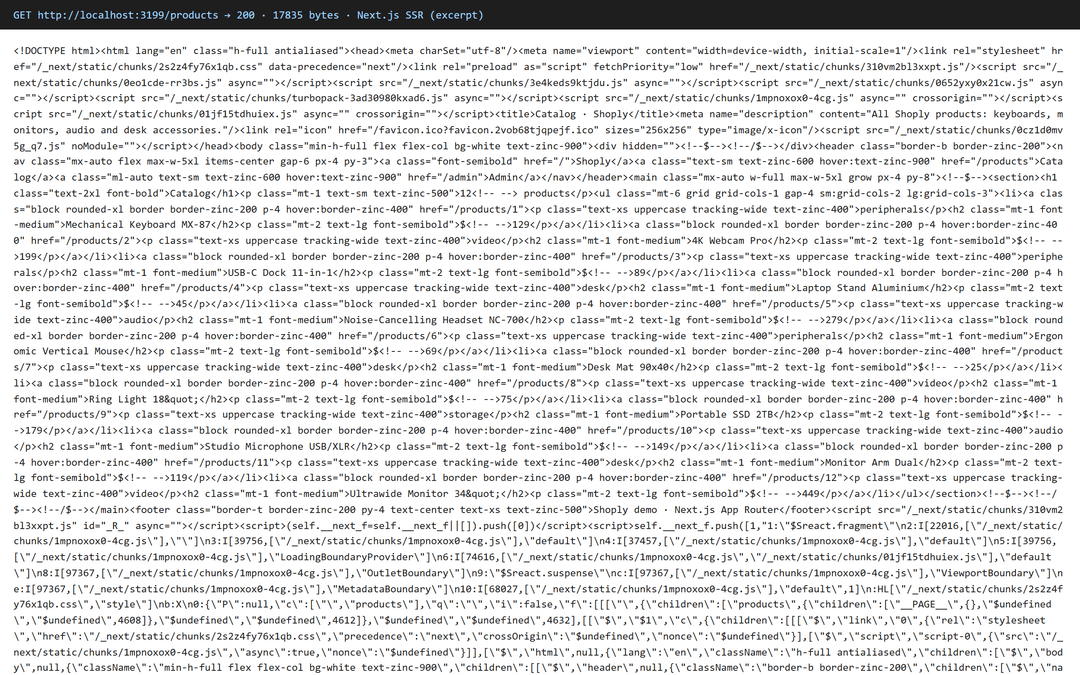 Next.js HTML response: a finished page with products and meta tags
How Next does it: server components execute on the server; their code never reaches the client bundle, the result is serialized into an RSC payload (RSC, React Server Components) and streamed to the browser along with the HTML. Only client components hydrate. If you want the mechanics in depth, the best explanation out there is Dan Abramov’s essay “JSX Over The Wire” and his whole RSC series.
Behind the elegance sit four caveats worth knowing before you build a product on RSC:
- The App Router in “stable” Next 16 runs on React Canary, the prerelease React channel the React team officially targets for frameworks: features land there ahead of the stable release, but their APIs can still change. package.json says React 19.2.8, while
node_modules/next/dist/compiled/reactholds a build of its own: in our install that’s19.3.0-canary-cbb046ab-20260731, and that’s what the App Router renders on. We’ve verified this in 16.3.1; the docs mention no such caveat. - You won’t always see the error in the browser console. Server components execute on the server, so their errors go to the server logs (locally, to your terminal), and the browser gets only a scrubbed message with no details. Client components fail the usual way, in the console. The upshot: debugging starts with the question “where did this code even run, and where do I look?”
- A server component lives on the server, a client one in the browser, and props travel between them over the network. So you can only pass what React knows how to serialize: strings, numbers, arrays, plain objects, dates, promises. A plain function you cannot, and React says so in as many words. Write
<Button onClick={...}>in a server component and you get an error, then you get to move code around. One exception: server functions with the'use server'directive. They cross the boundary not as a body but as a reference to the server (inside a client component such a prop looks like an object with$$typeof: Symbol.for('react.server.reference')), and by convention those props are namedactionor…Action. - If you’re building an app on RSC, there is exactly one production-ready implementation today: Next.js. React Router’s RSC support is marked unstable; Waku and the other experiments stay niche. In practice, that means picking RSC as your architecture is picking Next: swapping frameworks and keeping the code isn’t going to happen.
Partial Prerendering tells the same story: the page ships as a ready shell, and the dynamic pieces stream in separately. Announced in 2023 as a preview, it never went stable as its own flag: Next 16 removed the flag and moved the behavior inside Cache Components, where it’s on by default (more on that in the caching section).
What this means for the user: we measured on production builds, with a cold cache and 4x CPU throttling:
| Metric (medians of 5 runs) | Vite: localhost / desktop / Slow 4G | Next: localhost / desktop / Slow 4G |
|---|---|---|
| LCP, content page | 476 / 824 / 1,484 ms | 404 / 360 / 608 ms |
| LCP, dashboard | 500 / 644 / 1,312 ms | 368 / 476 / 568 ms |
| TTFB, dashboard | 1 / 2 / 1 ms | 176 / 177 / 182 ms (~150 ms of it waiting on our API) |
| TBT, Slow 4G | 0 ms | 170–206 ms (hydration) |
What the metrics mean:
-
LCP (Largest Contentful Paint): how long until the largest element of the page appeared on screen;
-
TTFB (Time to First Byte): how long until the first byte of the server response arrived;
-
TBT (Total Blocking Time): how long in total the main thread was blocked by scripts and the page didn’t respond;
-
CLS (Cumulative Layout Shift): how much the layout “jumped” during load;
-
RTT (round-trip time): network latency there and back.
The desktop profile: 10 Mbps, RTT 40 ms. Slow 4G: the Lighthouse mobile profile, 1.6 Mbps, RTT 150 ms. CLS is identical for both (0 on the content page, 0.0059 on the dashboard), so it’s not in the table. Every number in the table is the worst case for a first visit; we benchmarked the repeat visit separately (see below).
Look at the first column: on localhost, the content page differs by 70 milliseconds on LCP, which is to say it doesn’t differ at all. Most comparisons benchmark exactly this way and conclude that the rendering model changes nothing. Add a network, though, and the picture changes: Next shows the content page 2.3–2.4x faster, and the dashboard anywhere from 1.35x on fast internet to 2.3x on slow mobile. The reason is simple: a browser holding an empty div has to download JavaScript first, then fetch data, and both operations are bounded by network speed.
Next pays for this in its own currency. Its dashboard stays silent for 176 ms before the first byte while the server waits on the API, then adds another 200 ms or so of hydration if the user’s CPU is weak.
Now the repeat visit, with the bundle already in the browser cache. Here we expected the SPA to claw it back: nothing left to download. It didn’t. LCP halves on the content page for both: Vite from 1,352 ms to 640, Next from 536 to 232. Next’s lead doesn’t shrink, it grows slightly. The reason is that a cache only fixes code delivery. The SPA’s data request still goes out over the network, and that request is what holds LCP, while Next has finished HTML with the data baked in, sitting in cache on the content page. It also loses the biggest drawback of the cold visit: TBT drops from 97 ms to zero, because hydration is warm. The dashboard’s TTFB, though, stays at 169 ms, and no cache fixes waiting on a backend.
These are two different UX contracts: “the page opens instantly, but the content loads later” versus “the content arrives ready, but wait for the server.” Which one is right depends on who’s opening the page: a random visitor from search who’ll leave after two seconds of blank screen, or an employee who keeps that tab open all working day.
How much of Next’s “TTFB pain” is the framework itself? We ran the dashboard with API latency from 0 to 300 ms. The 50 ms row, where one run threw an outlier, stayed in the raw data.
| API latency | Vite TTFB / LCP | Next TTFB / LCP |
|---|---|---|
| 0 ms | 2 / 344 | 33 / 392 |
| 150 ms | 2 / 476 | 182 / 472 |
| 300 ms | 2 / 624 | 335 / 576 |
Next holds the request: the server waits for the API, and the user stares at a white screen the whole time (the latency lands in TTFB). Vite hands over the page immediately, the user sees a skeleton, and the data rolls in later (the latency lands in LCP). Hence the conclusion: Next’s slow TTFB is ~80–90% API wait time, not the framework doing work.
Faster is the wrong question. You get the latency either way; you pick where it lands: first byte or first content. That is the real next.js vs vite comparison.
Dev server, HMR, and builds: what we actually measured
Cold dev server start until the first painted page: 3.5 seconds for Vite, 5.8 for Next. We deliberately measure to the picture in the browser, not to the moment the server starts responding, which is what most benchmarks do. For these two tools “the server responded” means different things: by that point Next has already compiled the page, while Vite has only handed over an empty HTML shell (that same <div id="root">) and will start building modules once the browser asks for them.
| Metric (cold, medians of 5 runs) | Vite 8 (Rolldown) | Next 16 (Turbopack) |
|---|---|---|
| Dev: first page on screen | 3,547 ms | 5,798 ms |
| Dev: server responds | 1,341 ms | 3,105 ms |
| HMR in a deep lazy component | 60 ms | 111–157 ms |
| Prod build | 3,519 ms | 8,322 ms |
| Prod build, warm | 3,535 ms | 4,878 ms |
Only two rows show a noticeable difference: the cold start, where Vite puts the first page up 1.6x faster, and the cold build, where the gap is 2.4x. On HMR Vite is faster: 60 milliseconds against Next’s 111–157. We give a range on purpose, because across sessions Next settles at either 110 or 157, while Vite holds steady at 60. But both numbers are so small that you don’t notice the difference over a working day. On a repeat build, Next catches up: Turbopack has a disk cache that shaves off 41% of the time, whereas Vite doesn’t engage Rolldown’s cache between prod builds. In the build code, that option is commented out, so every build starts from scratch. Those are the vite vs next.js differences that matter in day-to-day work.
// vite-app/vite.config.ts - the entire config
export default defineConfig({
  plugins: [
    tailwindcss(),
    tanstackRouter({ target: 'react', autoCodeSplitting: true }),
    react(),
  ],
})
// next-app/next.config.ts - the entire config
const nextConfig: NextConfig = {
  reactCompiler: true,
}

export default nextConfig
The difference shows up even here. In Vite, you assemble the config out of plugins yourself and decide what goes into the build. In Next there’s nothing to assemble: everything is already inside; you only switch ready-made features on and off.
Vendor-published numbers are a story of their own. Back in 2022 Vercel claimed Turbopack was 10x faster than Vite. Vite’s creator, Evan You, re-ran that benchmark and showed that the tenfold gap only appears with Vite on Babel, a synthetic case of 20–30 thousand modules, and convenient rounding: with SWC on both sides, editing the root component came out level (334.6 vs 338.2 ms), and Turbopack’s advantage survived only on the leaves of the graph. We keep that story in mind when looking at our own numbers. The scripts and every raw run are in the repository, so check any of them.
We also tested React Compiler, which create-next-app enables by default. The build with it took 10.4 seconds, without it 10.0: a difference within the test machine’s margin of error, so it doesn’t affect our numbers. We ran this benchmark in a separate session as five pairs of “with compiler / without”, so its seconds are comparable only within a pair and not against the table above.
Our project is small, and that’s worth saying out loud: Documenso left Next.js when HMR on their codebase took 45 seconds; the figure comes from their own migration post. A demo reproduces nothing of the sort, so we checked scale separately: the numbers on 300 routes are waiting below.
Testing, tooling, and observability
Build speed is not the only thing a developer deals with every day. There are also tests, debugging, and understanding what’s happening in production. Here the stacks diverge, and not all in one direction.
Tests. Tests. Vitest is part of the Vite ecosystem, so in a Vite project it uses the same config and build rules as the app. It works in Next too, and is even covered in the docs, but it needs a separate setup that lives its own life. When one tool builds the tests, and another builds the app, the configs start drifting apart. The Plane team, leaving Next, noted that their test environment had lived on Vite for a long time, and named standardizing the build as one of the goals of the migration. Same story with Storybook.
Debugging. Here Next pays for its magic. When a server action performs a mutation, the network tab shows you a POST to the page’s own address, and instead of the function name there’s an opaque actionID: what actually happened on the server can’t be reconstructed from the request. In an SPA any mutation is an ordinary fetch with readable JSON, and you can see the request’s whole path in the browser.
Production. And here Vite is the one paying. In Next every request goes through the server, so there’s a log and a trace for it: you can see which page rendered, which requests it made, and where it fell over. An SPA has no server at all, and everything happening on the user’s side reaches you only if client-side monitoring caught it. So Vite’s comfort in development is real, but it costs you visibility in production, and it’s better to decide which of the two matters more to you before the project starts, not after the first incident.
Data: fetching and mutations
Every app has to pull data off a server and show it. We wrote that twice: a catalog page that loads a product list, and an admin form that creates a new one.
Start with reading. In the Next version the server requests the product list and sends the browser finished markup. In the Vite version the browser goes after the data itself: one more network request, but the whole path to the API is visible in DevTools. The difference is easier to look at than to describe. Here is what happens on the wire when you open /products.
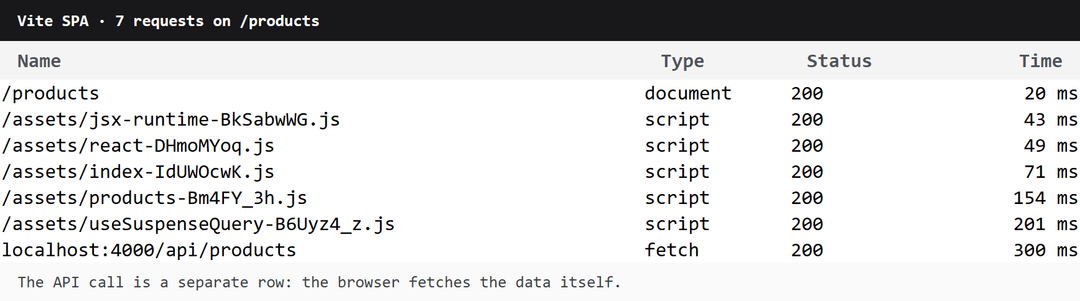 Network requests in the Vite version: the browser loads scripts, then calls the API itself
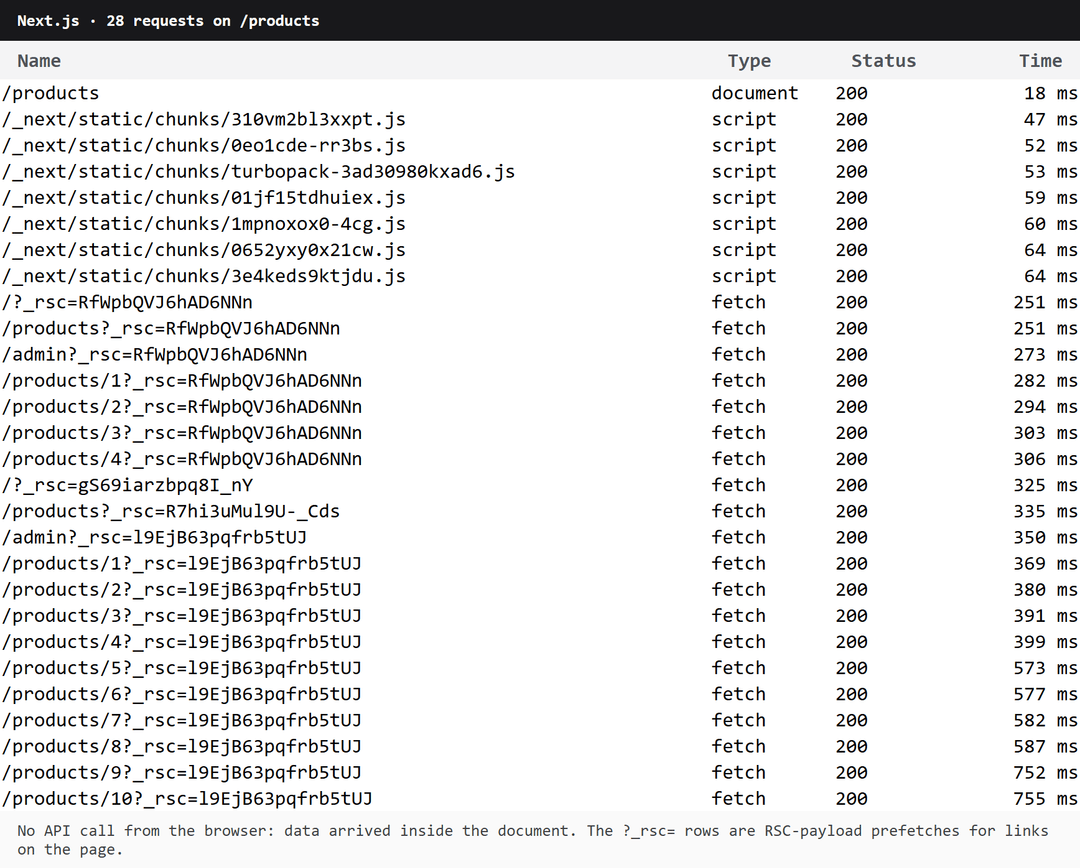 Network requests in the Next version: no API call, but RSC-payload prefetches show up
With Vite, everything is linear: the document, five script files, and only then the request to the API, 51 ms after navigation start. With Next there is no API request in the browser at all: the data arrived inside the document. What showed up in the list were rows with ?_rsc=. Next pulls data ahead of time for the links it sees on the page so that following them is instant. Handy for navigation, and it also explains why the total request count came out higher than the SPA’s.
// next-app/src/app/products/page.tsx
export default async function ProductsPage() {
  const products = await getProducts()   // fetch on the server
  // card markup is inline in the file; collapsed here for symmetry
  return <ul>{products.map((product) => /* <li>…card…</li> */)}</ul>
}
// vite-app/src/routes/products/index.tsx
export const Route = createFileRoute('/products/')({
  loader: ({ context }) => context.queryClient.ensureQueryData(productsQuery),
  /* … head() - see the SEO section … */
  pendingComponent: ProductsSkeleton,
  errorComponent: ProductsError,
  component: ProductsPage,
})

function ProductsPage() {
  const { data: products } = useSuspenseQuery(productsQuery)
  // same card as in the Next version; collapsed
  return <ul>{products.map((product) => /* <li>…card…</li> */)}</ul>
}
The skeleton and the error screen are written identically in both projects. Only the way you wire them up differs. In Next, it is a file-naming convention: drop loading.tsx and error.tsx next to the page, and the framework slots them in at the right moment; no imports needed.
next-app/src/app/products/
├── page.tsx      // the page itself
├── loading.tsx   // shown while the page loads
└── error.tsx     // shown if the page throws
In TanStack Router, the same thing is set through route fields, and the components are visible right in the declaration:
// vite-app/src/routes/products/index.tsx
export const Route = createFileRoute('/products/')({
  loader: ({ context }) => context.queryClient.ensureQueryData(productsQuery),
  pendingComponent: ProductsSkeleton,
  errorComponent: ProductsError,
  component: ProductsPage,
})
Next saves you keystrokes at the cost of explicitness: the file found itself, but to know what is happening to the page you have to know the convention. TanStack makes you write three more lines, and in exchange the route’s behavior reads in one place. Neither option is better—both work. That’s the practical vite vs next.js comparison in one section.
The gap widens when writing data. Here is what creating a product from the admin form looks like:
// next-app/src/app/admin/products/new/actions.ts
'use server'
const API_URL = process.env.API_URL ?? 'http://localhost:4000'
export async function createProduct(formData: FormData) {
  const token = await requireSession()
  const res = await fetch(`${API_URL}/api/products`, {
    method: 'POST',
    headers: { authorization: `Bearer ${token}` /* … */ },
    body: JSON.stringify(/* form fields */),
  })
  if (!res.ok) throw new Error(`Create failed: ${res.status}`)
  revalidatePath('/products')
  redirect('/admin')
}
// vite-app/src/routes/_authed/admin/products/new.tsx
const create = useMutation({
  mutationFn: createProduct,    // an ordinary fetch with a Bearer token
  onSuccess: () => {
    queryClient.invalidateQueries({ queryKey: ['products'] })
    navigate({ to: '/admin' })
  },
})
The server action wins on client-code volume and does the mutation plus the UI update in a single round trip. The SPA version is wordier, but transparent. The Documenso team, explaining why they moved off Next, wrote that debugging and monitoring server actions had become “opaque and tricky to track.” In production that transparency is worth a lot.
Routing and protected layouts
Both routers are file-based: a page’s address comes from where the file sits, not from entries in a config. After that they part ways.
In Next, the folder structure is the route. A products folder gives you /products, a page.tsx inside it is the page itself, an [id] folder is the dynamic segment /products/42. Alongside them go files with reserved names: layout.tsx wraps nested pages, loading.tsx and error.tsx hook themselves up automatically, not-found.tsx handles the 404. Everything is tied together by file name, with no glue code at all. The param arrives in the page as a prop, and the framework infers its type from the folder name.
TanStack Router reads files too, but generates a route tree in TypeScript out of them: a routeTree.gen.ts file that updates on the fly during development. Every route is declared explicitly, via createFileRoute, and knows everything about itself: path params, query-string params, what the data loader returned. Route.useParams() inside a component returns a typed object, not a Record<string, string>.
That produces a practical difference. Next has a typedRoutes mode: it checks both the href in <Link> and the arguments to router.push, replace, prefetch at compile time, and it even parses template literals with dynamic segments. The query string, though, is left to the developer, and a path assembled in a variable has to be cast to the Route type by hand. In TanStack, all navigation is typed: a typo in a path, a forgotten param or an extra key in the query will not build. The price: a generated file in the repo and noticeably wordier route declarations.
There are also things the SPA world simply does not have. Parallel routes hold several independent regions in one layout, each with its own address, its own skeleton and its own error screen: a dashboard where the event feed and the chart load in parallel, and a panel that crashes does not take its neighbor down with it. Intercepting routes fix the eternal modal problem: clicking a product opens it in a dialog over the catalog, the address changes to /products/42, and that same link, sent to a colleague or opened fresh, gives you a full product page rather than a modal floating over an empty screen.
We’ve built the protected routes the canonical way for each stack:
// next-app/src/lib/auth.ts
export async function requireSession(): Promise<string> {
  const token = await getSessionToken()  // reads the httpOnly cookie
  if (!token) redirect('/login')
  return token
}
// next-app/src/app/admin/page.tsx - same in every protected page
export default async function AdminDashboard() {
  await requireSession()  // first line of the component
  const products = await getProducts()
  // …
}
// vite-app/src/routes/_authed.tsx
export const Route = createFileRoute('/_authed')({
  beforeLoad: () => {
    if (!getToken()) throw redirect({ to: '/login' })
  },
  /* … component: AdminLayout … */
})
Note where requireSession() is called: as the first line of every protected page and every server action, not once in a shared layout. This is not paranoia. A layout in the App Router renders once and does not run again when you move between nested pages, so a check left only there simply will not fire on client navigation. Our demo has it in the layout too, but as a second line of defense, not the only one. In TanStack the check lives in the beforeLoad of the pathless _authed route: it fires when you enter the branch, when you move between pages inside it, and even when a link is preloaded on hover. No need to duplicate it in the pages.
The upshot: Next gives you conventions, TanStack gives you a compiler that catches routing mistakes before deploy. And now for the part you only find out about in production.
Caching: the sharpest edge in Next.js
Next doesn’t do work twice: if a page can be built ahead of time, it builds it once at build time and then serves everyone the same HTML. The builder decides that on its own, from the page’s code, and tells you nothing about it.
The catalog page in the demo is an ordinary server component that does a fetch for the product list. Not one flag in the project was touched, but at build time Next judged the page static: the HTML was built once and frozen at the moment of npm run build. A product created after that through the admin panel won’t show up in the catalog, even though the dashboard reading the same data shows it right away. The page updates when a server action calls revalidatePath('/products'): that’s not a one-off “unfreeze” but a cache invalidation, after which the next request renders the page again. You need to know this in advance, otherwise your catalog quietly serves yesterday’s data.
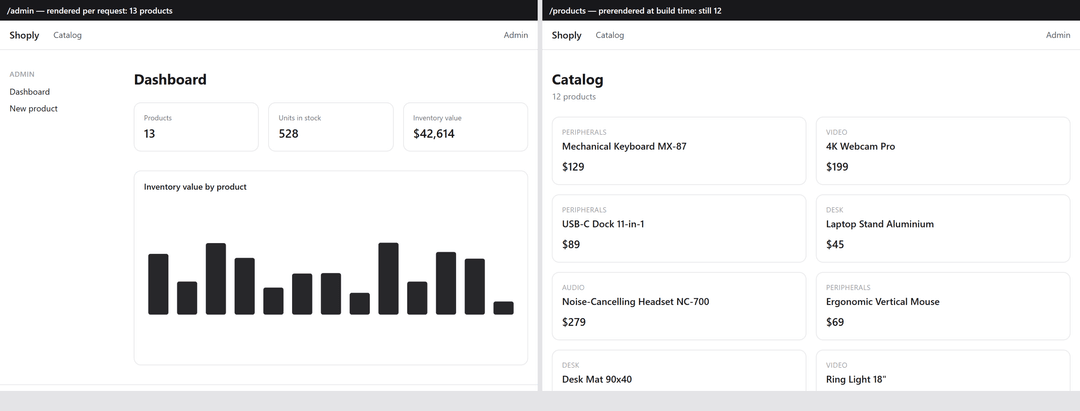 The same moment in time: the dynamic /admin already sees 13 products, the prerendered /products still holds 12
In the earlier model, which the docs now literally call the previous one, there are four such layers: fetch memoization within a single render, the Data Cache and its invalidation, the Full Route Cache and the client Router Cache. Each with its own invalidation rules.
The rules of these layers changed twice in two years. In versions 13 and 14, almost everything was cached by default: fetch stored the response by default, GET Route Handlers did too, and the explanation of the model was moved into a separate long GitHub discussion. In 15 the defaults were flipped: fetch and GET Route Handlers stopped being cached by default, and the dynamic half of the client Router Cache was zeroed out: staleTimes.dynamic went from 30 seconds to zero, while static pages still hold for five minutes. The release notes frame this as a fix for the fact that “caching by default was confusing”. In 16 the model was recut again: now all caching is opted into by hand with the use cache directive, and that model itself, Cache Components, still lives behind a flag that is off by default.
But the defaults are only half the problem. Worse, on your machine these layers effectively don’t exist. Next disables the route cache in dev mode on purpose, so the page rebuilds on every request and is easier to debug: the source says so outright: “we don’t leverage the prerender cache in dev mode”. Sound reasoning, unpleasant consequence: the screenshot above, where the catalog shows yesterday’s data, cannot be reproduced on npm run dev at all. You meet the cache for the first time in production. Hence the whole genre of bug report titled “works locally, breaks on Vercel”.
A Vite SPA has no server cache layers whatsoever, because no server could cache anything. What’s left is the ordinary HTTP cache, familiar to any frontend developer: build files get a hash in the name so that they can be cached forever.
index.html goes the other way: no-cache, or after a deploy the browser goes looking for chunks that are already gone. You do have to set this up yourself, though: headers come from your host, Vite doesn’t set them, and its own vite preview isn’t meant for production at all.
There’s a data cache too, but it lives in the client, in TanStack Query, and is configured in your application code. staleTime sets how long data counts as fresh: zero by default, meaning it goes stale immediately, and the next reason to refresh (a component mounting, the window regaining focus, the network coming back) will trigger a background request. The timer by itself requests nothing. gcTime sets how long data nobody needs anymore stays in memory: five minutes by default… There are plenty of knobs here, but they’re all in one place and all yours: the framework bakes nothing behind your back.
Not having a server cuts both ways, though. No server means no ready-made HTML: the browser fetches the data every time and draws the page from scratch. The very thing all those cache layers in Next are built for, a finished page delivered instantly with no trip to the API, is unreachable in an SPA by construction.
Vite SEO in 2026: Google is no longer the only crawler
Remember the empty page the Vite version returned to curl: 643 bytes, a <div id="root"> inside and a script tag. That is exactly what search crawlers see. Google won’t be a problem: Googlebot can execute JavaScript and will get to the SPA’s content. The question is when. First the crawler takes the bare HTML, then sends the page off to a separate queue for rendering, and how long it sits there is anyone’s guess. Google’s own wording: pages “can be queued for a few seconds, sometimes longer”, and they name no upper bound. Industry write-ups from 2026 (Search Engine Land, EdgeComet) talk about hours in the worst cases, but nobody published their own data, so that’s an estimate, not a fact. Tolerable for stable content, already a risk for news and prices.
In 2026 Google is no longer the only reader. Research by Vercel and MERJ (December 2024) showed that not a single major AI crawler executes JavaScript: not GPTBot, not ClaudeBot, not PerplexityBot. One exception: Gemini, which inherited Googlebot’s infrastructure. The finding was independently confirmed by searchVIU in a breakdown of 23 crawlers (November 2025) and by Cloudflare’s data. Content that only exists after JS runs does not exist for AI search; partial visibility through third-party search indexes is possible, but outside your control.
The scale of the appetite: in the summer of 2025 ,ClaudeBot was pulling tens of thousands of pages for every referral it sent back: 70,900 to one at the end of June, per Cloudflare’s June 2025 data. The month-to-month ratio drifts, so what matters is the order of magnitude, not the exact number.
The same boundary shows up in the metadata code:
// next-app/src/app/products/[id]/page.tsx
export async function generateMetadata({
  params,
}: PageProps<'/products/[id]'>): Promise<Metadata> {
  const { id } = await params
  const product = await getProduct(id)
  if (!product) return { title: 'Product not found' }
  return { title: product.name, description: product.description }
}
// vite-app/src/routes/products/$productId.tsx
export const Route = createFileRoute('/products/$productId')({
  loader: /* … same as in the catalog listing … */,
  head: ({ loaderData }) => ({
    meta: loaderData
      ? [{ title: `${loaderData.product.name} · Shoply` }, /* … */]
      : [{ title: 'Product not found · Shoply' }],
  }),
})
The difference is that in Next the meta tags sit in the HTML response, while in the SPA they appear after JS runs; for bots that don’t run JS, they aren’t there.
If an SPA needs to be indexed, there is a cure, and two paths to it. The first is prerendering pages at build time; it exists in React Router 7 in framework mode, in TanStack Start and in Vike, but that’s no longer “Vite plus a router”, it’s a move to one of the hybrids from the third-paths section. The second is services like Prerender.io, which serve bots snapshots. It works, but that’s infrastructure now, and someone has to maintain it. So a dashboard behind a login is indifferent to all of this, while public content on pure CSR has no place in 2026. How the App Router assembles metadata and where teams most often get it wrong, we covered in the Next.js App Router SEO Guide and Next.js SEO Pitfalls.
Build, deploy, and the cost of ownership
So far we’ve talked about what the developer and the user see. Now for what the person paying the infrastructure bill and carrying the pager sees.
The difference starts with what the build actually produces. With Vite it’s a folder of static files: HTML, JS, CSS, images. Drop it on any CDN or into S3, and that is the whole of your operations story: anyone can serve files. Next produces an application that needs a live Node process: it holds the cache in memory, renders pages on request, and runs server actions. Which means you also need someone to notice when that process dies.
| Metric | Vite | Next.js |
|---|---|---|
| Deploy artifact | 0.35 MB of static files | 27.7 MB standalone + Node runtime |
| node_modules / packages in lockfile | 141 MB / 166 | 439 MB / 439 |
Clean npm ci |
3.8 s | 16.0 s |
Static files are served by any CDN (content delivery network) with no server at all. Caveat: an API or BFF (backend-for-frontend, a server layer built around the frontend’s needs) is needed by both, it’s just that Next ships with one, and an SPA has to bolt one on. And here what matters is what you already have. If your backend is written in Go, Rails, or Java, the main argument for Next gets weaker: the server layer exists, and the question is no longer “do we need a server” but “do we need a second one”. For an app behind a login you usually don’t. The public part, though, will find one useful, because that’s where you need meta tags in the HTML and fresh content without a rebuild.
Now the money. Vercel’s billing is made of a dozen independent meters (bandwidth, function invocations, ISR operations, image optimization), and there is no hard spend cap by default: there is a budget with notifications, but automatic pausing at 100% is something you switch on yourself. The arithmetic for our shop: computed from August 2026 pricing, not a benchmark. 100,000 visits a month × ~118 KB of compressed JS per Next page comes to around 12 GB (463 KB raw; the same route on Vite weighs 88 KB compressed / 314 KB raw). That’s the floor, and JS only: HTML, the RSC payload, and images sit on top, while image optimization and function invocations bill on separate meters; for a shop the headline item will be images.
But even allowing generously for all of that, the average site sits deep inside the Pro plan’s included quotas; on Cloudflare Pages bandwidth is free and unmetered. The average site is cheap everywhere. The tail is what runs up the bill: art platform Cara went suddenly viral and got a $98,280 bill for serverless function execution. Its audience grew from 40,000 to 650,000 in a week, and on June 3 function invocations spiked to 56 million in a day (June 2024, before Vercel moved to Fluid Compute; no source says what period the bill covered). Bots and DDoS are billed like people.
So is this soft lock-in or not? Leaving is definitely possible: output: 'standalone' and Docker, OpenNext for AWS and Cloudflare, and in 16.2 Vercel opened a stable Adapters API: the same contract its own adapter runs on, plus a shared test suite platforms use to check compatibility. The door is open, and this isn’t a gesture of goodwill: the API was designed together with OpenNext, Netlify, Cloudflare, AWS Amplify, and Google Cloud.
What you’ll pay for isn’t the exit, it’s everything Vercel was doing quietly. The ISR cache breaks first. By default it lives on the instance’s disk, and while there’s one instance, all is well. Spin up a second replica and users start seeing different versions of the same page, because the invalidation never reached the neighbor; the fix is shared storage, Redis or S3. Images break second: next/image does work on your own server, but in standalone mode you’ll have to ship sharp by hand, and its CPU time and memory are now yours. We’ve written about choosing a host separately: When to Host on Vercel and When Not, Self-Hosted Next.js, Vercel vs Netlify.
Secrets, security, and the upgrade tax
Secrets are one more line on the architecture bill:
# next-app/.env
API_URL=http://localhost:4000  # stays on the server
NEXT_PUBLIC_APP_NAME=Shoply  # ships to the browser - the prefix is mandatory
# vite-app/.env
VITE_API_URL=http://localhost:4000  # inlined into the bundle
VITE_APP_NAME=Shoply  # inlined into the bundle - there is no other option
The server-side API_URL never leaves the Next server; anything public gets marked with the NEXT_PUBLIC_ prefix. With Vite everything is public: any VITE_* variable is inlined into the bundle at build time, so an SPA has no build-time secrets, ever. That’s an architectural limit. Sessions are subtler, and worth not overstating: an httpOnly cookie is available to an SPA too, if you put a BFF in front of it (standard practice). In our demo the token sits in localStorage; that’s a deliberate simplification, and we show it honestly, because that’s how a sizeable share of real SPAs are built.
But secrets aren’t the only risk the server layer brings. In spring 2025 came CVE-2025-29927: one x-middleware-subrequest header in the request, and the check in your middleware doesn’t run at all. CVSS 9.1, critical, and it hits exactly the pattern people hang authorization on. The moral isn’t that Next is leaky, it’s that the framework layer is attack surface too: the more magic between the request and your code, the more places a surprise can come from that is not your own code.
Upgrades are the other half of the same bill. Between majors, Next asks for codemods and rewrites roughly once a year: in 15, for instance, the request APIs went async, and params along with cookies() had to be migrated across the whole project. In a default five-line Vite config there isn’t much to break: the breaking changes in Vite 8 touched rollupOptions, manualChunks, and plugins, none of which are in it; for projects with a custom build, the move to Rolldown wasn’t free.
Scale: what happens at 300 routes
Everything we measured above ran on fifteen routes. That’s a pet project, not the kind of product people pick fights over bundlers about. Which is usually the point where someone says: come back with a hundred pages.
We’ve generated 300 pages into each app, about 165 lines apiece. A hero on top, a grid of six cards below it, a ten-row table, a five-field form. Plus five shared components that each page pulls from a library of ten, and those in turn drag in icons from lucide-react, whose barrel file holds 6,000 exports. In both stacks the form was moved into a client component. That came out to 47,000 lines per app. Not production scale, but you can’t call it stubs any more either.
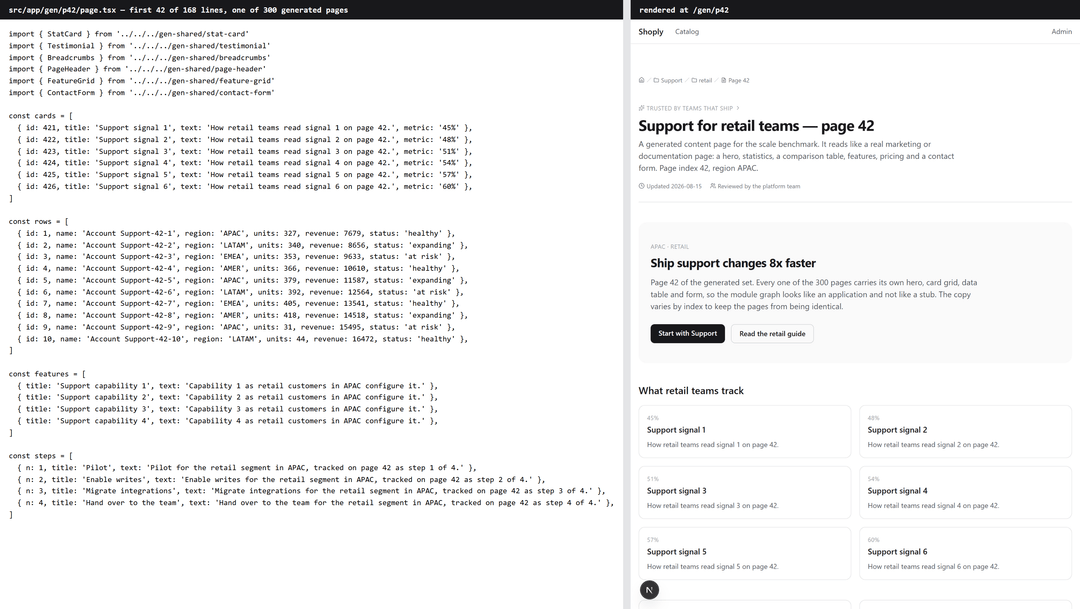 A generated route: a fragment of the source and the page in the browser
| Metric, cold (medians of 5 runs) | Vite: 15 → 315 routes | Next: 15 → 315 routes |
|---|---|---|
| Dev start (“server responds”; asymmetric metric, see above) | 1.3 → 2.9 s | 3.1 → 4.6 s |
| Prod build (gap is inside the noise, see below) | 3.5 → 37.0 s | 8.3 → 32.9 s (including prerender of 300 HTML) |
| HMR on a shared component | 60 → 258 ms | 111 → 264 ms |
| Client JS on disk | 325 KB → 2.9 MB | 597 KB → 603 KB |
The baseline column here is the same 15 routes from the benchmarks above, captured in a separate run; in the HMR row the baseline edit landed on a deep lazy component, while at 300 pages it landed on a shared one, so read those two numbers as two separate benchmarks rather than one curve.
But the build surprised us. By the medians it’s 37.0 seconds for Vite against 32.9 for Next, and Next renders 300 HTML pages inside those same seconds. A win? No. Vite’s run-to-run spread reaches 8.7 seconds, and only 4.0 seconds separate the stacks. Which means the same stack disagrees with itself from run to run more than it disagrees with its rival. Calling a winner on a gap like that would be dishonest. At 300 realistic pages the builds are comparable. Which one is faster on your hardware and your code, only your own benchmark will tell.
Vite’s dev server still starts faster (2.9 against 4.6 seconds), and HMR between the two has leveled off for good: 258 against 264 milliseconds, a gap inside the precision of the benchmark.
Vite’s dev server still starts faster (2.9 against 4.6 seconds), and HMR between the two has leveled off for good: 258 against 264 milliseconds, a gap inside the precision of the benchmark.
Now the caveats, without which these numbers can’t be read.
- One template. All pages come from the same template. We also ran a variant with a separate API request on every page, but a real app with mixed dependencies still scales worse.
- Noisy test machine. The tests ran on a work laptop with background apps left open. On minute-long builds, results varied by up to a quarter of the total time between sessions, so absolute seconds can’t be trusted here. Only ratios count, and only when they’re bigger than the noise.
- HMR especially. Between runs, absolute values ranged from 112 to 258 ms on Vite and from 156 to 264 ms on Next. Still, the two stayed comparable across all three passes.
- Lazy compilation. Both dev servers compile lazily, so the shared-component edit was measured with a single tab open. “Invalidating 150 pages” is static here, not real.
- The big one:
lucide-react. It’s on Next’s defaultoptimizePackageImportslist, so Next defuses the barrel before parsing. Vite reads the whole thing, then strips the excess with tree shaking (throwing out code nobody imports). So the growth percentages between the stacks can’t be read as a difference in scalability. - Type checking included. Both figures cover a full
npm run buildwith strict type checking. For Vite, that’s a separatetsc -bbefore the build; Next checks types insidenext build.
The third paths: TanStack Start, React Router, and Astro
Sometimes the “Vite or Next” question is just framed wrong: the middle of the spectrum belongs to hybrids.
TanStack Start is a full SSR framework on top of Vite with typed routes, server functions, prerendering. Per its docs as of August 2026, it’s a Release Candidate, and the first version has no RSC. React Router 7/8 in framework mode is the heir to Remix and the best-trodden escape route out of Next: it’s what Plane picked. RSC support is still unstable, and version eight is built on the Vite Environment API, which Vite itself still labels RC. Astro 6 is the other pole: content sites, zero JS by default, React added as islands. And don’t forget output: 'export', Next.js’s own “Vite mode”: a static export with no server, but also no ISR, and server actions don’t work there: next dev fails with an error.
We covered this landscape more broadly in Top 10 React Frameworks in 2026.
Migration costs, and the decisions you can’t undo
Migration between the stacks is asymmetric, and real cases show it. Inngest moved a Vite SPA to Next.js in under a day back in 2023; Next’s official guide recommends exactly that strategy: first run the SPA as it is inside Next, then bite off features incrementally. The way back is a different story: Plane, leaving Next.js for React Router + Vite, updated 1,200+ files and added 20,000+ lines across three apps, and the migration itself touched three repositories.
The sequel to the Inngest story is telling: in January 2026 they left Next.js again, for TanStack Start, and cut local page load from 10–12 to 2–3 seconds. The trip out really is cheaper than the trip back, but it isn’t final either.
Why the way back costs so much: code that lives on the server/client boundary doesn’t get ported, it gets rewritten. A useQuery with the enabled option, optimistic updates and polling has no direct equivalent in server components. Moving into Next, they break apart into a client component plus a server action. Fleeing Next, all that server magic unrolls back into explicit requests.
Hence the irreversibility rule. A year from now, styles and the data layer are cheap to change, even static hosting. What will cost you is everything living on the server/client boundary: RSC boundaries and server actions in forms, plus logic tied to ISR. The more code sits on that boundary, the more expensive the ticket back. An SPA has its own, symmetric irreversibility: a client bundle that only grows (our entry weighs 296 KB raw before compression, and that’s without a single business feature), state sprawling between Query, forms and the URL, plus SEO debt that nobody is going to pay down for you.
When Vite works best
A dashboard or a SaaS app entirely behind a login. Internal tools and admin panels. Desktop shells and embeddable surfaces: Electron, Tauri, browser extensions, widgets. Offline-first PWAs (progressive web app: an app that works without a network too). The common trait: crawlers never get in here, which makes server rendering pure overhead. You’d be paying TTFB, a Node runtime and cache layers for something nobody uses.
Let’s take on the number in our own table that’s inconvenient for this verdict: Next paints the dashboard faster, 568 against 1,312 ms on Slow 4G. We assumed the SPA would catch up on repeat visits, and checked it with a separate benchmark: it doesn’t. There, Next’s dashboard comes in at 524 against 1,220 ms on a cold visit and 244 against 652 on a warm one, so the lead actually grows a little. Cache speeds up code delivery, but the SPA’s data request still goes over the network, and that request is what sets the moment of paint.
So the verdict here isn’t about speed: behind a login, Next is faster; you have to pay for it with TTFB on every request, a Node runtime in production, and cache layers with their debugging, all for pages nobody indexes.
When Next.js works best
CMS-driven content sites where SEO makes money. E-commerce with an indexable catalog. SaaS with a large public surface: marketing, docs, blog and the app under one roof. CMS-driven content sites where SEO makes money. E-commerce with an indexable catalog. SaaS with a large public surface: marketing, docs, blog and the app under one roof. All three show up in these Next.js website examples from leading brands.
A separate case is when what matters isn’t architecture but predictability: in Next the project structure is fixed in advance, so a new developer opens the repository and already knows where things live, and a popular mistake usually has a thread that already worked it out. Usually, but not always: for React Canary under the App Router, or for the cache that doesn’t exist in dev, we found no such thread. With Vite, the team solves every one of those things itself. The opposite case: if the public part is five pages total and changes once a quarter, there’s no reason to keep a Node runtime. Static will do.
The verdict: should you use Vite or Next.js?
| Project type | Pick | Why | When to reconsider |
|---|---|---|---|
| Dashboard / internal tool | Vite | nobody to show the SSR to | public indexable pages appear |
| Docs / landing page, up to ~10 pages | Static: a Vite build or Next static export | zero server infrastructure | an interactive product grew inside it |
| Marketing + CMS | Next | SEO out of the box + fresh content without a rebuild (ISR) | the site is fully static with no personalization → static export is enough |
| E-commerce with an SEO catalog | Next | LCP and metadata in the HTML | the catalog sits behind a login (B2B) → the SPA route is open |
| SaaS hybrid | Next or a split: static marketing + a Vite dashboard | one codebase instead of two separate stacks | separate teams/releases → split; one shared auth session everywhere → Next |
| Desktop / embedded / offline PWA | Vite | Next has no track record here | — |
The hybrid deserves more than a table cell, and it’s the most common case. The split option, marketing built separately from the dashboard, lets teams work without stepping on each other. You pay for it with two deploys and a session you have to stretch across subdomains so nobody logs in twice on the way from the landing page into the app.
Choose by the row and the trigger, not by the brand.
A five-minute decision
- Is the whole app behind a login, with no need for search traffic? → Vite.
- Does indexable content make money, and is it more than a few static pages? → Next (otherwise static is enough, see item 4).
- Do you need server components today? → Next; for the state of the alternatives, see “third paths”.
- Fixed budget and no DevOps? → static: Vite, or Next in static export.
- Still unsure, and no public indexable pages? → Still unsure, and no public indexable pages? → Vite





.png&w=828&q=90)