
The fastest server response is the one that never reaches your server. If a CDN node near the user can answer a request, it should.
Caching in Next.js gives you several tools for that: Incremental Static Regeneration (ISR), Partial Prerendering (PPR), and a cache model that produces standard HTTP Cache-Control headers, including the stale-while-revalidate directive.
On Vercel, those headers drive the Vercel Edge Network, which Vercel now calls the Vercel CDN. Each tool is simple on its own. Choosing which one a page needs, and knowing what it costs you in speed, money and complexity, is where Next.js caching gets tricky.
Everything below assumes Next.js 16 with Cache Components enabled.
What This Means for Your Site (Note for CMOs and Content People)
If you’re not the one writing the code, here’s what matters for you site performance:
- Your site should rarely build pages from scratch. In a well-set-up Next.js site, most pages are served as ready-made copies from a CDN near each visitor. Pages load in tens of milliseconds, which helps Core Web Vitals, SEO and conversion.
- Publishing should update the site in seconds, not hours. Your headless CMS (Sanity, Storyblok, Contentful or Payload) can notify the site when an editor publishes, so only the changed pages refresh. If your edits take an hour to appear, the site refreshes on a timer instead. That’s one of the red flags that your headless CMS setup needs attention.
- Personal content doesn’t have to slow the whole page. With Partial Prerendering, shared content loads instantly and only personal parts, like a cart or customer pricing, are built per visitor.
- Caching is a cost decision. Every cached page view is server time you don’t pay for. Refreshing pages too often, or letting bots trigger thousands of rebuilds, is what drives Vercel bills up.
- For each page, ask one question: does it change per visitor? If not, cache it. The rest of this article shows your developers how.
Types of cache
“Caching” in a Next.js app is not one thing. A single request can touch five layers, and each one has its own owner, lifetime, and invalidation rules.
| Layer | Where it lives | What it stores | Who controls it | Invalidated by |
|---|---|---|---|---|
| Browser cache | User’s device | Responses, assets | Cache-Control: max-age (ETag / Last-Modified for revalidation) |
Expiry, user, new URL (hashed assets) |
| Client router cache | Browser memory (Next.js) | RSC payloads of visited routes | Next.js, cacheLife stale value, experimental.staleTimes |
router.refresh(), revalidateTag / revalidatePath / updateTag and cookie changes in Server Actions, stale time expiry, full page reload |
| CDN / edge cache | Provider’s global network | Full responses (HTML, JSON, assets) | s-maxage, CDN-Cache-Control, Vercel-CDN-Cache-Control |
Expiry, purge, new deployment, revalidateTag / revalidatePath (on Vercel; self-hosted needs a CDN integration) |
| Server / data cache | Next.js cache handler (Vercel: managed; self-hosted: disk, Redis, …) | Rendered pages, "use cache" results |
"use cache", cacheLife, cacheTag |
Tags, paths, cacheLife expiry |
| Request memoization | Single render in server memory | Repeated identical calls in one render | React cache(), fetch dedupe |
End of the request |
Below those sit the caches you already know from backend work: application caches (Redis, Memcached), database query caches, and ORM-level caches. They make the origin faster. The layers in the table above make the origin unnecessary.
Two rules hold across all of them:
-
The closer to the user, the cheaper and faster the hit, and the harder the purge. The server can’t purge a browser cache at all, a CDN needs an explicit purge, and a server cache is under your direct control.
-
Every layer is a place where stale data can hide. When a user reports “I don’t see my change”, ask which layer is serving it.
The foundation: Cache-Control and stale-while-revalidate
The edge layers are driven by the Cache-Control header (plus two CDN-specific variants, covered below).
Cache-Control: public, s-maxage=60, stale-while-revalidate=300
-
s-maxage=60: shared caches (the CDN) may serve this response as fresh for 60 seconds. Browsers ignores-maxage. -
stale-while-revalidate=300: after those 60 seconds, for up to 300 more, the CDN may still serve the old response immediately while it fetches a new one in the background.
That second directive does the real work. Without it, the first user after expiry waits for a full origin render. With it, nobody waits inside the stale window: one request triggers a refresh, everyone keeps getting a fast (slightly old) answer, and once the refresh finishes, visitors get the new version. No unlucky user. No cold render on the critical path.
| Time since cached | CDN behavior | User waits for origin? |
|---|---|---|
| 0–60 s | Serve from cache (HIT) |
No |
| 60–360 s | Serve stale, revalidate in background (STALE) |
No |
| > 360 s | Fetch from origin (MISS) |
Yes |
What the browser does with this header depends on the CDN. Most browsers honor stale-while-revalidate, and with no max-age they may apply heuristic caching. Vercel avoids the ambiguity: when Cache-Control is the only cache header, it strips s-maxage and stale-while-revalidate and sends the browser public, max-age=0, must-revalidate. On other CDNs, set an explicit max-age or use the CDN-specific headers below.
On Vercel you can watch the cache in the x-vercel-cache response header. The values are HIT, STALE and MISS, plus PRERENDER, REVALIDATED and BYPASS (see Vercel’s response header docs for each).
Other directives worth knowing:
-
stale-if-error=N: serve stale content for N seconds if the origin fails. It’s a cheap resilience layer. Vercel supports it; other CDNs vary. -
private: only the browser may cache it. Use it for anything personal. -
no-store: nobody caches it. Use it for checkout, tokens, and secrets. -
immutable: the content never changes at this URL. Use it for hashed build assets (Next.js already sets this for/_next/static).
Controlling the CDN separately from the browser
You often want the CDN to cache a response for a long time while the browser always rechecks. Vercel supports targeted headers:
-
Cache-Control: browsers and every cache in between; -
CDN-Cache-Control: any CDN that honors it, Vercel included; -
Vercel-CDN-Cache-Control: only Vercel’s CDN, not forwarded downstream.
Vercel uses the most specific one present: Vercel-CDN-Cache-Control, then CDN-Cache-Control, then Cache-Control. When Vercel-CDN-Cache-Control is set, CDN-Cache-Control only affects CDNs further downstream.
// app/api/products/route.ts
export async function GET() {
  const products = await getProducts();

  return Response.json(products, {
    headers: {
      "Cache-Control": "public, max-age=0, must-revalidate",
      "Vercel-CDN-Cache-Control": "s-maxage=300, stale-while-revalidate=3600",
    },
  });
}
For pages, let Next.js write Cache-Control. A page component has no response object, and for prerendered, and ISR pages Next.js derives the header from the cache lifetime you declare. You can override it through headers() in next.config or in proxy.ts, but then the header and the framework’s idea of freshness can disagree. We’ve seen this pattern before, and it always ends in a “why is this page stale?” ticket. Keep hand-written headers for Route Handlers, and control page caching through the cache APIs.
Techniques compared
Next.js lets you pick a rendering strategy per route, and with Cache Components, per component. All examples below assume Cache Components is enabled:
// next.config.ts
import type { NextConfig } from "next";

const nextConfig: NextConfig = {
  cacheComponents: true,
};

export default nextConfig;
SSG: Static Site Generation
Rendered once at build time and served from the CDN until the next deploy. With Cache Components, this is what you get for any route that neither reads request data (cookies, headers, search params) nor does uncached I/O. A database call or fetch outside <Suspense> must be cached with "use cache", or Next.js reports it.
ISR: Incremental Static Regeneration
Incremental Static Regeneration is stale-while-revalidate applied to whole pages. A page is rendered once, stored, served from the edge, and regenerated in the background when it goes stale.
// app/products/[slug]/page.tsx
import { notFound } from "next/navigation";
import { cacheLife, cacheTag } from "next/cache";

async function getProduct(slug: string) {
  "use cache";
  cacheLife("hours");
  cacheTag(`product:${slug}`);
  return db.product.findUnique({ where: { slug } });
}

export async function generateStaticParams() {
  const top = await getTopProducts(100);
  return top.map((p) => ({ slug: p.slug }));
}

export default async function ProductPage({
  params,
}: {
  params: Promise<{ slug: string }>;
}) {
  const { slug } = await params;
  const product = await getProduct(slug);
  if (!product) notFound();

  return <ProductView product={product} />;
}
The 100 most popular pages are prerendered at build time. Any other slug is rendered on first request, then cached. cacheLife("hours") revalidates about once an hour: the next request after that gets the cached page and triggers a background regeneration. cacheTag labels the data so a webhook can refresh it on demand (below).
generateStaticParams matters here. Under Cache Components it must return at least one entry (an empty array fails the build). Leaving it out takes the route out of ISR: params becomes request data, so everything that depends on the slug renders on every request.
Next.js turns the cache lifetime into a CDN header: s-maxage is the revalidate interval, and stale-while-revalidate is the expire time minus that interval. The hours profile revalidates after 1 hour and expires after 1 day, so this page is served with:
Cache-Control: s-maxage=3600, stale-while-revalidate=82800
If several cached functions run in one render, the shortest lifetimes win. On Vercel, ISR adds durable storage behind that header: when a regional CDN cache misses, the page is read from the ISR cache rather than re-rendered.
Without Cache Components, the older equivalent is export const revalidate = 3600 on the page. It is not allowed when cacheComponents is on.
On-demand revalidation replaces the “every hour” guess with an event:
// app/api/revalidate/route.ts, called by a CMS webhook
import { timingSafeEqual } from "node:crypto";
import { revalidateTag } from "next/cache";

function isValidSecret(received: string | null) {
  const expected = process.env.WEBHOOK_SECRET;
  if (!received || !expected) return false;
  const a = Buffer.from(received);
  const b = Buffer.from(expected);
  return a.length === b.length && timingSafeEqual(a, b);
}

export async function POST(request: Request) {
  if (!isValidSecret(request.headers.get("x-webhook-secret"))) {
    return new Response("Unauthorized", { status: 401 });
  }

  const { slug } = await request.json();
  if (typeof slug !== "string") {
    return new Response("Bad request", { status: 400 });
  }

  revalidateTag(`product:${slug}`, "max");
  return Response.json({ revalidated: true });
}
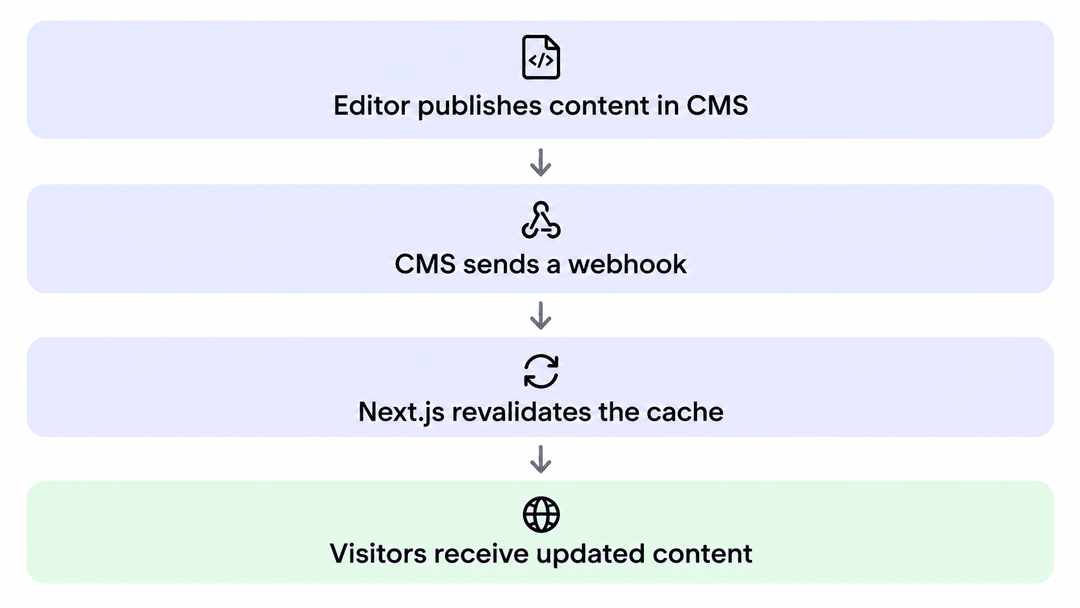 Flowchart showing content publishing workflow: Editor publishes in CMS, triggering a webhook to Next.js, which revalidates ca
"max" marks the tag stale with stale-while-revalidate semantics: the next visitor still gets the old page while the new one renders. If the webhook must expire the entry immediately, pass { expire: 0 } instead. When a user must see their own change at once, use updateTag inside the Server Action that made the change. updateTag only works in Server Actions, not in Route Handlers like this one.
PPR: Partial Prerendering
One cookie used to make a whole page dynamic. A product page could be almost entirely shared content and still render on every request because of a cart badge. PPR fixes that by splitting the page at <Suspense> boundaries. Everything outside them that doesn’t depend on the request, plus the Suspense fallbacks, becomes a static shell served from the edge. Everything inside that reads request data is streamed into the same response.
In Next.js 16, PPR is part of Cache Components. Here is the same product page with two personal parts added:
// app/products/[slug]/page.tsx (getProduct and generateStaticParams as above)
import { Suspense } from "react";
import { cookies } from "next/headers";
import { notFound } from "next/navigation";

async function PersonalPrice({ productId }: { productId: string }) {
  const segment = (await cookies()).get("price-segment")?.value;
  const price = await getPrice(productId, segment);
  return <Price value={price} />;
}

export default async function ProductPage({
  params,
}: {
  params: Promise<{ slug: string }>;
}) {
  const { slug } = await params;
  const product = await getProduct(slug);
  if (!product) notFound();

  return (
    <>
      <ProductView product={product} />
      <Suspense fallback={<PriceSkeleton />}>
        <PersonalPrice productId={product.id} />
      </Suspense>
      <Suspense fallback={<CartSkeleton />}>
        <CartBadge />
      </Suspense>
    </>
  );
}
ProductView is in the static shell. PersonalPrice and CartBadge (which reads the cart cookie the same way) stream in per request. The question changes from “is this page static or dynamic?” to “which parts depend on the request?”. Give fallbacks fixed dimensions, or PPR will improve LCP and hurt CLS.
One thing PPR doesn’t save: the shell comes from the CDN, but every request still invokes a function to render the dynamic parts.
SSR: Server-Side Rendering
Rendered on every request. It’s always fresh and always personal, and it always costs compute. The CDN only helps if the response carries a shared-cache Cache-Control, and that is only safe for responses that aren’t personal. For pages, prefer moving the shared parts into "use cache" over hand-writing headers.
Keep content that should rank in the static shell. Streamed parts may not reach every AI crawler (see our React SEO test).
CSR: Client-Side Rendering
A static shell plus data fetched in the browser (React Query, or the SWR library). The shell caches perfectly, but users see spinners, crawlers see less, and the data requests still hit your API. It’s a good fit for app-like screens behind login.
Summary table
| Technique | Freshness | TTFB | Personalization | Compute per request | Complexity |
|---|---|---|---|---|---|
| SSG | Until deploy | Best | None | None | Low |
| ISR | Seconds–hours, or on event | Best (after first render) | None | Only on regeneration | Low–medium |
| PPR | Shell like ISR, dynamic parts live | Best for the shell, dynamic parts stream | Yes, in dynamic parts | Every request, dynamic parts only | Medium–high |
| SSR | Always fresh | Worst (origin round trip) | Full | Every request, whole page | Low |
| CSR | Live (client fetch) | Good shell, slow content | Full | Every API call | Medium |
Pros and cons
Speed
Pros
-
A CDN hit is usually served in tens of milliseconds from a nearby node, instead of hundreds for a cold origin render.
-
stale-while-revalidate removes the “unlucky user” who waits after every expiry.
-
PPR brings that speed to pages that used to be fully dynamic because of one cookie.
-
Better TTFB and LCP feed directly into Core Web Vitals, and so into SEO and conversion.
Cons
-
Cache misses are still slow, and long-tail pages (rarely visited slugs) miss often. CDN caches are per region, so a “cached” page can still miss in a region nobody has visited recently (on Vercel, the ISR cache absorbs these misses, as described above).
-
PPR streams the dynamic parts, so slow data still shows up as a slow skeleton.
-
Badly sized fallbacks trade LCP gains for CLS regressions.
Money
Pros
-
Every CDN hit on a static or ISR page is a function invocation you don’t pay for. On usage-based platforms (Vercel, Netlify, Cloudflare, AWS), compute and invocations are often the biggest line item, and caching cuts them the most. PPR pages are the exception: they still invoke a function per request for the dynamic parts.
-
Fewer origin requests also means less load on your database and third-party APIs, which matters for metered APIs (CMS, commerce, Salesforce, …).
-
Tag-based revalidation regenerates only what changed, instead of rebuilding the whole site.
Cons
-
Bandwidth and CDN requests are billed too. Caching moves cost from compute to bandwidth; it doesn’t remove it. On Vercel’s on-demand pricing, as of November 2026, CDN requests cost $2.00–3.20 per million and Fast Data Transfer $0.15–0.35 per GB, depending on region. Pro teams can instead use Flat Rate CDN: a fixed monthly price per capacity tier, so a one-day traffic spike doesn’t raise the bill.
-
ISR reads and writes are metered on Vercel: $0.40–0.64 per million read units and $4.00–6.40 per million write units (8 KB each), charged at the rate of the project’s function region. A write costs ten times a read, so regeneration is the expensive part. Regeneration is bounded by the revalidate interval, Vercel collapses concurrent regenerations into one invocation per region, and unchanged content creates no ISR write. So a short interval hurts most on low-traffic and long-tail pages, where each regeneration serves few visitors.
-
Bots and crawlers hitting millions of long-tail URLs can trigger mass ISR renders. Under Cache Components,
dynamicParamsisn’t available, so reject unknown slugs early withnotFound(), and use bot management or rate limiting where needed. -
Vendor lock-in has a price. Tag purges at the CDN, durable ISR storage and PPR shell serving work out of the box on Vercel. Self-hosting needs a shared cache handler (e.g. Redis) and a CDN that respects your headers, which is engineering time. . See when self-hosting Next.js makes sense.”
Freshness and correctness
Pros
-
On-demand revalidation gives near-real-time updates with static-level speed.
-
updateTaggives read-your-own-writes where it matters.
Cons
-
Stale data is a feature until it isn’t: prices, stock, and legal text need careful TTLs or event-based purges.
-
Caching personal data in a shared layer is a security bug, not a performance bug. A
"use cache"entry is shared by everyone who calls the function with the same arguments, and apublicresponse is shared by everyone. Don’t let per-user data into a shared entry; for per-user caching, Next.js 16 has"use cache: private". -
Five cache layers make “why is this old?” a real debugging task.
Developer experience and complexity
Pros
-
Per-route and per-component choices, with no separate caching infrastructure on Vercel.
-
Cache Components makes the static/dynamic split explicit and checks it for you.
Cons
-
The model has changed several times (Pages Router ISR, App Router fetch cache,
unstable_cache, route-levelrevalidate, now"use cache"). Tutorials and Stack Overflow answers are often out of date. -
next devdoesn’t cache like production. You need preview deployments ornext build && next startto test caching. -
Behavior differs between Vercel and self-hosting, so you need to test on the platform you ship to.
What “Vercel Edge” means today
“Edge” means two different things.
The Vercel Edge Network, now called the Vercel CDN, is a global network of cache nodes. It serves static assets, ISR pages, PPR shells and any response with a cacheable Cache-Control. This is where the wins in this article come from. Vercel’s billing has followed the rename: “Edge Requests” are now “CDN Requests”.
The Edge runtime (export const runtime = "edge") is a lightweight V8 runtime that runs code close to the user, with a restricted API surface. It is on its way out:
-
Vercel recommends migrating from the Edge runtime to Node.js, running on Fluid compute. For how Route Handlers and functions behave on each runtime, see our Next.js serverless functions guide.
-
In Next.js 16,
middleware.tsbecameproxy.ts, and proxy runs only on Node.js. -
The Edge runtime is deprecated as of Next.js 16.3. With Cache Components, any
runtimeexport (even"nodejs") fails the build.
The reason is simple: a function next to the user still has to reach your database, which usually sits in one region. Take a user in Europe and a database in Virginia. A page that makes five sequential queries from a Frankfurt edge function pays five transatlantic round trips. The same page rendered by a function in Virginia pays one: the user’s request crossing the Atlantic. Put compute near your data, and put caches near your users.
Market state and forecast
Where we are
-
Caching has become a framework feature, not just an infrastructure feature. Next.js (
"use cache", PPR), Nuxt (route rules, ISR), Astro (server islands), SvelteKit and Remix/React Router all now expose cache and rendering choices per route. Developers configure CDN behavior from application code. -
Static shell + dynamic parts is spreading. The closest equivalent to Next.js PPR is Astro’s server islands. They differ in delivery: each server island is fetched in a separate request after the page loads, while PPR streams the dynamic parts in the same response.
-
“Edge compute everywhere” has cooled. After the 2021–2023 hype, Vercel moved back to regional Node.js compute with Fluid compute and is phasing out the Edge runtime. Cloudflare Workers still run at the edge by default, but Smart Placement lets them run near the backend instead. The edge is used mainly as a cache and routing layer.
-
Hosting is consolidating around a few platforms: Vercel, Netlify, Cloudflare, AWS (Amplify / CloudFront) and others such as Fastly. Self-hosting Next.js is getting easier. Next.js 16.2 shipped a stable Adapter API in March 2026. The only verified adapters so far are Vercel and Bun, while adapters for Netlify, Cloudflare and AWS are being built on it through OpenNext, which reduces lock-in pressure.
-
Cost scrutiny is high. Public “surprise bill” stories have made teams look harder at usage-based pricing. In February 2024, a free-plan Netlify site received a $104,500 bill after a DDoS on a single MP3 file (Netlify waived it). In June 2024, the artist app Cara got a $96,280 Vercel bill for one week of function usage after growing from 40k to 650k users. Platforms are responding: Vercel made Flat Rate CDN generally available for Pro teams in September 2026, alongside its on-demand and best-effort Flex tiers. Caching strategy is now a cost decision as much as a performance one.
-
The infrastructure underneath is growing fast. Grand View Research sizes the edge computing market at $33.4 billion in 2025, growing at 32.1% a year to 2033. MarketsandMarkets puts the CDN market at $27.25 billion in 2025, reaching $42.89 billion by 2030 (9.5% a year). Analyst estimates vary widely, so treat these as direction, not precision.
The Future of Next.js Caching: 5 Trends to Watch in 2027
Here’s where we think this goes next, based on what we see in client projects and platform roadmaps:
-
Component-level caching becomes the default mental model. “Static vs. dynamic page” will sound as dated as “SPA vs. MPA”. Frameworks will infer more cache boundaries automatically.
-
Smarter invalidation. Expect tighter integration between CMSs, commerce platforms and databases on one side and CDN tag purges on the other, so revalidation is wired up rather than hand-written in webhooks.
-
Data moves closer to the edge, selectively. Read replicas, edge KV and globally distributed databases will make rendering near the user viable for more use cases, but mainly for read-heavy data.
-
AI traffic changes cache economics. AI crawlers and agents already generate a meaningful share of requests: Cloudflare Radar measured AI bots at 4.2% of HTML requests on average in 2025, peaking at 6.4%. They also crawl far more than they send back: Cloudflare counted 38,000 pages crawled by Anthropic for every referred visit in July 2025. Long-tail pages that humans rarely visit will be fetched far more often, which makes efficient caching and bot management a bigger part of the bill.
-
Cache hit ratio becomes a budget metric. As pricing moves further toward CDN usage, cache hit ratio will become a standard number on hosting dashboards and in budgets.
Choosing the right strategy
There’s no single right answer for a whole site. There’s the right architecture for each page type, and most sites have several.
| Page type | Example | Strategy |
|---|---|---|
| Never changes between deploys | Docs, legal, marketing | SSG (default) |
| Changes on publish, same for everyone | Blog, product catalog | ISR ("use cache" + cacheTag) with webhook revalidation |
| Mostly shared, some per-user parts | Product page with cart / personal price | PPR (Cache Components) |
| Fully personal | Dashboard, account, checkout | SSR / CSR; cache shared data with "use cache", per-user data with "use cache: private" |
| JSON for many clients | Public API, search suggestions | Route Handler + Vercel-CDN-Cache-Control with stale-while-revalidate |
| Routing logic | Redirects, geo, A/B | proxy.ts, kept light because it runs on every matched request |
If your content comes from a headless CMS, wire its publish webhooks to revalidateTag so each page type refreshes only when its content changes.
Common Next.js Caching Mistakes (and How to Fix Them)
Most of these don’t fail loudly. They show up later, as a slow page, a stale price or a bigger invoice.
-
A
cookies()call outside<Suspense>. Without Cache Components it makes the whole page dynamic. With Cache Components, Next.js reports it as a blocking route (a build error in 16.0–16.2, a dev-time error from 16.3). Move the code that reads the cookie behind<Suspense>, or to the client. -
Caching personal data in a shared
"use cache"entry or apublicresponse. -
Tiny revalidate intervals instead of webhooks. That means constant regeneration and avoidable ISR costs, especially on low-traffic pages.
-
Rendering every slug a crawler asks for. Reject unknown slugs early with
notFound(). -
Reading the browser’s response headers to debug the CDN. Vercel strips
s-maxageandstale-while-revalidatefrom what the browser sees. Checkx-vercel-cacheinstead. -
Testing caching in
next dev. Use a preview deployment ornext build && next start. -
Running code at the edge that calls a single-region database. This adds latency instead of removing it.
Summary: How to Cache a Next.js Site
Edge performance in Next.js isn’t about where your code runs. It’s about how often it doesn’t need to run:
-
Know your cache layers: browser, router, CDN, server/data, memoization. Know which one is answering.
-
Cache-Control + stale-while-revalidate is the base: instant responses, background refresh.
-
ISR applies it to pages. On-demand revalidation makes it precise. PPR extends it to personalized pages.
-
The trade-off is real: caching cuts compute and latency, but adds bandwidth and ISR costs, staleness risk and debugging work.
-
The market is moving toward component-level caching, wired-up invalidation and cost-aware hosting. The Vercel Edge, now the Vercel CDN, is mainly a cache, not a place to run everything.
If you take one thing away: for every page, ask which parts depend on the request. Cache everything else as close to the user as you can, and wire invalidation to real events instead of timers. Then watch your cache hit ratio: it is your performance metric and your cost metric at once. Get these decisions right early, because they compound.
If you’re working through a caching strategy, a slow Next.js app or a hosting bill that keeps growing, let’s talk. At FocusReactive, a Next.js development agency, we’ll review your setup and tell you exactly what we’d change.
Incremental Static Regeneration vs Stale-While-Revalidate
ISR and stale-while-revalidate are related, but they are not the same thing.
Incremental Static Regeneration is a Next.js rendering and regeneration strategy. It decides when a page is rendered, cached, and re-rendered. stale-while-revalidate is an HTTP caching directive and behavior used by shared caches and CDNs. It decides what a cache may serve while it refreshes content in the background.
That difference matters because the responsibility sits in different layers. ISR is a framework concern: Next.js and its cache layer decide when a page becomes eligible for regeneration, how tags and lifetimes work, and when a request should trigger a refresh. stale-while-revalidate is an edge-cache concern: the CDN decides whether it can serve an expired response immediately and fetch a new one behind the scenes.
People mix them up because the user-facing behavior looks similar. In both cases, the first request after expiry may not wait for a full rebuild, and in both cases, a subsequent request gets the fresh version. But the mechanics are not interchangeable. ISR can use stale-while-revalidate semantics at the CDN level, and on Vercel it often does, but ISR is the broader page strategy. stale-while-revalidate is only one part of how that strategy is expressed over HTTP.
The practical takeaway is simple: if you’re talking about page architecture in Next.js, say ISR. If you’re talking about the cache directive in response headers, say stale-while-revalidate. They work together, but they solve different problems.
PPR and performance tradeoffs
Partial Prerendering gives you a fast shared shell and live personalized fragments in the same response. That is the right shape when most of the page is identical for everyone, but a few parts depend on cookies, session state, or other request data.
The upside is obvious in production. The shell can be served from the CDN at static speed, which keeps TTFB low and gives the browser something useful to paint immediately. Shared layout, product copy, navigation, and other common content stay fast. The personalized fragments then stream in after the shell, so you keep the page responsive without turning the whole route into SSR.
The tradeoff is that dynamic fragments still require per-request compute. PPR reduces how much work happens on each request, but it does not remove the request entirely. If the dynamic part has expensive data access or multiple serial queries, that cost still shows up. You have to design the boundary carefully.
Fallbacks matter too. If the Suspense placeholder is too large, too vague, or visually unstable, you can trade a better shell for worse CLS. That is the part that’s easy to get wrong. A good fallback reserves space, matches the final layout closely, and avoids layout shifts when the streamed content arrives.
PPR also adds observability complexity. You are now debugging a response made of a static shell, streamed fragments, and the data behind each fragment. A slow page might be slow because the shell is heavy, because one fragment is waiting on data, or because a fallback is masking a layout issue. You need to measure each part separately.
Used well, PPR is a strong fit for commerce, content, and logged-in experiences where the shared page is valuable but a small amount of personalization would otherwise force full SSR. Used poorly, it becomes a more complicated version of the same slow page.
Cache-Control settings for Next.js
Think about Cache-Control in layers, not as one universal instruction. The browser, the CDN, and Next.js do not all need the same caching rules, and they do not interpret those rules the same way.
For most rendered pages, the browser should be conservative while the CDN is aggressive. That usually means short or zero browser freshness with strong shared-cache behavior at the edge. The browser revalidates, the CDN serves hits quickly, and the page still benefits from background refresh. That pattern keeps personal browsing state from getting too sticky while still giving you low-latency shared delivery.
You generally should not hand-write headers for pages that Next.js is rendering or prerendering. Let the framework derive the response headers from the cache lifetime and tags you declare in the route or cached function. If you override page headers manually, you can end up with a browser, a CDN, and Next.js each believing a different thing about freshness. That is how teams create stale-page bugs that are hard to reproduce.
Route Handlers are different. They are explicit HTTP responses, so writing cache headers there is normal and often the right choice. Use them for APIs, JSON responses, and any route where you want to control browser caching and CDN caching independently. For page rendering, prefer the Next.js cache APIs. For Route Handlers, write the headers you want.
A good rule of thumb is this: use conservative browser caching when the page can change often or is likely to be revalidated by the app, and stronger CDN caching when the response is shared across users and expensive to produce. If the content is personal, make it private or uncacheable. If the content is shared, make the edge do the work.
When to use Vercel Edge with ISR
If you are using ISR on Vercel, the first thing to optimize is usually the CDN cache, not edge execution. That is where the biggest win is. The Vercel CDN can serve cached ISR pages close to the user, absorb most requests, and keep regeneration out of the critical path.
That makes the edge cache the right fit for content that is shared, relatively stable, and expensive enough to render that you want as few origin hits as possible. Product pages, marketing pages, editorial content, and many catalog views fit that model well. You get fast responses, background regeneration, and a simpler architecture than pushing logic into edge runtime code.
Use regional compute near the data when the request needs fresh backend state that cannot be cached safely, or when the page depends on a data source that lives in one region and would suffer from long cross-region round trips. In those cases, running extra code at the edge can add latency instead of removing it. The closer compute is not automatically the better choice.
Do not add edge execution just because a team is using ISR. Edge runtime complexity is a separate decision, and most ISR setups do not need it. If the page can be cached at the CDN and regenerated in a normal server runtime, that is usually the cleaner path. Add edge logic only when there is a clear routing, personalization, or latency reason that cannot be solved with cache headers and ISR alone.
The pattern we see most often is simple: cache at the edge, compute in the region, and keep the runtime choice as boring as possible. That is usually the right architecture for the problem.
If you’re working through a caching strategy, a slow Next.js app or a hosting bill that keeps growing, let’s talk. At FocusReactive, a Next.js development agency, we build and optimize production Next.js apps for SaaS and enterprise teams. Book a free consultation and we’ll audit your caching setup.