
TL;DR
Vanilla Payload CMS gives you a great foundation, but it’s not yet the editorial product that a marketing team expects. On every client project we were building the same things on top of it again and again, and each of them took weeks. So we packaged them as 12 MIT plugins plus a starter, and we call it Ideal CMS. You can install one plugin into an existing Payload 3 project, or start from the whole starter with one command.
Why did clients who wanted Payload still choose an alternative?
Sometimes we had cases like this: a client was ready to work on Payload, they understood that the bill would be smaller, but because some features were missing they still chose a SaaS alternative. The main one was visual editing, because Payload didn’t have click-to-edit by default.
I can’t blame them. This is what the client works with every day, and when we developed Payload projects without this feature, it was not always convenient for clients to edit and work with the content.
So where do our plugins come from? The story behind them is always one of these 2:
- Our wish to compete with products like Sanity and Storyblok. Visual Editing is the main example. Payload didn’t have it, and we needed this plugin.
- A real problem of our existing clients. By developing a plugin we simply fix this problem for the future cases and the future clients.
So we solve each problem basically once. How the result looks next to Sanity, screen by screen, I showed in Open-Source Sanity Alternative.
What does vanilla Payload CMS leave you with?
Vanilla Payload CMS doesn’t include click-to-edit visual editing, AI translation, A/B testing, Yoast-style SEO analysis, field comments or scheduled publishing that works on Vercel. What it does give you is a really strong foundation. It’s Next.js-native, MIT licensed, and you can extend every field and every admin component. If you are new to it, start with our Payload CMS overview.
Why are those features not in Payload itself? I can identify 3 reasons:
- Part of it is there, but not on the level we need, the one we usually provide to clients. Payload has localization, but no translation. It has scheduled publishing, but not on serverless platforms like Vercel. It has live preview, but no click-to-edit.
- Part of it is under the Enterprise subscription, so you need to pay. SSO and audit logs are Enterprise-only in vanilla Payload.
- Even the Enterprise plugins don’t always have the functionality the client needs, and we have to extend it for them personally.
How long does it take to build these features yourself?
At least a week if the project is simple, and at maximum it could go up to a month. I’m talking about the time before we had the plugins, when a client came and we developed, for example, AI translations or A/B testing from scratch.
What we were building on every project: the page builder logic, sections and their composition, fields optimized for SEO, structured data, visual editing, translations, A/B testing. Maybe the development itself was not that long, but in total it was eating a lot of time, because it’s the whole software development lifecycle:
- Presale. First we discussed it on the presale and spent time to understand what should be done and how.
- Context transfer. Then we spent time to pass the context to the team.
- Dailies. Then we spent time discussing this feature on the dailies.
- Development and review. And only then the development itself.
And you can say this about every feature.
Plugins for editors
6 of the 12 plugins are for the people who open the CMS every day: Visual Editing, Stacked Editing, Presets, Comments, Scheduled Publishing and AI Translation. All 12 are published on npm under @focus-reactive, and each of them works on its own in any Payload 3 project.
Visual Editing: click-to-edit for Payload
The Visual Editing plugin is the one I like the most. First, because it’s something that sets us apart, if I can say so, from other builds. Second, because it’s what the client works with every day.
You click on any text in the preview (1), and the exact document and field open in the admin (2). Tabs, collapsibles and array rows expand on the way, and the input gets focus. Then you type, and the preview updates while you type. It works for a Next.js or React frontend, inside Live Preview and in a separate browser tab.
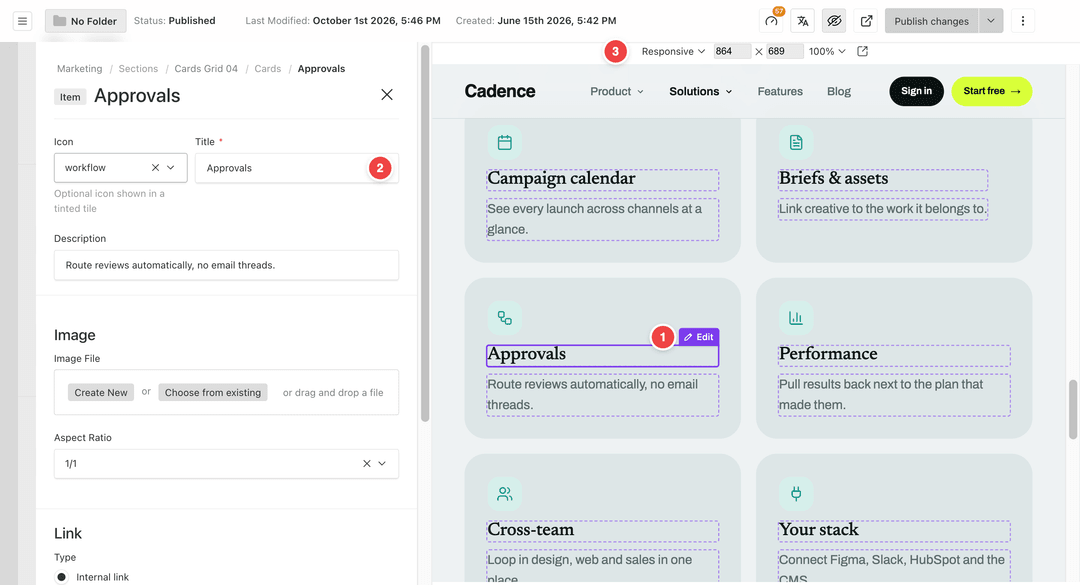 Ideal CMS Live Preview: an Edit badge on a card title in the preview, and the same card's Title field open in the admin
Click the Edit badge on a text in the preview (1) and its field opens in the admin (2), however deep it sits; the preview (3) stays next to the form
Stacked Editing: no more accordions inside accordions
The Stacked Editing plugin came directly from the feedback of our clients on the default admin. Payload shows nested blocks and arrays as inline accordions, and when you are 3 levels down, you scroll a long form and lose track of where you are.
With the plugin, a click on a block or an array row opens it in a panel on top of the previous one (1), with breadcrumbs to jump between the levels (2). It’s the same navigation that editors know from Sanity and Storyblok. Payload’s own fields, validation and permissions stay as they are, the only thing that changes is where the fields of a row are shown.
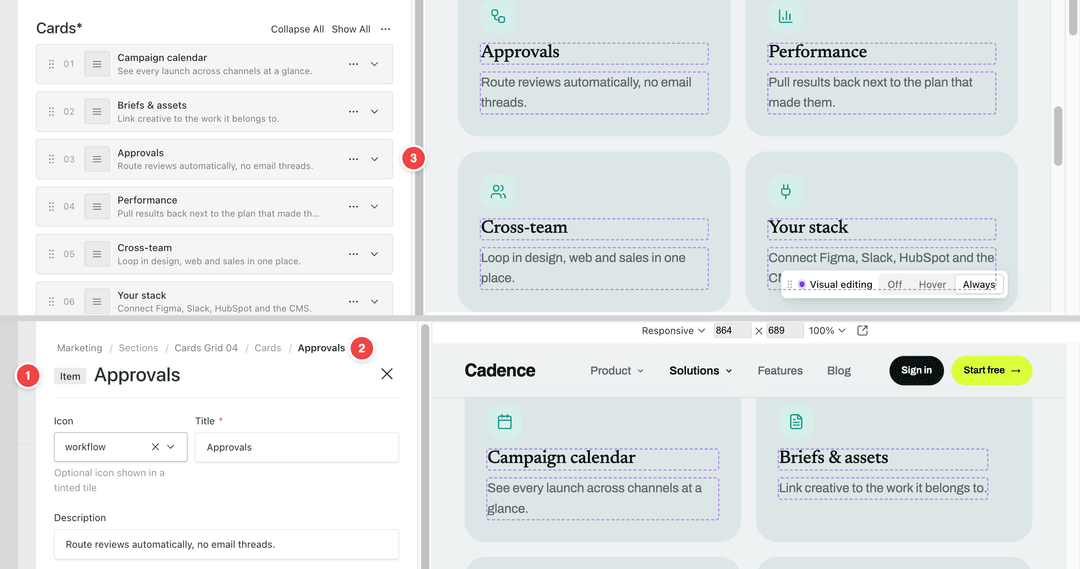 Stacked Editing in Ideal CMS: a card row opens as a separate panel with breadcrumbs from the page down to the card
A nested row opens as its own panel (1), with breadcrumbs back up (2); the rows themselves are short cards with a preview (3) and not long accordions
Presets: reuse a configured block
The Presets plugin lets editors save a configured block, for example a hero with the right layout and copy, and apply it to any page with one click. It finds all your blocks automatically (1), so you don’t need to change any block config to add it. This is the piece that makes a headless CMS page builder fast for marketing, because nobody starts a section from empty fields (2).
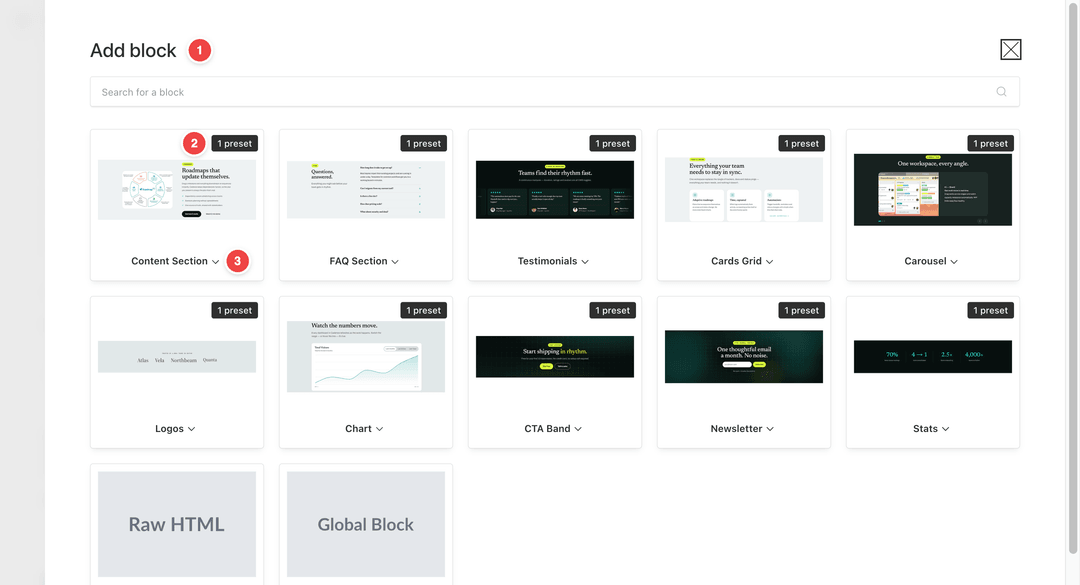 Ideal CMS Add block drawer where every block shows a preview image and a 1 preset badge
The Add block drawer (1) lists every block with its saved presets (2); pick a preset from the block’s menu (3) and the section arrives already filled
Comments: feedback on the field itself
With the Comments plugin editors and developers can comment on a single field or on a whole document (1). You can @mention teammates with email notifications (2) and resolve the threads (3), so the feedback doesn’t live in Slack and email anymore.
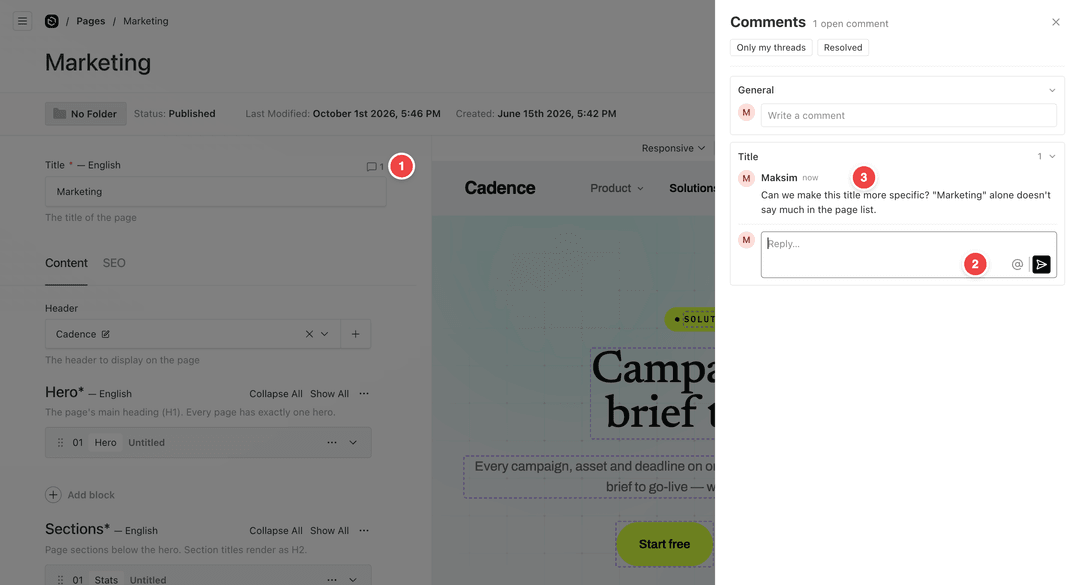 Comments drawer in Ideal CMS with a thread on the Title field and a comment count badge on the field label
Comments live on the field itself (1), with @mentions (2) and a thread per field (3)
Scheduled Publishing: Payload scheduling that works on Vercel
Payload has native scheduled publishing, but out of the box it doesn’t run on serverless platforms like Vercel. The Scheduled Publishing plugin makes it work there: an editor picks a date (2), and a cron job publishes the document on time.
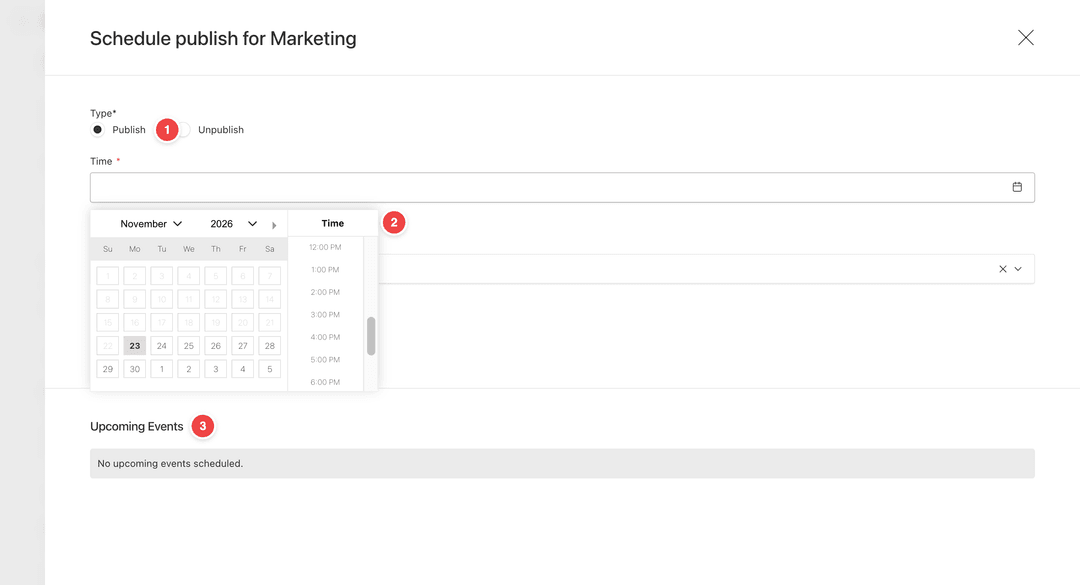 Schedule publish drawer in Ideal CMS with Publish selected and the date and time picker open
Choose Publish or Unpublish (1), pick a date and time (2), and the page goes live on its own, even on Vercel; scheduled events are listed below (3)
AI Translation: the hardest one to build
The AI Translation plugin translates every localized field in Payload, however deep it sits in groups, arrays, blocks and tabs. It runs on the AI provider and the keys that you choose, and editors can translate one document, a whole collection, or auto-translate on save.
This was probably the hardest plugin of the 12, because in AI translations there are a lot of nuances, and there are very different ways to do them:
- The data model is not flat. There is nesting in the complex rich text blocks, and in the complex composition of the page itself.
- The quality of the translation. It’s important to translate the right words and exclude the ones that should stay, to keep the brand voice and the tone, so for the user the text sounds like quality and not like slop.
- How the translation runs. Synchronously or not, in the background or not. The plugin supports both: Payload Jobs by default, and inline when you need it.
In the end we managed to build a quality solution, but it required a lot of work and time, and of course the work doesn’t stop here. On Glimble’s migration from Contentful to Payload, AI translation with human review cut the translation time from weeks to days. About the process around the tool you can read in content localization with AI.
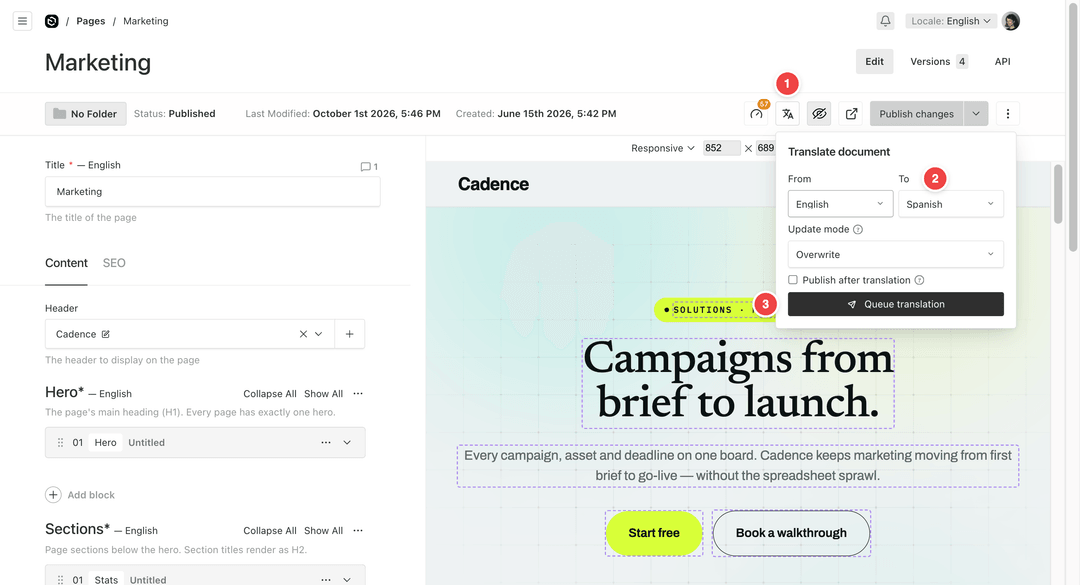 Translate document popup in Ideal CMS with English as the source and Spanish as the target
Open Translate (1), pick the source and target locales (2) and queue the translation (3); it runs in the background
Plugins for marketing
3 plugins are for marketing and product teams: SEO, A/B Testing and Analytics. With them your team doesn’t need to go to another tool.
SEO: the Yoast analysis inside Payload
One more plugin that I really like is the SEO plugin. It’s an analog of the Yoast plugin for WordPress, and it runs the Yoast analysis engine inside the Payload editor. Why do I like it? Because it allows you to write better content and highlights the mistakes before publishing, so the quality of the site and of the final pages is higher.
It covers keyphrase optimization, on-page checks, readability, inclusive language (2) and a Google SERP preview (3). It checks the text while you are still typing, before you save, and it doesn’t add any field to your database.
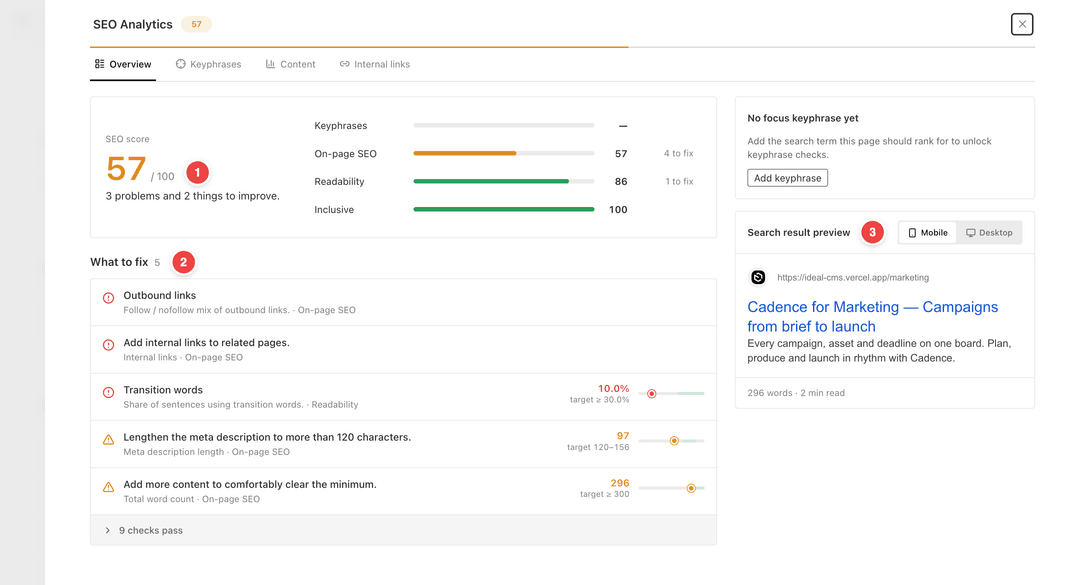 SEO Analytics drawer in Ideal CMS with an overall score, the list of checks to fix and a Google search result preview
The score (1) and the checks (2) update as you type; the search result preview (3) shows what Google will show
A/B Testing and Analytics
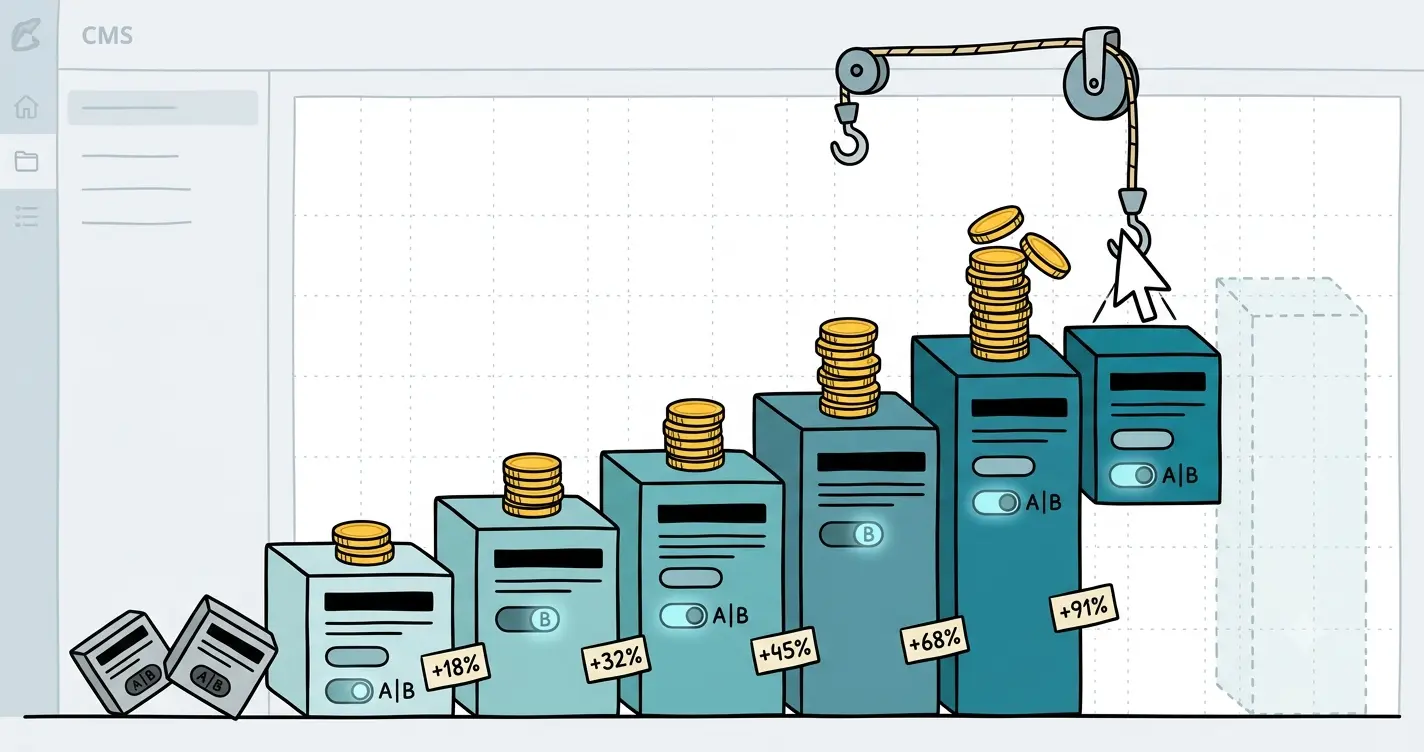
With the A/B Testing plugin marketers create a variant of a page in the admin and set how much traffic each variant gets, so once it’s set up they can run a test without a developer. The Analytics plugin shows a GA4 dashboard inside the admin: traffic, top pages, sources, journeys and lead-action conversions, with an optional tab for the A/B results. So you launch a test and see which variant wins in the same place where you edit the page, and the numbers come from GA4, so nothing extra is stored in your database.
Why this should live in the CMS, with screenshots, I wrote in A/B testing and analytics inside your CMS.
Plugins for developers and other stacks
The last 3 plugins solve more narrow problems, mostly for projects that are not a classic Next.js site on Vercel:
- HTML Preview. Live preview and click-to-edit for a site that is not built with React: Astro, Eleventy, Nunjucks or a PHP app. Editors get the same visual editing, and the site doesn’t need any SDK.
- Netlify Deploy. A Publish button next to Save. An editor rebuilds the site from the admin, sees the build log, checks a preview and publishes it, without asking a developer to trigger a build.
- JSON Form Builder. You build a new section with its fields right in the admin, on top of one Payload
jsonfield. Editors get normal inputs, images and rich text, and a new section needs no deploy and no database migration.
All 3 are in the same packages folder.
And let’s not forget that the admin itself is yours to change. Accordions are already covered by Stacked Editing, and if your editors don’t like any other default input, we replace it with a different one, as we describe in our guide to Payload admin UI customization.
What does the Ideal CMS starter add besides plugins?
So plugins are one part, and the starter is another one. What do we have there?
- SSO. It’s free, it works over OIDC with any identity provider, and it’s not even a plugin, it’s just code in the starter.
- Vectorized search. It’s not a separate plugin, it’s just a feature, because it’s a simple one. We vectorize the content on publish, store it in Postgres with pgvector, and then use this vector for semantic search. If you remove it, the search will still work, just as a plain text search.
- Blog, redirects and JSON-LD. Posts, authors and categories, redirects that editors manage on their own, structured data. So basically the things that you would have to set up on any content website anyway.
- DAL pattern. All the data access on the app side goes through one layer in
src/lib/dal.
And all of this lives in a monorepo. In the future it can make the work much simpler and reduce the time needed to cover specific requirements of the client, for example when one more project has to live next to the CMS and use the same database.
How does the starter work with AI coding agents?
The repo has a code structure that agents understand easily: CLAUDE.md, AGENTS.md and skills for Claude Code. MCP is supported as well, both for developers and for content editors. So a developer who joins the project can get into it and start adding features right away, and this is the new baseline for development right now.
What about editors who work through an LLM?
I think the same thing will happen for editors. Right now they mostly have to sit in the CMS UI, make changes, check previews, etc., and in 1-2 years an agent will be able to do all of this. Already today an editor can connect an AI tool to the CMS over MCP and ask it to create or update content, with permissions per collection. But the CMS as a place where the content is stored will stay in any case, because you still need the version system, you need permissions, you need approvals, and those are the features of a CMS that will not lose their relevance. The first steps in this direction we described in making your Payload site AI-ready.
Why is it MIT, and what is not free?
All 12 plugins are MIT, and there is one plugin outside of the repo, Content Releases, which is licensed. I want to explain both.
So why are they open source?
- We don’t want to sell licenses. First of all, we want to exclude the need for the client to pay for it. We just want the client to get it and be able to do whatever they want with it in the future.
- Transparency. We want to make sure that the client gets what they expect. With a closed plugin a client often can’t fully understand if it has everything they need or not, and with open code they can simply check.
- Our contribution. Payload itself is an open-source CMS, and we basically consume the work of the Payload team, so we also want to make our own contribution. There is a lot of AI slop on the internet right now, and from our side we’re trying to give quality solutions for free.
- R&D is paid once. We invest in the development of some tool or some workflow one time, and then other clients are able to reuse it without taking the cost of developing it.
- And of course it helps us. We get visibility, and we show our expertise, that we know what we’re doing.
Now about the part that is not free. At the moment when we were making this decision, some plugins had to be paid, and we decided to make 2 of them paid: Visual Editing and Content Releases. Later we decided to make Visual Editing open source, so now it’s 100% free, everybody can download it and use it. For Content Releases, which allows you to publish several documents as one release, the decision didn’t change yet. We added it because Sanity has it and we wanted to have parity in terms of features, and to be honest, clients don’t really ask about it.
I also want to be fair about the limitations, and there are 4 of them:
- The starter blocks are a starting point. There are around 15 of them, like hero, cards grid, carousel, FAQ and CTA, and your design system will replace them.
- There is no deploy button. There is an instruction, and to deploy on Vercel you basically press a couple of buttons, but it’s one step more than with a SaaS template, because you need to connect a database. We’re going to add the button soon.
- The admin lives at
your-domain.com/admin. We’re thinking about splitting the admin and the frontend into 2 apps in the same repo, so that the admin URL is not on the production domain and an attacker is not able to exploit this vector. - You own the ops. Plugins close the gap in features, but not in hosting and updates. What it costs is in Payload vs Sanity, Storyblok, Contentful.
The newest addition is an open-source Audit Logs plugin: a log of all the actions that can’t be changed, so if something happens, you will be able to trace it.
What is coming next? We’re improving the AI Translation and the SEO plugins, and really soon there will be an AI Content Agent as a separate plugin, where editors find, create and edit content right from a chat, with any AI provider and their own key. Until it’s released, here is where things are: Does Payload CMS have an AI content agent?
Should you take one plugin or the whole starter?
It depends on where you are right now.
Already on Payload? Then yes, of course, you can take just one plugin independently, without Ideal CMS, because every plugin is a separate npm package. I’ve already seen on the internet that people use our plugins in their own projects, and the SEO plugin, which is an analog of Yoast, is especially popular. You add it in the usual Payload way:
// apps/cms/src/lib/plugins/index.ts
import { presetsPlugin } from "@focus-reactive/payload-plugin-presets";
import { schedulePublicationPlugin } from "@focus-reactive/payload-plugin-scheduling";

export const plugins: Plugin[] = [
  presetsPlugin(),
  schedulePublicationPlugin({
    collections: ["page", "posts", "globalBlock"],
    globals: ["site-settings"],
    secret: process.env.CRON_SECRET!,
  }),
];
Starting something new? Then take the whole starter, it’s one command:
npx create-ideal-cms demo-app
create-ideal-cms will ask you for a project name, a brand color and the Postgres URL (1), and then for OpenAI, Vercel Blob and SSO credentials, which are optional (2). The plugins are installed as regular npm dependencies (3), so your project stays independent after that.
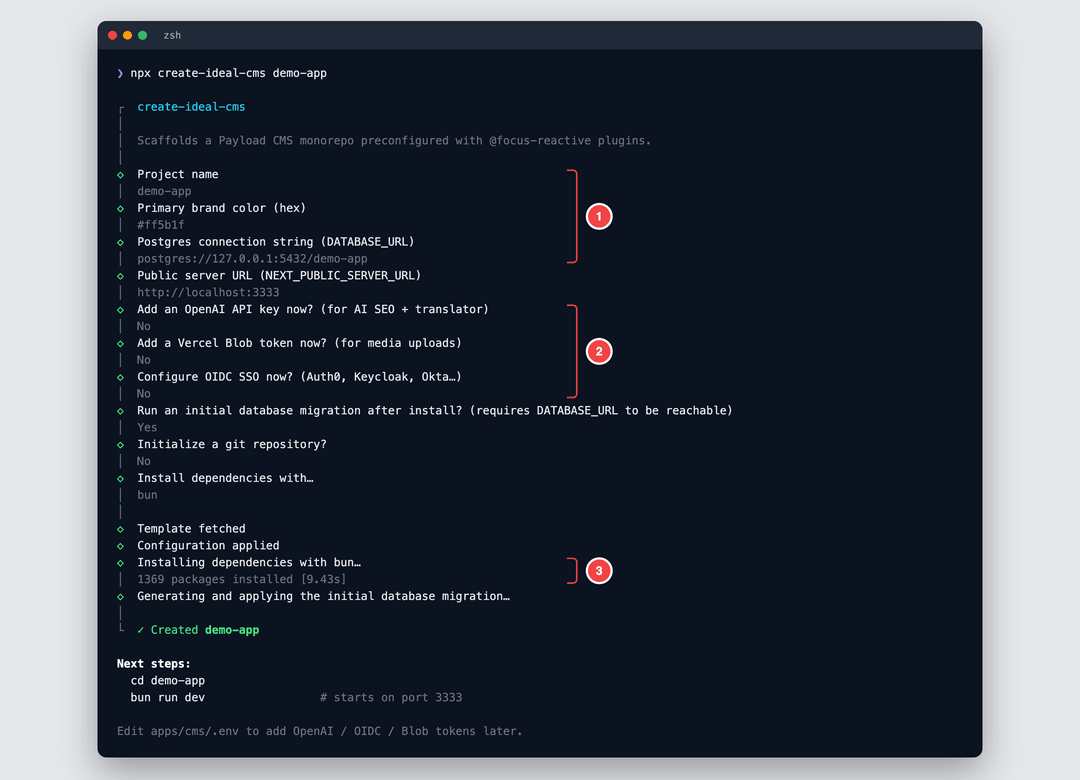 Terminal with npx create-ideal-cms: prompts for the project name, brand color and database URL, optional OpenAI, Vercel Blob and SSO steps, and the final Created message with next steps
One command and a few answers (1, 2), and the starter is on your machine with the plugins installed as npm dependencies (3)
Still deciding between Payload and a SaaS CMS? Then start with the Ideal CMS comparison table.
Of course, you can build all of this on your own, the question is only whether you want to pay for it one more time. If you need help with a Payload build or with a migration, talk to us.