
TL;DR
Payload with Ideal CMS gives you pretty much the same editor experience as Sanity, Storyblok or Contentful, but without a license: you pay only for infrastructure, around $60-130 per month for a typical project, regardless of how many editors you have. With a SaaS CMS the bill grows together with people, roles, languages and markets, and if you need SSO, all 3 of them will force you to have an Enterprise or Premium contract, starting from high five figures per year. In this article I compare the plan limits, the cost for 3, 10 and 30 editors, what sits behind Enterprise, and what self-hosting will cost you in return.
Why do companies leave a SaaS CMS they like?
I started with Storyblok. It was 2021-2022, Payload was just appearing and it was still a bit raw, so we were building projects on Storyblok, then on Sanity, and now more and more of our projects are on Payload because of its flexibility, extensibility and because it’s open source. So I know those platforms from the inside, and before comparing them I want to say what is really good there:
- Storyblok has a UI that is oriented first of all on non-technical users. It’s a bit like Framer: everything is really visual and clear, and it’s really polished.
- Sanity has a full suite of tools for editors. I already compared it with Ideal CMS one to one in Open-Source Sanity Alternative.
- Contentful is one of the oldest platforms for structured content. Its plans and limits we covered in detail in our Contentful pricing breakdown.
So why would somebody leave? In my experience it’s almost never about features. It happens when the company hits a limit of the plan, for example on seats, roles, locales or SSO, and the next step is an Enterprise contract.
Typically it’s marketing who starts the conversation about a new stack. When clients ask us about a CMS, the first thing they want is for the marketing team to be independent, so they don’t have to wait for a developer to create a page, a new landing of some different format, or just to change something. Then they want to know how much it will cost, and whether they will be able to have different roles, so one part of the team has access to some resources and another part of the team to other ones.
We see 2 types of clients here. The first one has already faced a big Enterprise contract, and the second one is just selecting a platform to scale on. In both cases we try to protect the client from an Enterprise contract they don’t need, so we evaluate different options and make sure the solution is optimized for them, and not based on SaaS marketing promotions. In the next sections I’m going to walk you through the main things to look at.
Where do the plan limits of Sanity, Storyblok and Contentful sit?
Let’s start with the limits, because this is exactly what clients usually forget to take into account. Every one of those 3 platforms has a plan that you can just buy with a card, and every one of those plans has a ceiling. I put all of them into one table, so you can see where it is for seats, roles and locales. Just to give you a feeling: in Sanity, before you hit Enterprise, the limit is 50 seats and just 5 roles, and in Storyblok and Contentful the ceiling for seats is even lower. I took the numbers from the official pricing pages of Sanity, Storyblok and Contentful in November 2026, so check them once again when you read this.
| Sanity | Storyblok | Contentful | |
|---|---|---|---|
| Free plan | 20 seats, 2 roles, 10K documents | 1 seat (max 2), 2 locales | 10 users, 2 roles, 2 locales, 25 content types |
| Paid self-serve plan | Growth: $15/seat/mo | Growth: $99/mo, Growth Plus: $349/mo | Lite: $300/mo |
| Seat ceiling | 50 | Growth 10 (5 included, +$15/seat), Growth Plus 15 | 20 |
| Roles | 5 | Custom roles on Premium/Elite only | 3 |
| Locales | Unlimited on all plans | 2 (+$20 each), Growth Plus 10 fixed | 3 |
| Usage | 25K documents, 250K API requests/mo | 1M API requests (+$10 per 1M), 2,500 assets | 1M API calls, 50 content types |
If you look only at the entry prices, it all looks pretty friendly. And this is how clients usually count: “I have 20 editors, we add them all for $15 a month, so it’s $300”. No, it doesn’t work like this, and there are 3 things they don’t count:
- The limit is not the next price step. If the limit is 50 users and after that it’s an Enterprise plan, this math works in a different way. You can’t just buy seat number 51 in Sanity or user number 21 in Contentful, you have to go and talk to sales.
- Features they expect to be included. They can expect that some features are covered automatically, and no, it’s not always the case. Most often it’s about roles and users.
- Infrastructure costs, which typically come from usage. For example, a million requests is one price, and then it’s another price, or 200 thousand images is one price, and then another one. And besides the CMS vendor itself you will still need to pay for hosting of the frontend, for support, and for third-party services which could be paid, for example search from Algolia.
Is there a way to work around a limit? Sometimes there is. For a financial media client who has 4 brands in one Sanity project we created a workaround for the limit on the number of documents, so they were not forced into the Enterprise plan. But it was a really specific use case, it worked because of the requirements of that client, and it’s not the case for most of the projects.
If you are a startup, we have a separate post about how to scale without Enterprise pricing surprises.
What does a headless CMS cost when the team grows from 3 to 30 editors?
Now I want to show you the same thing in numbers. Let’s take 3 use cases: a small team of 3 users with 1 locale, a growing team of 10 users with 3 locales, and a big team of 30 users with 6 locales which also needs SSO.
| Monthly cost | UC1: 3 users, 1 locale | UC2: 10 users, 3 locales | UC3: 30 users, 6 locales, SSO |
|---|---|---|---|
| Sanity | $0 on Free, or $45 on Growth | $150 (Growth) | Enterprise quote |
| Storyblok | $99 (Growth) | $194 (Growth, at the 10-seat cap) | Premium/Elite quote |
| Contentful | $0 on Free | $300 (Lite) | Enterprise quote |
| Ideal CMS (hosting) | ~$60-70 | ~$60-70 | ~$110-130, up to ~$500 at high traffic |
For the small team I have to be honest: Sanity and Contentful are free at this size, so they are cheaper than Ideal CMS, and it’s fair. Just keep in mind that the SaaS number is only the license, while the Ideal CMS number already includes the CMS, the database and the frontend.
For the growing team all 3 SaaS options are already more expensive, and what’s important here is not even the price itself. In Storyblok, for example, at this point you are already at the ceiling of seats, so one more editor will move you to the next plan, which is almost 2 times more expensive. And Ideal CMS is still the same, because nothing has changed in terms of infrastructure.
For the big team there is basically no price at all. SSO is not a part of any plan that you can buy on your own, so in all 3 cases you go to sales and wait for a quote. From what we see on our projects, an Enterprise contract starts from high five figures per year, many times more than the self-serve plan. And for a mid-market business, which is our typical client, it’s really aggressive.
So what actually moves the price? With SaaS it moves with people, roles, languages and markets. It hurts the most when the company is international and they have a lot of markets and a lot of locales. They work, work, work, then a new market appears or they add a new translation, and they already pay several times more. With Ideal CMS the price moves only with traffic, so 20 more editors or 3 more locales add nothing to the bill.
Here are 3 examples from real projects, and keep in mind that these are our estimates, not invoices:
- A company that needed Enterprise features. Running costs with Payload were £5-18k a year, and the same project with Sanity Enterprise was starting from high five figures a year.
- A small Contentful site with 3 editors. Contentful Lite is $300 per month, or $1,150 with an extra Lite space, and Payload hosting for the same site was about $30 per month. To be fair, to this client we said that Contentful on Lite is not too expensive for them, because Payload is the cheapest one to run, but a part of the cost moves into developer time.
- A long-term enterprise client on Storyblok. They had 3 spaces, they were already at the 50-user limit, and the pricing update could move them to a contract starting from high five figures per year.
What sits behind Enterprise: SSO, roles, locales, audit logs
What is important here is that it’s not the number of seats that sends you to Enterprise, it’s the requirements. I’ll give you an example of a US healthcare provider. They were choosing between 3 CMS platforms: Payload, which is an open-source one, and 2 SaaS providers, Storyblok and Sanity. For up to 5 editors both SaaS options cost about $100 a month, so at first it all looked fine.
Then came their security list: SSO, custom roles, an audit trail and data storage only in the US. And those features will force you to have an Enterprise contract on these 2 platforms, while Payload can give you the same capabilities with no license, and all of its costs are essentially infrastructure that you will still need to pay in case of Storyblok and Sanity anyway. So from a price standpoint Payload was a clear winner. But there is the other side too: if the SSO requirement can be dropped, then Sanity is a good second option, because without SSO it won’t force you to an Enterprise contract and it will cost around $15 per month per seat.
Which plans include SSO?
SSO is an Enterprise feature in Sanity and Contentful, and a Premium or Elite feature in Storyblok.
Why does a client need SSO at all? To control access. It’s really important for security, so attackers have fewer options to get into the system. And in corporate environments companies use their own login providers, so we can’t just tell them “here, for the CMS, you will use a login and a password”. No, for them it doesn’t work, for them it’s a dealbreaker.
So yes, in some cases SSO decided the choice of CMS in favor of Payload. One of them was a global engineering company: on Storyblok the SSO requirement would push the contract to Enterprise regardless of how many editors they have.
In Ideal CMS, SSO is free and it works over OIDC with any identity provider. It’s just code in the starter. In vanilla Payload, SSO is an Enterprise feature too, and I talk about it in Payload vs Strapi vs Directus.
How many roles do you get?
Sanity Growth gives you 5 roles and Contentful Lite gives you 3, and in Storyblok custom roles are available only on Premium (10) and Elite (unlimited). In Payload, roles are just code: you define them in the Users collection (1) and then use them in the access rules for any collection or even any field (2). So we can configure it really granularly, so that the roles you want have access to certain fields, and other roles don’t have the same level of access. For example, a “Legal reviewer” role is a few lines of code, and not a plan upgrade.
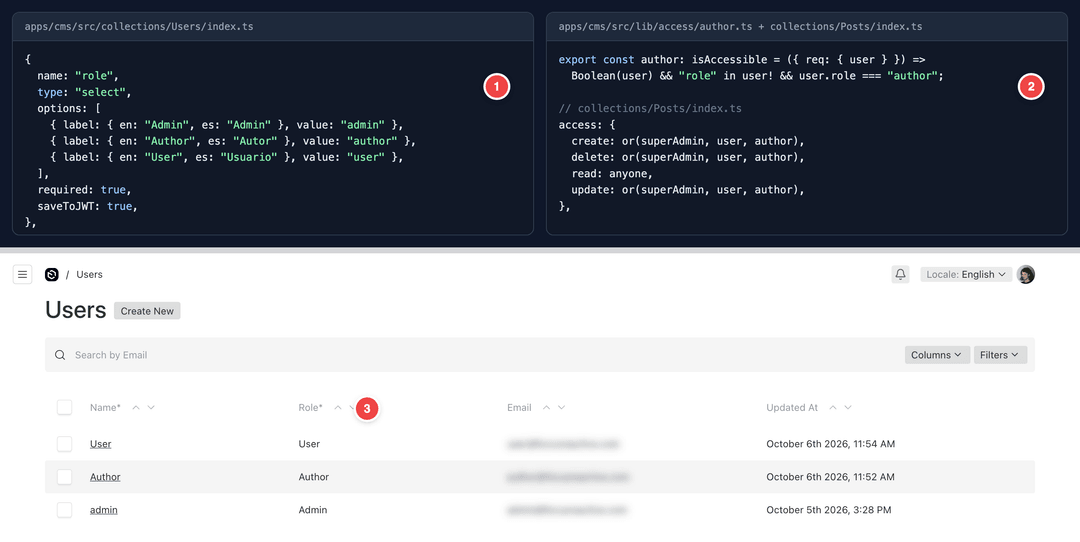 The role field and an access rule in the Ideal CMS code, and the Users list in the admin with the Role column
Roles live in code (1, 2) and show up in the admin (3). No plan decides how many.
What do extra locales and environments cost?
An extra locale is $20 per month on Storyblok Growth. An extra Sanity dataset is $999 per month, and an extra Contentful Lite space is $850 per month. In Payload, languages are a part of the foundation, so adding, for example, a third language or a fourth one is as simple as adding one line in the configuration (1), and a staging environment is just one more database branch.
Everybody also counts locales in a different way. If you have English for the US and for Britain, or French for France and for Canada, one vendor can count those 2 regions as 1 locale, and another one as 2, so check it before you sign. For the content side of it, we have a guide to headless CMS localization.
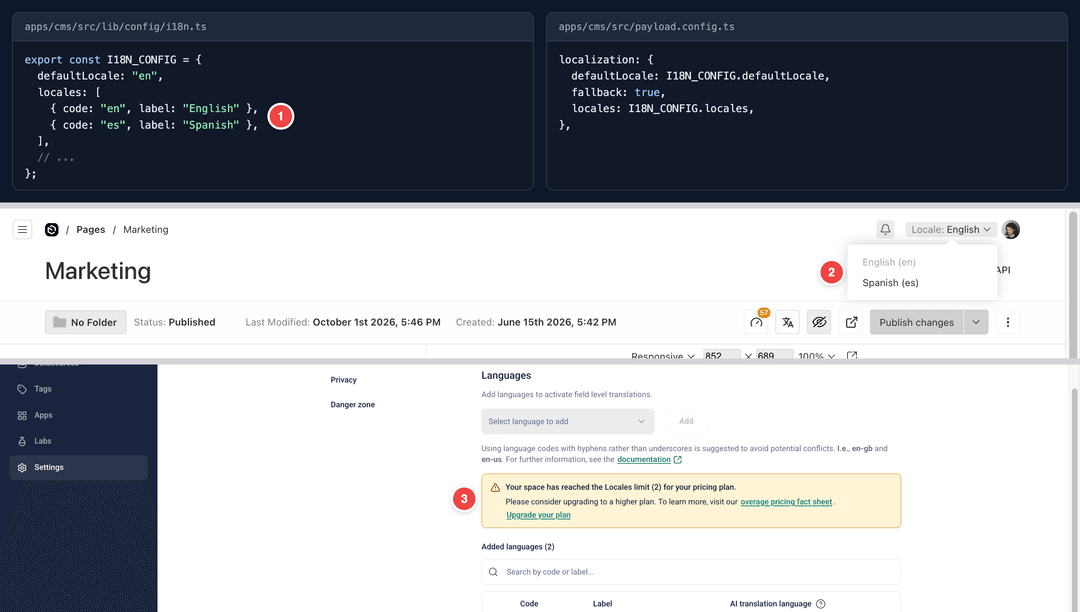 Locales in the Ideal CMS config and the locale switcher in the admin, next to the Storyblok languages setting that shows a locales limit for the plan
In Ideal CMS a locale is a line in the config (1) and a switcher in the admin (2); in Storyblok the same setting stops at the plan limit (3)
Who has audit logs and approval workflows?
Here I have to give credit to Storyblok: it has an activity log on every plan, with retention of 1 day on Starter, 30 days on Growth and 180 days on Premium. In Sanity the audit log is only for Enterprise. Contentful workflows (up to 5) exist only on an extra Lite space for $850 per month, and Storyblok custom workflows start from Premium.
Ideal CMS has an open-source Audit Logs plugin. Approval workflows are also based on a plugin, and we tailor it to the client’s operational workflow. For one client it was Draft → Review → Publish, so an editor is not able to publish any content until it’s approved.
Do editors lose anything on Payload?
I would say no, and let me explain why with Storyblok as an example.
What do editors love in Storyblok? The main thing is the Visual Editor, it’s top-notch. You click on a text, the field opens, you start typing right away, and the page updates while you type. We repeated exactly this feature for Payload as the open-source visual editing plugin, and presets we repeated too. More about the plugins is in Payload++.
Now about the look. If you compare with Storyblok, the Payload admin out of the box is more minimalistic and straightforward, and we do hear feedback about it. Some clients don’t like accordions, for example.
But in Payload the admin is fully customizable, and this is the difference. Any input we can replace per project. So we adapt the admin to the editors, and not the editors to the admin. How far it can go you can see in our guide to Payload admin UI customization.
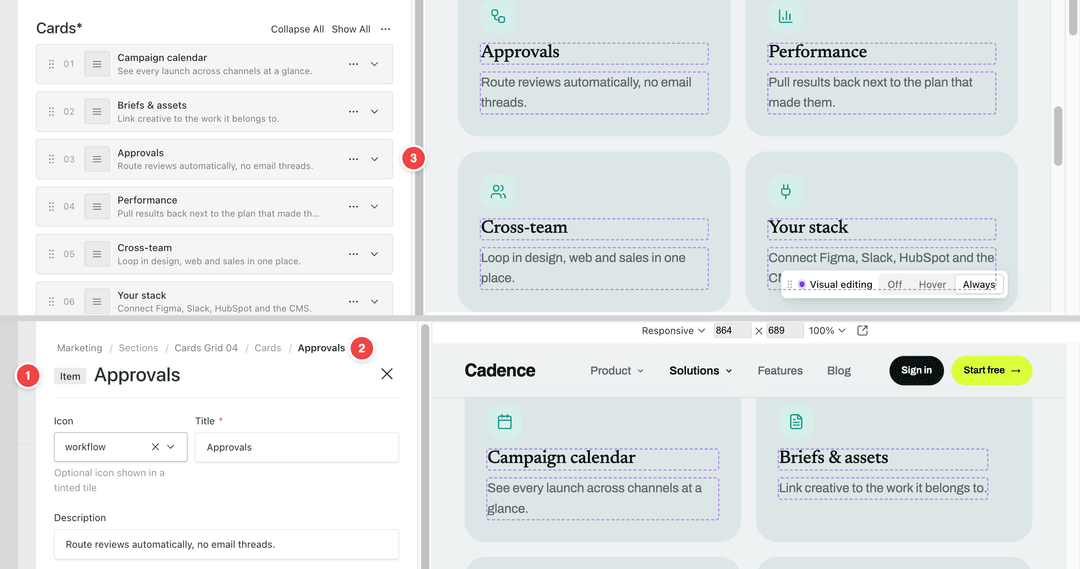 Stacked Editing in Ideal CMS: a card row opens as a separate panel with breadcrumbs from the page down to the card
In Ideal CMS a nested row opens as its own panel (1) with breadcrumbs (2), and the rows are short cards (3) and not accordions inside accordions
Who owns your content, and what does it cost to leave?
In SaaS, the lock-in hides first of all in the platform. When a client decides to run the CMS on a SaaS vendor, they agree to use its infrastructure with everything that follows: their servers, their database, their own specific data format, and no direct access to all the data. All the logic and all the data are fully tied to the SaaS provider.
In Payload, the content lives in your own Postgres, MongoDB or SQLite database.
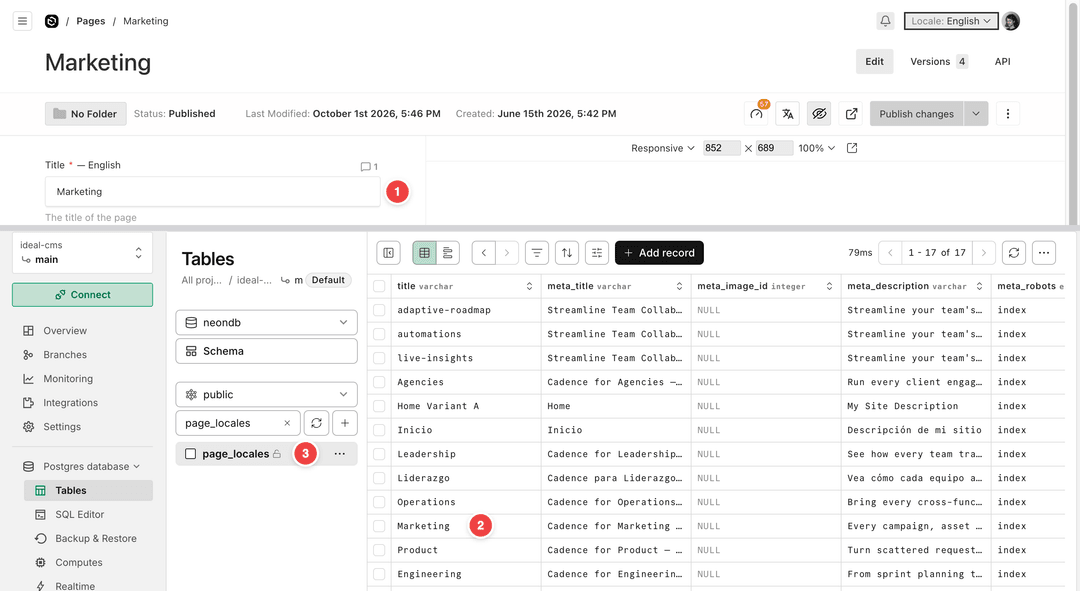 A page open in the Ideal CMS admin and the same page as a row in the page_locales table in the Neon console
The same page in the admin (1) and in your own Postgres (2), in a table per locale (3). No export step needed.
The content model shows the difference well. In Contentful it lives in the UI (1), and in Payload it’s TypeScript in your repo (2). And in Contentful it counts against the plan. If I make a simple section, it’s 1 content type, but if I make a more complex one, like a carousel with cards where the cards have variants (3), it eats not 1 but 3 or even 4 of the 50 content types on Contentful Lite.
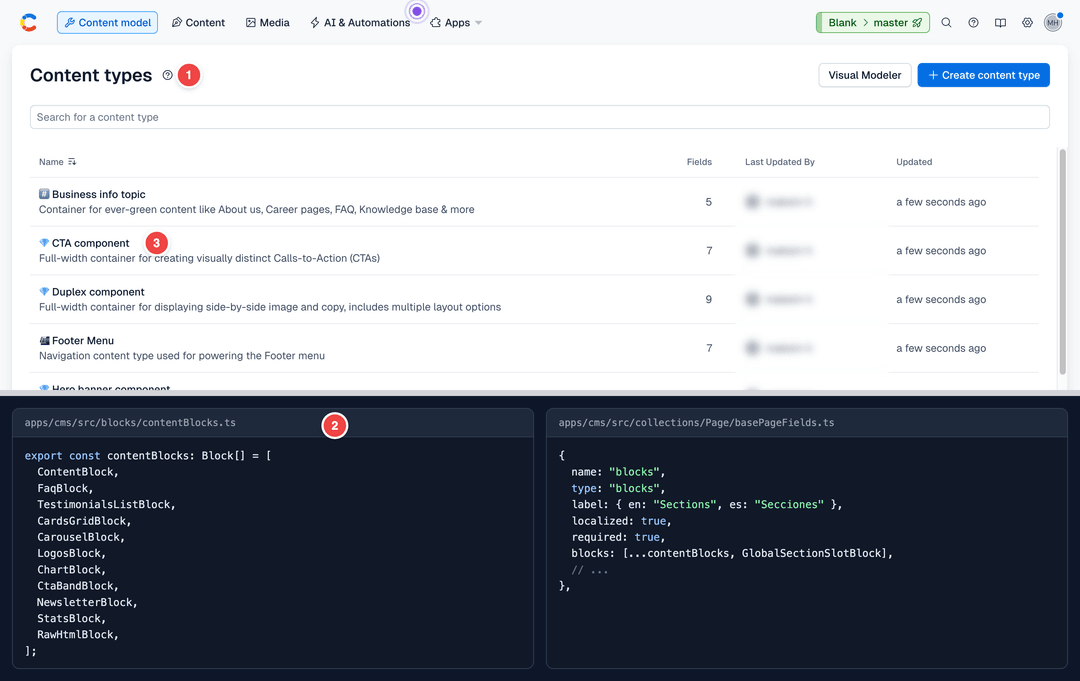 Content types list in the Contentful web app, where every page section is a separate content type, above the same sections defined as an array of blocks in the Payload code
In Contentful the model lives in the UI (1), and every section is its own content type (3): the Marketing website template alone creates 16 of them. In Payload the same sections are a list of blocks in your repo (2).
How long does it take to migrate from a SaaS CMS to Payload?
It depends a lot on the scope and the complexity of the project. Some simple sites can be migrated one to one almost automatically, in 1-2 weeks, because there are tools for this on the market now, and we have ours too. If we’re talking about a full big project that needs to be rebuilt, the timeline can vary from a month to a year.
Of course you always pay for servers, hosting and a database on the new platform, but the main cost of leaving is development hours. And there are 2 hard parts here:
- Data export. Some platforms store the data in their own proprietary format, and it can take time just to transform it into something more usual.
- The frontend. The markup is the smaller problem, because in the browser everything is HTML and CSS, and we can take it from there. But if the frontend is made on a framework like Vue or Svelte, we can’t just Ctrl-C, Ctrl-V the same UI logic and animations into a new project on another framework.
Let me give 2 real examples. A US-based parking service we have worked with for years was on Storyblok. Storyblok became expensive at their scale, and the client wanted to own the entire stack. We moved 16,500 pages from Storyblok to Payload in 8 weeks of active work, and verified the result page by page.
The second one is from Contentful. We migrated Glimble (by Arriva) from Contentful to Payload: 49+ components and 2 markets, NL and IT. High SaaS license costs were replaced by self-hosted infrastructure with predictable costs, they also got 2FA and granular user roles, and we have been working together for 2+ years.
The process itself is described in our CMS migration guide.
What does self-hosting Payload really cost?
Hosting on Ideal CMS really costs very little. For a classic marketing website the price will not go above $60-70 per month. For projects with more dynamic logic, when the website is not just marketing pages but also has a personal account, orders, a cart and personalized data, the costs can grow to $110-130 per month.
Where do those numbers come from?
- Vercel. During development the bill is a bit higher, because you need to add seats there, so if it’s 2 developers, it’s an additional $40, and if it’s 3 developers, it’s $60.
- Neon for Postgres. It’s also paid, and it’s somewhere around $20-30 per month.
- Media. If we’re talking about sites with a lot of video and a lot of images, then of course you need to pay for bandwidth, because the more people download them, the more we have to pay. In such cases we suggest clients to have just a file storage on Cloudflare R2, because Cloudflare has free bandwidth, and their plan is about $5 per month.
If we’re not talking about millions of users who actively open their account and make orders, then with confidence I can say it will be under $100 per month. One caveat is that compliance changes the math. For a healthcare site, our estimate for HIPAA-ready Vercel and Neon plans added about $1,100 per month. The Ideal CMS landing gives the full range, from $20 to about $500 per month, and if the Vercel line worries you, read Vercel cost optimization.
Now about the support:
- Updates. An update of Payload and Next.js takes about half a day: you download the new versions and make sure that everything works. Updates that don’t need any code changes can run automatically, but we still advise clients to have a person who watches it, because you never know which update can break something.
- Backups. They are basically covered, because Neon has automatic backups (1). If a client needs physical files stored somewhere, we set up an automation which makes a database dump as often as needed and uploads it where the client wants.
- Bugs and new requests. It really depends on the complexity of the project, so we have several support packages: 20, 40 or 60 hours per month.
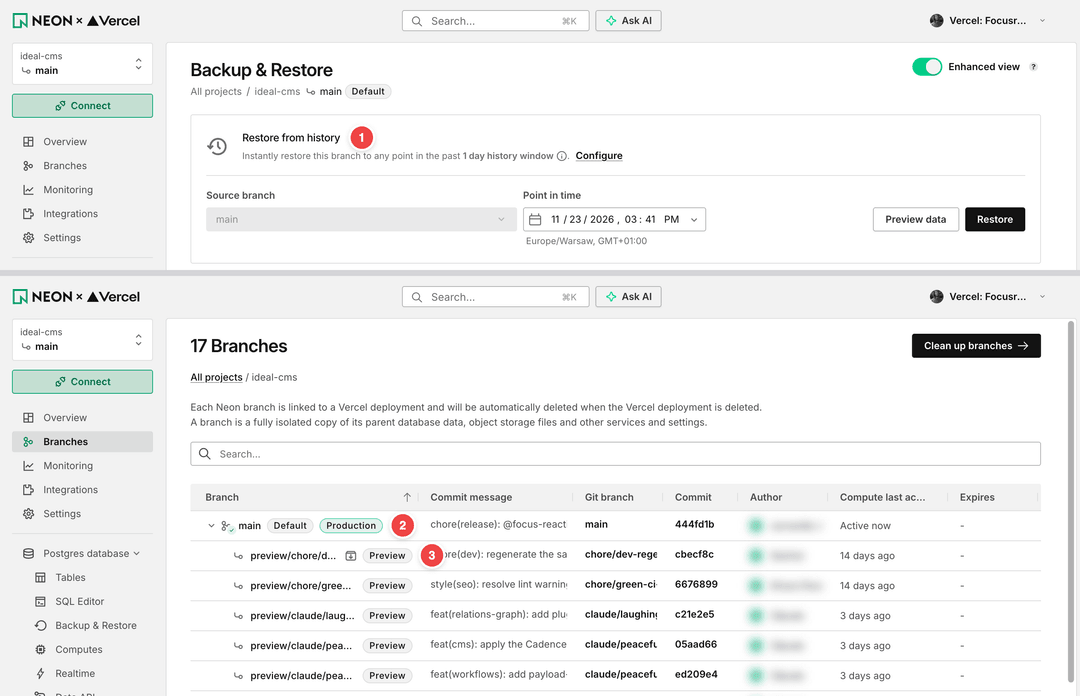 Neon console of the Ideal CMS project: point-in-time restore, and the branches list with the production branch and preview branches
Point-in-time restore (1), the production branch (2) and a separate database branch for every preview deployment (3) are part of the database plan, not a $999 add-on
And here is where Payload and Ideal CMS honestly lose today. You need to understand that it’s something we host ourselves, and we are responsible for the infrastructure. Sanity is a proprietary platform, so they update the servers, fix the bugs and support their system, and all you need is a frontend app that connects to their API. Images, the API, the database, the interface: on SaaS platforms it’s all collected in one bundle.
With Payload we collect it all together on our side. We choose: for images we use this, for the database we use that. It’s a bit of a constructor, and we are responsible for how these parts work with each other, which creates more places where something can go wrong.
There is a managed option too, Payload Cloud. New projects there are paused right now, but the Payload team says they are working on what’s next, so I expect a managed option to be available again soon.
Should you choose a SaaS CMS or Payload?
To summarize: in terms of features it’s pretty much a tie. SaaS wins when you want everything polished and nothing to maintain, and when budget is not a concern, because with more critical features you will most likely hit the Enterprise wall. Payload wins when you grow, when you want to have flexibility and to control your costs.
So when is a SaaS CMS the right choice? I can name several cases:
- You are a startup with a really small team and you want the site live yesterday, without thinking about hosting, a database or updates. To be fair, Payload with Ideal CMS can be set up with one command as well,
npx create-ideal-cms, so it’s actually fast too, but with SaaS you don’t have to think about anything. - You don’t have a tech team. Imagine a publisher: 20 editors, a boss and a deputy, and all of them are about content. With Payload they would need somebody on contract who watches the logs and the infrastructure.
- You are a really big enterprise, like Puma, and you need many countries, many languages and thousands of employees in one space. There the infrastructure risk is higher than the cost of the license.
- You are a tiny business that just needs a nice site. My Spanish tutor wanted a website, so she picked a Framer template, paid $15, connected a domain, and that was it.
For mid-market companies that have outgrown the self-serve plan and need SSO, more roles or more locales without an Enterprise quote, Payload with Ideal CMS might be the best solution.
In any case it’s a trade-off between money, speed and responsibility, and you can’t get away from it. Everything in engineering is a trade-off.
We recommend SaaS ourselves when it fits. For a team without in-house developers we recently recommended Sanity, because it’s fully managed and has the fewest moving parts.
We’re an official Payload partner, and we have delivered 19 CMS migrations. Here is the feature-by-feature comparison table, and the code is open on GitHub. If none of the 4 fits, see our list of the best Sanity and Storyblok alternatives.