
TL;DR
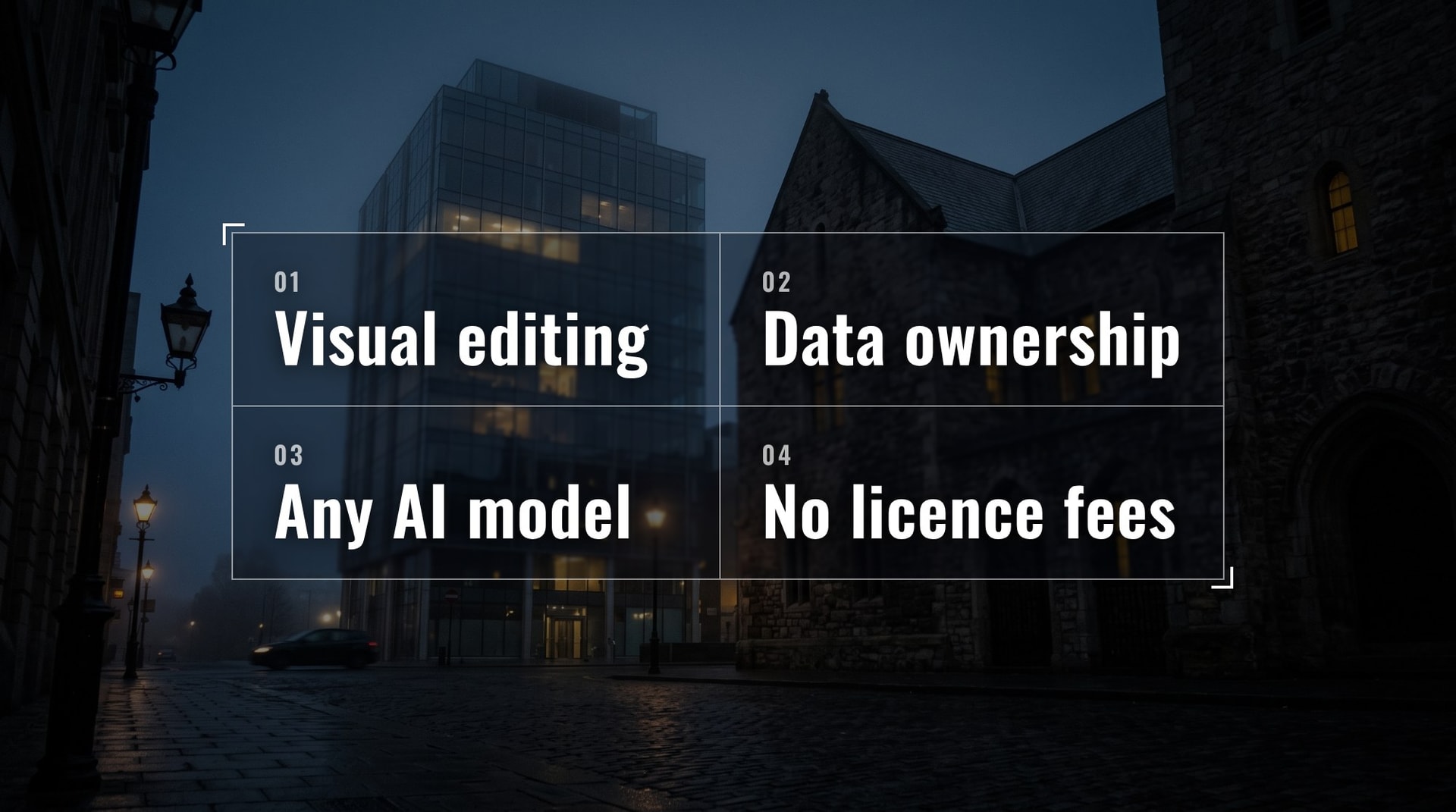
Ideal CMS, built on the open-source Payload CMS, is a free alternative to Sanity that matches its editor experience with built-in features: click-to-edit visual editing, an SEO plugin, and AI content tools. The main difference: Ideal CMS is self-hosted, so you own your data end to end and pay only for infrastructure, while Sanity runs on its own platform with usage-based pricing and an Enterprise tier from $100,000 per year. Sanity fits small teams and large enterprises; Ideal CMS fits mid-market companies that have outgrown Sanity’s Growth plan but don’t want to pay for Enterprise.
Why Sanity is so popular, and what comes with it
Sanity is one of the best CMS platforms. I think the reasons can be split into 2 groups:
- It offers a full suite of tools for editors.
- It has open-source code that developers can easily use to build all sorts of applications.
But those great features come with some baggage, and before making a critical decision about which CMS to choose, you need to know about it.
Sanity is separated into two parts:
- the Sanity framework (open-source code that helps you build with it)
- the Sanity platform (proprietary technology, essentially hosting that charges you based on usage)
How much does Sanity cost, and where are the limits?
The Sanity platform has three tiers:
- Free. Good for testing the water on smaller projects, maybe a startup with a few pages.
- Growth. $15 per seat, and you only get so many seats.
- Enterprise. Starts at $100,000.
Depending on your business or the solution you’re trying to build, you might hit different limits, which might or might not be critical for you.
One of those limits is the number of pages. Companies that do programmatic SEO and have a lot of content hit it right away. We’re talking tens of thousands of pages.
Another limit is the number of seats and roles. Before you hit Enterprise, the limit is 50 seats and just 5 roles.
When a company scales, goes international, or expands, those limits, along with visitor numbers, force the business to pay a $100,000 minimum. That is not necessarily reasonable for what the business, editors and developers actually get.
What is the best open-source alternative to Sanity?
What if I told you there is a solution that covers almost everything Sanity has, but it’s free and open source?
The solution is Payload CMS, a Next.js-based CMS. Like Sanity, it covers all the features editors, developers, and, most importantly, businesses need.
But Payload on its own is a framework, not a finished editorial product. That’s why we built Ideal CMS: Payload with batteries included. It adds the pieces editors expect from Sanity out of the box: click-to-edit visual editing, an SEO plugin, AI content tools, and a ready set of sections. With those batteries, you get the same editor experience and logic as in Sanity, on an open-source stack you own.
You don’t have to pay for a license. You can deploy it to your own infrastructure or use convenient options like Vercel. You own the data, because the database is yours. You can self-host it or use a managed option like Neon, which integrates well with Vercel.
Now I want to show you real features in Sanity and Ideal CMS side by side, so you can see the difference. Of course, there is a difference between a product from a nine-figure company and an open-source solution, but you will be surprised how insignificant it can be.
How is content organized in Sanity and Ideal CMS?
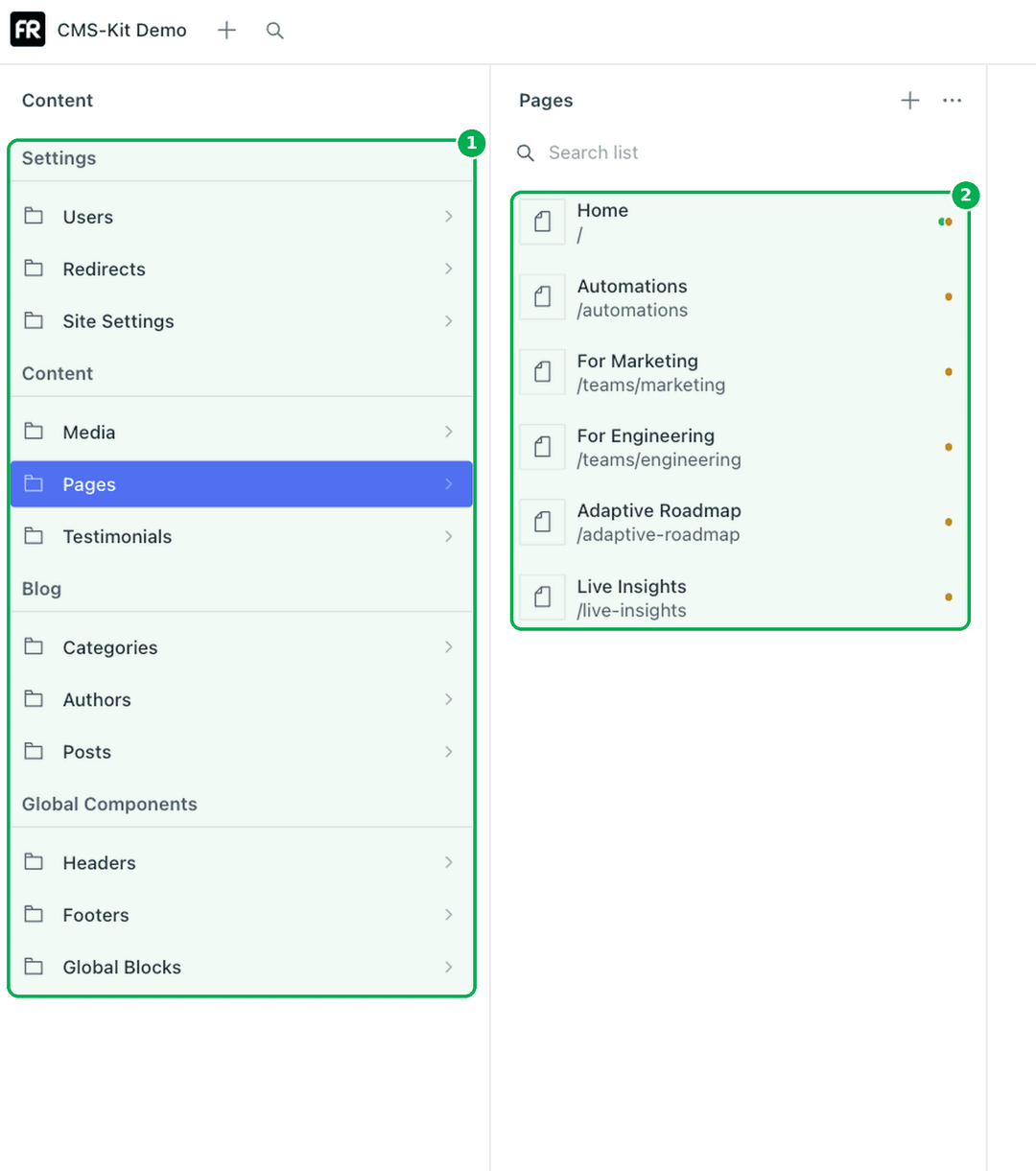
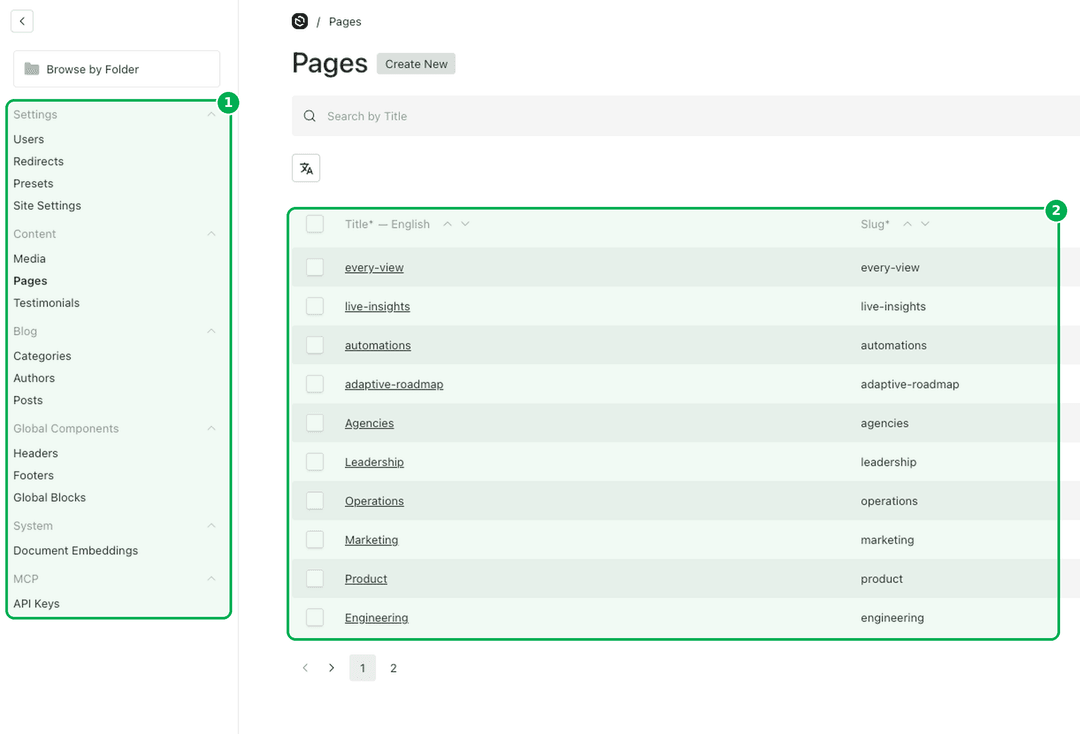
Let’s start with what editors see first: how content is organized. In both CMSs, the content types sit on the left (1). Pick one, and you get the list of documents of that type (2). Sanity calls it the Structure tool; Payload calls it the collections sidebar and list view.
Sanity content types (1) and the documents inside (2)
 sanity structure annotated
Sanity content types (1) and the documents inside (2)
 payload structure annotated
Ideal CMS collections (1) and the documents inside (2)
Same mental model, same two clicks to any page. An editor moving from Sanity will find their way around Ideal CMS in minutes.
Visual editing and preview: Sanity vs Ideal CMS
Next, page creation and the editing flow with visual editing and preview. For editors, this is where they spend most of their time in a CMS.
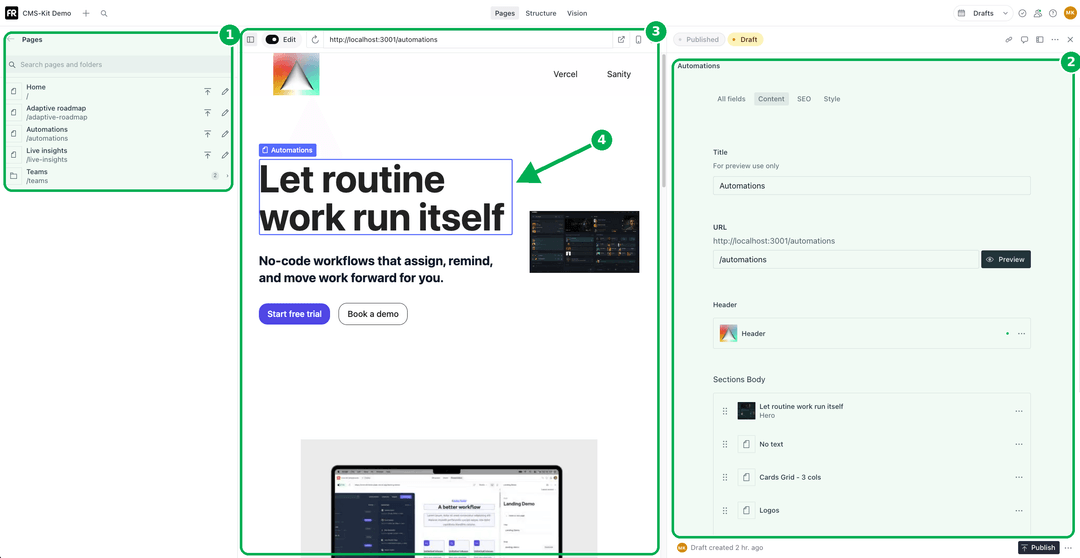
As the screenshots below show, each UI is branded towards its company, but conceptually it’s the same:
- Navigation to other pages and collections (1)
- Fields and sections of the page (2)
- Live preview of the page (3)
- Click-to-edit right in the preview (4)
 Sanity visual editing
Sanity Presentation: navigation (1), fields (2), live preview (3), click-to-edit (4)
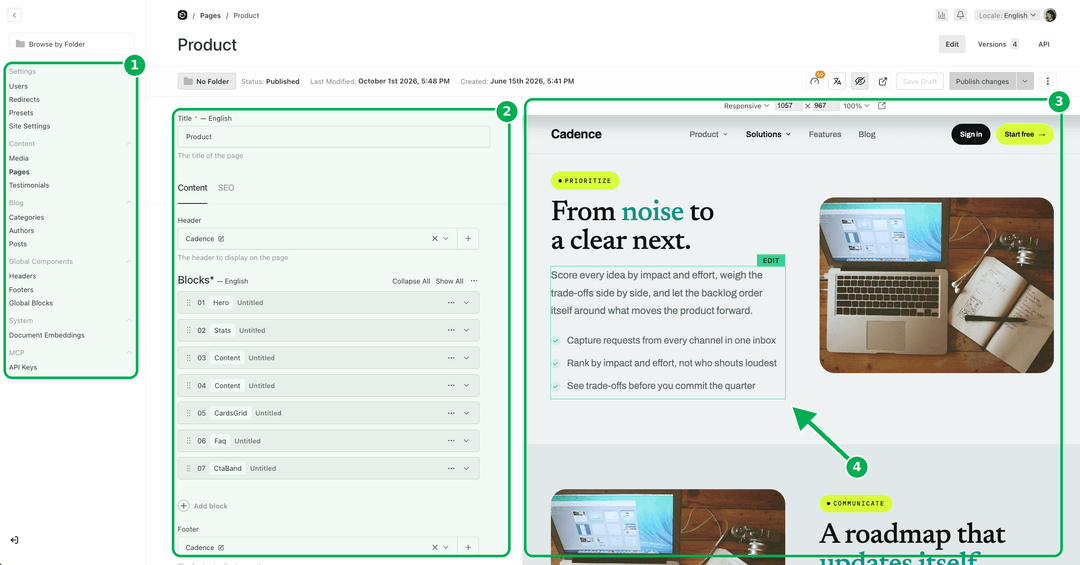 Ideal CMS visual editing
Ideal CMS: navigation (1), fields (2), live preview (3), click-to-edit (4)
Both have click-to-edit (4), which is super convenient for editors. When the library of sections grows, editors can start having trouble finding the right fields. Both products cover it.
Sanity click-to-edit
Click the hero in the preview, and its fields open
Ideal CMS click-to-edit
Click a heading in the preview, and its field opens.
One difference is where Sanity outperforms: the page updates on every keystroke. In Sanity, when you edit a section, you see the change within a few seconds. In Ideal CMS, you need to click Save Draft before the page updates.
On the Payload side, this functionality comes from our open-source Click-to-Edit Visual Editing plugin, which is part of Ideal CMS. Live updates on every keystroke are in our backlog, and we’re looking forward to implementing them and matching Sanity’s behaviour.
Schemas and content modeling: how do they compare?
The next important thing for anyone working with Sanity or Payload is how to build schemas, data types, and collections: how to define the fields a business actually needs. Both take a similar approach: you define your content structure in code.
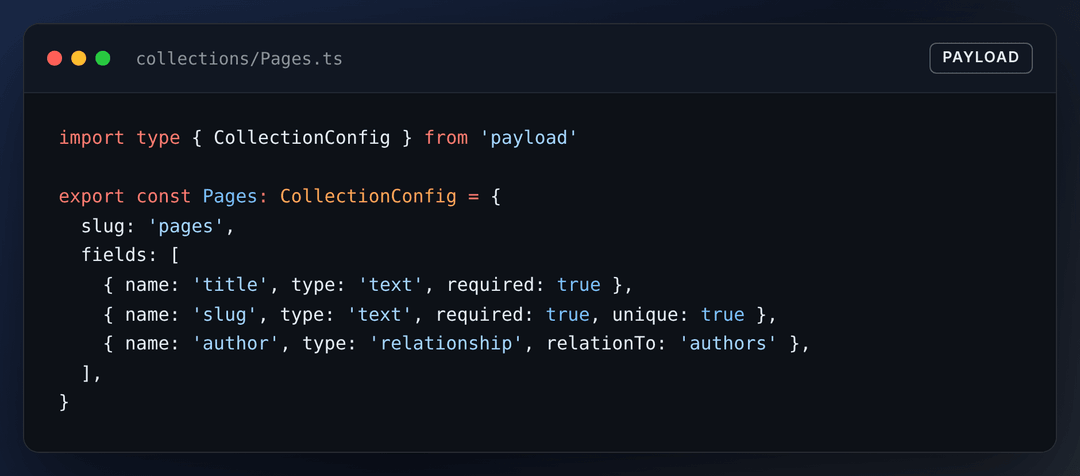 payload schema example
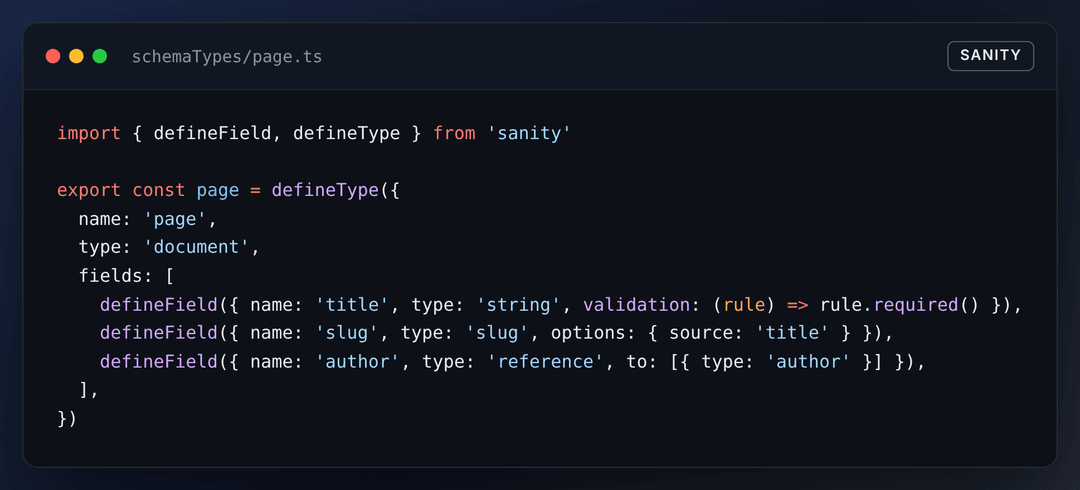 sanity schema example
As you can see, conceptually it’s pretty much the same. Yes, the APIs differ, but for a developer it doesn’t matter which one they build with.
Both support nested fields, custom UI for fields and references between documents. Both have version history, drafts and collaboration features like comments.
Who owns your data in Sanity and in Payload?
With Payload, you store your data in a database of your choice: Postgres, SQLite, or MongoDB. In all of those cases, you own the data. You can switch providers, extract it, reformat it, and reuse it. The same goes for images and uploaded assets like videos and documents: you choose the storage, and you own it.
In Sanity, it’s a little different. Sanity has its own platform and data format, so you cannot simply move to a different provider and keep using it. This is the main problem. You can export your data from Sanity and normalize it into the format you like, but it will cost you time and money.
Data ownership gives you a moat when you need to move quickly and change something in your stack. It also matters for AI: you want to build your own AI on your data without depending on a third-party provider.
AI features: Sanity AI vs Ideal CMS
Since we got to AI, let’s compare the AI capabilities of both products. Sanity has great AI coverage, from basic content writing to AI translations to an AI content agent. It really sets the tone for what a CMS should offer in terms of AI.
Ideal CMS is on par here, and on top of that, you can use any model from any provider, and you fully control what data you give it. You can connect any data source as context, so the AI has everything it needs to produce a good response. We tested this head-to-head: in Sanity Content Agent vs. Payload: an open-source alternative, tested on 31 real editorial tasks.
Yes, Sanity’s AI features are integrated into the CMS more natively. On the other hand, it’s proprietary AI: you don’t fully control what feeds into it, or what the long-term consequences might be. And don’t forget that intelligence keeps evolving: frontier AI companies like Anthropic and OpenAI spend hundreds of billions of dollars improving their models. Being able to plug the best, newest model into your CMS is a real advantage.
There are two more advantages when you don’t depend on a third-party CMS and AI provider:
- You can cut costs drastically by choosing the level of intelligence you actually need, so you don’t overpay.
- You can hook it up to a self-hosted model and feed it any data, because you control it and the data doesn’t go to anybody else.
Long-term support: hiring, upgrades and maintainability
One more point I want to cover from the business side: supporting, upgrading, and maintaining such a CMS project over the long term.
Both Sanity and Payload work with different web frameworks. Sanity offers an even wider choice, but typically it’s Next.js, so it’s easy to find developers on the market: it’s an industry standard. For querying data, though, Sanity uses its own query language, GROQ, which isn’t widely known. Payload uses standard databases like Postgres, SQLite, and MongoDB. Those are well-known, established technologies, so every developer should be familiar with them and have no problem adopting them.
Both products are actively developed and keep shipping new features. Payload version 4 is in testing right now and will bring even more capabilities. Let’s not forget that Payload was acquired by Figma. It’s not a nine-figure company focused solely on its CMS like Sanity, and Payload has a small team, but it’s now part of a public company. As I see it, after the acquisition, they kept doing what they were doing, just under a different roof.
Sanity vs Ideal CMS: full comparison
Here is an extended comparison of both platforms from a business-impact standpoint.
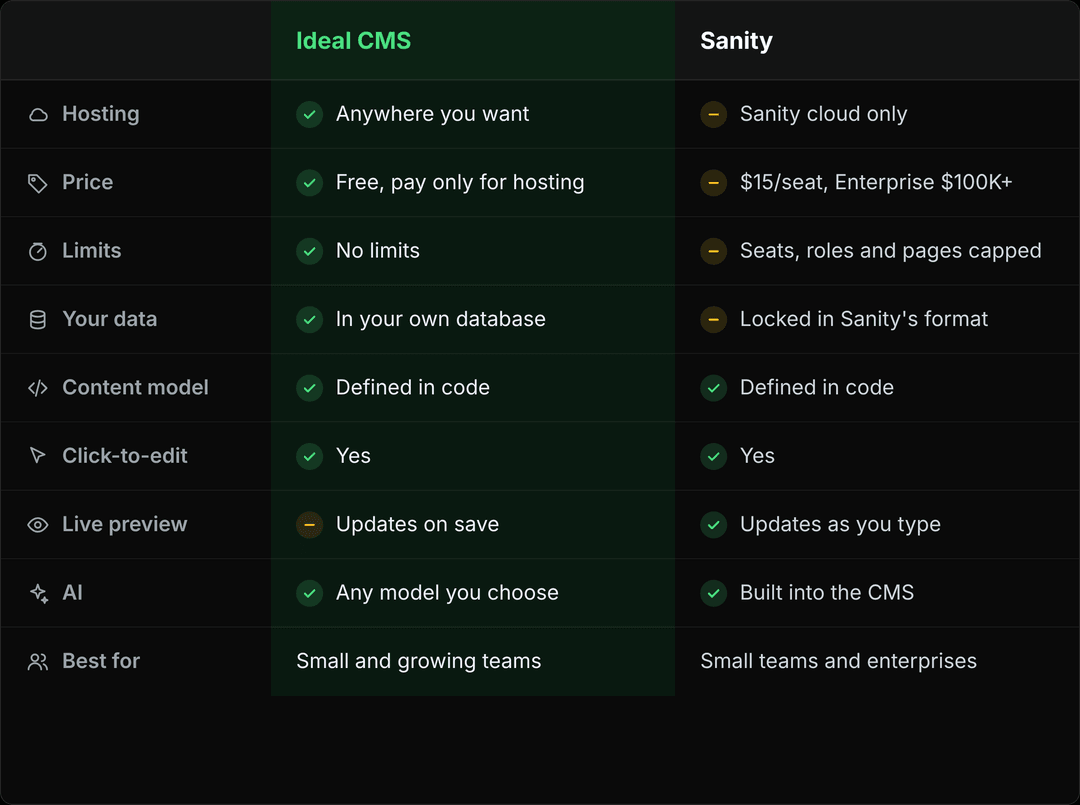 Sanity vs Ideal CMS comparison
Ideal CMS is self-hosted with no licence fee and your data in your own database, while Sanity runs on its own platform with per-seat pricing and an Enterprise tier from $100,000. Both provide similar editorial and developer experience.
Should you choose Sanity or Ideal CMS?
To summarize: Sanity and Payload give developers pretty much the same set of tools to work with content and implement its structure. Sanity is hosted on the Sanity platform, while Payload can be self-hosted with full end-to-end data ownership. Ideal CMS adds the batteries on top of Payload, so editors get the experience they’re used to in Sanity.
If you are a small team without that many pages and that much traffic, Sanity could be the perfect fit. It’s also a great fit for large enterprises, which make up a big part of Sanity’s client list, like Puma.
But for mid-market companies that have outgrown the limits of the regular plan and aren’t yet big enough to comfortably pay more than $100,000, Ideal CMS might be the perfect solution.
It’s also common to start with Sanity and later switch to Payload. We offer migration services and have already migrated more than 10 projects, from legacy technology like WordPress or from a modern stack like Sanity.
We offer migration services and have migrated more than 10 projects, from legacy technology like WordPress to modern stacks like Sanity.
Hopefully, this article helped you understand the pros and cons of both platforms and the business implications of the choice.




 Aleksei Zhilyuk
.png&w=828&q=90)

.png&w=828&q=90)