


FocusReactive AI Migration Tool migrates any website to a target CMS (Payload or Sanity) from its URL.
The output is a ready-to-run Next.js project. The tool rebuilds the source site in full, extracting everything it needs to generate these parts of the site:
- pages built from blocks in the same order as on the original;
- React components styled with Tailwind CSS: page blocks, template page sections, header, footer, and shared UI elements;
- a design system: a Tailwind theme with colors, typography, breakpoints, spacing, and border radii;
- interactivity and animations: tabs, accordions, sliders, hover effects, scroll animations, and page-wide effects like smooth scroll;
- a CMS schema: page blocks, collections, and globals;
- collection item pages;
- an admin panel;
- content and media seeded into the CMS;
- SEO settings for every page, so it looks the same in Google and in social media link previews as on the original.
The source can be a Webflow site, a Framer site, or any other published website. The tool detects the platform on its own from signals in the homepage HTML. For Webflow and Framer, it uses platform-specific adapters to migrate some parts of the site more accurately.
How does AI Migration Tool turn site content into an editable CMS?
AI Migration Tool is quite accurate at recognizing what data a page contains and moving it into the CMS. Text, images, links, and collection items don’t stay hardcoded in the markup. They become editable fields and documents with the right types and relationships.
Regular pages are built from blocks in the same order as on the original. In the admin panel, each section of the original page becomes its own block (1).
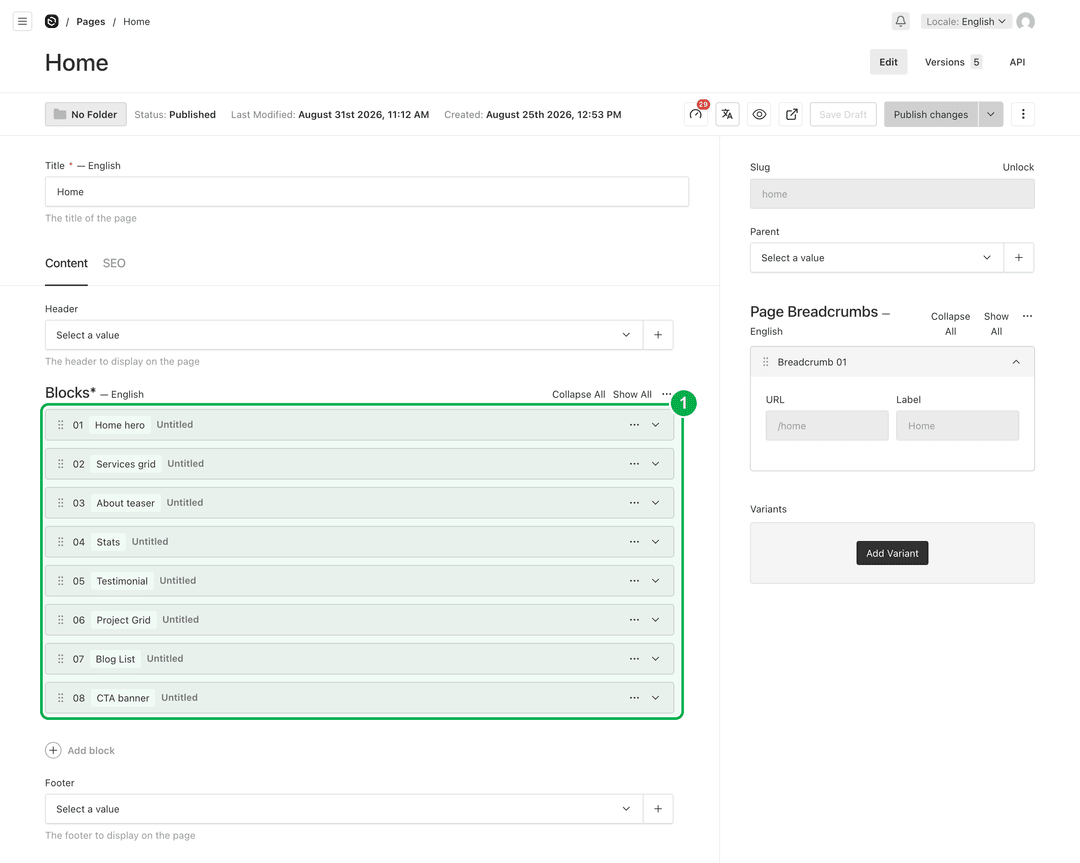 Payload admin panel showing the Home page editor. The Blocks field is outlined in green and marked with "1". It lists eight blocks in order: Home hero, Services grid, About teaser, Stats, Testimonial, Project Grid, Blog List, CTA banner.
Every migrated block has two tabs: Content and Container. Content holds the block’s text, images, and links. The container holds layout settings shared by all blocks, so editors can change a section’s width or spacing without breaking the site’s consistent style. The defaults are taken from the source site, so the block looks like the original right away.
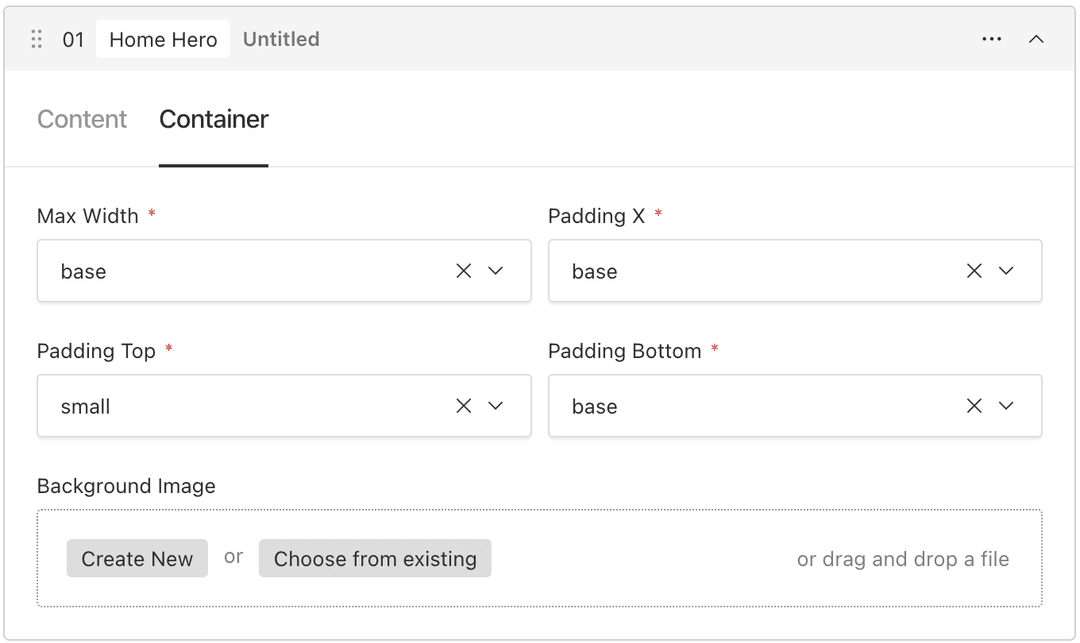 Container tab of the Home Hero block in the Payload admin panel: Max Width, Padding X, Padding Top and Padding Bottom presets, plus a Background Image field
Template pages on the source site, such as projects, blog posts, or team members, move into CMS collections of the same name. Each collection item becomes its own document, and its page keeps its original URL.
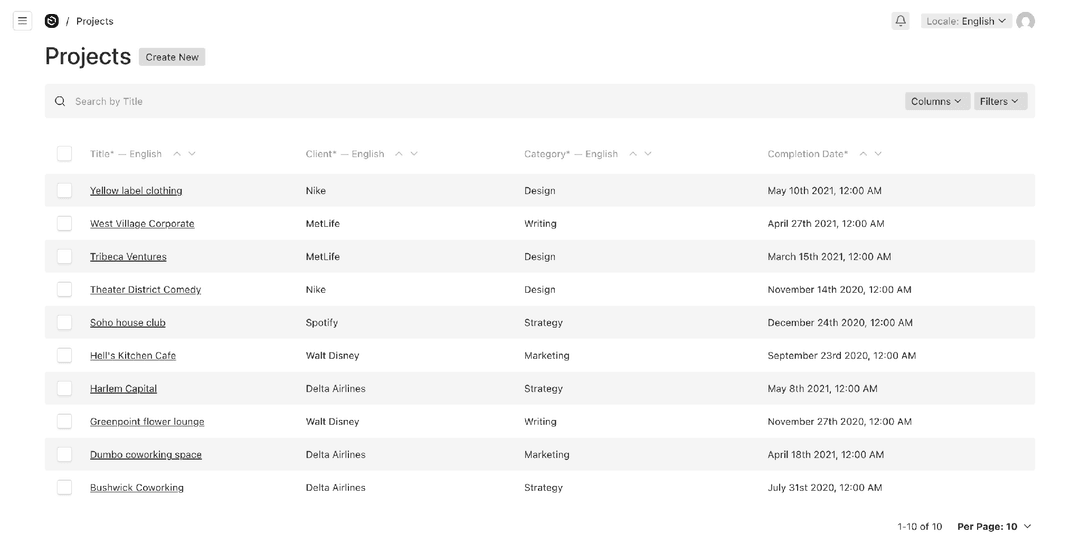 Projects collection in the Payload admin panel: ten migrated project documents in a table with Title, Client, Category and Completion Date columns.
Every page gets its own SEO metadata fields. The defaults are taken from the source site, so each page starts with the same metadata as the original.
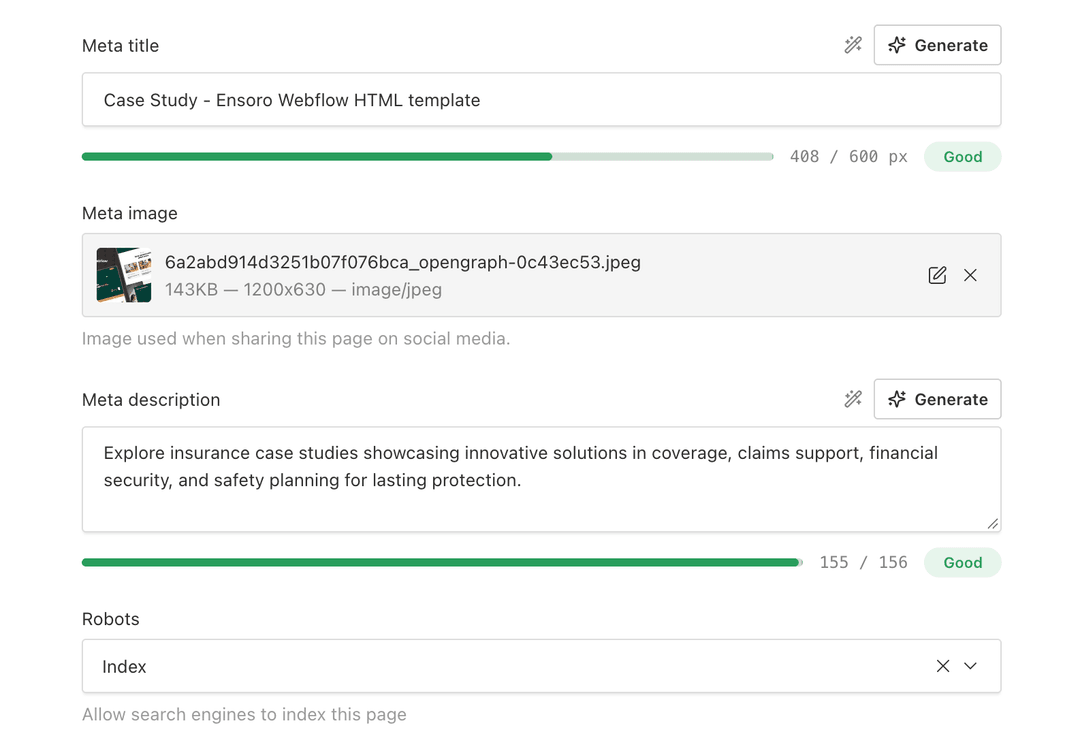 SEO fields of a migrated page in the Payload admin panel: meta title, Open Graph image, meta description with length indicators, and a Robots setting.
Every field of an item gets an appropriate type. The AI agent checks the data against a set of rules and infers the field type from patterns. It also recognizes relationships in the data, which makes it possible to use reference fields that point to collection documents. For example, blocks that list collection items reference those documents.
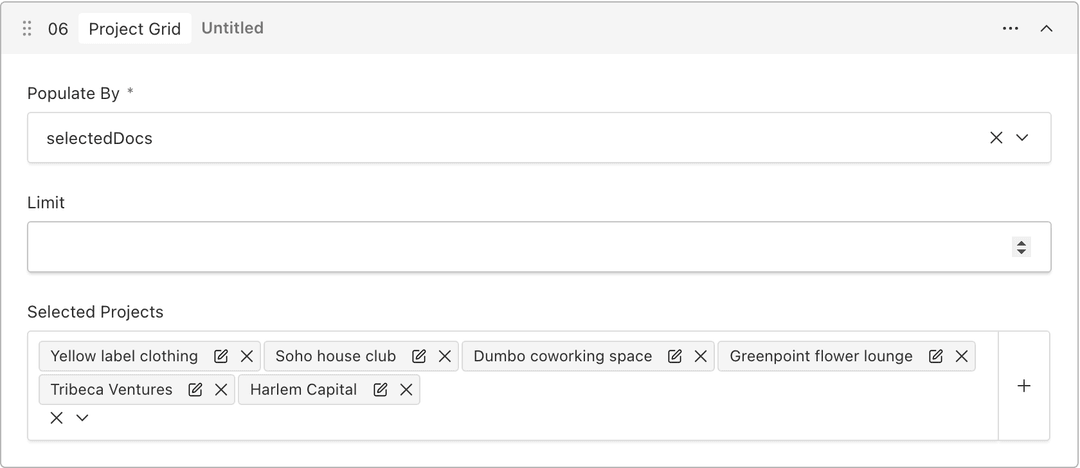 Project Grid block in the Payload admin panel: a Populate By setting, a Limit field, and a Selected Projects field that references six documents from the Projects collection.
The header and footer move into the CMS as collections. The AI finds them on the source site and models their fields the same way it models block fields. Each document in the collection is a separate header or footer variant, and a page picks which variant to show through a reference field.
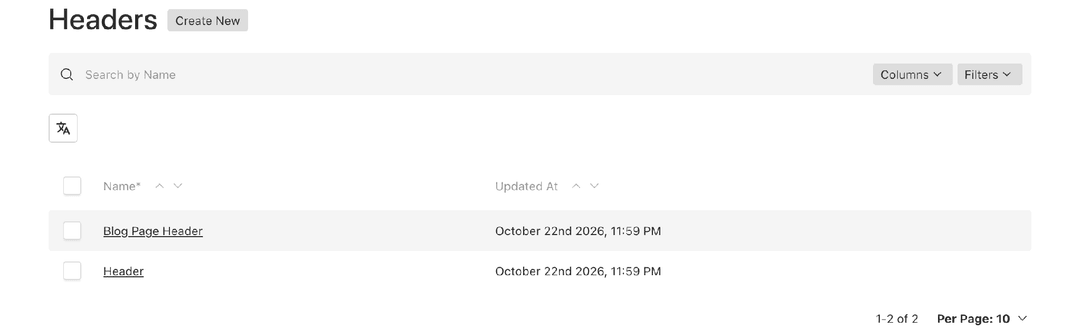 Headers collection in the Payload admin panel with two documents: Header and Blog Page Header.
Site-wide settings live in a separate Site Settings document. It holds the site name, SEO defaults, and 404 page copy. In Payload, this document also holds the admin panel branding.
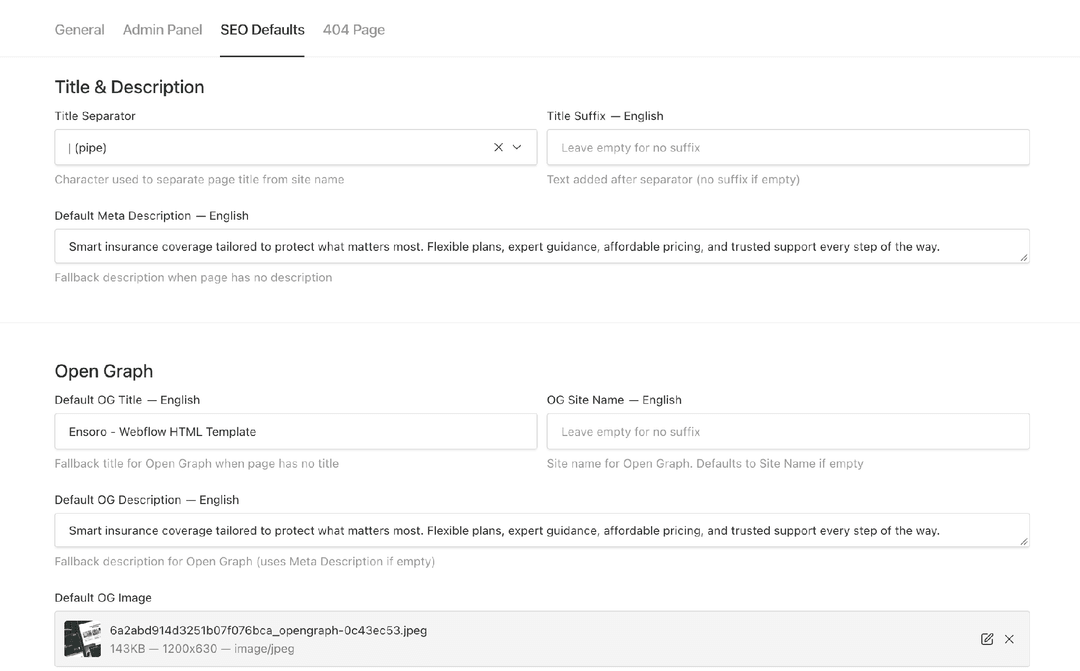 SEO Defaults tab of Site Settings in the Payload admin panel: title separator and suffix, default meta description, and Open Graph defaults for title, description and image.
All values come from the source site’s metadata, so a page without its own SEO fields still gets correct defaults.
How does the AI Migration Tool rewrite a site’s UI and animations in React?
AI Migration Tool reproduces the UI quite accurately along with its client-side logic, and aims to cover as many animations as possible. None of the UI, client-side logic, or animations are copied from the source site’s build output. Everything is rewritten from scratch in React.
First, an AI analyst reads the source site’s JS bundles and measures the original in a browser to record the actual parameters of its animations and interactions. Then an AI builder writes the component from the section spec: markup, styles for each breakpoint, and a description of its behavior. Animations are rewritten with GSAP, and page-wide effects like smooth scroll are moved into the page runtime.
Here’s an example from one of my migrations, a Webflow site moved to Payload.
Side-by-side scroll through the Flow Party homepage: the Payload migration on the left, the Webflow original on the right, with the same scroll animations on both.
In the original, almost every homepage section is animated with Webflow Interactions. These animations carried over in the migration:
- line-by-line heading reveals;
- scroll-driven scenes;
- a character that follows the cursor;
- a drag cursor on the slider.
How does an AI Migration Tool migrate a site from a single URL?
AI Migration Tool runs through 13 phases grouped into five stages. First, it captures the site. Then the AI analyzes the structure and behavior of the pages. After that, the tool builds the components and the CMS schema, checks the pages against the original, and generates the project.
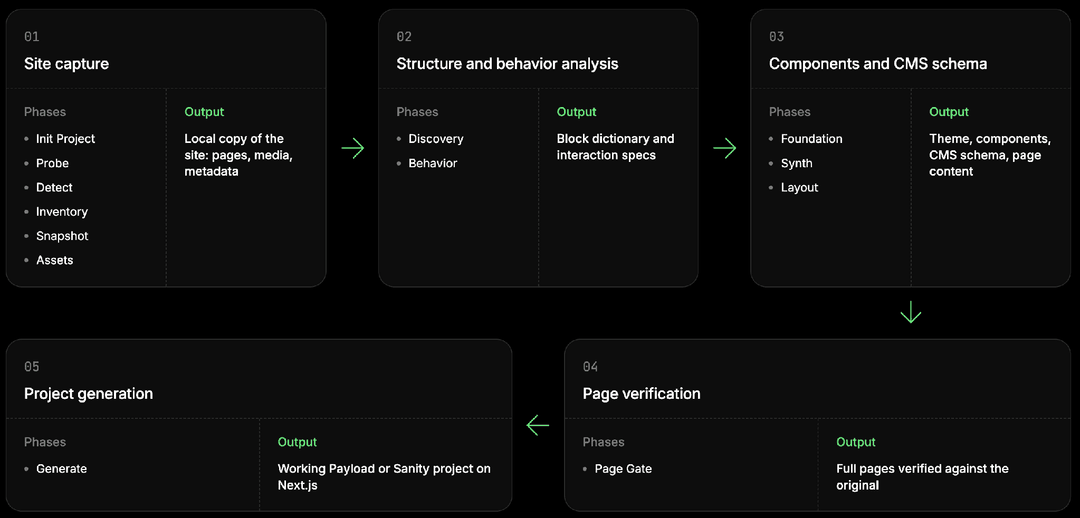 AI Migration Tool pipeline diagram: five stages and their 13 phases. 1. Site capture (Init Project, Probe, Detect, Inventory, Snapshot, Assets) outputs a local copy of the site. 2. Structure and behavior analysis (Discovery, Behavior) outputs a block dictionary and interaction specs. 3. Components and CMS schema (Foundation, Synth, Layout) outputs the theme, components, CMS schema and page content. 4. Page verification (Page Gate) outputs full pages checked against the original. 5. Project generation (Generate) outputs a working Payload or Sanity project on Next.js.
A run can be stopped at any point. The tool stores the status of every step and, on restart, resumes from the first unfinished one.
A migration starts by invoking the skill with the source site’s URL.
How does the AI Migration Tool capture the source site?
Six phases turn the live site into a local copy with all its pages, media, and metadata. This is deterministic code; no AI model is involved.
Init Project sets up the configuration for the project being migrated: target CMS, project name, project folder path, and lists of routes to include or exclude. A human then reviews the configuration before the pipeline continues.
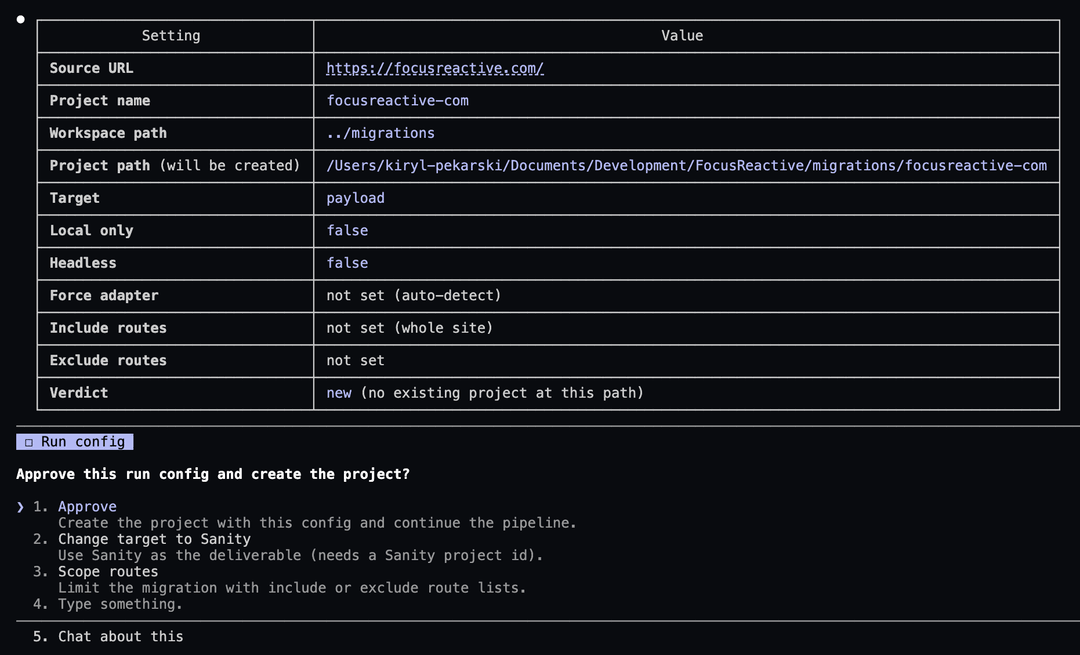 Init Project run config in the terminal for focusreactive.com: target Payload, project name and path, platform auto-detection, no route filters, and a prompt to approve the config, switch the target to Sanity, or scope the routes.
Probe downloads the homepage HTML, robots.txt, sitemap.xml, and the 404 page, and extracts HTTP metadata from the homepage requests.
Detect scores the homepage HTML and HTTP response headers against a set of Webflow and Framer signals, each with its own weight. There are three possible verdicts: Webflow, Framer, or the generic path if no signal matches.
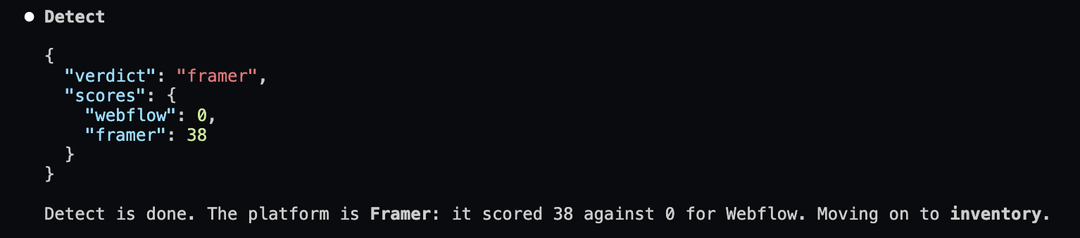 Output of the Detect phase in the terminal: a JSON verdict of "framer" with per-platform scores, followed by a message that the platform is Framer and the pipeline moves on to Inventory.
Inventory crawls the entire site: every URL in the sitemap and every internal link on every page. It then splits pages into regular pages and CMS collection items. On Webflow and Framer, the platform itself marks collections in the HTML, so the split is exact.
On the generic path, collections are inferred from the URL structure: a parent path with several child pages is treated as a collection. This heuristic is sometimes wrong, so a human confirms every inferred collection. A rejected collection is migrated as a set of regular pages.
Finally, the include and exclude lists from the configuration are applied, producing a map of pages and collections.
Snapshot freezes the site. Each page is opened in a browser. The tool waits for the network to go idle and scrolls the page so lazy-loaded content comes in. Then every element gets a stable ID, and the tool records each element’s computed styles and position at several viewport widths, from desktop down to mobile. A full-page screenshot is taken at each width: animations are frozen for the capture, and sticky elements appear in the frame only once.
The tool also downloads CSS, JS bundles, JSON data, and font files. From this phase on, every later phase works only with the copy and never touches the live site again.
Assets first finds every reference to images and videos: in HTML, srcset, CSS backgrounds, and OG tags. It then merges different sizes of the same image into a single entry. To do this, the tool learns from srcset how a given host encodes the size in the URL. Known platforms have predefined rules, and unfamiliar hosts fall back to a dictionary of common patterns. The largest variant in each group is downloaded, and files with identical content are deduplicated.
It also builds a list of fonts and extracts metadata: title, description, and OG tags for every page, plus the site-wide favicon, logo, and title suffix.
How does the AI understand a site’s structure and behavior?
Discovery breaks the site down into entities. First, the AI finds the header and footer on one page. Then it splits every representative page into sections: all regular pages and one item from each collection. Pages are analyzed in parallel.
Next, the AI merges similar sections from regular pages into site-wide block types. Sections are merged only when both their role and their structure match. An extra type is safer than a lost difference in fields. A unique block becomes a type with a single instance. For collections, a script lays out the sections of the item page from top to bottom, and those sections form the template.
The output is a block dictionary, globals, and collection templates.
Behavior runs the AI analyst on every page that contains entity instances. The analyst reads the site’s JS bundles and measures the original in a browser.
It assigns every observation to one of two levels:
- Behavior of a single entity is described together with that entity: tabs, accordions, sliders, hover effects, a section’s scroll scenes.
- Page-wide mechanics are described separately as the page runtime: smooth scroll, the scroll-reveal engine, a custom cursor, a preloader.
How are the components and the CMS schema built?
First, the shared foundation is built: the theme, specs, and shared components. Then, for each entity, the AI creates a schema, content, and a component. Finally, the AI lays out pages as blocks.
Foundation builds the shared foundation once per site. First, a script collects design token candidates: colors, fonts, sizes, spacing, border radii, shadows, and breakpoints. The AI selects and names them, and a Tailwind theme is generated from the result.
Next, the AI picks npm packages for the recorded behavior. If the source uses a library that has a React version, the tool uses that. If the behavior comes from a platform runtime, such as Webflow Interactions, it’s moved to a standard stack: GSAP for animations and Radix for interactive primitives.
Then a spec is prepared for each entity: markup, styles per breakpoint, and a set of widths to test against, taken from the entity’s own media queries.
A separate agent derives a shared Container: site-wide width and spacing variants and which variant each entity uses.
After that, the AI looks for repeated UI elements across screenshots of all entity instances. It groups the candidates it finds into types: atoms like buttons and badges, content components like cards, interactive widgets, and entire sections. Only atoms have variants. Shared components are built from the innermost outward, using the same loop as entities in Synth. AI Migration Tool then adds the finished shared components to the entity specs: the markup marks where each component goes, which variant it uses, and where to import it from.
Synth builds entities in order: collections first, then globals, then blocks. Several AI agents work on each entity.
The AI modeler creates the field schema and content. Every piece of text, link, and media item on the original becomes a field. For collection sections, a script also separates document data from content that repeats on every page of the collection, and the modeler decides whether to keep it as a field or make it part of the template.
Next, the AI builder writes the React component. The component must meet these requirements:
- Field data is passed through props.
- It must be a server component, with interactivity added through client wrappers.
- It uses shared components and Container.
- Animations are defined through the runtime API.
The builder checks interactive states itself. A script compares the component with the original pixel by pixel in a real browser at every width defined for the entity. If the component fails, the builder gets the reasons and tries again. After several failed attempts, an AI judge decides whether the remaining difference is acceptable. For example, a difference is acceptable if its cause lies outside the component. Otherwise, the entity is marked as failed, but the run continues.
The output is collections with typed fields and content, plus editable blocks.
Layout breaks each regular page down, top to bottom, into blocks from the dictionary. The header and footer are skipped because they are globals. The AI fills each block’s fields with the actual values from the page. Collection item pages aren’t laid out here: they’re assembled from the template that Synth built.
How does the AI Migration Tool verify the result?
Each representative page is assembled in full and compared with the original once. Any mismatches send specific entities back to be rebuilt. This phase catches what a single-block check can’t see: the seams between adjacent sections, page-wide scrolling, and page-level animations.
Page Gate assembles a page from components, layout, globals, and runtimes, and compares it with the original at every width: pixels, page height, and text. If there are no mismatches, the page passes. If there are, the AI attributes each mismatch to a specific entity, or to the page runtime when it affects the whole page, and writes a note. Every entity with a note is rebuilt with a fresh set of attempts. The builder reads the note and goes through the same gate-and-judge loop as in Synth. Notes about runtimes go to the agent that wrote them.
What do you get at the end?
Generate first checks the package manager, the CMS access keys, and that the database or dataset is reachable, depending on the target adapter.
It then scaffolds the project and runs, in order: dependency installation, type generation, formatting, seeding, type checking, the build, and the linter.
The result is a working Payload or Sanity project on Next.js with the content already loaded.
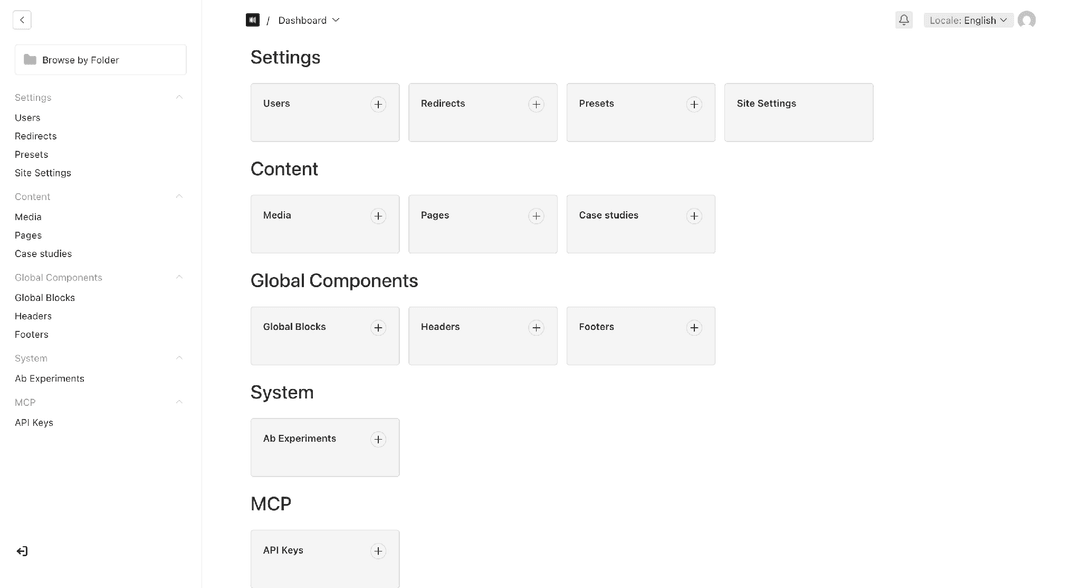 Dashboard of the migrated project's Payload admin panel.
What did I learn building the AI Migration Tool?
Building the AI Migration Tool taught me a few lessons I’d like to share.
Why should an AI agent make a judgment instead of doing all the work?
Many steps in the pipeline call for an AI judgment: classifying, matching, or evaluating data. For every such step, it’s critical to force the agent to answer in a fixed schema, to assemble its context in a structured way, and, where possible, to compress that context to cut token usage.
At first, these steps were simple: the agent read the data, made the decision, and wrote the artifact itself. With large inputs, it could stop reading partway through, reference an ID that didn’t exist, or write a file that didn’t match the schema.
So I split each such step into substeps:
- A script prints the full response schema straight into the agent’s context, so the agent can’t miss part of it. This keeps the agent from failing at the last step because of a malformed response.
- A script prints, in full, the data the agent is judging. The key here is to structure the input so it’s easy for the model to work with, without flooding the context window.
- Narrow read-only commands let the agent pull in extra data at its own discretion when it needs more confidence in a verdict.
- The agent’s step. It writes only a raw response, not the artifact.
- A script validates the response against the same schema and cross-checks it against known data, for example, that it doesn’t contain made-up IDs. It doesn’t judge whether the agent is right.
The agent gets all validation errors at once, fixes its response, and runs the check again. The loop is closed within the step, so an invalid response never reaches the artifacts.
Why isn’t it enough to check each component on its own?
Each component can match the original while the page built from them doesn’t. An isolated check can’t see how components work together.
Here’s what breaks only at the page level:
- The seams between adjacent sections.
- Page-wide effects like smooth scroll.
That’s why I added Page Gate. It assembles every representative page in full and compares it with the original. The AI attributes each mismatch to a specific component, which is then sent back to be rebuilt with a note explaining the cause.
How do you give an AI agent everything it needs to build a component?
Prepare the data in advance and hand it to the agent as a contract.
The first version of generation worked like this: each section got a single AI author that read the original on its own through Playwright MCP tools. This approach had three main problems:
- Styles were captured as computed values at predefined viewport widths. The original CSS rule was lost, and between the captured widths the author had to guess.
- It was expensive by tokens.
- Client-side logic was written from scratch, so it didn’t work very well.
I then rewrote component generation. Now a deterministic extractor prepares a spec for each entity in advance: the source markup, styles per breakpoint, a set of widths to test against taken from the entity’s own media queries, a description of the component’s client-side logic, and the repeated components it uses. If the builder is missing something, it reads more of the original with a CLI command.






.png&w=828&q=90)
.png&w=828&q=90)