


TL;DR
- Rankings depend on the HTML your server sends and on how the page behaves for real users. React doesn’t change either of those by itself.
- Google renders JavaScript, but client-side rendering is still the slowest and least reliable way into its index.
- Most AI crawlers read only the initial HTML. In our own test, ChatGPT, Claude and Gemini ignored content that appeared after JavaScript ran, and content inside a script, even when it was already in the HTML.
- For React SEO, every page that should rank needs server-built HTML: SSR, SSG or ISR. Next.js makes that the default, as long as the data also loads on the server.
- Server rendering alone doesn’t guarantee complete HTML. Suspense streaming, server errors and components with SSR turned off can still hide or delay content.
- Compare the raw HTML of key pages with what Google renders in Search Console. The difference is your to-do list.
React SEO: What’s at Stake
Why are we writing about the React framework again and again?
Teams pick React for good reasons, then notice that some pages barely show up in search, or that an AI assistant describes their product from an old blog post instead of the pricing page. The question that follows is usually some version of “Is React bad for SEO?”
React SEO is the work of making sure search engines and AI assistants can find, read and rank the pages of a site built with React. It matters because a page crawlers can’t read doesn’t rank, doesn’t get cited in AI answers and doesn’t bring the visitors, leads and sales it was built for, however good it looks in the browser.
This guide is for the people who have to answer that question: the developers who build the site, and the marketers and founders who own its traffic. It covers what search engines and AI crawlers actually receive from a React page, which rendering choices matter, and where React can quietly lose content even on a well-built site.
Is React Bad for SEO?
No. Search engines rank pages, and they judge a page by what arrives in its HTML and how it behaves for the people who use it. React always builds that HTML. The difference is where: on the server, so it arrives with the first response, or in the browser, only after JavaScript runs.
On a traditional website, the server sends a complete page: text, links, title and description are all in the HTML it sends back. On a React app rendered in the browser, the server sends a nearly empty file plus a bundle of JavaScript code. The browser runs the code, and only then does the content appear. A visitor barely notices. A crawler that doesn’t run JavaScript sees an empty page.
That setup is called a single-page application, or SPA, and a Vue or Angular app built the same way has the same problem. React simply became the most common way to build SPAs, so it took the blame.
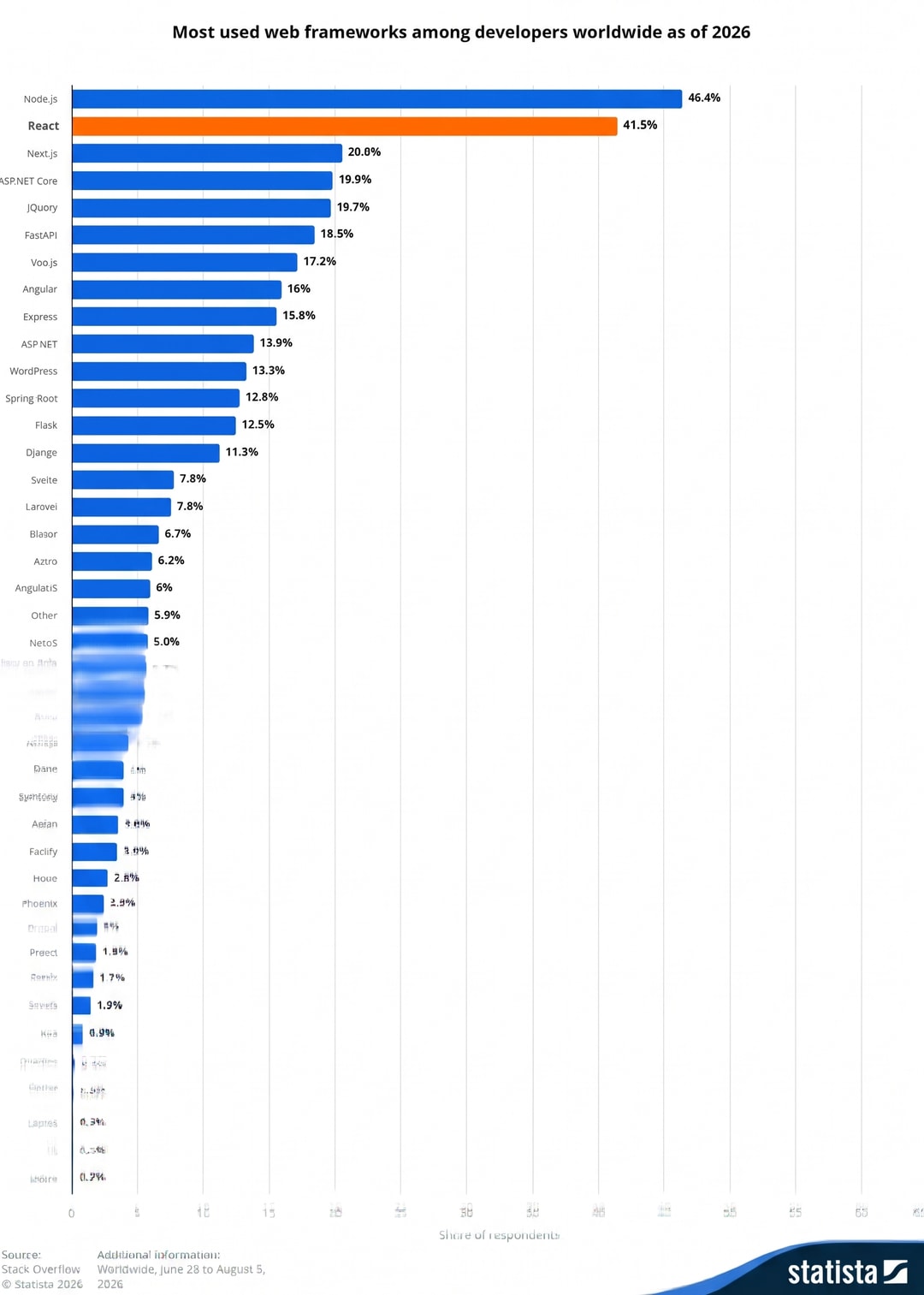 web frameworks according to statista
Until May 2019, Googlebot rendered pages with Chrome 41, a browser from 2015 that couldn’t run much modern JavaScript, and React sites of that time often needed workarounds to get indexed (Google Search Central). Since 2019, Googlebot has rendered pages with a current version of Chrome. The tools changed too: frameworks such as Next.js, which has rendered on the server by default since its first release in 2016, made server rendering the usual way to build React sites.
For React JS and SEO, the answer is simple: it’s a rendering problem, not a React problem.
How Search Engines See a React Website
Search engines handle a page in three steps:
- They crawl it, which means downloading the HTML.
- They render it, running its JavaScript in a browser without a screen.
- They index what they found, so the page can show up in search results.
For a page built on the server, the content is already there after crawling. For a page built in the browser, nothing useful exists until rendering. Google and Bing render JavaScript, with delays and limits, while most other crawlers, AI crawlers included, read only the initial HTML.
How Google renders JavaScript
Google crawls a page first and puts it in a queue for rendering. When the page’s turn comes, Google runs the JavaScript and indexes the result. A 2024 study by Vercel and MERJ found that Googlebot rendered all of the eligible pages it tracked on nextjs.org (Vercel), yet the study’s own comparison still rated client-side rendering lowest for crawl efficiency and rendering completeness. nextjs.org is mostly prerendered or server-rendered, so the result says little about pure SPAs.
Rendering has limits that matter for React apps:
- Google doesn’t click, scroll or type. Content that appears only after a user action stays invisible.
- If the first HTML contains a
noindextag, Google may skip rendering altogether, so removing that tag with JavaScript doesn’t help (Google Search Central). - Google renders only what it’s allowed to fetch. While rendering, the page’s JavaScript requests its data just as it would in a browser, and Google checks
robots.txt(the file that tells crawlers where they may go) before each of those requests. If it blocks the API the page calls for its data, Google gets an empty page (Google Search Central). One site withDisallow: /api/showed up in Search Console as a “soft 404”, an error page in disguise, although the page worked for users; a reply traced it to the blocked API calls (r/TechSEO). - Rendering takes Google more resources than reading HTML, and pages wait in a render queue, so on large sites heavy JavaScript can slow how quickly new and updated pages get processed (Google Search Central).
AI crawlers read only the initial HTML
Most other crawlers are far simpler than Google. In December 2024, Vercel and MERJ analyzed AI crawler traffic across Vercel’s network and found that none of the major AI crawlers from OpenAI, Anthropic or Perplexity executed JavaScript. Some downloaded JavaScript files but never ran them (Vercel). Link previews in Slack, LinkedIn and X are built from Open Graph and X Card tags their crawlers read from the page (Slack, LinkedIn), so those tags need to be in the server HTML.
AI firms also use separate crawlers for training, searching, and retrieving a page that someone requested. Blocking one doesn’t block the others, so a rule meant for one of them can quietly shut out the rest.
🛠️ For developers
OpenAI runs GPTBot, OAI-SearchBot and ChatGPT-User (OpenAI), and Anthropic runs ClaudeBot, Claude-SearchBot and Claude-User (Anthropic). Check your robots.txt and firewall rules by name. OpenAI notes that robots.txt rules may not apply to ChatGPT-User, which fetches pages on a person's request.
</aside>
SEO consultant Glenn Gabe saw the effect in August 2025: on a fully client-rendered company site, ChatGPT, Perplexity, and Claude couldn't read the pages, while Google and Bing showed them normally (GSQi).
This may be starting to change: in late September 2026, one site owner reported server logs suggesting OpenAI had begun rendering some pages, which OpenAI hasn't confirmed (DEV Community). The practical rule holds either way. Content in the initial HTML reaches every crawler. Content that needs JavaScript depends on which crawler shows up.
What we saw in our own test
In October 2026, we built a fictional museum with one exhibit for each rendering method, using Next.js 16.4 and TanStack Start 1.169. We then gave ChatGPT, Claude, Gemini and Grok the exhibit URLs and asked them to answer questions about the content. Each exhibit contained names and numbers we invented for the test, allowing us to check whether the answers reproduced those details. We also used server logs to record the requests associated with each test.
| How the exhibit text reached the HTML | ChatGPT | Claude | Gemini | Grok |
|---|---|---|---|---|
| Regular markup (SSG, SSR, prerendered)[cite: 1] | Read it[cite: 1] | Read it[cite: 1] | Read it[cite: 1] | Read it[cite: 1] |
| Streamed Suspense block, hidden until a script moves it into place[cite: 1] | Read it[cite: 1] | Missed it[cite: 1] | Read it[cite: 1] | Read it[cite: 1] |
Only as data inside a script (ssr: false with props, TanStack data-only)[cite: 1] |
Missed it[cite: 1] | Missed it[cite: 1] | Missed it[cite: 1] | Read it[cite: 1] |
Not in the HTML, loaded in the browser (CSR, TanStack ssr: false)[cite: 1] |
Missed it[cite: 1] | Missed it[cite: 1] | Missed it[cite: 1] | Read it[cite: 1] |
ChatGPT, Claude, and Gemini read only the HTML and ran no scripts. That includes Gemini, often assumed to render JavaScript because Google’s crawler does. Grok was the exception: it ran the scripts and read everything. On the empty pages, the assistants said the details weren’t available rather than guessing. Perplexity and Microsoft Copilot didn’t visit our pages at all; both answer from their own indexes. Perplexity described exactly the pages its crawler had fetched and nothing else. Copilot, which draws on Bing’s index, couldn’t read any of our pages because Bing hadn’t indexed the site yet. For both, a page exists only once it’s in the index, and a client-rendered page stays as empty as the copy they crawled.
🛠️ For developers
ChatGPT, Claude and Gemini fetched one HTML document per page and nothing else: no scripts, no API calls. On the empty pages they had at most the title and meta description, sometimes only the site name. Grok opened the pages in a headless Chrome, ran their scripts and called our API, taking about two minutes for six pages. Perplexity's crawler had fetched one of our client-rendered pages two days before we asked, and Perplexity described that page exactly as the crawler had received it, a "Loading exhibit" placeholder, while it couldn't open pages its crawler hadn't visited yet. Copilot made no requests to our site. When it tried to fetch the pages by running code, its own sandbox blocked the requests. Bingbot had fetched our home page twice, but a site: search on Bing returned nothing, so the pages weren't in Bing's index yet.
How to Make a React Website SEO Friendly
The decision that matters most for SEO with React is where the HTML gets built. React leaves that choice to you or to your framework, and modern frameworks let you make it per route. For a deeper look at the options, see SSR, SSG, and ISR explained.
| Method | How it works | Content in first HTML | Best for |
|---|---|---|---|
| CSR (client-side rendering) | The browser builds the page with JavaScript | No | Apps behind a login, internal tools |
| SSR (server-side rendering) | The server builds the page on every request | Yes | Personalized or real-time pages |
| SSG (static site generation) | Pages are built once, at build time, and served from a CDN | Yes | Blogs, docs, marketing pages |
| ISR (incremental static regeneration) | Static pages rebuilt in the background on a timer or when content changes | Yes | Large catalogs, CMS-driven sites |
When dynamic rendering is an option
Dynamic rendering means detecting crawlers by their user agent, the name a browser or bot sends with each request, and serving them prerendered HTML while people get the client-rendered app. Google describes it as a workaround and doesn’t recommend it as a long-term solution (Google Search Central). It can buy time for a legacy SPA. If crawlers and humans see significantly different content as a result of the infrastructure added to a new project, this could be considered cloaking—the deliberate display of content to search engines that visitors do not see—which Google considers spam (Google Search Central). No matter what you use, make sure that each URL has its own title, canonical, and content in the page source.
If your site was built with Vite or an AI website builder
React on Vite without a framework produces an SPA by default, and many AI website builders generate exactly that setup. Typical symptoms are a homepage that gets indexed while inner pages don’t, the same title on every page (a Vite starter calls every page “Vite + React” until someone changes it) and an empty rendered HTML in Search Console. The fix doesn’t require starting over, since the same tools can build a server-rendered version if you ask for one explicitly.
Lovable, for example, switched new apps to TanStack Start in May 2026, so they are served as complete HTML, while older apps get HTML snapshots for crawlers, a form of dynamic rendering (Lovable, announcement).
Put Metadata, Links and Structured Data in the Server HTML
The basics of React SEO optimization are the same as for any site. What differs in React is how you get them into the initial HTML.
Metadata
Every page you want indexed needs its own title, meta description, canonical tag (the URL search engines should treat as the main version of the page) and Open Graph tags (the preview in social networks and messengers). All of them must be in the HTML the server sends.
Many guides still recommend React Helmet for this. In current projects there are better options. Next.js has a Metadata API that generates tags on the server for every route:
// app/products/[slug]/page.tsx
export async function generateMetadata({ params }) {
const { slug } = await params;
const product = await getProduct(slug);
return {
`title: product.name,`

`description: product.summary,`

`alternates: { canonical: `/products/${slug}` },`
};
}
React 19 also lets any component render <title> and <meta> tags and moves them into the page head. In an SPA, those tags still appear only after JavaScript runs. With server rendering, they land in the initial HTML.
Links and URLs
Crawlers discover pages through links, so navigation needs real <a href> elements, as Google’s link guidelines spell out. The Link components in Next.js and React Router render them correctly. A button that calls navigate() on click looks the same to a visitor and is invisible to a crawler. A quick manual test: hover over the link. If the browser shows no URL and “Open in new tab” doesn’t work, crawlers can’t follow it either, and screen readers won’t treat it as a link.
Google Search generally doesn’t support URL fragments, the part after #, so hash routes such as /#/pricing aren’t treated as separate pages (Google Search Central). Use real paths, give each piece of content one URL, and redirect the variants with and without a trailing slash to the one you choose.
Internal links also tell search engines which pages matter. Link related pages to each other with descriptive anchor text, and make sure every page you want indexed is linked from at least one other page. Pages that exist only in the sitemap, often called orphan pages, get no signals from internal links, so they tend to be crawled less often, and a sitemap alone doesn’t guarantee indexing. In React apps they tend to appear when a page can be reached only through on-site search, filters or a button that navigates with JavaScript.
Images
Images need the same treatment as text: a real <img> in the server HTML with a descriptive alt attribute, so crawlers know what the image shows. Give every image explicit width and height so the layout doesn’t jump while it loads, serve modern formats such as WebP or AVIF, and lazy-load images below the fold. Don’t lazy-load the main image at the top of the page, since it usually decides LCP. In Next.js, the Image component handles sizing, formats and lazy loading, and lets you mark the main image to load first.
Structured data
Structured data is a machine-readable description of a page, usually JSON-LD inside a script tag, and it helps search engines understand what a page is about. Most sites need three types: Organization on the home page, Article on blog posts and Product on product pages. Render it on the server like any other content. In the Next.js App Router, that’s a script tag in the page component:
// app/products/[slug]/page.tsx
export default async function ProductPage({ params }) {
const { slug } = await params;
const product = await getProduct(slug);
const jsonLd = {
`"@context": "https://schema.org",`

`"@type": "Product",`

`name: product.name,`

`description: product.summary,`

`offers: { "@type": "Offer", price: product.price, priceCurrency: "USD" },`
};
return (
`<>`

  `<script`

    `type="application/ld+json"`

    dangerouslySetInnerHTML={{ __html: JSON.stringify(jsonLd).replace(/</g, "\\u003c") }}

  `/>`

  {/* page content */}

`</>`
);
}
The replace call stops text from your CMS from closing the script tag and injecting HTML, as the Next.js JSON-LD guide recommends. Check the result against Google’s structured data guidelines and in the Rich Results Test.
React SEO Traps: Where Server-Rendered Pages Still Lose Content
Server rendering removes the biggest risk, but it doesn’t guarantee that every piece of content reaches the HTML. React and Next.js have a few mechanisms that can keep content out of the HTML the server sends without breaking anything a visitor would notice. Several of them come up among the common Next.js SEO pitfalls we see in audits.
Content streamed through Suspense
Risk: an AI crawler may get a loading spinner where your product description should be.
React can send a page in parts. Content inside a Suspense boundary that waits for data arrives last, in a hidden block at the very end of the HTML, while its proper place holds a placeholder, and a small script moves it into place (React docs). The Next.js App Router, the default for new projects, does this for crawlers too: when we requested such a page as Googlebot, Bingbot and the main AI crawlers, every one of them got the hidden block. Whether it counts depends on who reads it. In our test, ChatGPT and Gemini quoted the hidden content, while Claude answered as if it wasn’t there.
Keep the main content outside boundaries that wait on slow data, and use Suspense for secondary parts such as reviews or recommendations. To check a page, open its source and search for your main text, as described in “How to Check What Crawlers See” below.
🛠️ For developers
We tested on Next.js 16.4.2. You'll often read that Next.js turns streaming off for bots, but the older Pages Router doesn't stream page content to anyone, and the bot checks that do exist affect metadata, covered below, and fallback pages. In the App Router, even a loading.js file wraps the whole page in Suspense, so all of its content streams (Next.js docs). Fully static and ISR pages aren't affected. New projects from create-next-app turn on Cache Components, Next.js's partial prerendering (Next.js docs). We rebuilt our test app with it: crawlers got exactly the same HTML, but the build now fails for any page that waits for data outside a Suspense boundary, and the first fix Next.js suggests is to add one. React Router v7 streams a promise you return from a loader without awaiting it. Its default server entry waits for everything when the user agent looks like a bot, which also catches the major AI crawlers, but a customized entry file can lose that check (React Router source). Turning JavaScript off in the browser isn't a reliable test here: the streamed content is in the HTML but never moves into place without the script.
Metadata that streams into the page body
Risk: crawlers, Googlebot included, may find your title, description and canonical in the body instead of the head.
When Next.js needs time to fetch the data for a page’s title and description, it can send the page first and add those tags to the body later. It puts them in the head only for a built-in list of bots, which includes Bingbot but not Googlebot or the AI crawlers. In our test, a page with slow metadata sent its title, description and canonical in the body to every crawler except Bingbot. Google says it accepts rel="canonical" only in the head (Google Search Central), so this is a risk even with Googlebot, at least in the raw HTML.
Where you can, make metadata static or cached, so it’s resolved at build time and lands in the head for everyone.
For developers
Metadata streaming arrived in Next.js 15.2 and applies when generateMetadata waits for data (Next.js docs). In Next.js 16.4.2, the list of "HTML-limited bots" covers bots such as Bingbot, facebookexternalhit, Twitterbot, LinkedInBot and Slackbot, but not GPTBot, OAI-SearchBot, ChatGPT-User, ClaudeBot or PerplexityBot (source). The htmlLimitedBots option in next.config lets you change the list, but it replaces the defaults instead of extending them, and with Cache Components there is an open report of custom patterns dropping metadata altogether (#95406).
Server errors that silently move rendering to the browser
Risk: a section that looks fine to visitors is just a placeholder for crawlers.
If a component inside a Suspense boundary throws an error during server rendering, React doesn’t fail the page. It sends the placeholder in the server HTML and tries again in the browser. If that works, the visitor sees the content and no error (React docs). Nobody notices, and the only traces are server logs and a difference between raw and rendered HTML. On our test page, a component that relied on a browser-only API did exactly this: visitors saw the full exhibit, while ChatGPT and Claude both found nothing but a loading message.
Keep an eye on server rendering errors in your logs, and make components that need the browser render safely on the server too, for example by moving the browser-only code into an effect.
Components with server rendering turned off
Risk: the content of the component never reaches the HTML.
Next.js lets you load a component only in the browser, with next/dynamic and ssr: false. Developers reach for it to fix errors with browser-only APIs or to lighten the first load, and it works well for chat widgets and maps. When the wrapped component holds a product description or an article body, that content disappears from the HTML. In one example, a developer moved most components behind ssr: false, cut the JavaScript on first load from about 2 MB to 447 kB and got a Lighthouse SEO score of 100, while a reply pointed out that the content had left the initial HTML (r/reactjs). In our test, the text was even in the HTML as data for such a component, inside a script, and ChatGPT, Claude and Gemini ignored it.
Keep ssr: false for parts that don’t need to be found, and render the main content on the server.
Server functions that refuse Google’s renderer
Risk: Google indexes an error screen while visitors see a working page.
This one surprised us. In our test, a TanStack Start page that loaded its data in the browser worked for every visitor, but the framework’s built-in protection against requests from other sites turned Google’s renderer away. Search Console showed TanStack’s default “Something went wrong!” screen instead of the exhibit. We reproduced it on a fresh project from the official Railway template and haven’t tested other hosts.
If a page should be indexed, load its data on the server. Where a route has to load data in the browser, check its rendered HTML in Search Console. 🛠️
For developers
The route used ssr: false and loaded its data through a server function. TanStack Start’s CSRF middleware lets such a request through only if it proves it came from the same site. Browsers prove it with Sec-Fetch-Site: same-origin, and so did the headless Chrome Grok used. Google’s renderer sent only Referer, which started with https://. The app ran behind a hosting proxy that handles HTTPS and passes plain HTTP inside, so it believed its own address started with http://. The addresses didn’t match and the server answered 403. If a route has to call server functions from the browser, give the CSRF middleware your public address explicitly.
🧪
[Real case] Placeholder for a FocusReactive case: what broke, how it was found, how it was fixed, numbers before and after. Remove the block if there’s no material.
Why a Page Can Look Ready but Feel Slow
A server-rendered React page shows its content almost at once, but it isn’t fully working yet. The browser still has to download JavaScript and let React attach behavior to every part of the page, so buttons, menus and forms start responding. Developers call this step hydration.
Picture a new house. The walls and furniture are in place, but an electrician still has to walk through every room and connect the switches. You can look around, but nothing turns on yet. A crawler doesn’t mind the wait. People do.
That delay shows up in Core Web Vitals, the metrics Google uses to measure page experience: LCP for loading, INP for responsiveness and CLS for visual stability. Google’s Chrome UX Report collects them from real Chrome users, and a page passes when the 75th percentile of visits meets each threshold, so a perfect Lighthouse score in a lab doesn’t guarantee a pass in the field (web.dev). Google uses Core Web Vitals in ranking, but relevance comes first (Google Search Central), and they affect every visitor.
Every framework that makes a server-rendered page interactive pays this cost. React lets developers cut it by sending less JavaScript to the browser and by making the page interactive in parts.
For developers
In the Next.js App Router, Server Components render on the server and don't hydrate at all. Only components marked "use client" do, along with everything those files import, so putting "use client" on a whole page pulls all of it back into hydration. A client wrapper that receives server components as children doesn't change them, so keep the directive on the small interactive parts.
React.lazy and next/dynamic load heavy parts, such as a map or a complex filter, only when they're needed.
With Suspense, React hydrates the page in parts and starts with the part a person is interacting with. This is called selective hydration.
SEO-Friendly React Frameworks
Plain React is a UI library and doesn’t decide where your HTML is built. A framework does. These four make a React project React SEO friendly out of the box.
1. Next.js
 Next.js main banner
Next.js supports SSR, SSG, ISR and client rendering per route, along with Server Components, a Metadata API, generated sitemap and robots files, and image and font optimization. Its defaults protect you only until you opt out of them: mark every component "use client", fetch data in useEffect or load sections with ssr: false, and you have rebuilt the same empty shell inside Next.js. In an r/nextjs thread about moving a React storefront for SEO, one reply put it plainly: “It will not fix much if the product data is still fetched in the browser after the page loads” (r/nextjs). Our Next.js SEO in 2026 overview and Next.js App Router SEO guide cover implementation in detail.
2. React Router v7 (formerly Remix)
 React Router
Remix announced in May 2024 that it would merge into React Router, and React Router v7, released in November 2024, carries the Remix approach forward in its framework mode. Pages render on the server by default, each route exports its own metadata, and links and forms work before JavaScript loads. For an existing Vite SPA built on React Router, switching on framework mode is usually an upgrade without a rewrite.
3. TanStack Start
 tanstack
TanStack Start is a full-stack React framework built on TanStack Router and Vite. Pages render on the server by default, with streaming, and for user agents that look like bots the default server handler waits for the full page. Each route can change that through its ssr option (TanStack docs), which deserves a look in any audit: with ssr: false the route renders only in the browser, and with ssr: 'data-only' the server loads the data but still leaves the component out of the HTML. The prerender option turns marketing pages into static HTML at build time (TanStack docs), and each route sets its own title and meta tags through head.
4. Gatsby
 Gatsby main page
Gatsby generates static HTML and has a strong image pipeline. Development has slowed since Netlify acquired it in 2023, so it makes most sense for sites already on Gatsby.
How to Check What Crawlers See
You need two views of the same page and a comparison.
The raw HTML is what crawlers without JavaScript receive. Right-click the page and choose View Page Source, or press Ctrl+U (Cmd+Option+U on a Mac), then search for your title, main heading and a key sentence. Don’t use Inspect for this: it shows the page after JavaScript has run, so missing content looks present. If the title, the main heading or a key sentence is missing, crawlers that read only HTML don’t have it.
The rendered HTML is what Google indexes. In Search Console, open URL Inspection, run “Test live URL” and choose “View tested page”.
Content that exists only in the rendered version depends on JavaScript. Content missing from both is a different problem, usually a blocked script, a failed API request or content that waits for a click. A placeholder where the main content should be points to streaming or a server error. Search results can give it away too: if Google shows “You need to enable JavaScript to run this app” in your search snippet, it indexed the empty shell (r/reactjs). The Lighthouse SEO score won’t catch any of this, because it checks the page after rendering.
Before blaming rendering, rule out blocking: a firewall or bot filter may answer a crawler instead of your app. A 403 or a “checking your browser” page means the request was blocked.
For AI crawlers, server logs are the most reliable evidence. Filter requests by user agent, check that they come from the companies’ published IP ranges, and see which pages they fetch. Not every assistant announces itself, though: in our test, Grok’s requests looked like ordinary visitors, so a user agent filter won’t show them. A quicker spot check, borrowed from Glenn Gabe’s test: ask ChatGPT, Perplexity and Claude to return the first and last paragraph of a specific URL. If they can’t, they aren’t getting your content.
Technical SEO Checklist for React Websites
These checks are specific to React website SEO. If you are moving an existing site to a new stack, our SEO migration checklist covers the rest. If you’d rather have someone run these checks for you, that’s where our technical SEO audit starts.
These checks are specific to React. Redirects, URL consistency and the rest of a site move are covered in our SEO migration checklist. If you’d rather have someone run these checks for you, that’s where our technical SEO audit starts.
Crawlability
- Navigation uses
<a href>links with real URLs, present in the server HTML. - Every page you want indexed is linked from at least one other page, not only listed in the sitemap.
- Indexable pages use real paths, not hash routes.
robots.txtdoesn’t block the JavaScript, CSS or API endpoints a page needs to render, including/_next/. Seeing/_next/files as “Crawled, currently not indexed” in Search Console is usually harmless: they are scripts and styles, and Google doesn’t index them as pages.- The XML sitemap is generated from the same source as your routes, and
lastmodcomes from the real update date in your CMS.
Indexability
- Unknown URLs return a real 404 status from the server. An SPA that shows “Page not found” with a 200 status creates soft 404s. In Next.js, call
notFound()before any Suspense boundary starts streaming, so the response is a real 404. - The canonical tag is in the initial HTML as an absolute URL and points to the production domain. One developer built canonicals from an environment variable that didn’t resolve during the production build, so the live HTML pointed canonicals at
localhost, and the site, which serves eight languages, dropped out of Google’s index (r/nextjs). noindexis decided on the server. Never ship it in the initial HTML and remove it with JavaScript.
Content and metadata
- Each route has its own title, description and canonical in the server render. None of them are set in
useEffect. - On Next.js pages with dynamic metadata, the title, description and canonical are in the head of the raw HTML for Googlebot and AI crawlers, not only for Bingbot.
- Main content is fetched on the server and reaches the raw HTML: not loaded in
useEffect, not behindssr: false, not behind a Suspense boundary that waits on slow data (see React SEO Traps above). - Accordions and tabs hide content with CSS, so the text is in the HTML before anyone clicks.
- Each page has one
<h1>, headings follow the structure of the content, and the markup uses semantic elements (<nav>,<main>,<article>,<button>) rather than styled<div>s. - After changing the rendering strategy, the CDN cache is purged, so crawlers don’t keep getting old responses.
Performance and structured data
- Core Web Vitals pass in real-user data: LCP at or under 2.5 s, INP at or under 200 ms, CLS at or under 0.1.
- Images have alt text and explicit dimensions, images below the fold are lazy-loaded, and the main image at the top of the page isn’t.
"use client"sits on small interactive components, not on whole pages or layouts.- The browser console shows no hydration errors.
- JSON-LD is in the server HTML: Organization on the home page, Article on blog posts, Product on product pages. It matches the visible content and passes the Rich Results Test.
Make Your React Content Visible to Search Engines
React SEO comes down to the HTML your server sends, and to making sure nothing between your code and that HTML quietly removes content. Start with server rendering or static generation for every page that should rank, then compare the raw HTML of your most important pages with what Google renders, and fix the gaps, starting with the traps that hide content from crawlers while the page looks fine to people.
If you’d like a second pair of eyes on that comparison, our technical SEO audit starts exactly there. We’ll tell you what we’d fix first.




.jpg&w=64&q=90) Katarina Harbuzava
Katarina Harbuzava



%2520(1).png&w=828&q=90)