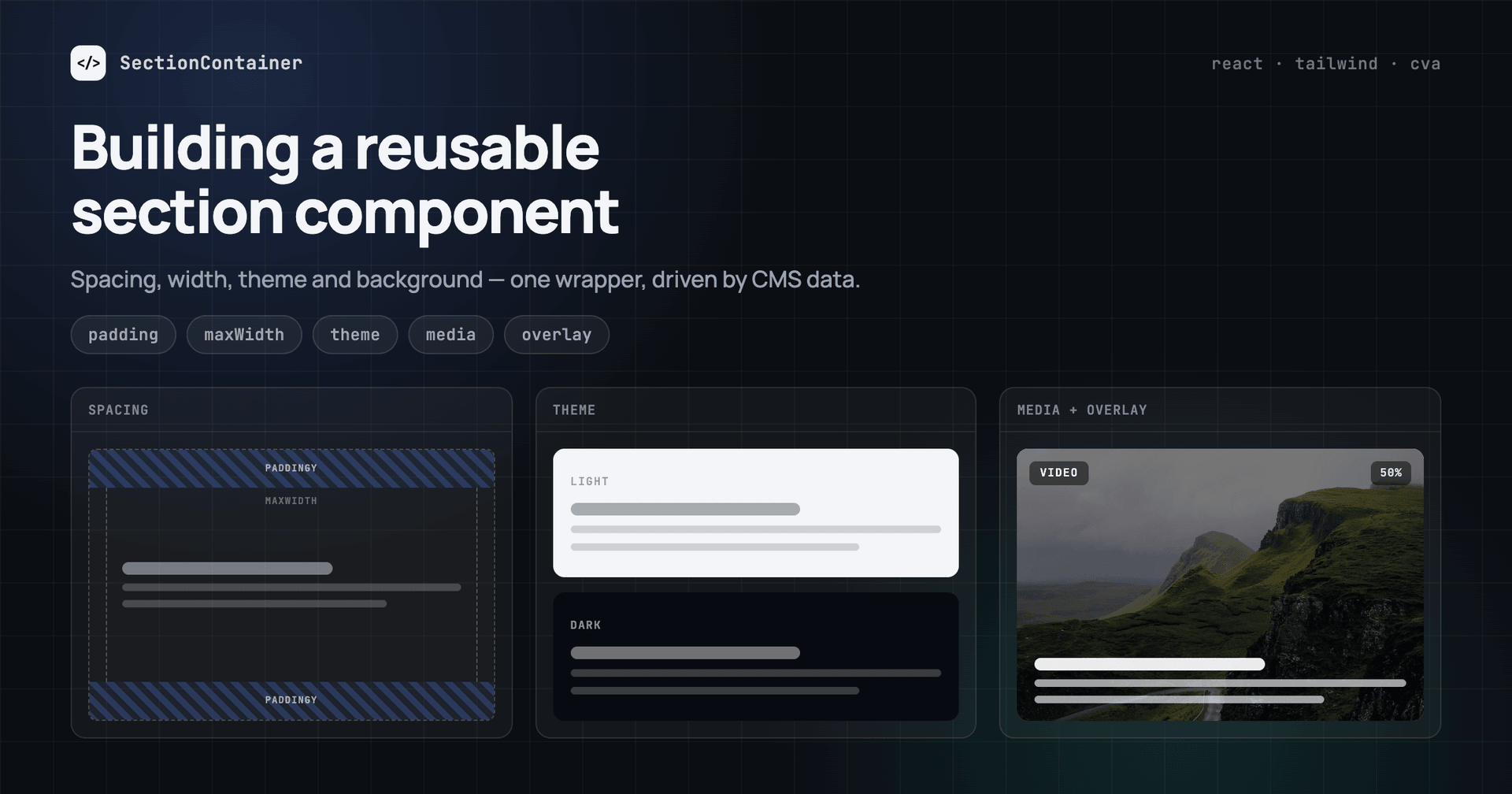

Every site has the same list of sections: hero, features, pricing, testimonials, FAQ, CTA. The content is different, but the frame around it is almost always the same. If the frame repeats, it can be reused. Expose a few parameters — vertical padding, content width, theme, background — and every section on the site is built on one component.
The task was simple to state: bring all kinds of sections down to one wrapper that takes these parameters and adapts to each section. The code gets cleaner: styling is configured in one place, and the same place is where new parameters are added when a new variant appears.
Why you need a reusable section
- Flexibility. Combinations of theme, padding, width and background give dozens of section variants from one wrapper.
- Speed. You write the frame once. After that, a new section is only its content plus a few settings.
- Maintainability. When the styles of all sections live in one component, you make a change once and it applies everywhere.
- Editor autonomy. The content manager changes the look of a section without a developer task. At the same time, they cannot leave the design system: values are picked from a list, not typed by hand.
What we’ll cover
- the five settings that cover almost any section
- how a reusable section lives in Storyblok, Sanity and Payload
- how the component helps AI build sections
- when section settings in a CMS pay off, and when they don’t
All the code is in two public repositories, so the article keeps only what is hard to explain in words: focusreactive/cms-kit for Storyblok and Sanity, focusreactive/payload-plugins for Payload.
1. The five settings that cover almost any section
Five settings are enough to build almost any section. All of them apply to the section itself and do not touch its content: the content comes through children and stays as it is, so any block can go into the same wrapper. There is one exception, the theme. It is set on the section, but it also recolors everything inside.
Let’s go through all five:
- Vertical padding —
paddingY. Three values:none,base,large. - Content width —
paddingXandmaxWidth. Side padding and the maximum width of the container inside the section. - Theme —
theme. Switches the colors of the section and everything inside it. - Background —
background.media. An image or a video that covers the whole section. - Overlay —
background.overlayandbackground.opacity. A layer over the background so the text stays readable.
So we have five settings and seven fields: width and overlay take two fields each.
Here is how the settings look in practice. The section is the same, only the values change:
These parameters appear in almost every section. They also do not overlap: padding knows nothing about the theme, the background does not affect the width, so you can combine them any way you want.
This is why the wrapper is self-sufficient: to get a new kind of section, you do not need a new component, only a different combination of values. And when the combinations are not enough, the set is easy to extend with new values.
2. How a reusable section lives in Storyblok, Sanity and Payload
The component does not care where the settings come from: it takes a plain object with five values and knows nothing about the CMS. So in theory it can be connected to any CMS. In practice, the CMS defines the shape of that object.
Storyblok
In Storyblok the schema is built from blocks in the interface; there is no schema code. To avoid describing the seven fields again in every section, we move them into a separate sectionSettings block and attach it to each section with one field that allows only this block. The section reads it through an adapter. The block looks like this:
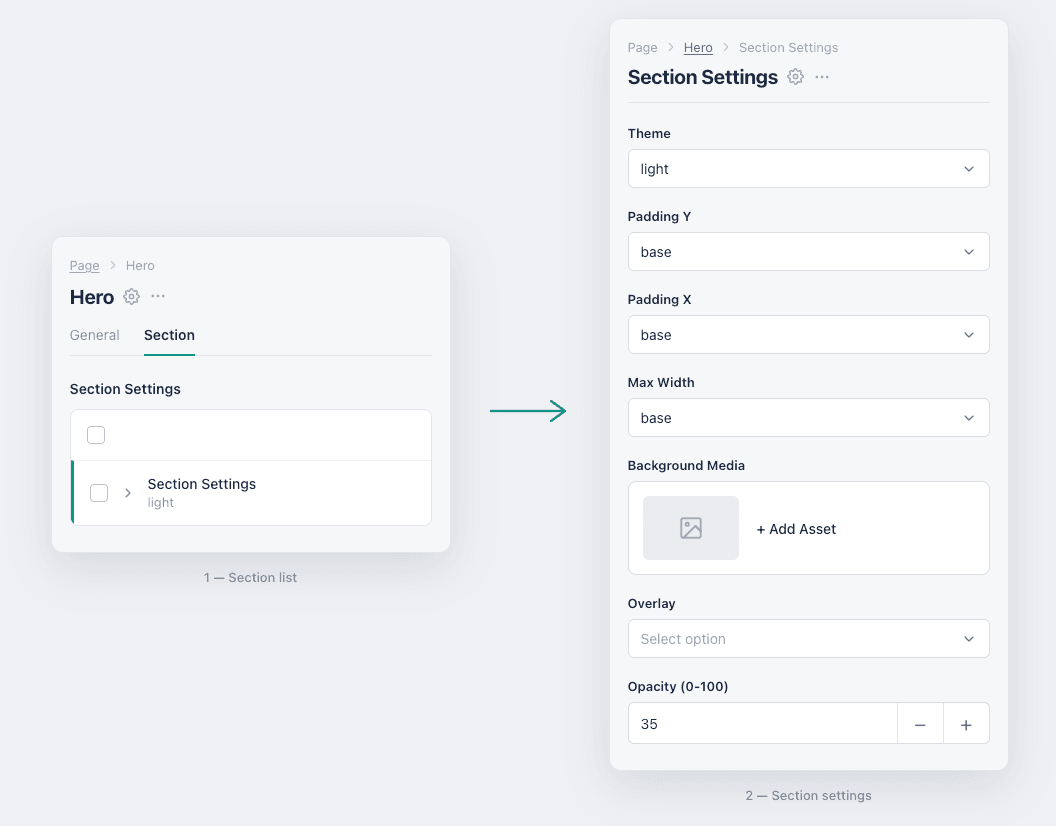 Website builder interface showing Section Settings panel with Theme, Padding, Max Width, Background Media, Overlay, and Opaci
The reusable section expects the background as one object: media, overlay color and opacity inside background. In Storyblok these are three separate fields, so we build the object in the adapter, and the section can read it.
export const prepareSectionData = (settings, id) => ({
  id,
  theme: settings?.theme || null,
  paddingY: settings?.paddingY || null,
  paddingX: settings?.paddingX || null,
  maxWidth: settings?.maxWidth || null,
  background: {
    media: settings?.media?.filename ? settings.media : null,
    overlay: settings?.overlay || null,
    opacity: settings?.opacity ? Number(settings.opacity) : null,
  },
});
The full file is prepareSectionData.ts.
The plus of this block is that it is easy to extend: a new parameter or value is added in the block schema, with no migrations and no deploy.
There is also a minus. The block is attached by hand to every new section, and it is easy to forget. Conditional fields in Storyblok are available only on Enterprise plans, so on other plans overlay and opacity are always visible in the form, although it would be better to hide them until a background is chosen. For this, the section has a check that does not depend on the schema: no media, no overlay, no matter which CMS sent the data.
Sanity
Sanity works differently: here we write the schema in code. We create a separate file for the section parameters, attach it to every section, and for convenience put these parameters into a separate Style tab.
In the admin it looks like this:
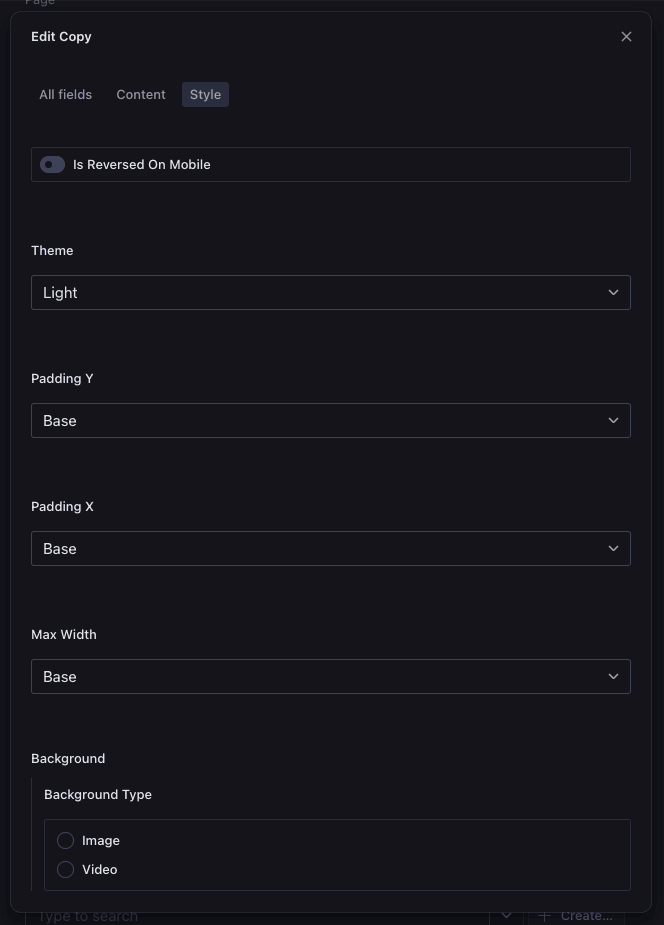 Section settings in the Sanity Style tab
The file is attached to a section schema with one line:
fields: [
  defineField({ name: "items", type: "array", group: CommonGroup.Content }),
  ...sectionCommonFields,
],
The full file is commonFields.tsx.
The nice part: conditional fields work. Overlay and opacity appear only after a background is chosen.
The minus is that the background has to be split into two fields: an image and a video file. Sanity does not support one field for both types, so we need a switch to choose the right field. Because of this, the background object here is the only one that differs from the common shape: instead of media it has type, image and video, and the Sanity section reads exactly these. Values also have to go through stegaClean before they are used in the section’s classes: with visual editing on, Sanity adds invisible characters to strings, and "dark" is no longer equal to "dark".
Payload
Payload, like Sanity, needs the schema in code, but the approach is different. The section parameters are not listed in the block. The block is wrapped in a function, and the function adds a settings tab to it.
In the admin it looks like this:
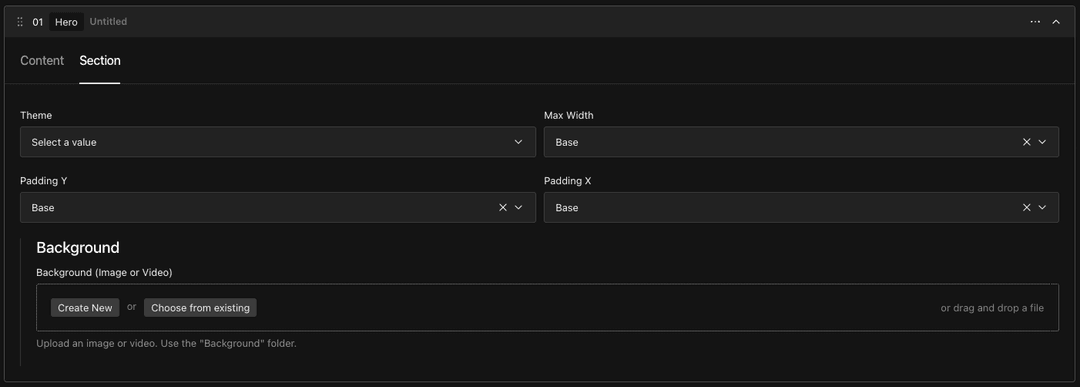 Section settings tab in Payload CMS
And the block is attached like this:
export const CardsGridBlock: Block = injectSection({
  slug: "cardsGrid",
  fields: [ /* the block's own fields */ ],
});
The parameters are in sectionFields.ts, the wrapper is in injectSection.ts.
Payload handles section settings best of the three. You can describe them any way you want, there are no schema limits here. Conditional fields work, the background fits in one field, and the data needs no reshaping for the section. Since the block is wrapped in a function anyway, it is a good place for other shared things too: in our wrapper it also adds a “hide section” checkbox, which turns a section off on the page without deleting it.
The minus depends on the database. On Postgres every new field in production is a migration; in development the schema is synced automatically.
What we got in the three CMSs
Storyblok
- settings are described as a separate block in the interface;
- attached to a section by hand, with a field that allows one block;
- conditional fields only on Enterprise;
- background is one asset field;
- an adapter is needed, it builds
background; - a new value is an edit in the interface, no deploy.
Sanity
- settings are described as shared fields in code, Style tab;
- attached to a section by a spread of shared fields into the schema;
- conditional fields work;
- background is two fields and a switch;
- no adapter, but
stegaCleanis needed; - a new value is a schema edit and a Studio deploy.
Payload
- settings are described by a wrapper function around the block, Section tab;
- attached to a section with
injectSection()around the block; - conditional fields work;
- background is one upload field;
- no adapter;
- a new value is a schema edit, plus a migration on Postgres.
3. How the reusable component helps AI build identical sections
AI is developing fast, and writing code with prompts has become normal practice. What this code looks like depends not on the model but on the project it lands in: on how the sections are built there.
If the project has no shared section, AI builds each one from scratch. It copies values straight from the mockup, py-[23px], text-[#ffffff], where one section has 72 pixels of padding and the same section next to it already has 81. Even matching values are written as custom classes, not variables. And it does not reuse a similar section on its own: it makes another one, unless the prompt says so explicitly.
With a ready section the next step is obvious: AI reads it and builds the new one from what already exists. Instead of duplicates you get the same sections with different parameters. The work goes faster, and it uses fewer tokens.
Extending the set is easy for it too. You need a vertical padding bigger than large, you ask to add xl, and AI finds all three places by itself: the variable in CSS, the variant in the wrapper and the item in the list of values in the CMS schema. The edits are the same kind every time and always sit next to the previous ones. It builds on what is already there instead of building its own thing next to it. It does what it is good at: following the pattern.
This is not only about code. Storyblok, Sanity and Payload already have MCP servers, Sanity has released Content Agent, and agents are starting to build pages right inside the CMS. An agent that picks the theme and the padding from a list cannot build a section outside the design system, no matter what prompt it gets. Settings as fixed lists work as a limit both for the editor and for the agent.
4. When section settings in a CMS pay off, and when they don’t
Settings in the CMS are not free. Saying honestly where they pay off is more useful than praising the approach.
For:
- the editor changes the look of any section alone, picking from ready options, without a developer;
- styling is fixed in one component, and all sections pick up the change;
- section styles are easier to manage in the admin than in code;
- more section variants: themes, backgrounds and paddings combine with each other;
- new parameters are easy to add.
Against:
- it is not always a good idea to give the editor control over section styles;
- there is a risk of breaking the look: someone picks a theme or a background that nothing was designed for;
- there is a cost at the start: the parameters have to be described and connected to styles.
Simple arithmetic: on a site with three or four sections that nobody will ever restyle, it is faster to build each one separately. The approach starts to pay off at around ten sections: they repeat on different pages, and their look is changed without a developer.
Conclusion
A section like this can be reused with any headless CMS: Storyblok, Sanity and Payload are only examples here. The parameters either go into the admin or stay in code. Either way, it is one set of settings that the developer, the editor and the AI agent all work with.
Both implementations are public: cms-kit for Storyblok and Sanity, payload-plugins for Payload.
Stack
React 19, Next.js 16, Tailwind CSS 4, cva. CMS: Storyblok, Sanity and Payload.




 Aleksei Zhilyuk

.png&w=828&q=90)