
TL;DR
- Protected routes in Next.js require two layers.
proxy.ts(ormiddleware.tson Next.js 15) performs a fast session check and redirects anonymous users.- Authorization belongs next to the data, not in middleware.
- JWTs must be verified with signature validation, not decoded.
- Server Components, Route Handlers, and Server Actions must all re-check authorization.
- The same architecture applies whether you’re using custom JWTs, Auth.js, Clerk, or Supabase Auth.
Version note: This article uses proxy.ts, introduced in Next.js 16. On Next.js 15 and earlier, use middleware.ts. The security architecture is the same: request interception is an early session check, while authorization belongs in the server-side data layer.
Next.js Authentication: Middleware vs. Real Route Protection
Search for Next.js protected routes and you’ll find dozens of tutorials that recommend the same pattern:
- Create middleware
- Read a session cookie
- Verify a JWT
- Redirect if authentication fails
That pattern is useful, but it is incomplete. Protected routes in Next.js are not really about pages. They are about data. Modern App Router applications expose data through:
- Server Components
- Route Handlers
- Server Actions
- APIs
As a result, Next.js middleware protected routes should be treated as a user-experience feature, not a security boundary. This article explains the architecture we use for Next.js authentication, why middleware alone is insufficient, and how to build protected routes that remain secure even when middleware is bypassed, misconfigured, or skipped.
What Are Protected Routes in Next.js?
The phrase “protected route” can mean three different things.
Hiding UI
A Client Component checks for a session and shows a login screen instead of content. This is cosmetic protection. The underlying data may still be accessible.
Blocking Navigation
A middleware or proxy.ts check intercepts requests before rendering. This improves user experience because signed-out users are redirected immediately.
Protecting Data
Authorization happens next to the database query, Route Handler, or Server Action. This is the only definition that survives direct requests to your endpoints.
For App Router applications, the third definition is the one that matters.
Next.js Protected Routes: The Two-Layer Security Model
Every protected route should answer the same question twice:
- Is this user likely authenticated?
- Is this user actually allowed to access this data?
Layer 1: Middleware or proxy.ts
The first check happens before rendering.
Responsibilities:
- Read session cookie
- Verify JWT signature
- Verify expiration
- Redirect anonymous users
Benefits:
- Fast
- Cheap
- Excellent user experience
Limitations:
- Has no database access
- Cannot detect revocations
- Cannot enforce business rules
- Should not be treated as authorization
Layer 2: Data Access Layer
The second check happens where data is retrieved.
Responsibilities:
- Verify session again
- Load current user
- Apply role checks
- Apply ownership checks
- Return safe DTOs
This is where authorization belongs.
Why Middleware Alone Can’t Protect Next.js Routes
A protected route implemented only in middleware is not truly protected. Middleware exists in front of the application. Authorization needs to live inside the application.
The CVE-2025-29927 Example
CVE-2025-29927 is a useful example of why middleware should not be the application’s only authorization boundary. The broader principle is simple: protection implemented only at the request boundary should never be the sole control protecting sensitive data.
The Security Principle
Use middleware to decide: Should this navigation continue?
Use the Data Access Layer to decide: Can this user access this data?
How to Protect Routes in Next.js 16 with proxy.ts
Next.js 16 renamed middleware to proxy.ts.
Basic Flow
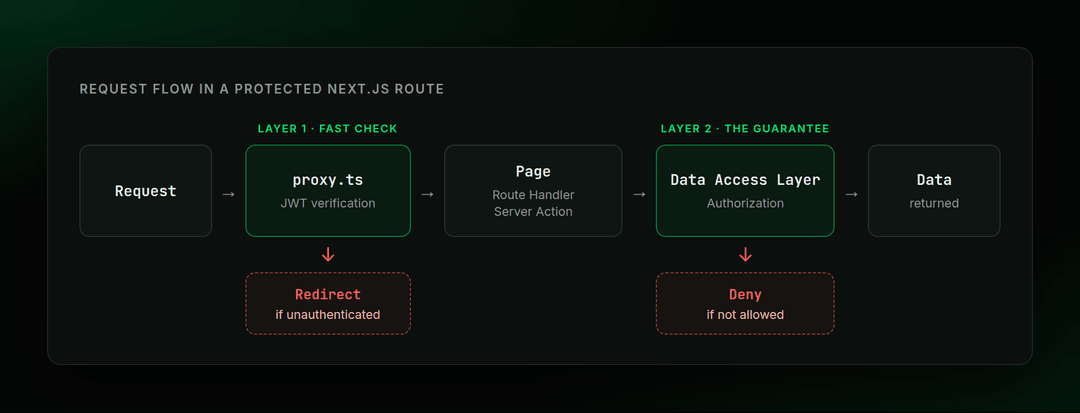 Request flow: proxy.ts runs a fast JWT check, the Data Access Layer makes the authorization decision
What proxy.ts Should Do
Keep middleware lightweight:
- Read cookie
- Verify token signature
- Verify expiration
- Refresh session if required
- Redirect anonymous users
What proxy.ts Should Not Do
Avoid:
- Database queries
- Permission checks
- Role lookups
- Ownership validation
Keep these checks in the server-side authorization layer.
Scoping Protected Routes with config.matcher
A matcher determines which requests reach proxy.ts. It controls where proxy.ts runs, but it does not define your application’s complete authentication or authorization policy.
Use the matcher to keep Proxy focused on routes that benefit from an early session check:
- Include protected application routes
- Exclude static assets
- Exclude image optimization routes
- Exclude public pages such as login and signup
- Exclude authentication endpoints when they do not require the protected-route check
The important distinction is that a route excluded from the matcher is not automatically authorized. Sensitive data and operations must still enforce authentication and authorization at the Server Component, Route Handler, Server Action, or Data Access Layer that accesses them.
matcher controls where Proxy runs; it does not define who is allowed to access your data.
JWT Verification for Next.js Authentication
A common mistake in NextJS auth implementations is decoding a JWT instead of verifying it.
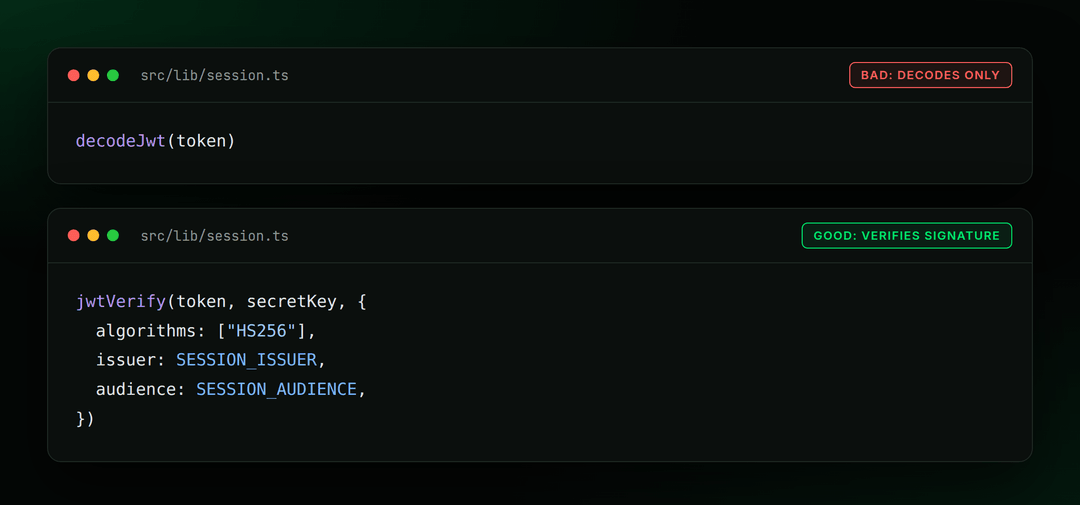 decodeJwt only reads the payload; jwtVerify checks the signature, algorithm, issuer and audience
Bad
This only decodes Base64 data.
Decoding only reads the token’s payload; it does not verify its signature.
Good
This validates:
- Signature
- Expiry
- Issuer
- Audience
- Required claims
Only verified tokens should be treated as authenticated sessions.
JWT vs Opaque Sessions
A JWT is useful when:
- Multiple services consume the token
- Middleware needs authentication without DB access
- External identity providers issue tokens
An opaque session ID is often simpler when:
- One application exists
- One database exists
- Immediate revocation is important
Building a Data Access Layer for Next.js Auth
Sensitive data access and authorization should happen in a trusted server-side layer close to the data.
Responsibilities
The DAL should:
- Verify sessions
- Load users
- Apply authorization rules
- Return safe DTOs
- Hide sensitive fields
Example Pattern
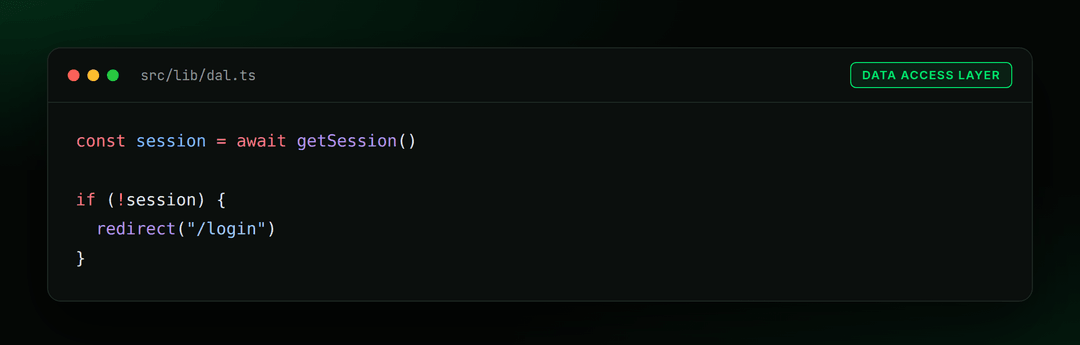 Data Access Layer: check the session before returning data
Why Sessions Must Be Rechecked
A JWT might still be valid while:
- The account has been deleted
- The user was disabled
- The role changed
- Access was revoked
Those checks require current authoritative server-side state.
Route Handlers, Server Actions, and Server Components
Modern Next.js applications expose multiple execution paths. Each must perform authorization.
Server Components
Pages should consult the Data Access Layer before rendering sensitive data.
Server Actions
Server Actions are public endpoints. Treat them the same way you would treat REST APIs. A Server Action is callable through an HTTP request, so don’t assume that because it is defined in a server-only file it is automatically authorized.
Validate:
- Authentication
- Authorization
- Input
on every request.
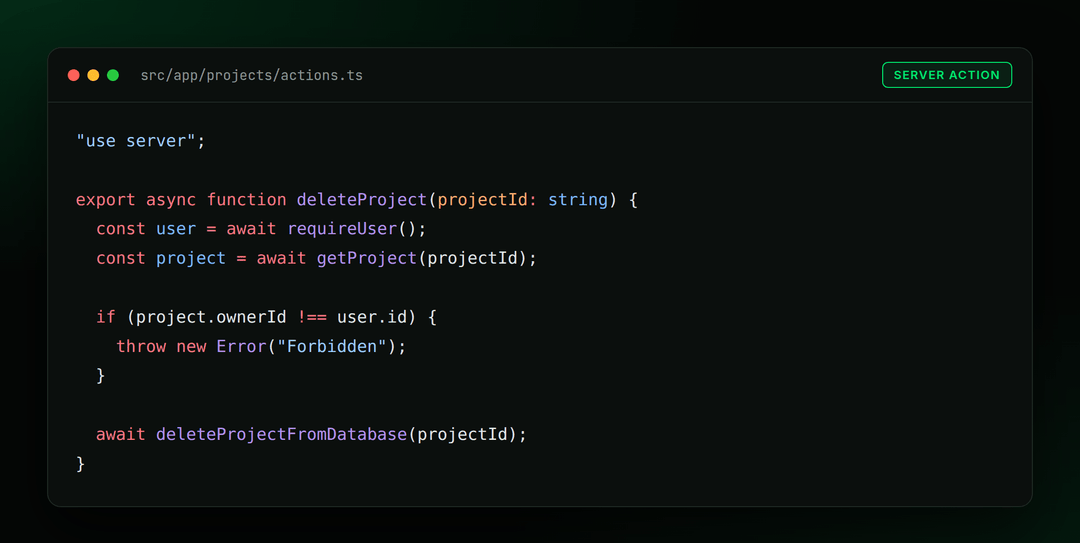 A Server Action checks the user and ownership before it deletes anything
Route Handlers
Route Handlers should never trust page-level protection. They must independently verify authorization.
Role-Based Access Control for Next.js Protected Routes
Role checks belong in the database layer.
Do Not Trust JWT Role Claims
A token issued before a demotion still contains the old role.
For example:
JWT: admin
Database: member
For permissions that can change during a session, authorization should use the current authoritative server-side state rather than trusting potentially stale role claims in a JWT.
Recommended Approach
requireRole("admin")
The helper:
- Loads current user
- Reads current role
- Applies rules
- Allows or denies access
Protected Routes with Auth.js and Supabase
The architecture remains the same regardless of provider.
Auth.js Protected Routes
Auth.js is often used to implement protected routes in Next.js, and its middleware can simplify the initial authentication check.
However:
- It improves navigation by handling the initial authentication check.
- Authorization still belongs in your Data Access Layer (DAL).
- Server Actions and Route Handlers still require their own authorization checks.
The authentication provider does not change this security model.
Supabase Protected Routes in Next.js
When implementing Supabase protected routes in Next.js:
Middleware frequently:
- Refreshes sessions
- Attaches authentication context
Authorization should still happen in:
- Server Components
- Route Handlers
- Server Actions
- Database policies
Authentication identifies users. Authorization grants access.
Common Mistakes in Next.js Authentication
1. Middleware As The Only Protection
The most common mistake.
2. Decoding Instead of Verifying JWTs
Decoded payloads prove nothing.
3. Trusting Layouts
Layouts do not always rerun. Do not treat them as security boundaries.
4. Treating Server Actions As Private
They are public HTTP endpoints.
5. Storing Protected Files Under public/
Files inside /public bypass your authorization logic.
6. Trusting Role Claims
When permissions can change during a session, use current server-side role data rather than potentially stale JWT claims.
7. Infinite Sliding Sessions
Always enforce a maximum session lifetime.
8. Database Queries in Middleware
Middleware runs on every matched request.
Should You Build Next.js Authentication Yourself?
For most applications, an established authentication library reduces the amount of security-sensitive code you need to maintain. Libraries provide:
- Password hashing
- Session rotation
- OAuth providers
- Magic links
- Email verification
- Security hardening
A custom implementation is reasonable when you only need:
- A single signed cookie
- One purpose
- One verification route
Anything larger usually benefits from an established authentication solution.
Practical implementation note
In production Next.js + Payload projects, we’ve used both CMS-managed authentication and jose for verifying tokens from OIDC flows. The implementation choice depends on whether authentication is handled by the CMS, an identity provider, or the application itself.
How We Verified the Architecture
We run the same checks in every Next.js security audit. Testing included:
- Tampered tokens
- Revoked users
- Role changes
- Open redirect attempts
- Download endpoints
- Cross-site requests
- Session refresh behavior
- Middleware migration scenarios
The critical test:
- Keep a valid cookie
- Delete the account
- Access a protected route
Result:
- Middleware permits navigation
- The Data Access Layer denies access
- User is redirected to login
This demonstrates why authorization belongs next to the data.
Next.js Protected Routes: Secure the Data, Not Just the Page
In Next.js, protected routes are ultimately about controlling access to data, not pages. Middleware and proxy.ts provide a fast authentication check that verifies sessions, redirects anonymous users, and keeps requests cheap.
The Data Access Layer understands the current state of your application: users, roles, ownership rules, revocations, and business logic. It is the security boundary that decides what data leaves the server. Whether you use custom JWT authentication, Auth.js, Supabase Auth, or another Next.js authentication solution, the architecture stays the same:
- Middleware improves navigation
- The Data Access Layer protects data
- You need both, but only the Data Access Layer has the final say
Not sure where your app stands?
Most authentication issues we find in Next.js projects are not exotic exploits. They are the gaps covered in this article: authorization that exists only in middleware, JWTs that are decoded but never verified, Server Actions assumed to be private, and role claims trusted over current server-side data.
Our Next.js security audit applies the same checks used to validate this architecture, including tampered tokens, revoked users, role changes, and every entry point that bypasses middleware.
If you need a second set of eyes on those risks, you can book a Next.js audit.




.png&w=828&q=90)