
revalidation-audit is a skill for coding agents that checks how a site on Next.js and next-sanity invalidates its cache when documents are published in Sanity. next-sanity puts on every cached response its sync tags, a publish invalidates every page that shares a tag with the publish, and which tags a response gets is decided by the shape of the query (Sync tags).
The result of the audit is a report with recommendations and a visual tool: a revalidation map that shows which document’s publish invalidates which route and through which tag.
 audit-overview
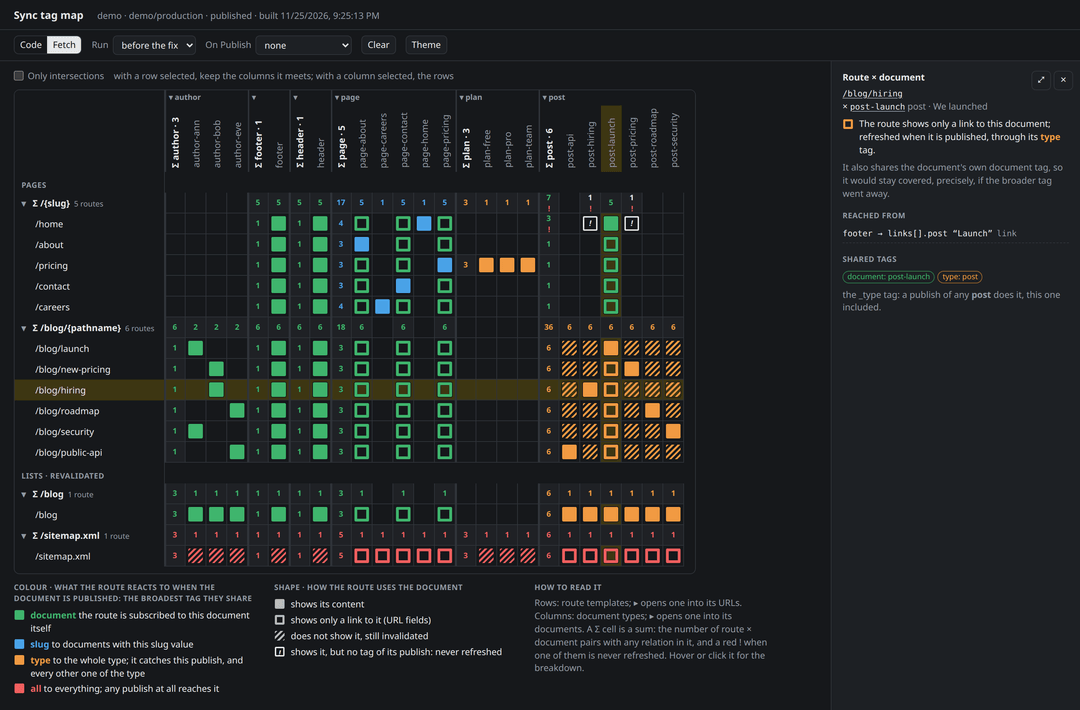
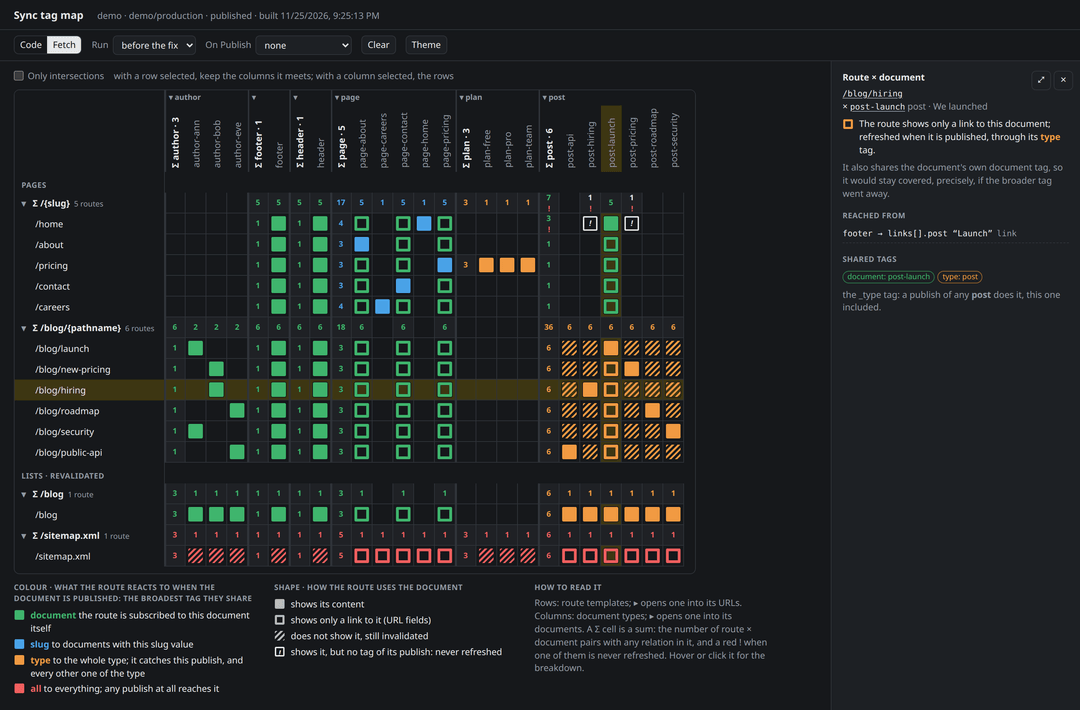
The screenshots show the audit of a demo project, a small site with a blog: 5 pages, 6 posts, 3 authors, pricing plans, a header, a footer and a sitemap.
The query shape leads to several typical problems:
-
revalidation that is too broad: a query gets the tag of the whole type or of the whole dataset, and a publish of one document invalidates pages that do not show it;
-
a lost tag: a page shows a document, but the page has no tag of that document’s publish, and the content is not refreshed;
-
a response has more than 100 tags, and Sanity collapses them into type tags or into the dataset-wide tag;
-
a page shows only a link to a document, but is invalidated by any edit of it, because the tag is bound to the whole document.
The skill finds such places in the project’s code, shows the query fragment that causes them, recommends a fix and, when asked, rewrites the query.
Install and run
The skill is installed inside the project, next to the code (revalidation-audit):
npx skills add focusreactive/ai-prompts --skill revalidation-audit
In the project the skill works in two modes. An agent that writes or changes GROQ queries uses the skill’s reference: which query shape gets which tags and how to rewrite a query so that the tag becomes narrower. The full audit is started with the /revalidation-audit command or by asking to check revalidation.
The agent’s permissions are set by permissions.json in the audit folder. At the code level (the default) the agent only reads the code. At the fetch level it also runs queries against the dataset, read-only. The audit does not write to the dataset at any level. All audit files are in <project>/revalidation-audit/, and git ignores this folder.
You need Node.js 20.11 or newer, the Next.js App Router and next-sanity; no extra packages have to be installed.
The revalidation map
The agent delivers the result of the audit in two parts: as the report report.md and through a visual tool that displays the revalidation map. The skill serves the map as a local page that you can open in a browser. The agent collects the data for it by itself, exploring the project: which routes the app tree has, which queries each one runs, where the params come from, how responses become cache tags and what triggers revalidation.
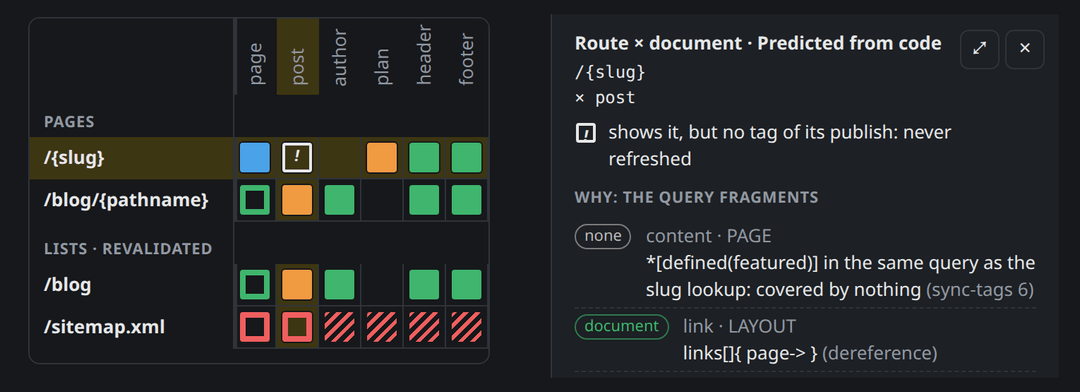
At the code level no query is run. The agent reads every query, predicts its tags based on Sanity’s rules and records the fragment that gives each tag. The map is built by route templates and document types. A click on a cell opens the reasoning behind it: in the example the pair /{slug} × post has no tag, and the panel shows the query fragment because of which it gets lost.
 audit-prediction
At the fetch level the agent runs the queries of every route and looks at which tags Sanity returned and which document each value of the response came from. The map goes down to a single route and a single document, and the prediction is checked against the measurement in every cell: any difference goes into the report.
 audit-overview
How to read the map
Rows are routes, grouped by template (/{slug}, /blog/{pathname}, /blog, /sitemap.xml). Columns are documents, grouped by type. A cell is a “route × document” pair, and it has two independent properties.
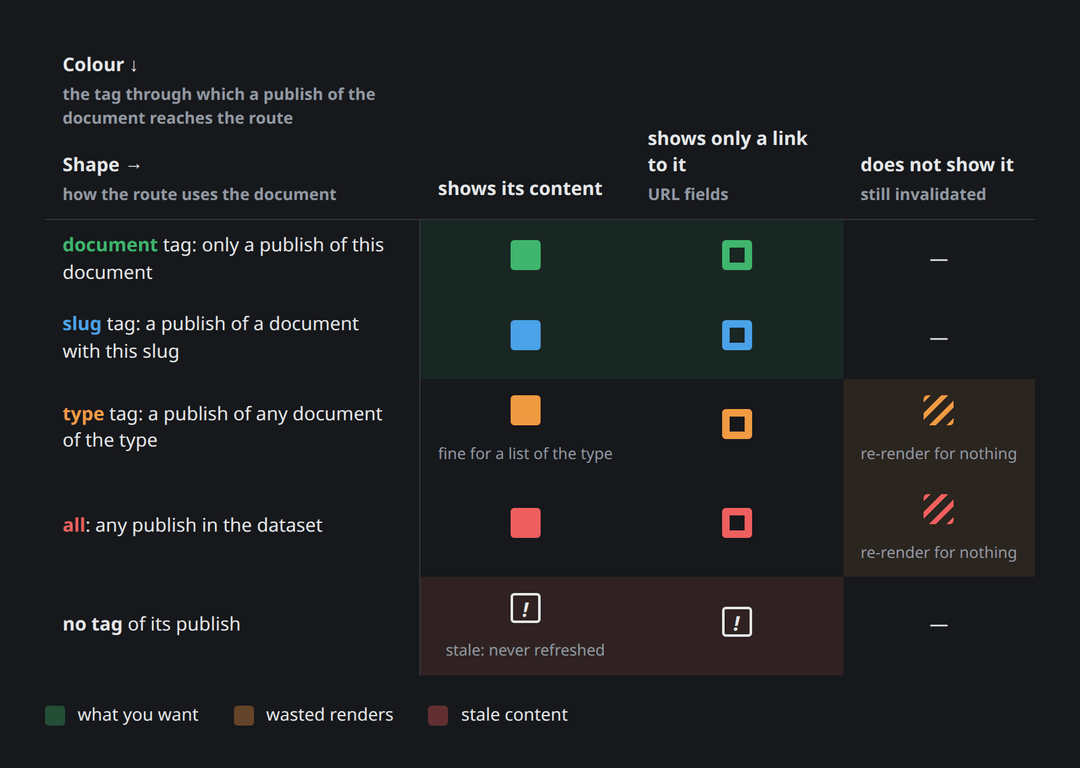
Colour: through which tag a publish of the document reaches the route. Green is the tag of the document itself, blue is the tag of a slug value, orange is the tag of the whole type, red is the tag of the whole dataset. Shape: how the route uses the document. A filled square: the route shows the content of the document. A frame: only a link to it. Hatching: it does not show it, but is invalidated by its publish. !: it shows it, but the route has no tag of its publish.
 audit-legend
A broad tag is not always a mistake: the list of posts /blog has to be invalidated by a publish of any post, and its orange fill is expected. The map of the demo project has three problems:
-
Orange hatching over almost the whole block
/blog/{pathname}×post. A post is looked up by the fieldpathname, and Sanity gives the tag of a slug value only to a filter on a field whose path ends inslug.current. The query gets the type tagpost, and a publish of any post invalidates the pages of all six posts. -
!at/homeon two posts. The home page in one query looks up the page by slug and takes the featured posts through*[defined(featured)]without_type. By itself such a filter would give the dataset-wide tag, but next to the lookup by slug Sanity loses it (sanity-io/sanity#16489). The home page shows the old titles of these posts until a publish of another document invalidates it. The third post of the block,post-launch, is green only because the footer links to it. -
The red row
/sitemap.xml. A filter without_typegives the dataset-wide tag: the sitemap is invalidated by a publish of a plan, an author, the header and the footer.
A click on a cell opens a panel: which tags the pair shares and through which link the route reached the document, and in full-screen mode also what the query read from the document. A click on a row or on a column header opens a summary of the route or of the publish.
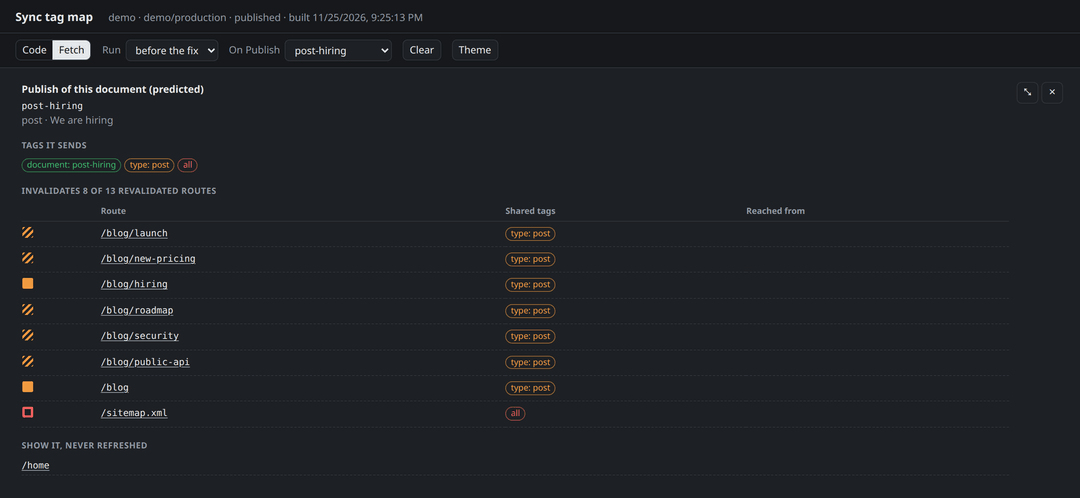
The On Publish menu answers the reverse question: what a publish of one document invalidates. Choosing a document opens its card over the whole window: the tags that the publish sends, the routes that it invalidates, each with the shared tag, and the routes that show the document but will not be refreshed. A publish of the post post-hiring invalidates 8 routes of 13. Five of them do not show the post, the sitemap shows only a link to it, and the home page, where its title is displayed, stays in the cache.
 audit-on-publish
The report and recommendations
report.md starts with a verdict in numbers (“a publish of any page invalidates N of M pages”), then the findings, the most dangerous first: first !, then templates with a type tag or the dataset-wide tag, then documents whose publish invalidates the most routes where they are not shown. Each finding has the query and its fragment. The recommendations are sorted by how many needless invalidations they remove. Every finding of the report can be checked on the map.
Fixes and the before and after comparison
The agent makes a fix only when asked and one query at a time:
-
A test in the project pins which tag classes (document, slug, type, dataset) the query must and must not carry after the fix and which result shape it must return.
-
The agent rewrites the query based on the reference of patterns and runs the old and the new query in one GROQ request with all the params of the template’s routes. It explains every difference in the results, and a person accepts it.
-
Type generation, the build, a comparison of the HTML of the affected routes before and after the fix.
-
Two measurements, before the fix and after, and
compare.mjs: which documents started to invalidate a different set of routes, whether any new!appeared.
Every measurement is saved in the folder as a separate run, and the Run menu in the map switches between them. Below are two runs of the demo project. Between them the field pathname was renamed to slug, and _type was added to the filters of the home page and the sitemap.
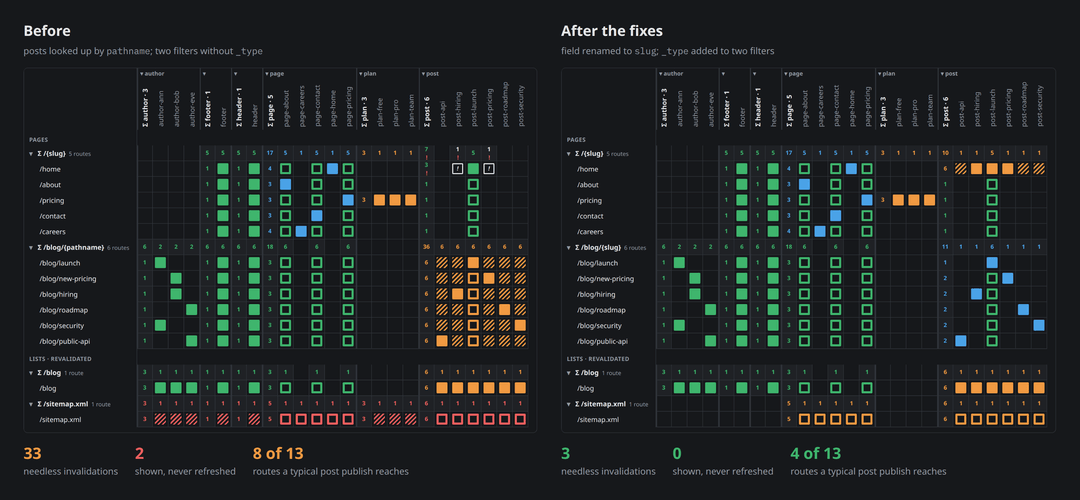 audit
The three remaining hatched cells are on the home page: with _type the block of featured posts got the type tag post, and the home page is invalidated by a publish of any post.
Renaming the field is a schema change with a backfill of all posts, and the agent does not do it. If a query fix is not enough (the URL field is not named slug, one query serves routes with different needs, a link and content sit in one document), the agent proposes to change the schema or the way the data is fetched and names the cost.
How Content Lake assigns tags and where they get lost is covered in the article Practical Use of Sanity Sync Tags for Granular Next.js Revalidation.