
TL;DR
- WordPress is an all-in-one CMS: it stores content, renders pages and runs themes and plugins on one PHP server. Sanity is a headless content platform: it stores structured content in a hosted database and delivers it through APIs to any front-end you build.
- WordPress still powers 39.5% of all websites (W3Techs, November 2026), down from 43.6% in January 2025 (our WordPress statistics report).
- WordPress wins on time to launch, cost for small sites, e-commerce on a budget (WooCommerce), self-hosting and data ownership, the size of its ecosystem and the hiring pool.
- Sanity wins on content modeling, real-time editing, multi-channel delivery, a smaller maintenance burden and front-end freedom for teams with developers.
- Cost sits in different places: hosting, plugins and maintenance for WordPress; a custom front-end build, seats and metered usage for Sanity. License prices alone tell you little.
- Choose WordPress for a simple site or store that a small team must launch fast and run cheaply. Choose Sanity when content is a product: many channels, many editors, complex structure, and developers who will own the front-end.
A Note on Where We Stand
FocusReactive is an official Sanity partner, and we also migrate teams off WordPress, so read this with that in mind. To keep the comparison useful, it includes sections on where WordPress is the better choice and where Sanity is a poor fit, and every statistic links to its source. For more data, see our Sanity CMS Statistics 2026 report.
Two Different Kinds of CMS
Most practical differences between Sanity and WordPress come from how each one is built.
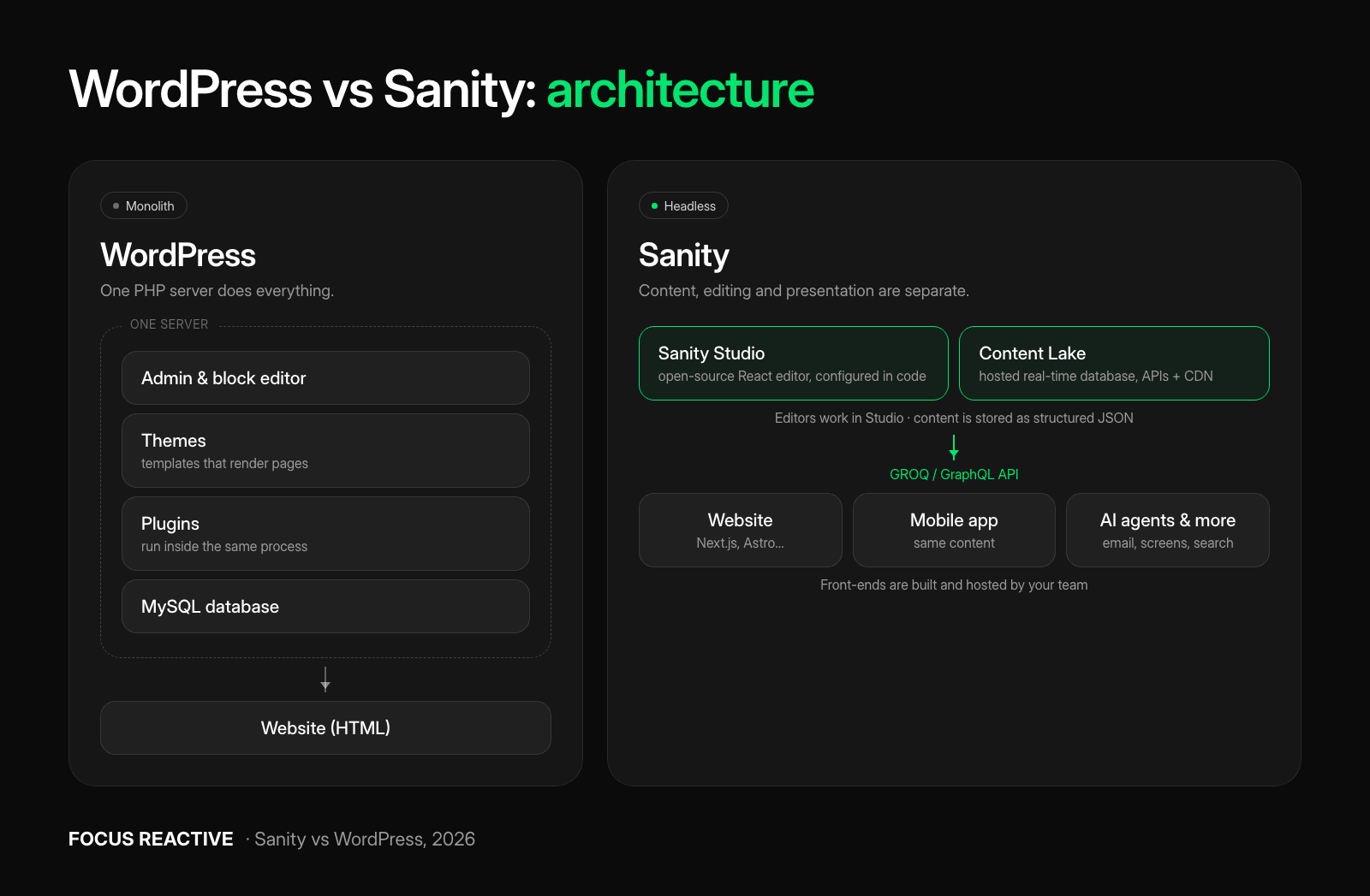
WordPress is a monolith. One PHP application, backed by a MySQL database, handles the admin screen, the content, the templates (themes), the extra features (plugins) and the HTML your visitors receive. That is why you can install it on cheap hosting, pick a theme and publish the same day. It is also why every plugin you add runs inside the same process that serves your pages. WordPress is open source under the GPL, so you can host it anywhere and you own the database.
Sanity is headless. It splits the job in three:
- Content Lake: a hosted, real-time database that stores content as structured JSON documents and serves it through APIs and a global CDN. It is a proprietary cloud service and cannot be self-hosted.
- Sanity Studio: the editing interface. It is open source and built with React, and developers configure it in JavaScript or TypeScript (Sanity docs).
- Your front-end: a website, app or any other channel built with the framework of your choice, such as Next.js or Astro.
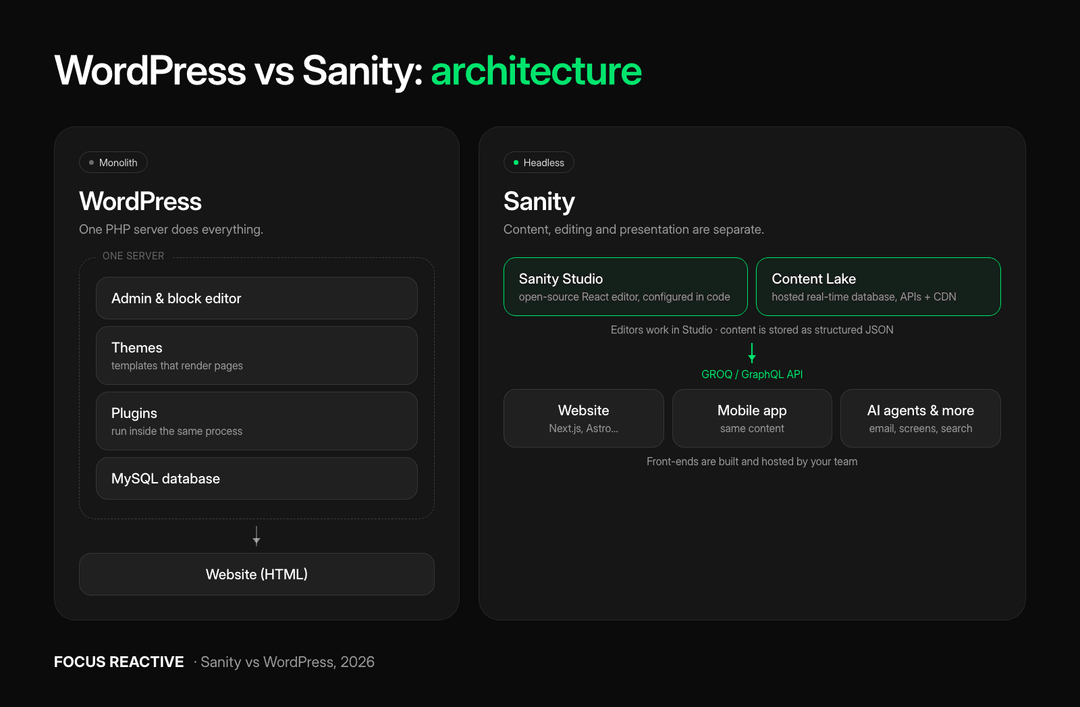 WordPress runs admin, themes, plugins and MySQL on one PHP server; Sanity separates the hosted Content Lake and Studio editor from front-ends such as a website, mobile app and AI agents
Neither model is better in the abstract. A monolith is simpler to start. A headless setup is more work up front but separates concerns, so each part can be scaled, secured and replaced on its own. Our guide to headless CMS architecture covers the trade-offs in more depth.
Content Modeling
WordPress starts with posts and pages, but core also supports custom post types, taxonomies, post meta and, more recently, Block Bindings to connect blocks to custom data. Plugins like Advanced Custom Fields make building field-based content types much easier, and Multisite lets one install run a network of sites. The body of most content lives in the block editor as HTML with block comments. This works well for articles and marketing pages. It gets harder when the same content must appear in several channels, because content and presentation are stored together.
Sanity treats content as data from the start. You define your schema in code: document types, fields, validation rules, references between documents and reusable objects. Rich text is stored as Portable Text, a JSON format that describes structure instead of HTML, so the same text can render on a website, in an app or in an email. References are real links between documents, so a product, an author or a pricing table can be edited once and used everywhere.
In WordPress you mostly shape content to fit pages; in Sanity you model the content first and let each channel decide how to present it. One website with a blog rarely needs more than WordPress offers. Localized content, several channels or many linked content types are where Sanity’s approach starts to pay back.
The Editor Experience
WordPress has the most familiar editor on the web. The block editor lets marketers build pages visually from blocks and patterns, and most content teams have used it before. WordPress 7.0 (“Armstrong”, May 2026) refreshed the dashboard and added a command palette (⌘K) and a font management page. WordPress 7.1 (“Mary Lou”, August 2026) lets editors leave Notes anywhere in content, with @mentions (WordPress.org).
What WordPress still lacks is real-time co-editing. It uses post locking, so only one person edits a post at a time. Real-time collaboration was planned for 7.0 but cut shortly before release (Search Engine Journal), and it is not in 7.1, the current stable version.
Sanity Studio is real-time by design: several editors can work on the same document at once and see each other’s changes and presence live. Developers can also rebuild almost any part of it with custom inputs, dashboards, workflows and document actions. For the Tipico sportsbook we built a Studio that 122 users work in, with 98 document types, white-label content for six US states and five environments, including a separate one for the regulator (case study, how the publishing flow works). See also our guide to customizing Sanity Studio.
Visual page building is where WordPress still leads. Its block editor gives editors a page-builder feel out of the box. Sanity gets close with Visual Editing and the Presentation tool, which show a live preview of the real website and let editors click any element to edit it (our breakdown). But developers have to set it up, and editors can only arrange layouts in the ways the content model allows. How close the result feels to WordPress depends almost entirely on that setup; a rushed one leaves editors with forms and a preview button.
The Developer Experience
WordPress development means PHP for themes, hooks and plugins, plus React and JavaScript for custom blocks. The ecosystem is huge, documentation is everywhere, and WordPress developers are easy to find. The cost of that ease is that quality varies, and large WordPress sites often carry years of plugin and theme code that nobody fully owns.
Sanity development looks like modern front-end work: TypeScript, React for the Studio, GROQ (Sanity’s query language) for fetching content, and TypeGen to generate types from your schema and queries. A query such as *[_type == “post”]{…, author->} returns every post with its author reference already resolved (more GROQ examples). Schema lives in your repository, so content model changes go through code review like any other code. GROQ is powerful, but it is Sanity-specific, and experienced Sanity developers are much harder to hire than WordPress developers.
Sanity also gives you no front-end: your team builds and hosts the website. React, Next.js and Astro teams usually want exactly that freedom. A team without front-end developers has no way around it.
Performance, SEO and AI Visibility
WordPress renders HTML on the server, which is good for crawlers. Its performance problems usually come from heavy themes, page builders and too many plugins. In HTTP Archive data from November 2025, WordPress had the lowest Core Web Vitals pass rate (46.28%) of six platforms, including Wix, Squarespace and Drupal (Search Engine Journal). A lean, well-built WordPress site can still be fast. SEO tooling is a real strength: plugins like Yoast give editors meta fields, sitemaps and schema markup with no developer work.
With Sanity, performance is whatever your front-end makes it. Static generation, revalidation and a CDN make a Sanity-powered site very fast: the Tipico marketing site we built on Sanity serves 10,000+ pages with a PageSpeed performance score of 100 and two-minute builds (case study). SEO fields, sitemaps and structured data must be modeled in the schema and implemented by developers. That is more work, though every piece of it lives in your own code.
Whichever you pick, check how your pages reach AI crawlers. In a December 2024 study, the major AI crawlers from OpenAI and Anthropic did not run JavaScript (Vercel), so every page you want cited by AI assistants must arrive as server-built HTML. A headless site built as a client-side app can be invisible to them. Our guide to headless front-ends in 2026 covers how to get this right.
Security and Maintenance
In WordPress, core itself is rarely the problem: Patchstack recorded 11,334 new vulnerabilities in the WordPress ecosystem in 2025, 91% of them in plugins and only six in core (Patchstack). Because the admin, the database and the public site run on the same server, one vulnerable plugin can expose the whole site. Keeping WordPress safe is ongoing work: core, theme and plugin updates, PHP upgrades, backups, a firewall and testing that updates do not break anything.
Sanity runs, patches and scales the Content Lake for you, and your editing backend is not a server you maintain. Plugin patching goes away; other security work stays. You still patch your front-end’s npm dependencies (frameworks like Next.js have had serious vulnerabilities too), manage API tokens and keep private content in private datasets (the Free plan only offers public ones). And you depend on Sanity as a vendor for uptime, pricing and data location.
AI Features
WordPress 7.0 added an AI Client to core, so WordPress can talk to generative AI models, with connections managed from one place in the dashboard. Together with the new Abilities API, which describes what a site can do in a way AI tools understand, this gives plugins and AI agents a standard way to work with WordPress (WordPress.org).
Sanity builds AI into the platform. Its Content Agent runs content operations through conversation: bulk edits, content audits and gap analysis, with changes staged for review before they go live (Sanity). Agent Actions let developers run schema-aware AI tasks, such as translating fields, from code. Because Sanity content is structured, AI can work on specific fields instead of HTML blobs. Both features use AI credits, which are metered beyond the monthly allowance. We tested Sanity’s agent on 31 real editorial tasks in our Content Agent comparison.
Pricing and Total Cost of Ownership
License prices are a poor guide here, because the two platforms put their costs in different places.
WordPress software is free. You pay for:
- Hosting, from cheap shared hosting to managed enterprise WordPress.
- Premium themes and plugins, usually yearly licenses for forms, SEO, caching, security, backups and page builders.
- Maintenance: updates, security monitoring, plugin conflicts and PHP upgrades. This is the cost teams most often underestimate.
Sanity has three plans (Sanity pricing):
- Free: $0, up to 20 seats, 10,000 documents, 2 public datasets.
- Growth: $15 per seat per month, billed monthly, up to 50 seats, 25,000 documents, private datasets, comments, tasks, scheduled drafts and 5 roles instead of 2. Viewer seats are free. API requests, bandwidth, assets and AI credits above the included quotas are pay-as-you-go. More documents need a $299/month quota add-on, and each extra dataset costs $999/month.
- Enterprise: custom pricing, with SAML single sign-on, custom roles, an uptime SLA and annual billing. SSO is not available on Growth, so if your company requires it, budget for Enterprise from day one.
On top of that you pay to build and host the front-end, which is the largest single cost of most Sanity projects.
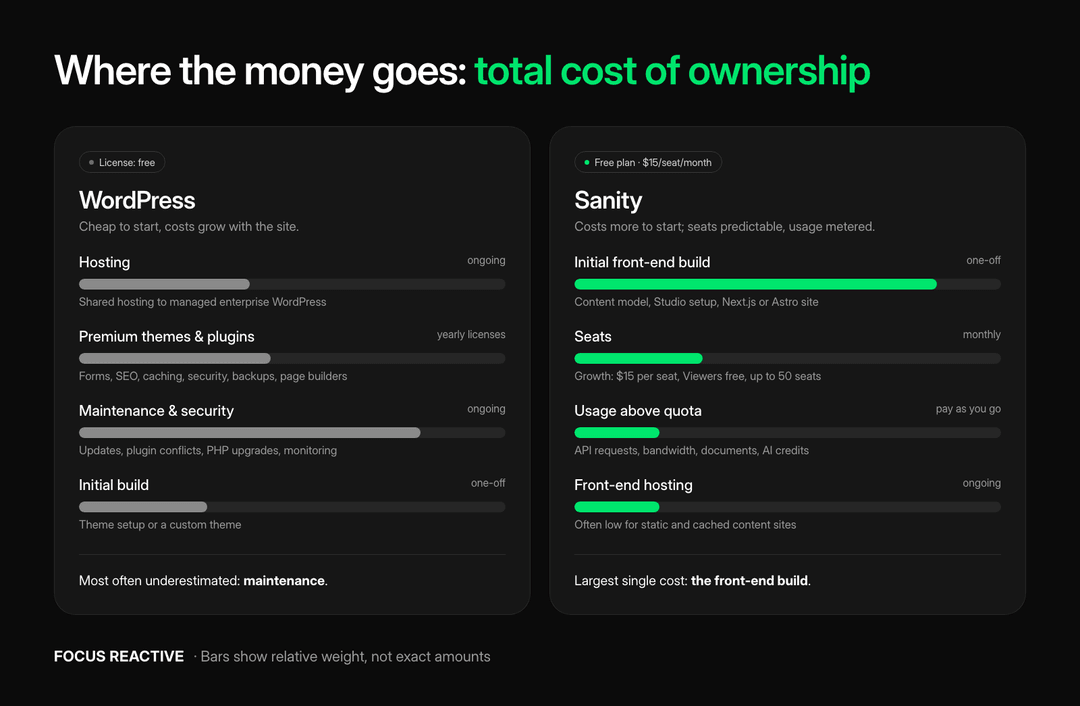 Total cost of ownership: WordPress costs concentrate in hosting, plugins and maintenance; Sanity costs concentrate in the front-end build, then seats, metered usage and hosting
In practice, WordPress is cheaper to start, and its costs grow with the plugin list and maintenance load. Sanity costs more to start; its seat fees are predictable, but usage is metered and outgrowing Growth’s caps means add-ons or an Enterprise contract. A team of 10 editors and 2 developers on Growth pays $180 per month in seats, before usage. Put that next to what you spend today on hosting, licenses and maintenance hours.
The Third Path: Headless WordPress
You can also use WordPress as a headless CMS: keep the familiar admin and serve content to a modern front-end. WordPress has a built-in REST API, and WPGraphQL adds GraphQL. It has 30,000+ active installations and is becoming a canonical WordPress.org plugin (WordPress.org).
Headless WordPress makes sense when editors are deeply invested in WordPress and you want a faster front-end without retraining anyone. But you keep WordPress’s maintenance and plugin risk, and many plugins that output HTML, such as page builders, forms and some SEO features, do not work on a headless front-end. You end up running two systems, and that double maintenance is the cost to plan for.
Sanity vs WordPress at a Glance
| WordPress | Sanity | |
|---|---|---|
| Architecture | Monolith: PHP + MySQL | Headless: Content Lake + Studio + your front-end |
| Hosting & data | Self-host anywhere, GPL | Proprietary cloud, Studio open source |
| Content model | Post types, taxonomies, fields (often ACF) | Schema as code, references, Portable Text |
| Editing | Familiar block editor, page building built in | Real-time collaboration, custom Studio, Visual Editing |
| Front-end | Themes included | You build it (Next.js, Astro…) |
| Developer stack | PHP, plus React for blocks | TypeScript, React, GROQ |
| Commerce | WooCommerce | Integrate Shopify or another platform |
| Security | Plugins are the main risk | Vendor-run backend; you secure the front-end |
| AI | AI Client + Abilities API in core | Content Agent, Agent Actions, metered credits |
| Licensing | Free, open source | Free plan, $15/seat/month, Enterprise |
| Biggest cost | Hosting, plugins, maintenance | Front-end build, then seats and usage |
| Time to launch | Days to weeks | Weeks to months |
Prices from sanity.io/pricing, November 2026.
When to Choose WordPress and When to Choose Sanity
WordPress is the better choice when:
- You need a brochure site, blog or small business site live in days, on a small budget.
- You want an online store on a budget: WooCommerce is mature and well supported.
- You have no front-end developers, and editors must manage layout themselves.
- An existing plugin solves your key need, such as membership, courses or bookings.
- You must self-host or keep full control over where your data lives.
Sanity is the better choice when:
- Content feeds more than one channel: website, app, in-store screens, email or AI agents.
- Many editors work at the same time, or you need workflows with reviews, releases and scheduling.
- Your content is highly structured: product catalogs, multi-language sites, documentation or many linked content types.
- You have developers who will build and own a modern front-end and keep evolving it.
Sanity is a poor fit when you have no developers, a very tight budget, a hard requirement for self-hosting or on-premises data, or a project that is mostly a store and needs nothing beyond what Shopify or WooCommerce already offer.
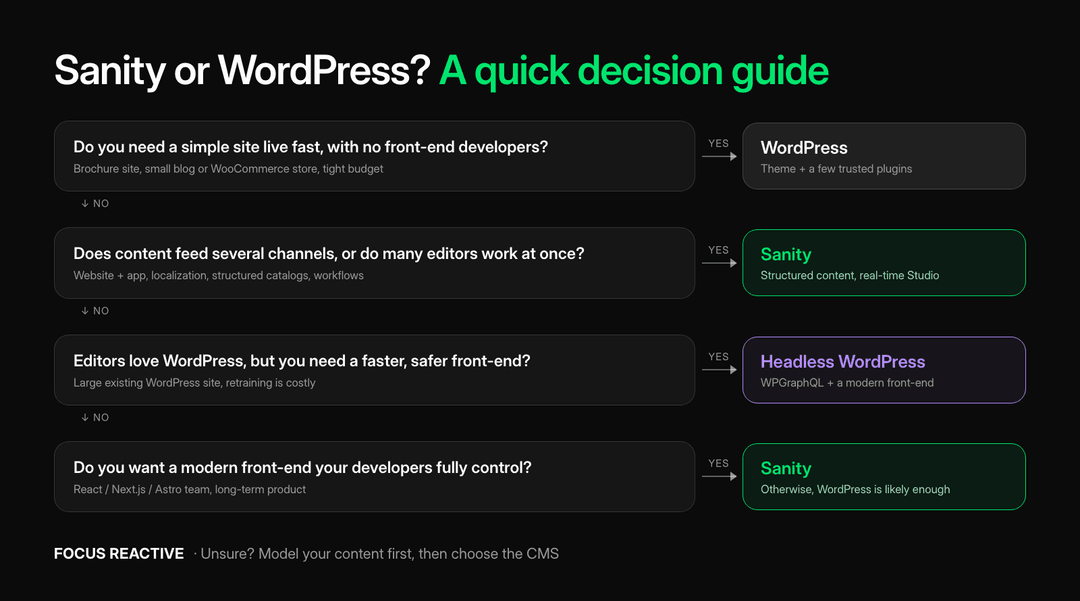 Decision tree for choosing between WordPress, headless WordPress and Sanity based on team, channels, editors and front-end needs
If you are comparing Sanity with other headless options too, see our Contentful vs Sanity and Sanity vs Storyblok comparisons.
Moving from WordPress to Sanity
Most teams that pick Sanity already have a WordPress site with years of content and search traffic. A migration has three hard parts:
- Content modeling. Turning posts, custom fields and shortcodes into clean Sanity schemas.
- Content transfer. Converting block editor HTML to Portable Text, moving images and keeping references intact.
- SEO continuity. Keeping URLs, redirects, metadata and structured data so rankings survive the move.
AI-assisted pipelines now do much of the first two, with automated checks against the live site. On our largest published AI-assisted migration, from Storyblok to Payload, one engineer and an AI harness moved 16,500 location pages and 439 editorial documents in eight weeks. The AI wrote almost all of the transfer code; automated checks confirmed 337 of 337 rendering checks, 35 of 35 redirects and zero lost content (case study). On a Prismic-to-Payload project, all 1,417 documents were verified after transfer (walkthrough).
Moving off WordPress itself is familiar ground. For EmailOctopus we moved 400+ pages and 4,000+ images from WordPress to Payload, and every key page now scores green in Google PageSpeed (case study). Ryte’s 40-page site moved from WordPress to Storyblok in under a month (case study). Our WordPress migration guide walks through the full process, and our AI website migration tool shows how we turn an existing site into a Sanity project.
Building with Sanity and FocusReactive
We design content models, build custom Sanity Studios and fast Next.js front-ends, and migrate WordPress sites without losing search traffic. If you are weighing Sanity against WordPress for a real project, we will look at your content and tell you which fits better, including when the answer is to stay on WordPress. Get in touch.




 Eugene Boruhov