
Payload CMS 2026: Complete Next.js Guide (Install, Features, Migration)
TL;DR
-
What is Payload CMS? An open-source, fullstack CMS and app framework built in TypeScript. It installs directly into your Next.js /app folder — same repo, same deployment, no separate backend to run. Your schema lives in code. Your data lives in your database. Nothing about your content infrastructure depends on a third-party vendor’s decisions.
-
Payload CMS licence: MIT. The core is free, no strings attached — no usage limits, no seat pricing, no API call quotas.
-
Payload CMS pricing: Free to self-host. An enterprise tier adds SSO, audit logs, advanced publishing workflows, and AI features — priced on request directly with the Payload team. Self-hosting is now the only path, and that decision needs to be made at the start of a project, not retrofitted later.
What is Payload CMS?
Payload is an open-source, fullstack CMS and application framework built entirely in TypeScript. It installs directly into your Next.js /app folder, gives you a REST and GraphQL API, and generates a fully customizable admin panel - all from a single config file in your codebase.
Most headless CMS platforms are hosted services. You get an API, a managed admin, and a pricing tier that someone else controls. That model works fine until the vendor changes something. Pricing changes. Policy shifts. It’s their call, not yours.
Payload is MIT licensed, self-hosted, and lives in your codebase like any other part of your application. Collections and access rules are just TypeScript config. Your admin UI is a React app you can override at the component level. If you need to change how something works, the code is right there.
For teams building on Next.js, the fit is direct. Payload rebuilt itself around the Next.js App Router in v3. Same stack, same deployment, no adapter layer in between. Which is exactly why teams migrating off managed platforms keep landing here.
Someone on your team needs to configure the infrastructure and maintain it. It’s not a turnkey product. But for web projects that need full data ownership, deep customization, or a content layer that fits how your application is actually structured. Payload is the right architecture for the problem.
How to Install Payload CMS
The fastest way to get started is create-payload-app. One command create a full Next.js project with Payload already wired in:
npx create-payload-app@latest
The CLI asks three things: project name, database adapter (MongoDB, PostgreSQL, or SQLite), and a starter template. Pick SQLite if you just want to run it locally without spinning up a database first.
What you get after setup:
src/
├── app/
│   ├── (payload)/        # Payload admin routes
│   └── (frontend)/       # Your Next.js frontend
├── payload.config.ts     # Everything starts here
├── collections/          # Your content types
└── payload-types.ts      # Auto-generated TypeScript types
The admin panel runs at /admin by default. Open it, create your first user, and you’re looking at a fully functional CMS running inside your own Next.js app.
payload.config.ts is where collections, plugins, database adapter, email, localization defined. Change something there and Payload regenerates.
payload-types.ts automatically generated types. Your frontend always has fully typed access to your content models without writing a single type by hand.
If you’re adding Payload to an existing Next.js project rather than starting fresh, the process is a few extra steps but the result is the same. The official docs cover both paths.
How Payload Works
Payload installs directly into your existing Next.js /app folder. No separate backend service to maintain, no extra deployment to manage - your CMS and your frontend live in the same codebase.
Everything is defined in code. Collections, globals, fields, access control, hooks. All of it lives in payload.config.ts. From that single config, Payload system generates a full REST and GraphQL API, a database schema, and an admin UI automatically.
import { buildConfig } from 'payload'

export default buildConfig({
  admin: {
    user: Users.slug,
    livePreview: { ... },
    components: { ... },
  },
  collections: [Users, Posts, Media],
  globals: [Header, Footer],
  db: mongooseAdapter({ ... }),
  editor: lexicalEditor({ ... }),
  localization: { ... },
  plugins: [seoPlugin({ ... }), formBuilderPlugin({ ... })],
})
Editors work with the content. Developers own the structure. That separation is intentional and for most teams building something serious, it’s exactly what you want.
Payload started MongoDB-first approach. PostgreSQL and SQLite came with v3. Today you pick your adapter and swap it out like any other config option. Runs on any Node.js infrastructure, with one-click deploy to Vercel if you want to move fast.
Payload CMS Features
1. Custom Fields and Content Modeling
Payload CMS ships with around 20 field types out of the box: text, richText, number, date, select, relationship, array, blocks, and more. Each field is defined in TypeScript directly in your collection config.
The blocks field is where things get interesting for complex content. It lets editors build pages from a predefined set of components - hero sections, callouts, media blocks, whatever your project needs. Each block has its own field schema. This is how most teams build page builders in Payload without reaching for a third-party plugin.
{
  name: 'layout',
  type: 'blocks',
  blocks: [
    HeroBlock,
    CalloutBlock,
    MediaBlock,
  ],
}
2. Drafts and Version Control
Payload separates the act of saving from the act of publishing. Draft mode gives editors a working copy that never affects the live document. Autosave keeps progress safe in the background. When the piece is ready, it gets published and the previous version stays in history in case anyone needs to go back. Scheduled publishing is also available, useful for content that needs to go live at a specific date without someone manually hitting the button.
3. Access Control
Access control in Payload is a function, not a settings page. You define who can read, create, update, or delete at the collection level, the document level, or the individual field level.
access: {
  read: ({ req: { user } }) => {
    if (user?.role === 'admin') return true
    return { status: { equals: 'published' } }
  },
}
That example returns a query constraint for non-admins. They only see published documents. The same pattern works for field-level visibility: hide a field entirely from certain roles, or make it read-only depending on document state. Because it’s just a function, you can pull in any logic your application already has. Roles from your database, external auth tokens, anything.
4. Localization
Localization is configured once at the top level of payload.config.ts, then each field opts in with localized: true. Payload handles storing separate values per locale.
localization: {
  locales: ['en', 'de', 'fr'],
  defaultLocale: 'en',
  fallback: true,
}
The fallback: true option means if a translation is missing, Payload falls back to the default locale automatically. For teams managing content in multiple languages, this removes a whole category of edge cases from the frontend.
5. Live Preview
Live preview is built in. Point it at your frontend URL and editors see their changes rendered in real time before publishing. No custom implementation needed on the CMS side. It works with Next.js draft mode out of the box, which means your preview environment is your actual production frontend, just with unpublished content unlocked.
Payload CMS Pricing and License
The core is MIT licensed and free. No usage limits, no seat pricing, no API call quotas. You run it on your own infrastructure and the only costs are the ones you’d pay anyway like hosting, database, file storage.
That’s a meaningful difference from SaaS CMS platforms where pricing scales with content volume, editor seats, or API requests. Contentful’s Growth plan starts at $300/month. Storyblok charges per seat. Sanity’s pricing depends on API usage. With Payload, none of those variables exist.
Payload Cloud was discontinued for new projects after the Figma acquisition in 2025. Self-hosting is now the only path, which for most teams evaluating Payload is already the plan.
For teams that need more, there’s an enterprise tier. It’s not a separate platform or managed hosting - it’s a set of plugins on top of the open-source core. For example: SSO, audit logs, publishing workflows, a visual editor, and AI features. The kind of capabilities larger teams typically need but don’t want to build themselves. Pricing is negotiated directly with the Payload team. The open-source core stays the same regardless.
For most projects the math is simple: Payload is free, and your infrastructure bill depends on the stack you pick. A Vercel + Neon setup for a mid-size site runs well under $100/month in practice.
Payload and Figma
In June 2025, Payload CMS was acquired by Figma. For teams evaluating Payload today, there are a few things worth understanding about what that means in practice.
Payload Cloud was discontinued for new projects shortly after the acquisition. Self-hosting is now the only path and if you’re starting a project today, that decision needs to be made upfront, not retrofitted later.
What didn’t change: Payload remains MIT licensed and fully open-source. Figma confirmed this publicly. The codebase is yours, the data is yours, and the licensing terms haven’t moved.
What’s coming: Figma is building a design-to-deployment pipeline called Figma Sites, and Payload is the CMS layer behind it. For teams already in the Figma ecosystem, that integration will eventually close the gap between design and production content management. It’s early, but the direction is clear.
Open Source and Self-Hosted
Most headless CMS platforms are SaaS. You get an API, a hosted admin, and a pricing tier that grows with your usage. That model works fine until it doesn’t. A pricing change, a policy update, and your content infrastructure is someone else’s decision to make.
Payload is MIT licensed and fully self-hosted. Your data lives in your database, on your infrastructure. No third party has access to it, no vendor can change the rules on you, and there’s no monthly bill.
For a deeper look at how Payload compares to other self-hosted options, see our breakdown of the best self-hosted headless CMS platforms.
Self-Hosting in Practice
Self-hosting Payload comes down to three things: your Next.js hosting, file storage, and database. Each is a separate decision, and each has solid options depending on your project.
We continuously research modern stacks, looking for technologies that integrate cleanly, stay lean, and hold up in production. A few combinations that work well:
- Vercel + Vercel Blob + Neon - Neon is a serverless Postgres that works particularly well for SSG-heavy sites. DB calls happen mostly at build time and on revalidation, so costs stay low and predictable.
- Vercel + Supabase Storage + Supabase Postgres - a reliable choice for more dynamic projects where you want a single platform handling both storage and database.
- Cloudflare Workers + R2 + D1 - an edge-first option that Cloudflare documented on their blog. Works well when you want global distribution without managing servers and want everything within a single provider.
None of these stacks wins by default. The right one depends on your specific constraints. We help teams find that answer before they commit to the wrong infrastructure.
Admin Panel Customization
Most CMS platforms give you an admin UI and a list of things you can configure. Payload gives you the source code. A better way to think about it: Payload is a framework for building your own CMS, not a product you configure around.
That doesn’t mean you’re starting from zero. The must-have features are already there: live preview, version control, asset management, localisation, drafts. The framework framing matters when you hit the edges of what those defaults cover, which on any serious project, you will.
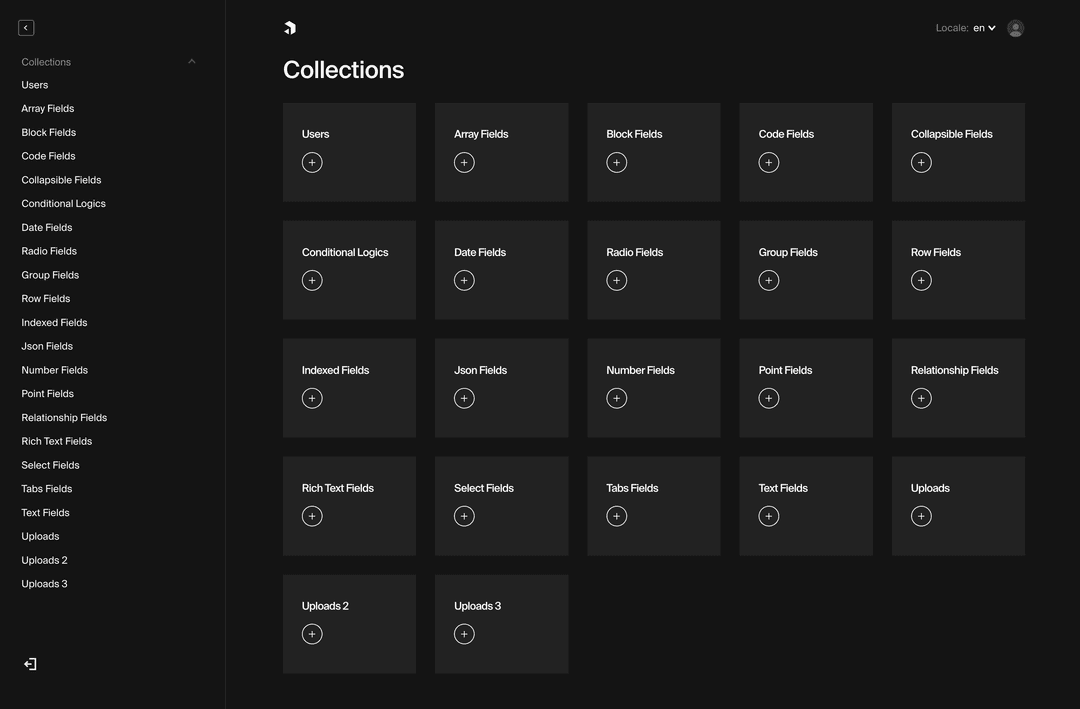 Payload's admin is a React app - every part of it is yours to change.
The admin panel is a React app. You can override components, add custom views, and reshape the editorial experience to fit exactly how your team works.
For a closer look at what’s possible, see our breakdown of Payload admin panel customization.
Plugin Ecosystem
Payload’s code-first architecture makes it easy to extend. Collections, hooks, and field schemas are all just TypeScript. So writing a plugin that taps into them feels like writing any other part of your application, not fighting an abstraction layer. Working across multiple Payload projects, we’ve built up a set of plugins that solve problems we kept running into. A few worth highlighting:
- Translations plugin - AI-powered localisation inside the admin. Translates text and rich text across nested fields, supports bulk translation, two modes (overwrite or fill-empty-only), and draft-aware publishing. OpenAI included, custom providers supported.
- A/B testing plugin - automatically maintains a variant manifest keyed by path, designed to be read by Next.js middleware at the edge. Users get routed to the correct variant without an extra database round-trip.
- Block presets plugin - lets editors save and reapply reusable block configurations in the admin panel, which cuts down repetitive content work on large sites.
Payload ships with a solid set of official plugins covering the most common needs: SEO, forms, redirects, and search. On top of that, there’s a growing number of community plugins - a direct consequence of an architecture that developers actually want to build on.
Lexical Editor
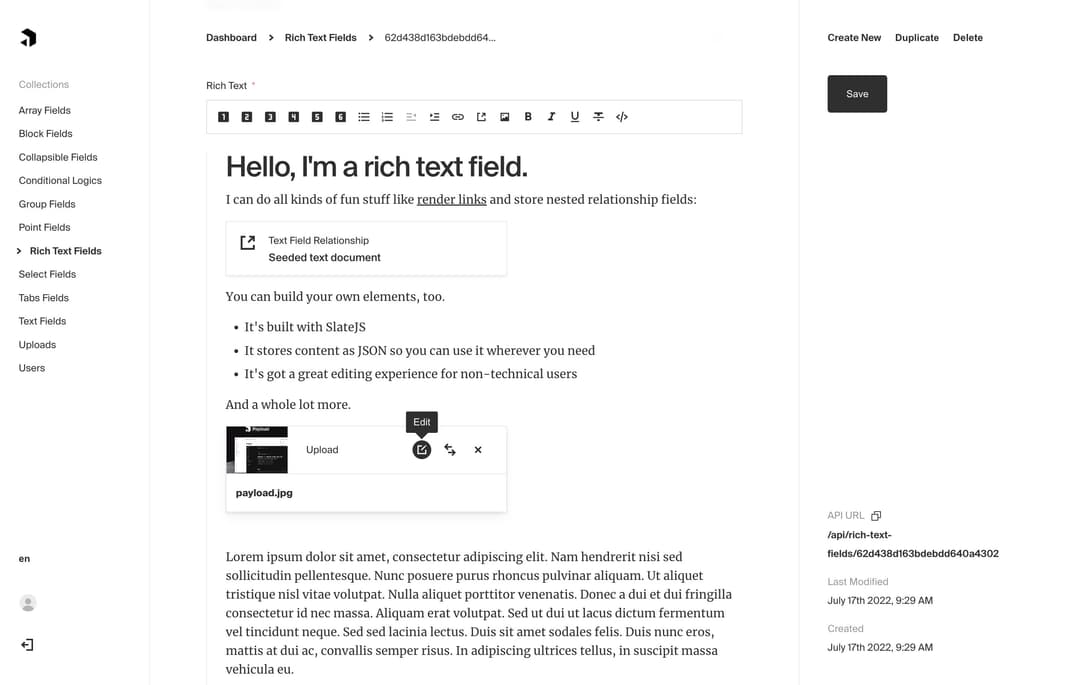
Payload CMS ships with Lexical as its default rich text editor. The same editor handles a simple article body and a complex page builder. How far it goes depends on how you configure it.
The extension model is built around custom nodes: drop in any component the editor needs to support. Charts, CTAs, carousels, custom media blocks - they live inside the editor as first-class content.
 Lexical rich text editor
Payload also ships official converters for Lexical output. HTML and plain text out of the box. For teams migrating from another platform, that cuts down the content transformation work at the point where migrations tend to get messy.
Payload CMS for eCommerce
Payload works as a content layer on top of your eCommerce engine for managing pages, editorial content, custom admin workflows, and anything that sits outside the product catalogue. It integrates with managed platforms like Shopify, open-source engines like Medusa, and others.
The product catalogue lives in Shopify or Medusa. Everything else lives in Payload, delivered to the frontend via API. Editors get a clean admin for content work without touching the commerce platform, and developers get a typed content layer that deploys with the rest of the application.
Managed commerce (Payload + Shopify) is the right combination when the team wants managed infrastructure for the commerce side but full ownership of the content layer. Shopify handles products, inventory, checkout. Payload handles the rest of the site. Editorial teams work in Payload without needing Shopify access, and content changes don’t require a developer.
Self-hosted commerce (Payload + Medusa) is a different conversation entirely. Both platforms are MIT licensed, both are self-hosted, and together they give you complete ownership of the stack: product logic, content, data, infrastructure. No feature gates, no third-party platform deciding what you can build. For projects that have genuinely outgrown what managed platforms allow, this combination doesn’t have a ceiling.
Both Shopify and Medusa come with the core commerce functionality out of the box: product catalogues, cart, checkout, regions, discounts, etc. For most projects that’s everything you need from a commerce engine. Shopify has a significantly larger ecosystem of integrations and apps, which means most standard requirements are already solved. Medusa has fewer out-of-the-box integrations, but you can build custom flows, modify core logic, and extend the platform in ways Shopify simply doesn’t allow.
For a broader look at headless eCommerce options that work well with Payload, see our Next.js headless eCommerce platforms comparison.
AI and MCP
Headless CMS platforms split into two camps: schema-in-code and schema-in-UI. Storyblok is a good example of schema-in-UI. Payload is schema-in-code, and in the current AI-assisted development environment, that distinction matters more than it used to. When your schema lives in code, AI tools can actually reason about it.
Payload now has an official MCP plugin, that enables advanced agentic CMS workflows: autonomous content chains via hooks, RAG embeddings in your DB, local LLM support. Native TypeScript schemas let AI tools iterate directly on your content model. AI agents (Claude, Cursor, or any MCP-compatible client) can read, create, and update content in your CMS directly, without custom integrations layer.
In practice, your content team can prompt an AI assistant to draft a post, update a collection or query your data and it happens inside Payload, against your actual collections, access rules, and data structure.
Payload’s strongly typed codebase, with its schema defined directly in code, enables seamless AI integration: tools can suggest fields, generate queries, and refine structures on the fly. This creates a tighter feedback loop compared to UI-based schemas, making it ideal for dev teams embracing AI-assisted workflows.
Migration to Payload
Teams migrate to Payload from traditional CMS platforms like WordPress, or SaaS headless options like Contentful. The reasons vary: a project that’s outgrown its platform, costs that no longer make sense at scale, a need to own the infrastructure and data, or requirements around flexibility that a managed platform can’t meet.
Payload’s architecture maps legacy data structures directly into TypeScript schemas, which makes it a practical target for migrations rather than just a greenfield choice. Content moves from a restricted vendor environment into a codebase you fully own.
There are two examples of migration we’ve documented: transitioning from WordPress and an automated migration approach for Contentful.
Payload vs Competitors
Payload isn’t the only open-source headless CMS worth considering. Strapi and Directus solve the same category of problem, but they make very different architectural choices. Here’s how they compare on the criteria that actually matter when picking a platform for a real project:
| Payload | Strapi | Directus | |
|---|---|---|---|
| Schema definition | Code (TypeScript) | UI + code | Database-first |
| TypeScript support | Native, end-to-end | Partial | Minimal |
| Next.js integration | Native (App Router) | Via REST/GraphQL | Via REST/GraphQL |
| Self-hosted | Yes | Yes | Yes |
| Managed cloud | No (discontinued) | Strapi Cloud | Directus Cloud |
| Admin UI framework | React | React | Vue |
| Free tier limits | None | Role limits on free | None |
| Best fit | Next.js projects, full code control | Teams wanting UI-driven setup | Existing SQL databases |
Strapi has the largest community and the most mature plugin ecosystem of the three. Schema changes can be made through the admin UI without touching code, which is useful for teams where non-developers need to manage content structure. The tradeoff is TypeScript support that’s less complete, and a free tier that limits the number of custom roles which tends to surface as a problem on any project with real access control requirements.
Directus takes a different approach entirely. Rather than generating a schema, it wraps your existing SQL database and exposes it as an API. If you have a legacy database and need an admin panel and REST layer on top of it without migrating data, Directus is hard to beat. For greenfield projects it’s less compelling, the database-first model means less type safety and a looser connection to your application code.
Payload is the right call when the project is on Next.js and the team is comfortable with TypeScript. The Local API is querying your CMS data directly in server components without an HTTP round-trip. Is a meaningful performance advantage that neither Strapi nor Directus can match. Schema lives in code, deploys with the rest of the application, and is fully typed throughout.
If you need editors to manage schema without developer involvement, Strapi is easier. If you’re wrapping an existing database, Directus is the better fit. For everything else built on Next.js, Payload is the right architecture for the problem. For a closer look at how Strapi and Directus perform in practice, see our comparison of Strapi and Directus for marketing websites.
When to Choose Payload CMS
Payload fits best when the project has a developer on it and data ownership actually matters. A few scenarios where it keeps coming up:
SaaS products and internal tools. The admin panel is a React app, which means custom views and role-based dashboards are just components. Teams end up building internal tooling directly inside the CMS rather than maintaining a separate back-office. One codebase, one deployment.
eCommerce content layer. Product pages, campaign landing pages, editorial content - managed in Payload, delivered via API to whatever storefront you’re running. Pairs with Shopify for teams that want managed commerce and owned content, or with Medusa for teams that want to own the full stack.
Regulated industries. Healthcare, finance and similar regulated industries. Data lives on your infrastructure, access audit trails come with the enterprise tier, and nothing about your content setup depends on a third-party vendor’s compliance posture.
Existing Next.js projects. One command adds Payload to an existing codebase. Same repo, same deployment pipeline, fully typed content models across the whole application. No second service to run.
Skip it if there’s no developer available for the initial setup, if editors need to manage schema changes themselves, or if you need something running in an afternoon with minimal configuration. For those cases, a managed SaaS CMS makes more sense.
For a broader comparison of where Payload sits against other open-source options, see our open-source CMS comparison for 2026.
Ready to Build with Payload CMS?
As an official Payload partner, FocusReactive has built and shipped 30+ projects on Payload across a range of use cases - from custom admin panels with AI workflows to enterprise content architectures with full data sovereignty.
If you’d like to migrate to Payload CMS or you are building it from scratch, get in touch.
We are a headless CMS agency and we set up a free consultation with you to discuss your project and explore how Payload CMS or any other platform can serve your needs, ensuring you make the most of its powerful features.


.png&w=828&q=75)